Posted on — Leave a comment

How to Build a Cybersecurity Portfolio With Beginner Projects and Lab Reports

Breaking into cybersecurity can feel challenging, especially when you have little or no professional experience. You may have completed online courses, learned networking fundamentals, practised with tools such as Wireshark and Nmap or earned an entry-level certification. But how can you demonstrate these skills to a potential employer?

One effective way is to build a cybersecurity portfolio.

Before building a cybersecurity portfolio, beginners should understand what to learn and in what order. Following a cybersecurity learning roadmap for beginners helps establish the technical foundations and practical skills needed to create meaningful portfolio projects.

A cybersecurity portfolio is a collection of practical projects, lab reports, technical documentation and learning experiences that demonstrate what you can do. It gives employers something more meaningful than a list of courses or certifications: evidence of how you approach security problems, investigate findings and communicate technical results.

The good news is that you do not need professional experience or expensive equipment to get started. You can build a useful portfolio using beginner-friendly projects and virtual labs.

Building a cybersecurity portfolio is an important step for anyone exploring a cybersecurity career path for beginners because it demonstrates practical knowledge beyond theoretical learning.

What Is a Cybersecurity Portfolio?

A cybersecurity portfolio is a structured collection of work that demonstrates your cybersecurity knowledge and practical abilities.

It can include:

  • Network discovery and analysis projects.
  • Vulnerability assessment reports.
  • Wireshark packet analysis exercises.
  • Windows and Linux security configuration reviews.
  • Security log investigation exercises.
  • Web application security lab reports.
  • Incident investigation case studies.

For example, instead of simply writing “I know Nmap” on your resume, you could include a project showing how you used Nmap in an isolated lab to discover active hosts, identify exposed services and document your observations.

This provides evidence of practical learning.

Choose a Cybersecurity Career Direction

Before deciding which projects to include in your cybersecurity portfolio, consider the type of cybersecurity role you want to pursue. Understanding the differences between Red Team, Blue Team and SOC Analyst career paths can help you select projects that demonstrate relevant technical skills and align with your career goals.

Red Team and penetration testing:

Focus on authorized security assessments, network discovery, vulnerability identification, web application testing and technical reporting.

Blue Team and defensive security:

Include security log analysis, endpoint monitoring, network traffic investigation, security configuration reviews and incident response exercises.

SOC Analyst:

Demonstrate alert investigation, event-log analysis, basic threat detection, incident documentation and SIEM fundamentals.

You do not have to choose a permanent specialization immediately. Start with foundational projects and gradually add work related to the career path that interests you. Before building practical cybersecurity projects, beginners should understand essential cybersecurity fundamentals such as threats, vulnerabilities, risk assessment and the CIA Triad.

Start With Beginner-Friendly Cybersecurity Projects

Your first projects should be manageable, clearly defined and based on skills you have already learned. Here are some practical ideas.

Project 1: Network Discovery Using Nmap

Build an isolated virtual network using your own virtual machines. Use Nmap to identify active hosts and examine the services exposed by those systems.

A network discovery project requires an understanding of IP addressing, ports, protocols and network communication, making networking fundamentals an essential starting point.

Your project can document:

  • The lab environment and network configuration.
  • The objective of the exercise.
  • The discovery methodology.
  • Hosts and services identified.
  • Observations and security recommendations.

Do not scan public networks or systems without explicit authorization. For your network discovery project, Nmap can help identify live hosts, discover open ports and enumerate services within an authorized lab environment. Learn more about Nmap network discovery.

Project 2: Network Traffic Analysis Using Wireshark

Capture traffic generated within your own lab and examine common network protocols. A Wireshark-based portfolio project can demonstrate how network packets are captured and inspected, helping you understand how password sniffing works and why unencrypted communication is dangerous.

Your report can explain:

  • The purpose of the packet capture.
  • Protocols observed.
  • Differences between encrypted and unencrypted traffic.
  • Important packet fields.
  • Security observations and recommendations.

This project demonstrates your understanding of networking and traffic analysis.

Project 3: Windows Security Configuration Review

Create a Windows virtual machine and review its basic security configuration. A Windows security assessment project becomes more meaningful when you understand Windows user accounts, permissions, services, firewall settings and event logs through Windows fundamentals.

Explore areas such as:

  • User accounts and privileges.
  • Windows Firewall configuration.
  • Installed updates.
  • Password and account policies.
  • Windows Defender status.
  • Relevant security event logs.

Document your findings and explain why each configuration matters.

Project 4: Linux Security Fundamentals

Use a Linux virtual machine to examine user permissions, file ownership, running services and basic system security settings. Your report could include configuration observations, potential security weaknesses and recommended improvements.

If you plan to include a Linux security assessment in your portfolio, first understand Linux users, permissions, processes and filesystem management through Linux fundamentals.

Project 5: Web Application Security Assessment

Use a deliberately vulnerable training application in an isolated lab. Explore beginner-level web security concepts, such as authentication weaknesses, security misconfigurations and input validation.

Document the vulnerability, its potential impact and appropriate remediation. Never test websites or applications without permission. When documenting a web application security assessment, use the OWASP Top 10 web application security risks as a reference for identifying and explaining common vulnerabilities.

Web application security projects can also demonstrate how weaknesses in session management may expose users to session hijacking attacks.

Project 6: Security Log Investigation

Use sample Windows event logs or logs generated by your own virtual machines. Investigate authentication events, failed login attempts and unusual activity. Explain what you observed, which events were relevant and what additional investigation would be appropriate.

These projects provide a starting point. Quality matters more than quantity: a few well-documented projects are more valuable than many incomplete exercises.

Write Professional Lab Reports

A lab report is one of the most important parts of your portfolio. It explains what you did, why you did it, what you discovered and what you learned.

Use a consistent structure for every project:

  1. Project title: Give the project a clear, descriptive name.
  2. Objective: Explain what you wanted to learn or investigate.
  3. Lab environment: Mention the operating systems, virtual machines and tools used.
  4. Methodology: Describe the steps taken at a high level.
  5. Observations: Present relevant findings, screenshots and technical evidence.
  6. Analysis: Explain what the findings mean from a security perspective.
  7. Recommendations: Suggest appropriate security improvements.
  8. Lessons learned: Mention what you learned and what you would improve next time.

For example, a network discovery report should not simply contain screenshots of Nmap output. Explain what the discovered hosts and services represent and why the results matter.

Remove passwords, tokens, personal information, private IP details where inappropriate and other sensitive data before publishing reports.

Organize and Publish Your Portfolio

Your portfolio should be easy to navigate. You can begin with a GitHub repository, a simple personal website or a professional portfolio page.

A practical folder structure could look like this:

  • Cybersecurity Portfolio
    • Network Discovery Project
    • Wireshark Traffic Analysis
    • Windows Security Review
    • Linux Security Review
    • Web Security Lab
    • Security Log Investigation
    • Certificates and Learning Resources

Each project should contain a README file explaining its objective, environment, tools, findings and key lessons. Store reports as PDFs or Markdown documents and include carefully selected screenshots.

GitHub is useful for version-controlled documentation. A personal website can provide a more polished presentation. You can use either option or combine them.

Demonstrate Your Thinking, Not Just Your Tools

Employers are not only interested in whether you have used a particular security tool. They also want to understand how you think.

When documenting a project, explain:

  • Why you selected a particular approach.
  • What you expected to discover.
  • What the results actually showed.
  • Which findings were important and which were not.
  • What limitations affected your investigation.
  • How you would improve the process.

This demonstrates analytical thinking, problem-solving and communication skills.

Avoid copying tutorials without explaining your own work. If you followed a learning resource, acknowledge it and clearly distinguish the original instructions from your own observations.

Keep Improving Your Portfolio

A cybersecurity portfolio is not a one-time assignment. Add new projects as your knowledge develops.

Start with networking, Linux and Windows fundamentals. Then explore vulnerability assessment, web application security, security monitoring or incident response, depending on your career interests.

Review older reports and update them when you learn better methods. Add diagrams, clearer explanations and stronger security recommendations.

You can also link relevant projects to your resume and professional profiles. Make sure every published project is something you can confidently explain during an interview.

Conclusion

Building a cybersecurity portfolio is one of the most practical ways for beginners to demonstrate their technical skills. You do not need an expensive laboratory or years of professional experience. A few carefully selected projects, supported by clear lab reports, can show your ability to investigate security issues, understand technical findings and recommend improvements.

Start small, practise in authorized environments, document your work and keep improving. Your portfolio will gradually become a record of your cybersecurity journey and a useful resource when applying for your first cybersecurity role.

Building a portfolio is one milestone in your cybersecurity journey. Follow our step-by-step cybersecurity learning roadmap to continue developing your skills and prepare for real-world cybersecurity opportunities.

Posted on — Leave a comment

Blue Team vs Red Team vs SOC Analyst: Which Cybersecurity Career Path Is Right for You?

If you are starting a career in cybersecurity, you have probably come across terms such as Red Team, Blue Team and SOC Analyst. They are often mentioned together but they represent different roles, responsibilities and approaches to cybersecurity.

Before choosing between Red Teaming, Blue Teaming and becoming a SOC Analyst, beginners should first understand the foundational knowledge and technical skills required to enter cybersecurity. Our cybersecurity learning roadmap for beginners provides a step-by-step guide to building these foundations, from networking and operating systems to practical ethical hacking and security concepts.

A Red Team focuses on testing security by simulating realistic attacks. A Blue Team protects systems, detects threats and responds to security incidents. A Security Operations Center (SOC) Analyst monitors security activity, investigates alerts and helps organizations identify potential attacks.

All three paths are important but they require different interests and skills.

So, which one should you choose?

In this guide, we will explore the differences between Red Team, Blue Team and SOC Analyst roles, understand their responsibilities, compare the skills they require and help you decide which cybersecurity career path is right for you.

What Are Red Team, Blue Team and SOC?

Organizations face cybersecurity threats every day. Attackers may attempt to steal information, compromise accounts, exploit vulnerabilities or disrupt business operations.

To defend against these threats, organizations employ cybersecurity professionals with different responsibilities. Three commonly discussed roles are Red Team professionals, Blue Team professionals and Security Operations Center (SOC) Analysts.

Although their work overlaps, their primary objectives are different.

  • Red Team: Simulates attacks to identify weaknesses in an organization’s security.
  • Blue Team: Defends systems, detects threats and improves security.
  • SOC Analyst: Monitors security events, investigates suspicious activity and supports incident response, usually as part of a Blue Team or security operations function.

Let’s explore each path.

Regardless of whether you choose Red Teaming, Blue Teaming or SOC operations, you need a solid understanding of cybersecurity fundamentals, including threats, vulnerabilities, risk and security principles.

What Is a Red Team?

A Red Team is a group of authorized security professionals who simulate realistic attacks against an organization’s systems, applications, networks and people. Their objective is to identify security weaknesses by thinking and operating like potential attackers but within an agreed scope and with explicit authorization.

Red Team professionals help organizations understand whether their security controls can withstand realistic attack scenarios.

What Does a Red Team Professional Do?

A Red Team engagement may involve several activities:

  • Reconnaissance: Collecting information about approved targets.
  • Vulnerability identification: Finding weaknesses in systems and applications.
  • Security testing: Assessing how weaknesses could affect the organization.
  • Adversary simulation: Reproducing selected attacker behaviors in a controlled and authorized manner.
  • Reporting: Documenting findings, evidence, business impact and recommendations.

For example, an organization may hire a Red Team to assess whether its security controls can detect and respond to a simulated compromise of an employee workstation. The Red Team conducts the approved assessment, documents its findings and explains how the organization could improve its defenses.

Red Team professionals assess more than technical vulnerabilities. They may also evaluate how organizations respond to social engineering attacks that exploit human behaviour and trust.

Skills Required for Red Team

Red Team professionals need a strong understanding of how technology works and how security weaknesses can be identified.

Important skills include:

Networking fundamentals: Understanding TCP/IP, DNS, ports, protocols, routing and network communication.

Linux and Windows: Understanding operating systems, users, permissions, services, processes and system administration.

Web application security: Learning common web vulnerabilities, authentication, authorization, sessions and application architecture.

Scripting and programming: Basic Python, Bash or PowerShell knowledge can help automate tasks and understand technical environments.

Security tools: Familiarity with tools such as Nmap, Burp Suite, Metasploit and Wireshark can support authorized security assessments.

Analytical thinking: The ability to investigate technical problems, connect observations and explain security weaknesses.

Who Should Choose Red Team?

Red Team may be a good fit if you:

  • Enjoy understanding how systems work and where they can fail.
  • Like solving technical puzzles.
  • Are interested in ethical hacking and penetration testing.
  • Enjoy hands-on security assessments.
  • Are comfortable continuously learning new technologies and attack techniques.

Red Team work is not simply about using hacking tools. It requires technical knowledge, careful planning, clear documentation and strict adherence to authorization and scope.

What Is a Blue Team?

A Blue Team is responsible for defending an organization’s technology environment against cybersecurity threats.

While Red Teams simulate attacks, Blue Teams focus on protecting systems, detecting suspicious behavior, responding to incidents and strengthening security controls. Blue Team professionals work across networks, endpoints, servers, cloud environments, applications and identity systems.

What Does a Blue Team Professional Do?

Blue Team responsibilities can include:

  • Monitoring systems and networks for suspicious activity.
  • Detecting and investigating security incidents.
  • Managing endpoint and network security controls.
  • Reviewing security logs.
  • Identifying vulnerabilities and misconfigurations.
  • Improving access controls and security policies.
  • Supporting incident response and recovery.
  • Strengthening security monitoring and detection capabilities.

For example, imagine an employee receives a suspicious email containing a link to a fake login page. A Blue Team may investigate the email, identify affected users, review authentication activity, block malicious infrastructure and take steps to prevent further compromise.


Beyond responding to security alerts, experienced Blue Team professionals perform threat hunting to proactively search for hidden threats and suspicious activity within enterprise environments.

Skills Required for Blue Team

Blue Team professionals need a good understanding of systems, networks, security monitoring and defensive technologies.

Important skills include:

Networking: Understanding network traffic, protocols, DNS, firewalls and common communication patterns.

Operating systems: Learning Windows and Linux administration, event logs, permissions and system processes.

Log analysis: Understanding how to examine application, operating system, network and authentication logs.

Security monitoring: Learning how SIEM platforms collect, correlate and analyze security events.

Incident response: Understanding how to identify, investigate, contain and recover from security incidents.

Threat intelligence: Learning how information about threats, indicators and attacker behavior can support defense.

Who Should Choose Blue Team?

Blue Team may be suitable if you:

  • Enjoy protecting systems and information.
  • Like investigating suspicious activity.
  • Are interested in network and endpoint security.
  • Prefer defensive problem-solving.
  • Want to work on improving an organization’s security posture.

Blue Team is a broad area. It includes security engineering, threat hunting, incident response, detection engineering, digital forensics and security operations.

What Is a SOC Analyst?

A Security Operations Center (SOC) is a centralized function responsible for monitoring an organization’s security environment and coordinating the detection and investigation of potential threats. A SOC Analyst is one of the professionals who performs this work.

SOC Analysts are generally part of the Blue Team or a broader security operations function. Their primary responsibility is to examine security alerts, investigate suspicious activity and help determine whether an event represents a genuine security incident.

What Does a SOC Analyst Do?

A typical SOC Analyst may perform activities such as:

  • Monitoring security alerts from SIEM platforms.
  • Reviewing endpoint detection and response alerts.
  • Investigating suspicious login attempts.
  • Analyzing network and system logs.
  • Identifying potentially malicious files or activity.
  • Escalating confirmed or suspected incidents.
  • Documenting investigation findings.
  • Supporting incident containment and response.

Consider an example.

An organization’s SIEM platform generates an alert because an employee account has experienced several unusual login attempts. The SOC Analyst investigates the alert by reviewing authentication logs, checking relevant user activity, examining available endpoint information and determining whether the activity is suspicious.

If the evidence indicates a possible account compromise, the analyst follows the organization’s incident response process and escalates the case when necessary.

SOC Analyst Levels:

SOC teams often organize analysts into different levels, although job titles and responsibilities vary between organizations.

SOC Analyst Level 1 (L1): Monitoring and Triage

L1 analysts generally monitor alerts, perform initial investigations, distinguish routine activity from potentially suspicious events and escalate cases that require deeper analysis.

SOC Analyst Level 2 (L2): Investigation and Response

L2 analysts conduct more detailed investigations, correlate evidence across systems, analyze incidents and support containment and response activities.

SOC Analyst Level 3 (L3): Advanced Analysis and Threat Hunting

L3 analysts may handle complex incidents, conduct advanced threat investigations, develop detection strategies and perform proactive threat hunting.

These levels are not universal. Some organizations use different structures or combine responsibilities.

Skills Required for a SOC Analyst

A SOC Analyst needs a combination of technical knowledge, investigative ability and communication skills.

Important skills include:

  • Networking fundamentals.
  • Windows and Linux event log analysis.
  • SIEM platforms and security alert investigation.
  • Basic malware and phishing analysis.
  • Endpoint security concepts.
  • Incident response fundamentals.
  • Knowledge of common attacker techniques.
  • Clear documentation and communication.

Familiarity with tools such as Microsoft Sentinel, Splunk, Wireshark and endpoint detection platforms can be useful, depending on the employer. SOC analysts also rely on SIEM tools to collect security logs, correlate events and identify suspicious patterns across an organization’s IT infrastructure.

Who Should Choose a SOC Analyst Career?

A SOC Analyst role may suit you if you:

  • Enjoy investigating security alerts.
  • Like analyzing logs and identifying unusual patterns.
  • Want to learn how real-world security incidents are handled.
  • Prefer structured investigation and teamwork.
  • Want to build experience in defensive cybersecurity.

SOC Analyst positions can be an accessible starting point for people entering cybersecurity, although entry requirements differ across employers.

Red Team vs Blue Team vs SOC Analyst: Key Differences?

AreaRed TeamBlue TeamSOC Analyst
Primary objectiveTest security by simulating attacksDefend organizational systemsDetect and investigate suspicious activity
Main approachOffensive securityDefensive securitySecurity monitoring and investigation
Typical workAuthorized security assessmentsDefense, detection, and responseAlert triage, log analysis, escalation
Main focusFinding exploitable weaknessesReducing security riskIdentifying potential incidents
Common toolsNmap, Burp Suite, MetasploitEDR, firewalls, SIEM, security controlsSIEM, EDR, Wireshark, log tools
Key skillsTesting, enumeration, web securitySecurity engineering, monitoring, responseLog analysis, investigation, triage
Common deliverableAssessment reportImproved defensive controlsInvestigation notes and incident escalations

Important distinction:

A SOC Analyst is not a completely separate alternative to Blue Team. SOC analysis is generally a specialized role within the defensive security function. A Blue Team can include SOC Analysts, incident responders, threat hunters, security engineers and other specialists.

Which Cybersecurity Path Is Best for Beginners??

There is no single best path for everyone. The right choice depends on your interests, strengths and preferred working style.

Consider these questions:

Do you enjoy finding weaknesses?

If you like examining systems, testing applications and understanding how vulnerabilities can be exploited, Red Team may be a good direction.

Do you enjoy protecting systems?

If you prefer securing networks, improving configurations and strengthening organizational defenses, consider Blue Team.

Do you enjoy investigating suspicious activity?

If you like examining alerts, analyzing logs and determining whether an event represents a threat, SOC Analyst may be a suitable starting point.

You do not need to make a permanent decision immediately. Many cybersecurity professionals move between roles as their knowledge and interests develop.

What Should You Learn Before Choosing a Path?

Regardless of your preferred specialization, start with a common technical foundation.

Networking Fundamentals:

Learn IP addresses, TCP/IP, DNS, ports, routing, firewalls and network communication. These concepts are essential for understanding attacks and defensive monitoring.

Linux Fundamentals:

Learn Linux commands, file permissions, users, processes, services and basic system administration. Linux knowledge is useful in penetration testing, security engineering and incident investigation.

Windows Fundamentals:

Understand Windows users, groups, permissions, services, event logs, processes and Active Directory basics. Windows knowledge is especially useful in enterprise security environments.

Web Fundamentals:

Learn HTTP, HTTPS, browsers, web servers, databases, cookies, authentication and common web vulnerabilities. This knowledge is particularly important for application security and penetration testing.

Command-Line Essentials:

Become comfortable using the Linux terminal and Windows PowerShell. Learn how to navigate systems, examine files, manage processes and work with basic commands.

Virtual Labs:

Practice in isolated virtual machines and intentionally vulnerable training environments. Build confidence by learning how systems behave and how security controls work.

Can You Move Between Red Team and Blue Team?

Yes. Red Team and Blue Team knowledge can complement each other. A Red Team professional who understands defensive monitoring can better explain how simulated attack activity may be detected. Similarly, a Blue Team professional who understands attacker techniques can improve detection and investigation.

This overlap has also contributed to the idea of Purple Teaming, where offensive and defensive professionals collaborate to improve security controls.

For example, a Red Team may simulate an authorized attack technique while the Blue Team observes whether its monitoring systems detect the activity. Both teams then work together to improve detection and response. SOC Analysts can also progress into incident response, threat hunting, detection engineering, security engineering or other defensive specializations.

Conclusion

Red Team, Blue Team and SOC Analyst roles all contribute to protecting organizations but they approach cybersecurity from different perspectives.

Red Team professionals simulate attacks to identify security weaknesses. Blue Team professionals protect systems and improve defensive capabilities. SOC Analysts monitor security environments, investigate alerts and support incident response.

If you enjoy ethical hacking and security assessments, consider Red Team. If you prefer defending systems and improving security, explore Blue Team. If you enjoy investigating alerts and analyzing security events, a SOC Analyst role may be an excellent starting point.

Whichever path you choose, build your foundation in networking, Linux, Windows, web technologies, command-line tools and practical labs first.

Cybersecurity is a continuous learning journey. Start with the fundamentals, explore each path and develop the skills that match your interests.

Posted on — Leave a comment

OWASP Top 10 Explained for Beginners: The Most Critical Web Application Security Risks

Web applications are part of everyday life. We use them to access email, manage bank accounts, shop online, communicate with others and store personal information. But behind every web application are servers, databases, authentication systems and software components that can contain security weaknesses.

A vulnerability in any of these components could expose sensitive information, allow unauthorized access or disrupt a service.

This is where the OWASP Top 10 becomes important.

Web application security is an important area of cybersecurity that beginners should explore after developing their technical foundations. If you are following our cybersecurity learning roadmap for beginners, understanding the OWASP Top 10 is an important step toward learning how to identify and assess common web application vulnerabilities.

The OWASP Top 10 is a widely recognized awareness document that highlights major security risks affecting web applications. It helps developers, security professionals and ethical hackers understand the weaknesses they should pay attention to when building or assessing applications.

In this guide, we will explore the OWASP Top 10:2025, understand each risk category and look at how organizations can reduce these security risks.

Before exploring web application vulnerabilities, beginners should understand cybersecurity fundamentals such as threats, vulnerabilities, risk assessment and the principles of confidentiality, integrity and availability.

What Is the OWASP Top 10?

The Open Worldwide Application Security Project (OWASP) is a nonprofit organization that works to improve software and application security.

One of its best-known projects is the OWASP Top 10, which identifies ten important categories of web application security risks.

The list is intended to raise awareness and help organizations improve application security. It is not a complete list of every possible vulnerability, nor is it a guaranteed testing checklist. However, it provides an excellent starting point for learning web application security.

The latest edition is OWASP Top 10:2025. It includes updated categories reflecting changes in application development, software dependencies and security practices.

The OWASP Top 10:2025 List

The ten categories are:

  1. A01 – Broken Access Control
  2. A02 – Security Misconfiguration
  3. A03 – Software Supply Chain Failures
  4. A04 – Cryptographic Failures
  5. A05 – Injection
  6. A06 – Insecure Design
  7. A07 – Authentication Failures
  8. A08 – Software or Data Integrity Failures
  9. A09 – Security Logging and Alerting Failures
  10. A10 – Mishandling of Exceptional Conditions

Let’s understand each category with beginner-friendly examples.

1. Broken Access Control (A01)

Access control determines what an authenticated user is allowed to see or do within an application. For example, an online shopping website may allow customers to view their own orders, while administrators can manage orders belonging to all customers.

Broken access control occurs when an application fails to enforce these restrictions correctly.

Example:

Imagine a shopping website where customers can view their order details through a page associated with an order identifier. If the application does not verify that the requested order belongs to the logged-in customer, one customer might be able to access another customer’s order information.

Other examples include:

  • Ordinary users accessing administrator-only functions.
  • Users viewing another person’s private information.
  • Applications allowing unauthorized changes to account data.
  • Restrictions being enforced in the interface but not on the server.

Prevention:

Applications should enforce authorization checks on the server for every sensitive operation. They should follow the principle of least privilege, deny access by default and test permissions across different user roles.

2. Security Misconfiguration (A02)

Security misconfiguration happens when an application, server, database, cloud service or other component is configured insecurely. Even well-written software can become vulnerable when deployed with unsafe settings.

Example:

Imagine an organization deploying a web application while leaving a default administrator account active with its original password. An attacker who discovers the exposed administration interface may attempt to access it using those default credentials.

Other examples include:

  • Unnecessary services or features left enabled.
  • Public access to resources intended to be private.
  • Excessive permissions on files and directories.
  • Unnecessary error details exposed to users.
  • Missing or incorrectly configured security headers.

Prevention:

Organizations should use secure configuration baselines, remove unnecessary services and default accounts, restrict administrative interfaces, apply appropriate permissions and regularly review server and cloud configurations.

3. Software Supply Chain Failures (A03)

Modern applications rarely consist entirely of code written by one development team. They depend on external libraries, frameworks, packages, development tools, build systems and software distribution services.

A weakness or compromise anywhere in this ecosystem can affect the final application. Software supply chain failures occur when the security or integrity of these dependencies and processes cannot be trusted.

Example:

Imagine a web application using an external software library. The library’s maintainer account is compromised and an attacker introduces malicious code into a new release.

If the organization downloads and incorporates that compromised version without appropriate verification, its application may become affected.

Other risks include:

  • Vulnerable third-party packages.
  • Compromised software repositories.
  • Malicious or counterfeit dependencies.
  • Insecure build and deployment processes.
  • Insufficient verification of software updates.

Prevention:

Organizations should maintain an inventory of dependencies, use trusted sources, review and update packages, verify software integrity, protect development environments and monitor supply chain security.

4. Cryptographic Failures (A04)

Cryptography protects sensitive information through techniques such as encryption, hashing and digital signatures. Cryptographic failures occur when sensitive data is not adequately protected because cryptographic controls are missing, weak or incorrectly implemented.

Example:

Imagine a website transmitting login credentials over an unencrypted HTTP connection. Someone with access to the communication path may be able to observe the information being transmitted.

Other examples include:

  • Storing passwords in plaintext.
  • Using outdated cryptographic algorithms.
  • Poor encryption key management.
  • Exposing sensitive information through insecure communication.
  • Using encryption incorrectly.

Prevention:

Applications should use modern, well-maintained cryptographic libraries and protocols, protect sensitive data in transit and at rest, manage encryption keys securely and store passwords using suitable password-hashing algorithms rather than reversible encryption or plaintext.

5. Injection (A05)

Injection vulnerabilities occur when an application treats untrusted input as part of an instruction or command. This can happen when user input is incorporated into database queries, operating system commands or other interpretable expressions without appropriate safeguards.

Example:

Consider a website with a search or login feature that interacts with a database. If the application constructs database queries unsafely using user-supplied input, specially crafted input may change how the database interprets the query. Depending on the weakness, this could expose information or allow unauthorized database operations.

Common injection categories include:

  • Injection vulnerabilities occur when applications handle untrusted input insecurely. SQL injection is a well-known example in which malicious input can interfere with database queries.
  • Command injection.
  • Some injection vulnerabilities affect the browser rather than the database. Cross-Site Scripting (XSS) allows attackers to inject malicious scripts into web pages viewed by other users.
  • Other forms of interpreter-based injection.

Prevention:

Developers should use parameterized queries, safe APIs, appropriate input validation and context-aware output encoding. They should avoid constructing executable commands directly from untrusted input.

6. Insecure Design (A06)

Insecure design refers to security weaknesses that originate in the way an application is planned and designed. A system can be implemented without obvious coding errors and still be insecure if its underlying design does not account for important threats.

Example:

Imagine an online payment application that allows users to initiate unlimited payment attempts without appropriate transaction limits or abuse controls. Even if the payment code works as intended, the design may create opportunities for fraud or service abuse.

Other examples include:

  • Missing authorization requirements in important workflows.
  • No limits on sensitive operations.
  • Weak account recovery processes.
  • Insufficient protection for high-risk transactions.
  • Missing security requirements during development.

Prevention:

Security should be considered from the design stage. Organizations should use threat modeling, define security requirements, consider abuse scenarios and design appropriate controls before implementing features.

7. Authentication Failures (A07)

Authentication is the process of verifying a user’s identity. Authentication failures occur when an application does not properly protect login, account recovery, identity verification or session-related processes.

Example:

Imagine a website that allows unlimited login attempts without appropriate protections. An attacker may repeatedly attempt to guess a user’s password.

Other examples include:

  • Weak password requirements.
  • Insecure account recovery mechanisms.
  • Poorly protected authentication tokens.
  • Missing protections against automated login attempts.
  • Weak session invalidation after logout or account changes.

Prevention:

Applications should implement secure authentication mechanisms, support multi-factor authentication, apply appropriate login protections, securely manage sessions and protect account recovery processes.

8. Software or Data Integrity Failures (A08)

Software and data integrity failures occur when an application does not adequately verify that software, updates, code or important data have not been improperly modified. This category focuses on trust and integrity within the application’s own software and data processes.

Example:

Imagine an application that downloads an update and installs it without verifying that the update came from a trusted source and has not been altered. A malicious or modified update could introduce unwanted code into the application.

Other examples include:

  • Unverified software updates.
  • Unsafe deserialization of untrusted data.
  • Insecure handling of serialized objects.
  • Deployment processes that do not verify important artifacts.

Prevention:

Organizations should verify software and data integrity, use trusted update mechanisms, protect deployment pipelines, validate untrusted serialized data and apply appropriate digital signatures and integrity checks.

9. Security Logging and Alerting Failures (A09)

Security logging records important events, while alerting helps organizations recognize and respond to suspicious activity. Logging and alerting failures occur when security events are not recorded properly, monitored effectively or converted into actionable alerts.

Example:

Imagine an attacker repeatedly attempting to access an administrator account. If the application does not record these attempts or generate appropriate alerts, security teams may fail to recognize the suspicious activity.

Other examples include:

  • Missing authentication and authorization logs.
  • Logs that do not contain useful event details.
  • Sensitive information unnecessarily stored in logs.
  • No alerting for important security events.
  • Logs that are not protected against unauthorized modification.

Prevention:

Organizations should record relevant security events, protect log storage, monitor suspicious activity, configure meaningful alerts and establish an incident response process. Logging alone is not enough. Security teams must be able to recognize important events and respond appropriately.

10. Mishandling of Exceptional Conditions (A10)

Applications regularly encounter unexpected situations, such as network failures, invalid input, unavailable services, resource exhaustion and unexpected processing errors. Mishandling of exceptional conditions occurs when applications do not handle these situations safely and consistently.

Example:

Imagine an online payment application that encounters a database timeout while processing a transaction. If the application handles the failure incorrectly, it might leave the transaction in an inconsistent state, report an incorrect result or allow an operation to proceed without the necessary checks.

Other examples include:

  • Applications exposing sensitive internal details through error messages.
  • Failing to enforce security checks when a component becomes unavailable.
  • Incorrect handling of unexpected input or processing states.
  • Resource management errors during failures.
  • Logic errors that occur under unusual conditions.

Prevention:

Developers should implement safe error handling, validate application states, use secure failure behavior, protect sensitive error information and test how the application responds to unexpected conditions.

Why Is the OWASP Top 10 Important?

The OWASP Top 10 is useful because it gives developers and security professionals a shared starting point for understanding web application risks. For developers, it highlights common areas where secure coding and design practices are needed.

For organizations, it helps guide application security reviews, development policies and risk management. For ethical hackers, it provides a foundation for learning how web applications can become vulnerable and how to assess them responsibly.

However, the OWASP Top 10 should not be treated as a complete security checklist. An application can have serious weaknesses that do not fit neatly into one of these categories. A proper security assessment must consider the application’s architecture, business logic, technology and threat environment.

How Can Beginners Learn the OWASP Top 10?

If you are new to ethical hacking, do not try to learn all ten categories at once.

Build your foundation step by step:

  1. Learn HTTP, HTTPS, DNS and basic networking.
  2. Understand how browsers, web servers and databases communicate.
  3. Learn HTML, JavaScript and basic server-side programming concepts.
  4. Understand authentication, authorization, cookies and sessions.
  5. Study each OWASP Top 10 category individually.
  6. Practice in intentionally vulnerable training applications and authorized labs.
  7. Learn how to document security findings and explain their impact.

Tools such as Burp Suite Community Edition and OWASP ZAP can help beginners understand web application requests and responses in controlled testing environments. Only test applications you own or have explicit permission to assess. Never use training techniques against real websites without authorization.

Conclusion

The OWASP Top 10 provides an important introduction to the security risks that affect modern web applications.

From broken access control and injection to software supply chain failures and improper error handling, each category highlights a different way an application can become vulnerable.

Understanding these risks helps developers build safer applications and helps aspiring ethical hackers develop the knowledge required to assess web security responsibly. If you are beginning your cybersecurity journey, the OWASP Top 10 is one of the best places to start learning web application security.

Once you understand these common security risks, explore our guide to ethical hacking for beginners to discover the next skills, tools and practical exercises you should learn to develop your security testing abilities.

Posted on — Leave a comment

Cybersecurity Fundamentals Explained: CIA Triad, Threats, Vulnerabilities and Risk

Every organization depends on computers, networks, applications and digital information. From personal email accounts to enterprise databases, these systems need protection against unauthorized access, data theft, disruption and misuse.

This is where cybersecurity comes in.

Cybersecurity is the practice of protecting systems, networks, applications and data from digital threats. But to understand how cybersecurity works, beginners must first learn a few fundamental concepts.

Before exploring ethical hacking, penetration testing and advanced security topics, beginners need to understand the basic principles of cybersecurity. If you are starting your learning journey, our cybersecurity learning roadmap for beginners explains what to learn and in what order, from networking and operating systems to security fundamentals and practical skills.

Four particularly important areas are the CIA Triad, threats, vulnerabilities and risk. These concepts form the foundation of security assessments, penetration testing, incident response and defensive security.

Let’s explore each one.

What Is Cybersecurity?

Cybersecurity refers to the technologies, processes and practices used to protect digital systems and information against cyberattacks and unauthorized activities.

Its purpose is not simply to prevent hackers from accessing computers. It also involves ensuring that information remains accurate, services remain available and only authorized individuals can access sensitive resources.

For example, consider an online banking platform. It must protect customer information, prevent unauthorized transactions and remain accessible when customers need it. To achieve these goals, security professionals rely on several fundamental security principles.

Understanding the CIA Triad

The CIA Triad is one of the most important concepts in cybersecurity. It represents three essential security objectives:

  • Confidentiality
  • Integrity
  • Availability

Together, these principles help organizations design, implement and evaluate security controls.

1. Confidentiality

Confidentiality ensures that information is accessible only to authorized individuals, systems or processes. For example, a customer’s banking information should only be accessible to the customer and authorized banking personnel.

If an attacker steals login credentials and accesses private customer records, confidentiality has been compromised.

Common measures used to protect confidentiality include:

  • Access control and permissions
  • Strong authentication
  • Multifactor authentication (MFA)
  • Data encryption
  • Secure communication protocols

2. Integrity

Integrity ensures that information remains accurate, complete and protected against unauthorized modification. Imagine an attacker changing the account balance stored in a banking database. Even if the attacker does not steal the data, modifying it without authorization violates integrity.

Organizations use several controls to maintain integrity:

  • File integrity monitoring
  • Cryptographic hashes
  • Digital signatures
  • Access permissions
  • Database controls
  • Audit logs

For example, a cryptographic hash can help detect whether a file has changed. A digital signature can help verify the authenticity and integrity of signed information.

3. Availability

Availability ensures that systems, applications and information remain accessible to authorized users when needed. Consider an online shopping website. If customers cannot access it because its servers have failed or are experiencing a denial-of-service attack, availability has been affected.

Organizations protect availability through:

  • Regular backups
  • Redundant infrastructure
  • Load balancing
  • Disaster recovery planning
  • System monitoring
  • DDoS protection

The CIA Triad provides a useful way to understand the security objectives of almost any digital system.

What Is a Cybersecurity Threat?

A threat is anything that has the potential to cause harm to a system, network, application or information. Threats may come from malicious individuals, organized cybercriminal groups, insiders or accidental events.

Before examining network-based threats and vulnerabilities, it is important to understand how devices communicate, how IP addresses work and how data travels across networks. These concepts are covered in networking fundamentals.

Common cybersecurity threats include:

1. Malware:

Malicious software such as ransomware, spyware, trojans and worms can compromise devices, steal information or disrupt operations.

2. Phishing:

Attackers use deceptive emails, messages or websites to trick individuals into revealing credentials or performing unsafe actions.

Email-based threats are among the common ways attackers compromise individuals and organizations. Understanding the differences between spear phishing and phishing helps identify how attackers target their victims.

3. Password attacks:

Weak, reused or exposed passwords can allow unauthorized access to accounts. Weak or improperly protected network communication can also expose sensitive information, including login credentials. Attackers may use techniques such as password sniffing to capture authentication data transmitted over vulnerable connections.

4. Denial-of-Service attacks:

Some threats focus not on stealing information but on disrupting services and making systems unavailable to legitimate users. Denial-of-service attacks are a common example of this type of threat.

DoS and DDoS attacks attempt to disrupt the availability of services by overwhelming or exhausting resources.

5. Insider threats:

Some threats focus not on stealing information but on disrupting services and making systems unavailable to legitimate users. Denial-of-service attacks are a common example of this type of threat.

Employees, contractors or other trusted individuals may intentionally or accidentally expose sensitive information or misuse access.

6. Social engineering:

Not all cybersecurity threats rely on technical vulnerabilities. Some attackers manipulate human behaviour through social engineering attacks to trick individuals into revealing sensitive information or granting unauthorized access.

Attackers manipulate people into disclosing information, granting access or performing actions that compromise security. A threat does not necessarily mean that a system has already been compromised. It represents the possibility of harm.

What Is a Vulnerability?

A vulnerability is a weakness in a system, application, network, configuration or security process that could be exploited by a threat. For example, an outdated web application may contain a security flaw that allows unauthorized access. Similarly, a server with weak access permissions may expose sensitive files.

Common vulnerabilities include:

  • Outdated operating systems and applications
  • Weak passwords
  • Misconfigured firewalls
  • Unnecessary open network services
  • Insecure access permissions
  • Unpatched software flaws
  • Poorly secured web applications
  • Missing or ineffective security controls

Vulnerabilities may result from software coding errors, configuration mistakes, weak security practices or failure to apply updates. Security professionals identify vulnerabilities through activities such as vulnerability scanning, configuration reviews, code analysis and authorized penetration testing.

However, identifying a vulnerability does not automatically mean that an attacker can exploit it. Its exploitability depends on factors such as system configuration, network exposure, existing controls and attacker capabilities.

Understanding Cybersecurity Risk

Risk refers to the potential for loss or harm when a threat exploits a vulnerability and affects an asset. In simple terms, risk helps organizations understand how likely a security incident is and how serious its consequences could be.

For example, consider a company operating an internet-facing web application with an unpatched security vulnerability.

  • Asset: The company’s web application and customer database.
  • Threat: A malicious attacker.
  • Vulnerability: An exploitable software flaw.
  • Impact: Unauthorized access to customer information.
  • Risk: Potential data exposure, financial loss, and reputational damage.

A commonly used simplified risk model is:

Risk = Likelihood × Impact

This is a conceptual model rather than a universal measurement formula. Organizations may use qualitative ratings, numerical scoring or more detailed risk assessment methods. For example, a vulnerability with a high likelihood of exploitation and severe business consequences may require immediate attention.

Another vulnerability may have a lower likelihood or limited impact and therefore receive a lower priority. Risk assessment helps security teams decide which issues should be addressed first.

How Threats, Vulnerabilities and Risk Are Connected

Threats, vulnerabilities and risk are related but they do not mean the same thing. Consider an organization running an outdated web server.

  • The outdated server contains a vulnerability.
  • A cybercriminal capable of exploiting it represents a threat.
  • If the vulnerability is exploited, the organization may experience data theft or service disruption.
  • The likelihood and potential consequences of that incident contribute to the organization’s risk.

This relationship explains why organizations need to identify both their weaknesses and the threats that could affect them.

A vulnerability may exist without being exploited. A threat may exist without successfully reaching a vulnerable system. Risk depends on the possibility and consequences of a harmful event.

How Do Cybersecurity Professionals Manage These Risks?

Organizations use a combination of technical, administrative and operational controls to reduce cybersecurity risk.

Common security practices include:

  1. Asset identification: Identify important systems, applications, devices and data.
  2. Threat assessment: Understand the threats that could affect those assets.
  3. Vulnerability assessment: Identify weaknesses in systems and configurations.
  4. Risk prioritization: Evaluate likelihood and impact to determine which issues need attention.
  5. Security controls: Implement appropriate safeguards, such as encryption, access control, patching and monitoring.
  6. Continuous monitoring: Review systems, logs, alerts and security configurations.
  7. Incident response: Prepare procedures for detecting, containing, investigating and recovering from security incidents.

Security is not a one-time activity. New vulnerabilities, threats and business changes continually affect an organization’s security posture.

Why Are These Fundamentals Important for Ethical Hackers?

Understanding cybersecurity fundamentals is essential for anyone interested in ethical hacking or penetration testing. An ethical hacker must understand what needs protection, which security weaknesses may exist, how attackers might exploit them and what impact a successful attack could have.

For example, during an authorized security assessment, a penetration tester may discover that a web application exposes sensitive information because of an access control weakness.

The tester should understand:

  • Which security objective is affected?
  • What vulnerability caused the weakness?
  • What threat could exploit it?
  • What could happen if the weakness were abused?
  • How should the organization prioritize and fix it?

These questions connect practical penetration testing with the broader principles of cybersecurity risk management. Beginners should build this knowledge through networking, Linux and Windows fundamentals, web security, virtual labs and authorized security exercises.

Conclusion

Cybersecurity is built on fundamental principles that help organizations protect digital systems and information.

The CIA Triad defines three essential security objectives: confidentiality, integrity and availability. Threats represent potential sources of harm, vulnerabilities are weaknesses that may be exploited and risk describes the potential consequences of harmful events.

Understanding how these concepts connect provides a strong foundation for learning network security, ethical hacking, vulnerability assessment and defensive cybersecurity.

Before learning advanced security tools, make sure you understand these fundamentals. They will help you think like a security professional rather than simply learn how to operate security software. Understanding cybersecurity fundamentals is the first step for anyone exploring a cybersecurity career path, whether they want to become an ethical hacker, penetration tester or security analyst.

Posted on — Leave a comment

Windows Fundamentals for Ethical Hackers

Windows is everywhere: personal computers, business networks, government organizations and enterprise IT environments. It also plays a major role in cybersecurity technologies such as Active Directory, Windows Server, PowerShell and Microsoft Defender. Understanding operating systems is an essential part of learning cybersecurity. Our cybersecurity learning roadmap for beginners explains where operating system knowledge fits into the broader learning journey, alongside networking, Linux and security fundamentals.

For an aspiring ethical hacker, understanding Windows is not optional. Many real-world security assessments involve Windows workstations, servers, user accounts, network services and centralized identity systems.

But where should a beginner start?

Before exploring advanced penetration-testing techniques, learn how Windows works. Understand its users, permissions, processes, services, networking and security controls. These fundamentals will help you understand what security tools are examining and why certain weaknesses matter.

Let’s explore the essential Windows concepts every ethical hacking beginner should know.

Understand the Windows Environment

Windows is a family of operating systems developed by Microsoft. Common versions include Windows 10, Windows 11 and Windows Server.

In cybersecurity, you will encounter two broad environments:

  • Windows clients: Desktop and laptop systems used by individuals and employees.
  • Windows servers: Systems that provide services such as file sharing, authentication, applications and domain management.

A typical enterprise environment may contain hundreds or thousands of workstations connected to servers and managed through Active Directory. Understanding this environment is the first step toward learning enterprise Windows security.

Learn the Windows Filesystem

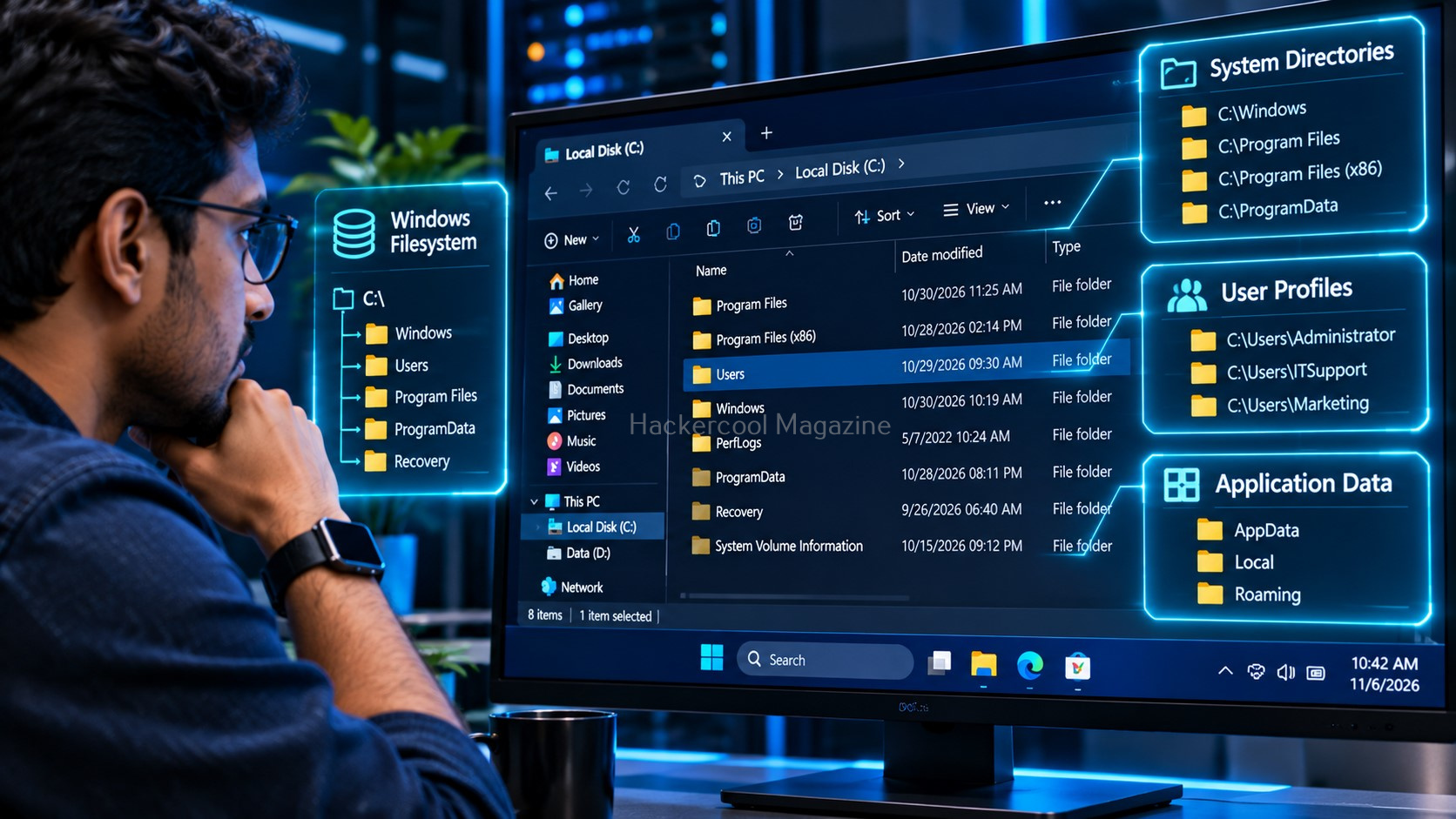
Windows organizes files and folders using a filesystem hierarchy. Unlike Linux, it commonly uses drive letters such as C:\.

Some important locations include:

  • C:\Windows – Operating system files.
  • C:\Users – User profiles.
  • C:\Program Files – Installed applications.
  • C:\ProgramData – Application data shared across users.
  • C:\Windows\System32 – Important system utilities and components.

Why does this matter?

Security professionals often investigate executable files, application data, user profiles, temporary files and configuration information. Knowing where Windows stores these resources makes system investigation easier.

You should also recognize common file extensions such as .exe, .dll, .ps1, .bat and .log. Understanding file types is useful when reviewing unfamiliar files or investigating suspicious activity.

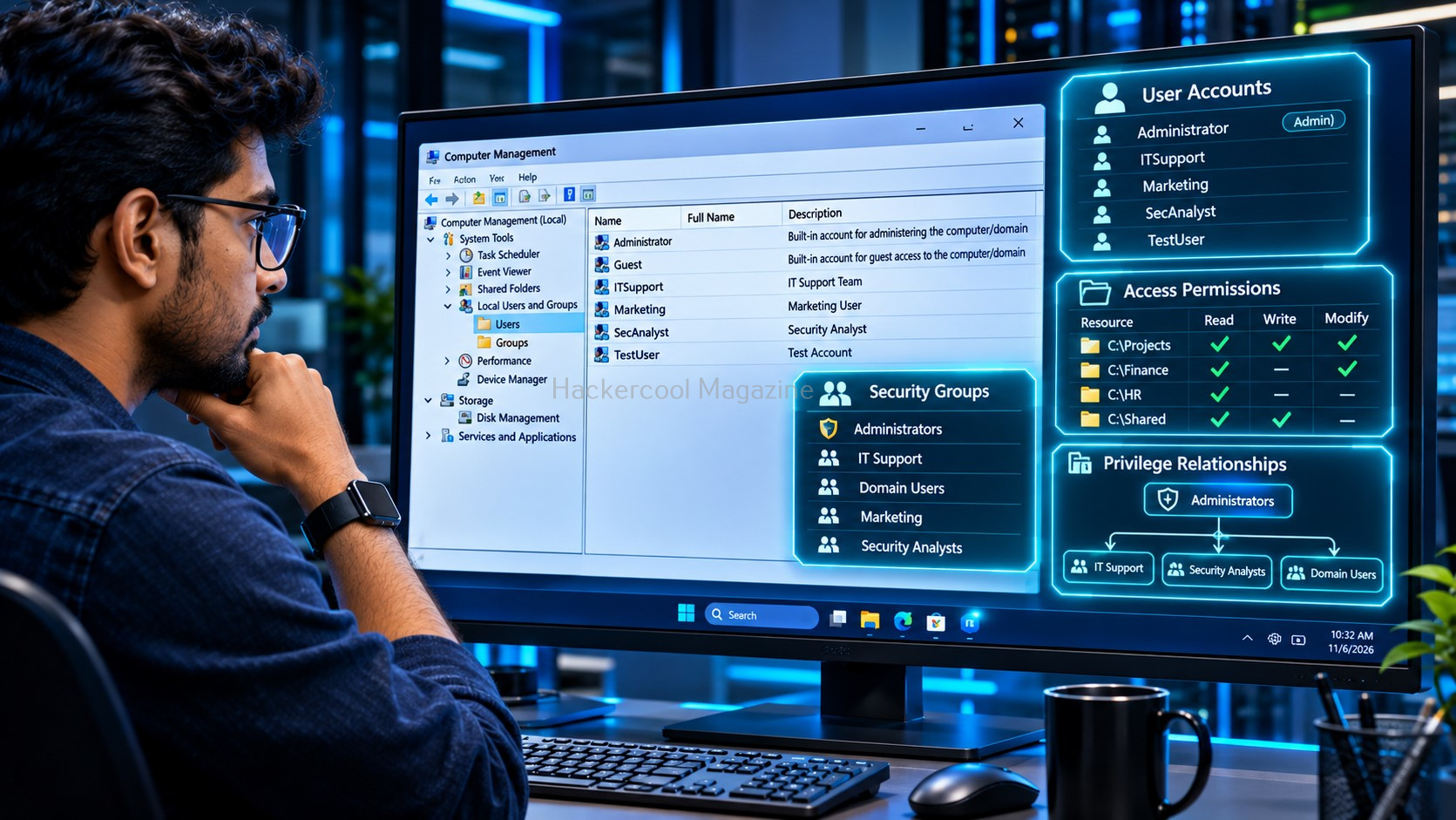
Understand Windows Users, Groups and Permissions

Every Windows user account has an identity and a set of permissions. These determine which resources the user can access and which operations they can perform.

Start by identifying the current account:

whoami

For more detailed identity and privilege information:

whoami /all

Windows also uses groups to simplify permission management. For example, the Administrators group contains accounts with elevated administrative privileges.

Another important concept is the difference between local and domain users. A local account exists on an individual computer, while a domain account is centrally managed through an Active Directory domain.

For ethical hackers, these distinctions matter because weak permissions, excessive privileges and poorly managed accounts can create security risks. Always understand the principle of least privilege: users should have only the permissions necessary to perform their jobs.

Learn Command Prompt Basics

Windows includes a traditional command-line interface called Command Prompt or cmd.exe.

Although many beginners rely on graphical tools, command-line skills are valuable when investigating systems or working with remote environments.

Here are a few commands worth recognizing:

hostname

Displays the computer name.

systeminfo

Displays system information.

dir

Lists files and directories.

ipconfig

Displays network configuration.

tasklist

Lists running processes.

These commands provide a quick introduction to identifying a system, examining its files and understanding its current activity.

Why PowerShell Is Important

PowerShell is Microsoft’s command-line shell and scripting environment. It is especially useful for Windows administration, automation and cybersecurity investigations. Unlike traditional text-oriented command-line workflows, PowerShell pipelines can pass structured objects between commands.

Consider these examples:

Get-ComputerInfo

Displays computer information.

Get-Process

Lists running processes.

Get-Service

Lists Windows services.

You can also filter results. For example:

Get-Process | Where-Object CPU -gt 100

This filters process objects based on their CPU property.

PowerShell is important because security professionals use it to examine system information, investigate processes, query event logs and manage Windows environments.

While Windows provides CMD and PowerShell for system administration, Linux offers a different command-line environment with its own tools and commands. Understanding both environments is essential for ethical hackers.

Examine Processes and Services

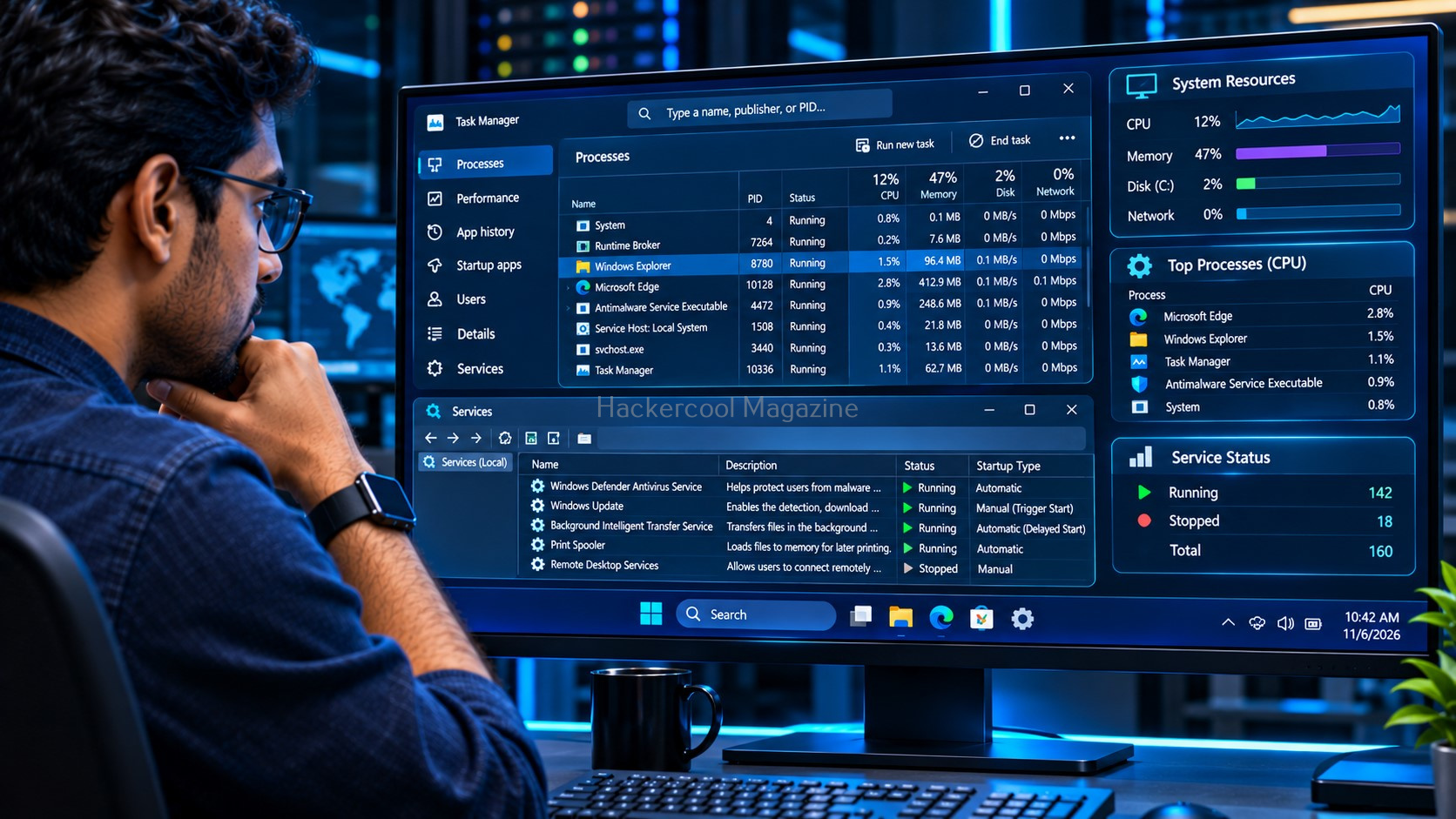
A process is a running program. Windows systems run many processes, including operating system components and user applications.

You can view running processes using:

tasklist

Or PowerShell:

Get-Process

Windows also uses background services to provide functionality such as updates, networking and security protection.

To list services using PowerShell:

Get-Service

From a security perspective, examining processes and services helps you understand what is running on a computer. Unexpected applications or misconfigured services may deserve further investigation.

Understand Windows Networking

Windows computers communicate through network connections using protocols and services. Windows provides several built-in networking commands to inspect IP addresses, identify DNS configurations, examine active connections and troubleshoot network communication. Understanding IP addresses, ports and DNS is essential before moving into practical network assessments.

A few commands help you understand the network configuration:

ipconfig /all

Displays detailed network configuration.

ping example.com

Tests connectivity to a destination.

nslookup example.com

Performs a DNS lookup.

netstat -ano

Displays network connections and associated process IDs.

You should also become familiar with services such as SMB and Remote Desktop Protocol (RDP).

SMB is commonly used for Windows file and printer sharing while RDP provides remote desktop access. Both are important in enterprise environments and should be configured and monitored carefully. Remember that a port number alone does not prove which service is running. Always interpret network information in context.

Explore Windows Event Logs

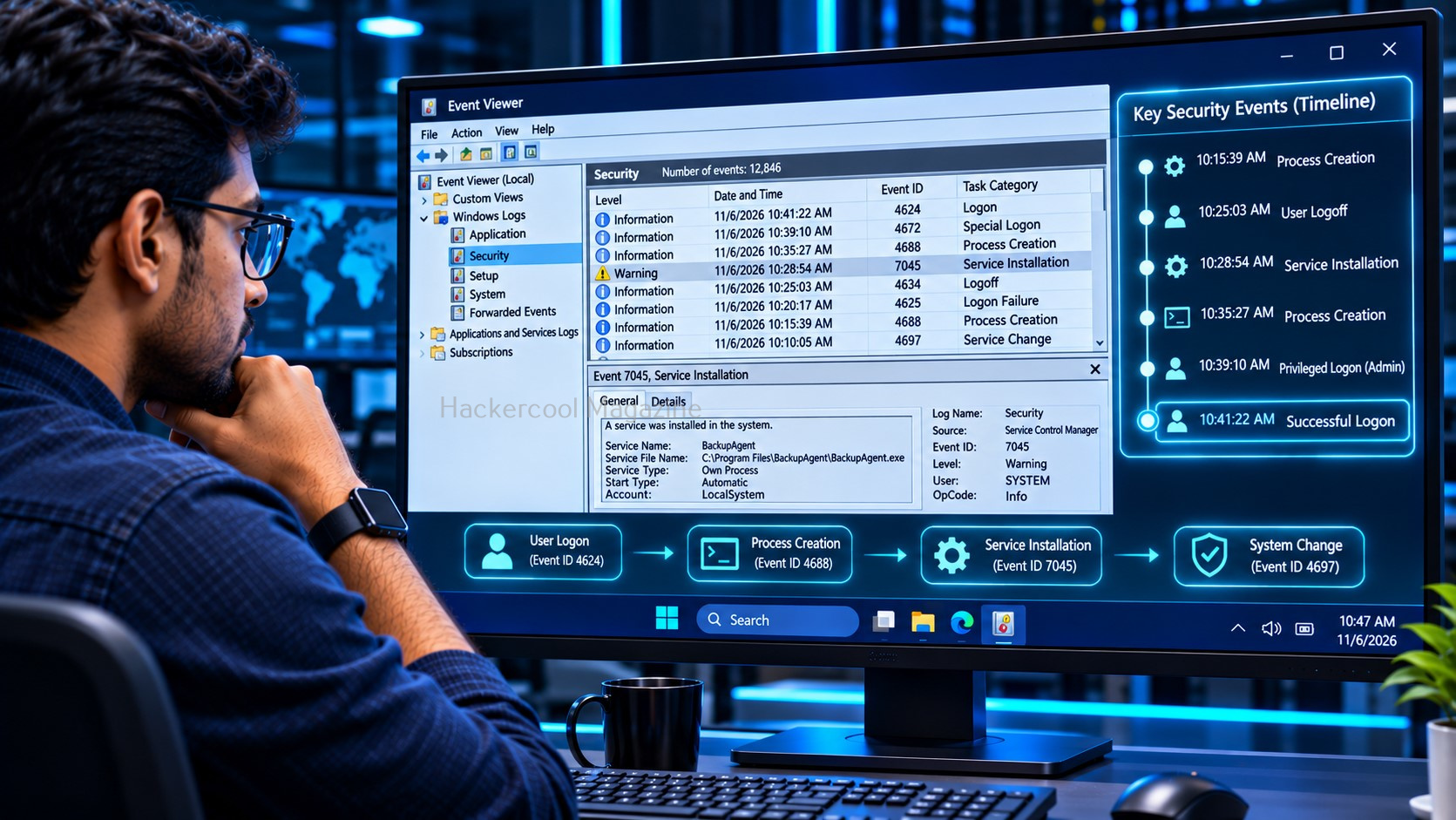
Windows records system and security activity through event logs. These records are valuable during troubleshooting and security investigations.

Event Viewer provides a graphical interface for examining logs. Important categories include:

  • Application
  • Security
  • System

Some Windows Security Event IDs are particularly useful to recognize:

Event IDGeneral meaning
4624Successful logon
4625Failed logon
4688New process created
4720User account created
7045New service installed

The availability of particular events depends on Windows configuration and auditing policies. Understanding event logs helps security professionals investigate account activity, process creation and other system events.

Understand Windows Security Controls

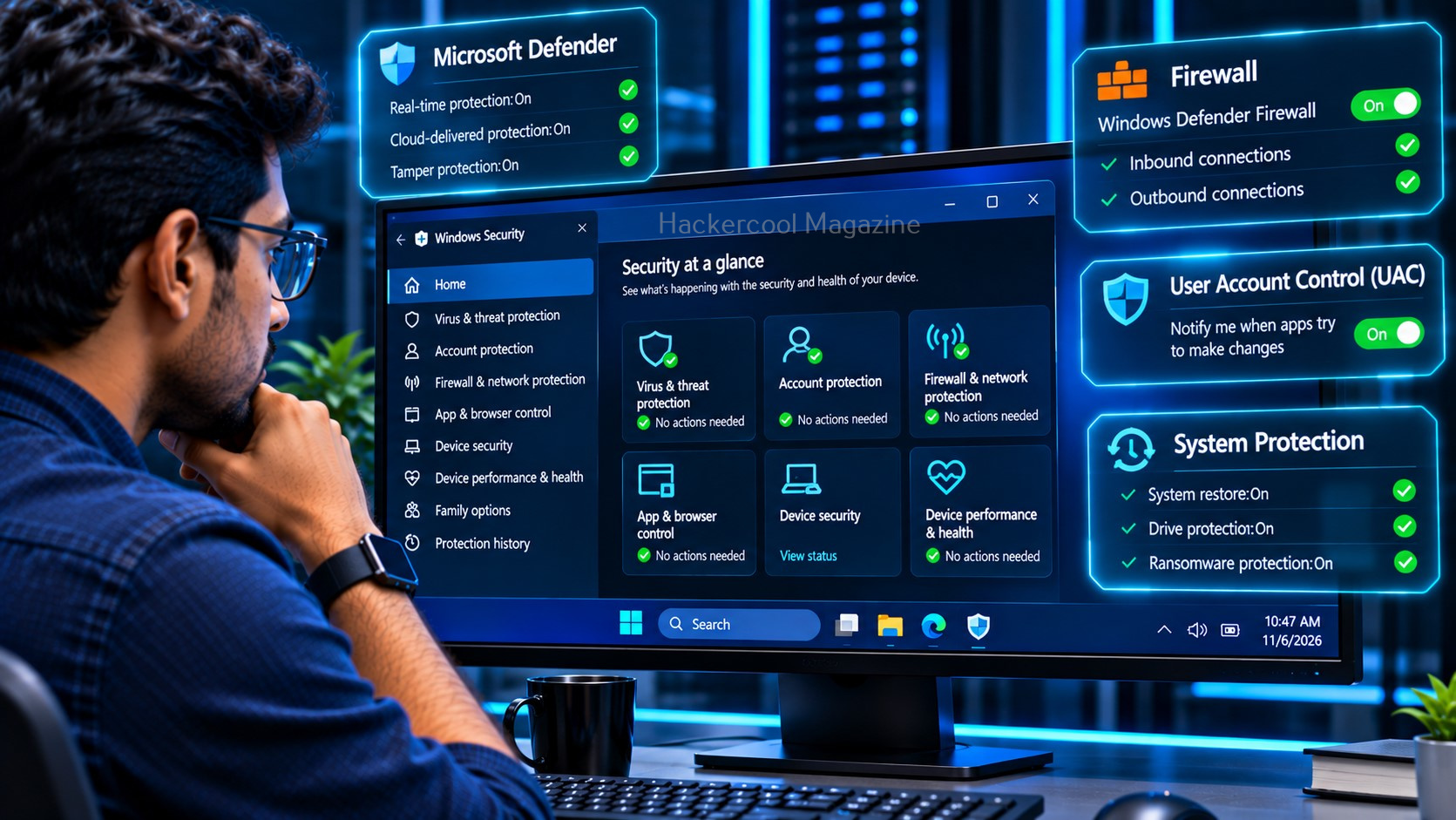
Windows includes several built-in security features.

Microsoft Defender Antivirus provides malware protection and threat detection.

Windows Firewall controls inbound and outbound network traffic according to configured rules.

User Account Control (UAC) helps prevent unauthorized changes requiring administrative privileges.

Windows Update delivers security patches and other system updates.

These controls work together as part of a broader security architecture. No single feature should be treated as complete protection. An ethical hacker should understand both what these controls do and how their configuration affects the security of a Windows system.

Why Active Directory Matters

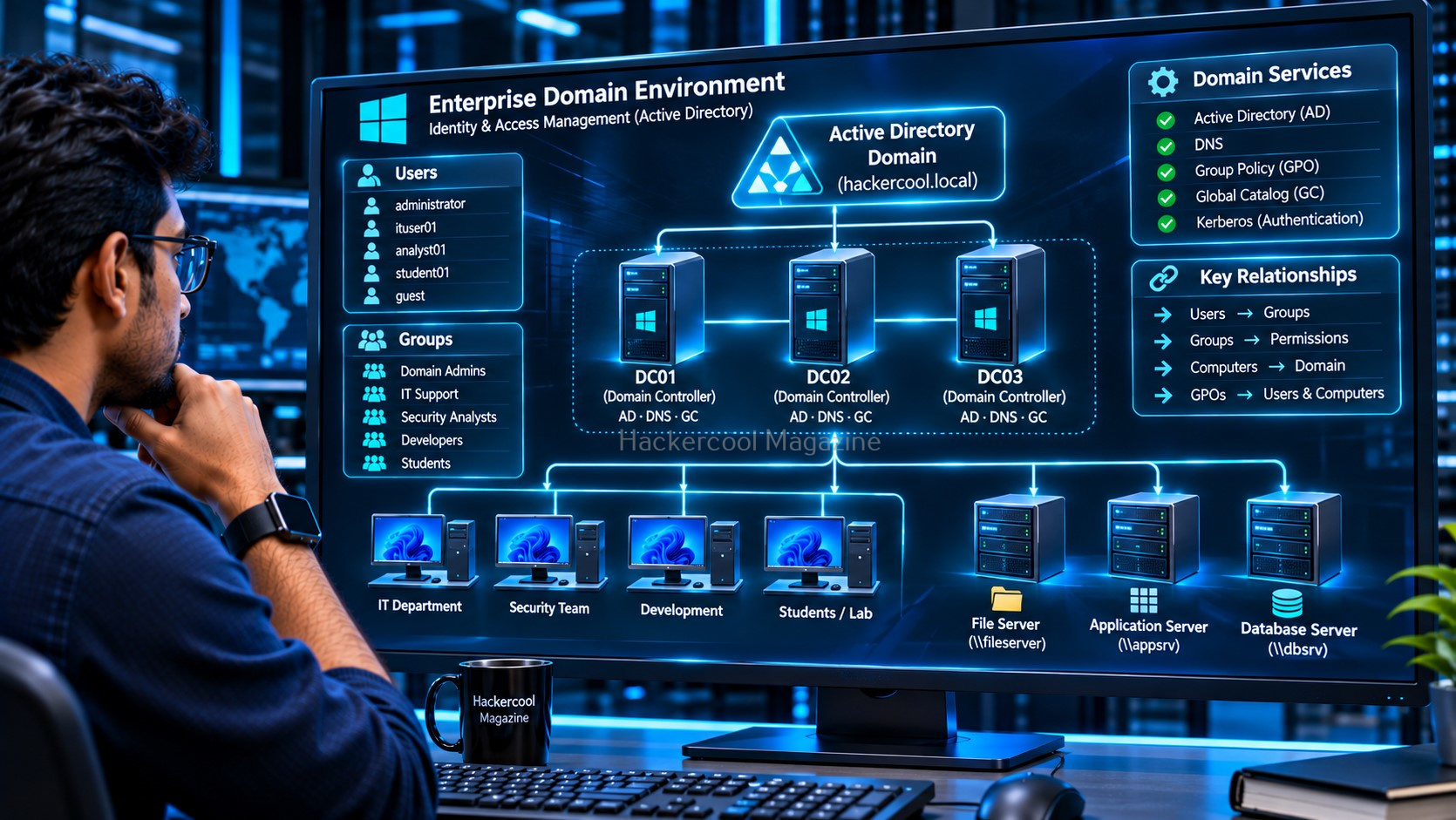
Active Directory Domain Services (AD DS) is Microsoft’s directory service used in many enterprise Windows environments.

It helps organizations centrally manage:

  • User accounts
  • Computer accounts
  • Groups
  • Authentication
  • Organizational Units
  • Group Policy
  • Access to resources

A Domain Controller hosts Active Directory Domain Services and performs important identity and authentication functions. You will also encounter authentication technologies such as Kerberos and NTLM.

Active Directory is a major area of enterprise cybersecurity. However, beginners should first understand Windows users, groups, permissions, networking and authentication before studying advanced Active Directory security.

Build Your Windows Fundamentals Before Moving to Advanced Security

Windows security involves much more than antivirus software. It is an interconnected environment of users, groups, permissions, processes, services, network connections, configuration and logs.

A good beginner learning sequence is:

  1. Windows basics and filesystem.
  2. Users, groups and permissions.
  3. Command Prompt and PowerShell.
  4. Processes and services.
  5. Networking and common services.
  6. Registry and Event Logs.
  7. Windows security controls.
  8. Active Directory and enterprise security.

Practice these concepts in a virtual machine or an isolated lab. Only assess systems you own or have explicit permission to administer or test.

Understanding Windows users, groups, permissions, processes, services and security configurations provides a foundation for examining Windows environments during authorized security assessments. Once you understand these concepts, explore our guide on ethical hacking for beginners to discover the next skills, tools and practical activities to develop.

Want to build a stronger Windows foundation?

The Hackercool Magazine $1 Trial includes the complete Windows Fundamentals beginner resource. It takes you beyond this introduction with structured explanations of Windows concepts, Command Prompt and PowerShell references, security events, Active Directory fundamentals, a Windows security investigation workflow, a practical lab checklist and a knowledge check.

Don’t rush into advanced techniques without understanding the system first.

Start your Hackercool Magazine $1 Trial and build your Windows cybersecurity foundation step by step.