Posted on — 1 Comment

Free Tools to Practice Ethical Hacking at Home

Learning ethical hacking doesn’t require an expensive cybersecurity lab or a corporate network. With a computer, free software and a controlled environment, beginners can build a practical home lab where they can safely learn networking, vulnerability assessment, web security, enumeration and penetration testing. The most important rule is simple: only practice against systems you own or have explicit permission to test.

A home lab gives you something that tutorials alone cannot provide, an environment where you can experiment, make mistakes, troubleshoot problems and learn how security tools actually work. In this guide, we’ll explore some of the best free tools and platforms beginners can use to practice ethical hacking at home.

Why Build an Ethical Hacking Home Lab?

Watching cybersecurity tutorials can teach you concepts but hands-on practice helps turn those concepts into skills. A home lab allows you to:

  • Practice safely
  • Experiment with security tools
  • Understand network communication
  • Test vulnerable applications
  • Learn Linux and Windows security
  • Practice vulnerability scanning
  • Improve troubleshooting skills

You don’t need a powerful computer to begin. Start small and expand your lab as your skills improve.

1. VirtualBox

One of the easiest ways to create a cybersecurity lab is by using virtualization. VirtualBox is a free virtualization platform that allows you to run multiple operating systems on a single computer. For example, you could create virtual machines running:

  • Linux
  • Windows
  • Vulnerable practice systems

These machines can communicate through an isolated virtual network.

Why Beginners Should Use It:

Virtualization means you don’t need several physical computers to create a small lab. You can experiment with different systems while keeping your practice environment separate from your everyday computer.

2. Kali Linux

Kali Linux is a popular Linux distribution designed for security professionals and cybersecurity learners. It includes many security-related tools for,

Why Beginners Should Learn Kali Linux:

Kali provides a convenient environment for learning cybersecurity tools. However, don’t make the mistake of thinking that installing Kali makes you an ethical hacker. Learn the underlying concepts first.

3. Parrot Security

Parrot Security is another Linux distribution designed for security testing, privacy and development. It provides a lightweight alternative for learners who want a security-focused operating system.

Why Use It?

It can help beginners explore:

  • Security tools
  • Linux administration
  • Privacy technologies
  • Development environments

You can run it inside a virtual machine as part of your home lab.

4. Metasploitable

Metasploitable is a deliberately vulnerable virtual machine designed for security training. Unlike normal operating systems, it contains intentionally insecure services and configurations. This makes it useful for practicing security assessment techniques.

Why Beginners Should Use It?

Instead of scanning random systems on the internet, you can scan a machine specifically designed for learning. This provides a much safer environment for experimentation.

5. OWASP Juice Shop

Web application security is an important part of ethical hacking. OWASP Juice Shop is a deliberately insecure web application designed for security training. It contains numerous vulnerabilities that allow learners to study web security concepts in a controlled environment.

What Can You Learn?

Juice Shop can help beginners explore topics such as:

  • Authentication weaknesses
  • Access control
  • Input validation
  • Web application security

It is particularly useful when learning alongside tools such as Burp Suite.

6. DVWA

Damn Vulnerable Web Application (DVWA) is another intentionally vulnerable web application. It provides a controlled environment for learning common web security concepts.

Why Beginners Should Use It?

DVWA is useful for understanding vulnerabilities rather than simply reading about them. You can observe how insecure application behavior works and learn how developers can prevent similar problems.

7. Nmap

Nmap is one of the most important tools beginners should learn. It helps with network discovery and security auditing. In your home lab, you can use it to understand:

  • Active hosts
  • Open ports
  • Running services
  • Network architecture

What You’ll Learn?

Nmap helps reinforce networking concepts such as:

  • IP addresses
  • Ports
  • Protocols
  • Services

8. Wireshark

Wireshark is a network protocol analyzer. It allows you to capture and inspect network traffic inside your lab. Instead of simply reading about protocols, you can observe how systems actually communicate.

Practice Topics

You can explore:

  • DNS traffic
  • TCP connections
  • HTTP communication
  • Network troubleshooting

Wireshark is especially valuable because it teaches you to think about what is happening at the packet level.

9. Burp Suite Community Edition

Burp Suite is widely used for web application security testing. The Community Edition provides a useful environment for beginners to learn web security concepts. You can use it with vulnerable applications such as Juice Shop or DVWA.

Concepts to Practice:

Learn how:

  • Browsers send requests
  • Servers return responses
  • Cookies work
  • Sessions are maintained
  • Applications process input

Understanding HTTP is more important than memorizing Burp Suite features.

10. OWASP ZAP

OWASP ZAP is an open-source web application security testing tool. It provides another way to explore web security in your lab.

Why Beginners Should Try It:

ZAP can help you understand:

  • Web application scanning
  • HTTP traffic
  • Application structure
  • Potential security issues

Learning both ZAP and Burp Suite can help you understand common web security workflows.

11. Gobuster

Gobuster is commonly used for content discovery and enumeration. In an authorized home lab, you can use it to explore how web applications are structured.

What You’ll Learn:

It introduces concepts such as:

  • Directories
  • Files
  • Virtual hosts
  • Web enumeration

Use it only against applications you own or are authorized to test.

12. Nikto

Nikto is a web server assessment tool. It can identify various potentially insecure configurations and outdated components. A vulnerable web server in your lab gives you a safe target for learning how web server assessment works.

13. John the Ripper

Password security is another important area of ethical hacking. John the Ripper is a password auditing tool that can be used in controlled environments to understand password security.

What You’ll Learn:

It introduces:

  • Password hashes
  • Password policies
  • Authentication security
  • Password strength

Practice only with credentials and password hashes created for your lab.

14. Hashcat

Hashcat is another widely used password security auditing tool. It provides an opportunity to study password hashing and the importance of strong authentication.

Beginner Lesson:

The goal isn’t simply to recover a password. The important lesson is understanding why weak passwords and poorly protected credentials create security risks.

15. Netcat

Netcat is a simple networking utility that beginners can use to understand client-server communication. It can help you explore how network connections work inside your lab.

Why Learn It?

Netcat reinforces concepts such as:

  • TCP connections
  • Ports
  • Client-server communication
  • Network troubleshooting

It is a great tool for strengthening networking fundamentals.

16. OpenVAS / Greenbone Community Edition

Vulnerability scanning is another useful skill to practice at home. Greenbone’s community-oriented vulnerability management tools can be used in suitable lab environments to explore vulnerability assessment.

What You’ll Learn:

You can study:

  • Vulnerability identification
  • Severity ratings
  • Security reports
  • Remediation concepts

Don’t simply run scans and accept every result as fact. Learn how to interpret findings.

17. Security Onion

If you’re interested in defensive cybersecurity, Security Onion is worth exploring. It is a Linux-based platform designed for security monitoring, network visibility, threat hunting and related defensive activities.

Why Include It in Your Lab?

Ethical hacking isn’t only about attacking systems. Understanding how defenders detect suspicious activity makes you a better security professional.

18. TryHackMe

Online cybersecurity training platforms can complement your home lab. TryHackMe provides guided learning experiences and practical cybersecurity exercises. It can be useful when you need structured exercises instead of creating every lab yourself.

19. Hack The Box

Hack The Box provides hands-on cybersecurity challenges and intentionally vulnerable environments. It can help learners move from guided exercises toward more independent problem-solving. Beginners should start with appropriate introductory content before attempting advanced machines.

How to Build a Simple Home Lab

You don’t need all the tools listed above. Start with a small environment.

Beginner Setup:

Your first lab could contain:

Host computer
↓
VirtualBox
↓
Kali Linux
↓
Metasploitable
↓
OWASP Juice Shop

You can then add additional systems as you become more comfortable.

What Should Beginners Practice?

Don’t randomly run tools. Give every lab session a goal.

For example,

Lab 1: Networking

Learn IP addresses, ports and services.

Lab 2: Network Discovery

Use Nmap to map your isolated lab.

Lab 3: Packet Analysis

Use Wireshark to observe traffic.

Lab 4: Web Security

Study HTTP using Juice Shop and Burp Suite.

Lab 5: Vulnerability Assessment

Run vulnerability scans against your intentionally vulnerable machines.

Lab 6: Documentation

Write a simple security assessment report describing what you discovered.

This approach turns individual tools into a structured learning program.

Common Home Lab Mistakes

Installing Too Many Tools:

You don’t need 50 tools. Master a few fundamentals first.

Making the Lab Accessible to the Internet:

Keep intentionally vulnerable machines isolated. Don’t expose vulnerable systems directly to the public internet.

Focusing Only on Exploitation:

Learn how vulnerabilities work and how they can be fixed.

Ignoring Documentation:

Professional security work requires clear reporting.

Record what you tested, what you discovered, and how the issue could be addressed.

Conclusion

You don’t need an expensive cybersecurity setup to start learning ethical hacking. Free and accessible tools such as VirtualBox, Kali Linux, Nmap, Wireshark, Burp Suite, OWASP Juice Shop, DVWA, Metasploitable and other training platforms can provide enough practical experience to build a strong foundation.

Start small. Build an isolated lab. Learn one concept at a time.

Most importantly, practice only against systems you own or have explicit permission to test.

The goal of an ethical hacking home lab isn’t to learn how to break random systems. It’s to create a safe environment where you can understand how systems work, discover weaknesses, analyze security problems and learn how to make technology more secure.

Posted on — 1 Comment

Essential Cybersecurity Tools Every Beginner Should Know

If you’re starting your cybersecurity journey, you’ve probably noticed there are thousands of tools available for use. Some are designed for network analysis, others focus on web application security, digital forensics, password auditing or incident response.

Seeing so many options can be overwhelming.

The good news is that you don’t need to learn every cybersecurity tool to build a strong foundation. Most professionals begin with a handful of essential tools that help them understand how networks, operating systems and applications work.

Remember, cybersecurity is not about collecting software—it’s about understanding technology and using the right tools to solve security problems. In this guide, we’ll explore the essential cybersecurity tools every beginner should know, why they matter and the skills you’ll develop by learning them.

Why Cybersecurity Tools Matter

Modern computer systems generate enormous amounts of information every second.

Imagine trying to:

  • Analyze millions of network packets
  • Monitor hundreds of servers
  • Identify vulnerable systems
  • Investigate suspicious activity

Doing this manually would be nearly impossible. Cybersecurity tools help professionals:

  • Automate repetitive tasks
  • Collect information
  • Analyze systems
  • Improve efficiency
  • Document findings
  • Monitor security

However, remember that tools are only as effective as the person using them.

1. Nmap

Nmap is one of the most widely used network scanning tools.

It helps identify:

  • Active devices
  • Open ports
  • Running services
  • Network structure

Why Beginners Should Learn It?

Nmap teaches important networking concepts that form the foundation of ethical hacking and penetration testing.

2. Wireshark

Wireshark is a packet analyzer that captures and displays network traffic. Instead of guessing how computers communicate, you can actually observe network packets moving between devices.

Skills You’ll Learn while using this tool:

  • TCP/IP
  • DNS
  • HTTP
  • Network troubleshooting
  • Packet analysis

3. Burp Suite Community Edition

Burp Suite is one of the most popular web application security tools. It allows you to inspect communication between a web browser and a web server.

Why It Matters

Modern businesses rely heavily on web applications. Learning Burp Suite helps you understand:

  • HTTP requests
  • Responses
  • Cookies
  • Sessions
  • Authentication

4. OWASP ZAP

OWASP ZAP is another excellent web application security tool. It is open source and beginner-friendly.

Skills You’ll Develop

  • Web application analysis
  • Security scanning
  • Website structure
  • Request inspection

5. WiFite and Aircrack-ng

Wireless networking is another important area of cybersecurity. These tools help beginners understand:

Always use them only on networks you own or are authorized to test.

6. John the Ripper

John the Ripper is a password auditing tool. It demonstrates the importance of strong password policies.

You’ll Learn

  • Password security
  • Authentication
  • Hashes
  • Secure credentials

7. Hashcat

Hashcat is another password auditing tool used to understand password hashing and authentication security. Learning Hashcat reinforces why organizations should use strong passwords and secure authentication methods.

8. Gobuster

Gobuster helps discover hidden directories and files within web applications. It teaches beginners how websites are organized and why hidden resources should be properly secured.

9. Nikto

Nikto is a web server scanner. It analyzes web servers for common security issues and configuration problems. This introduces beginners to web server security concepts.

10. Maltego

Maltego is an investigation and visualization tool. It helps organize relationships between:

  • Domains
  • Organizations
  • People
  • Email addresses
  • Infrastructure

Why Learn It

It develops critical thinking and investigative skills.

11. TheHarvester

TheHarvester collects publicly available information from online sources. It introduces beginners to Open-Source Intelligence (OSINT) and demonstrates how organizations leave digital footprints.

12. Metasploit Framework

Metasploit is one of the best-known penetration testing frameworks. It helps security professionals validate security controls and study vulnerabilities in authorized environments. Beginners should first understand networking and operating systems before exploring Metasploit.

Categories of Cybersecurity Tools

Instead of memorizing individual tools, think of them by category.

Network Analysis:

  • Nmap
  • Wireshark

Web Security:

  • Burp Suite
  • OWASP ZAP
  • Gobuster
  • Nikto

Password Security:

  • John the Ripper
  • Hashcat

Wireless Security:

  • WiFite
  • Aircrack-ng

OSINT:

  • Maltego
  • TheHarvester

Penetration Testing:

Metasploit Framework

Learning categories helps you understand where each tool fits into a professional workflow.

Build Your Skills Before Your Toolkit

Many beginners download dozens of cybersecurity tools without learning how they work. This usually leads to confusion.

Instead:

Learn one concept. Then learn one tool.

Practice. Repeat.

For example:

Understand networking before learning network scanners.

Understand HTTP before learning web security tools.

Understand passwords before learning password auditing tools.

Knowledge always comes first.

Recommended Learning Path

If you’re new to cybersecurity, this roadmap works well.

Step 1:

Learn networking.

Then explore:

  • Nmap
  • Wireshark

Step 2:

Learn web technologies.

Then study:

  • Burp Suite
  • OWASP ZAP
  • Gobuster
  • Nikto

Step 3:

Understand authentication.

Then learn:

  • John the Ripper
  • Hashcat

Step 4:

Learn wireless networking. Then explore wireless security tools.

Step 5:

Develop investigation skills.

Learn:

  • Maltego
  • TheHarvester

Step 6:

Finally, explore penetration testing frameworks like Metasploit after you have built a solid foundation.

Common Beginner Mistakes

Avoid these common pitfalls.

Installing Too Many Tools:

More tools do not equal more knowledge. Master a few tools before adding new ones.

Memorizing Commands:

Focus on understanding:

  • Why a tool exists
  • What information it collects
  • How the results should be interpreted

Ignoring Networking:

Networking is the foundation of cybersecurity. Without it, many tools will seem confusing.

Not Practicing:

Reading alone is not enough. Build a home lab. Experiment. Take notes.

Practicing Without Authorization:

Only perform security testing on:

  • Home labs
  • Virtual machines
  • Authorized cybersecurity training environments
  • Systems you own

Ethical hacking requires permission.

Build Your First Cybersecurity Lab

A home lab is one of the best investments for beginners.

Consider including:

  • A virtualization platform
  • Linux virtual machine
  • Windows virtual machine
  • Vulnerable practice machine
  • Small virtual network

This setup provides a safe environment to learn networking, web security and system administration while practicing with cybersecurity tools.

Conclusion

Cybersecurity tools are an important part of every professional’s toolkit but they are only effective when backed by strong technical knowledge. Don’t rush to learn dozens of tools at once.

Instead:

  • Learn networking.
  • Understand operating systems.
  • Study web technologies.
  • Practice regularly.
  • Build your own lab.
  • Focus on concepts before commands.

As your understanding grows, each new tool will become easier to learn and far more useful. Cybersecurity is a journey, not a race. By mastering these essential beginner tools one step at a time, you’ll build a strong foundation for ethical hacking, penetration testing, digital forensics and many other cybersecurity specialties.

Posted on

Best Penetration Testing Tools for Beginners

If you’re just starting your journey into ethical hacking, you’ve probably seen lists claiming there are hundreds of penetration testing tools you need to master. That can feel overwhelming.

The good news is that you don’t need to learn every tool. Professional penetration testers often rely on a core set of trusted tools and choose additional ones based on the target environment and the type of assessment they’re performing. For beginners, the goal isn’t to collect dozens of tools, it’s to understand what each tool does and how it fits into the penetration testing process.

In this guide, you’ll discover 15 beginner-friendly penetration testing tools, what they’re used for and the skills you’ll develop by learning them.

What Is Penetration Testing?

Penetration testing is the process of evaluating the security of a computer system, network or application by simulating authorized attacks. Unlike malicious attackers, penetration testers work with permission to identify security weaknesses before criminals can exploit them.

A typical penetration test consists of:

Different tools assist with each stage of this process.

Why Beginners Should Learn Penetration Testing Tools

Learning tools helps you:

  • Understand security workflows
  • Build practical experience
  • Learn networking concepts
  • Analyze systems methodically
  • Improve troubleshooting skills
  • Prepare for cybersecurity certifications
  • Develop confidence in security assessments

But remember, tools support your knowledge, they don’t replace it.

1. Nmap

Nmap is one of the first tools every beginner should learn. It is used to discover hosts, identify open ports and determine which network services are available.

Why Learn It?

Nmap teaches:

  • Network fundamentals
  • TCP/IP concepts
  • Service discovery
  • Host identification

It forms the foundation for many penetration testing workflows.

2. Wireshark

Wireshark captures and analyzes network traffic. Instead of guessing how systems communicate, you can actually observe packets moving across the network.

Why Learn It?

You’ll gain a better understanding of:

  • Network protocols
  • DNS
  • HTTP
  • TCP
  • Packet analysis

Believe me. networking becomes much easier once you can visualize traffic.

3. Burp Suite Community Edition

Burp Suite is one of the most popular tools for web application security testing. It acts as a proxy between your browser and a website, allowing you to inspect web requests and responses.

Why Learn It?

Burp Suite helps beginners understand:

  • HTTP communication
  • Sessions
  • Cookies
  • Authentication
  • Web application architecture

4. OWASP ZAP

OWASP ZAP is an open-source web application security testing tool. Its user-friendly interface makes it an excellent choice for beginners exploring web security.

Why Learn It?

It introduces concepts such as:

  • Web scanning
  • Security testing
  • Request analysis
  • Application mapping

5. Nikto

Nikto is a web server scanner designed to identify common configuration issues and outdated software.

Why Learn It?

It helps beginners understand:

  • Web server security
  • Server configurations
  • Security auditing
  • Assessment reporting

6. Gobuster

Gobuster is used to discover hidden directories, files and virtual hosts on web servers.

Why Learn It?

It teaches:

  • Website enumeration
  • Content discovery
  • Web structure analysis
  • Information gathering

7. Metasploit Framework

Metasploit is one of the best-known security testing frameworks. It allows security professionals to study vulnerabilities and validate security controls in authorized environments.

Why Learn It?

You’ll better understand:

  • Security testing workflows
  • Vulnerability validation
  • Professional assessment methodology

Focus on understanding the framework rather than simply running modules.

8. SQLmap

SQLmap helps security professionals study SQL injection and database security.

Why Learn It?

It reinforces concepts such as:

  • Databases
  • SQL
  • Input validation
  • Secure coding practices

Understanding SQL itself should come before learning the tool.

9. John the Ripper

John the Ripper is widely used for password security auditing.

Why Learn It?

It teaches:

  • Password security
  • Authentication
  • Password policies
  • Hash concepts

It helps demonstrate why strong passwords are essential.

10. Hashcat

Hashcat is another password auditing tool known for its speed and flexibility.

Why Learn It?

Beginners gain insight into:

  • Password hashing
  • Credential security
  • Authentication mechanisms

11. Aircrack-ng

Aircrack-ng is a collection of tools for learning wireless network security.

Why Learn It?

You’ll understand:

Only experiment with networks you own or are authorized to assess.

12. Hydra

Hydra is commonly used when studying authentication security.

Why Learn It?

It helps explain:

  • Login mechanisms
  • Authentication systems
  • Account protection
  • Defensive security controls

13. Netcat

Netcat is often called the “Swiss Army knife” of networking. It can establish connections, transfer data and assist with troubleshooting.

Why Learn It?

It develops your understanding of:

  • TCP/IP
  • Client-server communication
  • Network troubleshooting
  • Service interaction

14. WiFite

WiFite simplifies wireless security testing in authorized environments.

Why Learn It?

It introduces:

  • Wireless assessment workflows
  • Wi-Fi auditing
  • Wireless security fundamentals

Remember that it should only be used for educational purposes in your own lab or other authorized environments.

15. Maltego

Maltego is a visual investigation platform that maps relationships between people, domains, organizations and other entities.

Why Learn It?

It helps beginners improve:

  • Open-source intelligence (OSINT)
  • Investigation skills
  • Relationship analysis
  • Critical thinking

Recommended Learning Order

Trying to learn all these tools at once often leads to frustration. A better approach is to build your skills gradually. Follow our step-by-step guide.

Step 1: Networking

Start with:

  • Nmap
  • Wireshark
  • Netcat

Step 2: Web Applications

Then move to:

  • Burp Suite
  • OWASP ZAP
  • Gobuster
  • Nikto

Step 3: System Security

Continue with:

  • Metasploit
  • SQLmap
  • John the Ripper
  • Hashcat

Step 4: Wireless Security

Explore:

  • Aircrack-ng
  • WiFite

Step 5: Investigation and OSINT

Finally, learn:

  • Maltego

This progression builds knowledge naturally rather than overwhelming you.

Common Beginner Mistakes

Avoid these common pitfalls while learning about tools.

Installing Too Many Tools:

A small set of tools mastered well is more valuable than hundreds you barely understand.

Ignoring Networking:

Networking is the foundation of penetration testing. Without it, many tool outputs won’t make sense.

Memorizing Commands:

Understanding why a tool produces certain results is far more important than memorizing syntax.

Skipping Documentation:

Professional penetration testers carefully document:

  • Findings
  • Observations
  • Risks
  • Evidence
  • Recommendations

Good documentation is just as important as technical skills.

Practicing Without Permission:

Always practice in:

  • Home labs
  • Virtual machines
  • Cybersecurity training platforms
  • Authorized testing environments

Never test systems without explicit authorization.

Building Your First Penetration Testing Lab

A simple home lab is one of the best investments for learning.

Consider including:

  • A virtualization platform
  • A Linux security distribution
  • A vulnerable practice machine
  • A Windows virtual machine
  • A small virtual network

This setup lets you safely explore networking, web applications, operating systems and security tools without affecting real-world systems.

Conclusion

Penetration testing tools are essential for every ethical hacker but the real value comes from understanding the concepts behind them.

Start with networking fundamentals, learn how systems communicate and gradually expand into web applications, password security, wireless networking and investigation techniques.

Remember:

  • Learn concepts before commands.
  • Practice consistently in authorized environments.
  • Build one skill at a time.
  • Focus on understanding results, not just running tools.
  • Develop strong documentation habits.

Mastering these beginner-friendly penetration testing tools will give you a solid foundation for more advanced cybersecurity topics and prepare you for real-world security assessments.

Posted on — 1 Comment

Top 15 Ethical Hacking Tools Beginners Should Learn

One of the most exciting moments for beginners entering cybersecurity is discovering ethical hacking tools. You install your first security-focused operating system, open a terminal, explore different applications and suddenly feel like you’ve entered a completely new world.

However, there is one important lesson every beginner should understand:

Tools do not make someone an ethical hacker—knowledge does.

Ethical hacking tools are designed to help security professionals automate tasks, collect information, analyze systems and improve security. But without understanding the concepts behind them, tools are just buttons and commands. In this guide, we’ll explore 15 popular ethical hacking tools beginners should learn, what they are used for and the skills they help develop.

Why Beginners Should Learn Ethical Hacking Tools

Cybersecurity professionals use tools every day. Tools help with:

  • Information gathering
  • Network analysis
  • Vulnerability assessment
  • Web application testing
  • Password security testing
  • Digital investigation
  • Security monitoring

Learning tools helps beginners understand how security workflows operate. But remember:

The goal is not memorizing tools. The goal is understanding the problems they solve. Let’s learn about the top 15 Ethical Hacking Tools beginners should learn about.

1. Nmap

Nmap is one of the most well-known tools in cybersecurity. It is commonly used for network discovery and security auditing. Nmap helps identify information such as:

  • Active devices
  • Open ports
  • Running services
  • Network structure

Why Beginners Should Learn Nmap

Nmap teaches important networking concepts.

You learn about:

  • Ports
  • Services
  • Network communication
  • Asset discovery

Many cybersecurity learning paths introduce Nmap early because it builds strong fundamentals.

2. Wireshark

Wireshark is a network protocol analyzer. It allows users to inspect network traffic and understand how systems communicate. Wireshark helps analyze:

  • Network packets
  • Protocol behavior
  • Communication patterns

Why Beginners Should Learn Wireshark

Networking becomes much easier when you can see how data moves. Wireshark helps beginners understand:

  • TCP/IP
  • DNS
  • HTTP
  • Network troubleshooting

3. Burp Suite

Burp Suite is widely used for web application security testing. It helps professionals analyze how browsers and websites communicate. It is commonly used when learning:

  • Web requests
  • Authentication concepts
  • Web security issues

Why Beginners Should Learn Burp Suite

Many modern security assessments involve web applications.

Burp Suite helps beginners understand:

  • HTTP requests
  • Responses
  • Cookies
  • Sessions

4. OWASP ZAP

OWASP ZAP (Zed Attack Proxy) is another popular web security testing tool. It is an open-source project designed to help identify web application security issues.

Why Beginners Should Learn OWASP ZAP

It introduces:

  • Web testing concepts
  • Security scanning
  • Application analysis

It is beginner-friendly and useful for learning web security fundamentals.

5. Metasploit Framework

Metasploit is a security testing framework used for learning and research. It provides a structured environment for understanding vulnerabilities.

Why Beginners Should Learn Metasploit

Metasploit helps learners understand:

  • Vulnerability concepts
  • Security testing workflows
  • System weaknesses

It is best studied after learning networking basics.

6. Nikto

Nikto is a web server scanning tool. It helps identify:

  • Server configurations
  • Security issues
  • Outdated components

Why Beginners Should Learn Nikto

Nikto introduces beginners to:

  • Web server security
  • Configuration analysis
  • Security assessment reports

7. Gobuster

Gobuster is commonly used for discovering web resources. Security professionals use it to understand website structure.

Why Beginners Should Learn Gobuster

It teaches:

  • Website enumeration
  • Directory structures
  • Hidden resources
  • Web application mapping

8. Recon-ng

Recon-ng is an information-gathering framework. It helps organize reconnaissance activities.

Why Beginners Should Learn Recon-ng

It introduces:

  • Reconnaissance workflows
  • Information gathering
  • Organized investigation

9. TheHarvester

TheHarvester focuses on collecting publicly available information. It is often discussed in reconnaissance training.

Why Beginners Should Learn TheHarvester

It helps beginners understand:

  • Open-source intelligence concepts
  • Public information exposure
  • Digital footprints

10. John the Ripper

John the Ripper is a password security auditing tool. It is used to evaluate password strength.

Why Beginners Should Learn John the Ripper

Password security is a major cybersecurity topic. This tool teaches concepts like:

  • Password policies
  • Hashes
  • Authentication security

11. Hashcat

Hashcat is another advanced password auditing tool. It is known for high-performance password analysis.

Why Beginners Should Learn Hashcat

It helps understand:

  • Password storage concepts
  • Hashing
  • Credential security

12. Hydra

Hydra is commonly used in authentication security testing. It helps demonstrate the importance of strong authentication protections.

Why Beginners Should Learn Hydra

It introduces:

  • Authentication concepts
  • Account security
  • Defensive measures

Always practice only in authorized environments.

13. SQLmap

SQLmap is a tool related to database security testing. It is commonly used when learning about SQL injection concepts.

Why Beginners Should Learn SQLmap

It helps beginners understand:

  • Database security
  • Input validation
  • Web application weaknesses

However, learning how SQL works first is important.

14. Aircrack-ng

Aircrack-ng is a collection of tools focused on wireless network security. It is used for learning Wi-Fi security concepts.

Why Beginners Should Learn Aircrack-ng

It introduces:

  • Wireless networks
  • Encryption concepts
  • Wi-Fi security principles

Only test networks you own or have permission to assess.

15. Maltego

Maltego is a visual investigation and analysis tool. It helps map relationships between information.

Why Beginners Should Learn Maltego

It develops:

  • Investigation skills
  • Relationship mapping
  • Information analysis

It teaches beginners how different pieces of information connect.

Don’t Become Dependent on Tools

One of the biggest beginner mistakes is collecting tools without understanding them. A tool can provide results. But you need knowledge to interpret those results.

For example:

A scanner may identify an open port.

A beginner asks:

“What tool should I run next?”

A professional asks:

“What does this information mean?”

That mindset difference is important.

Recommended Learning Order for Beginners

We have given below a good learning path for beginners.

Start With Networking Tools:

Learn:

  • Nmap
  • Wireshark

Understand communication first.

Move to Web Tools:

Learn:

  • Burp Suite
  • OWASP ZAP
  • Nikto

Understand websites.

Learn Reconnaissance:

Explore:

  • Recon-ng
  • TheHarvester
  • Maltego

Build investigation skills.

Study Advanced Concepts Later:

Move gradually into:

  • Metasploit
  • Password security tools
  • Specialized testing tools

How to Practice Safely

Always use:

  • Personal labs
  • Virtual machines
  • Training platforms
  • Authorized environments

Ethical hacking requires permission. The goal is improving security, not breaking systems.

Conclusion

Ethical hacking tools are exciting but tools alone do not create cybersecurity skills.

The best ethical hackers understand:

  • Networks
  • Systems
  • Applications
  • Security concepts

Tools simply help apply that knowledge.

Remember:

✔ Learn concepts before tools
✔ Understand what each tool does
✔ Practice in safe environments
✔ Build strong fundamentals first
✔ Focus on problem-solving

Mastering these tools gradually will help you build a strong foundation for your cybersecurity journey. The real skill is not knowing which button to press. The real skill is understanding what happens behind the scenes.

Posted on

Beginners guide to Recon-ng

Hello, aspiring ethical hackers. In our previous blogpost, you learnt in detail about OSINT. In this article, you will learn about Recon-ng, a OSINT gathering tool.

Recon-ng is an open-source intelligence gathering tool aimed at reducing the time spent harvesting information from open sources. It is a full-featured reconnaissance framework designed to gather OSINT information very quickly.

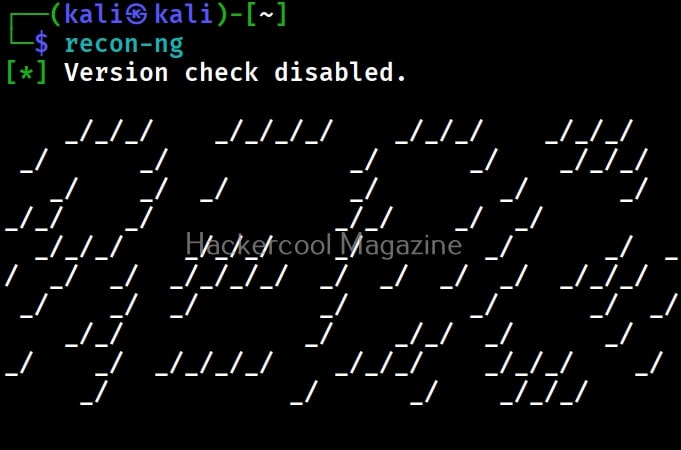
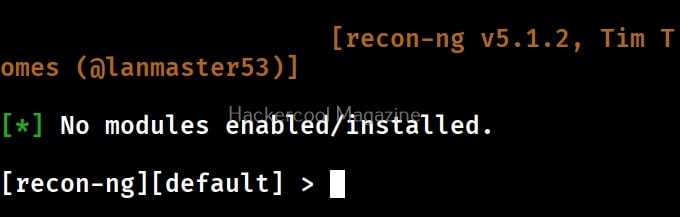
Let’s see how this tool works. For this, we will be using Kali Linux as Recon-ng is installed by default on it. This tool can be started using command shown below.

recon-ng

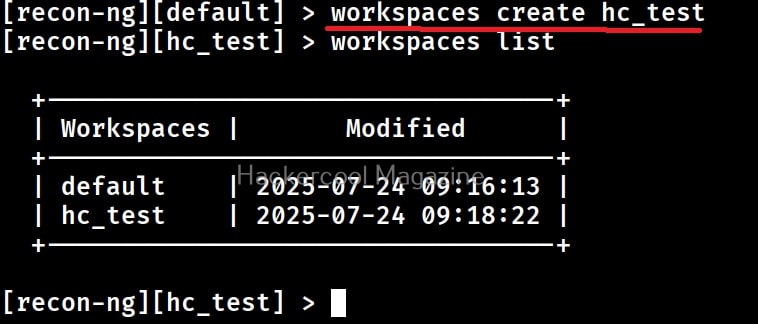
If you notice the above images, the interface of Recon-ng is similar to Metasploit. It has been designed in such a way to decrease the learning curve. You can create different workspaces in Recon-ng. To create a new workspace, you have to use the command shown below.


workspaces create <name of workspace>

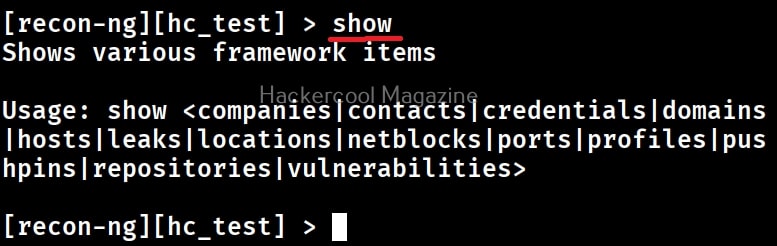
For example, we have created a new workspace named “hc_test”. The various framework items of Recon-ng that are useful to us can be seen using command shown below.

show

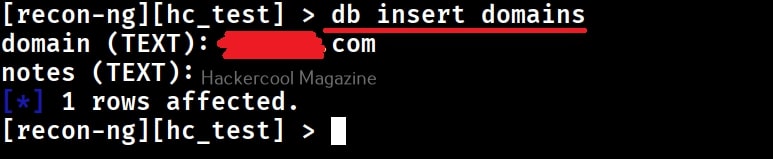
For this tutorial, let’s gather information about a domain. To do this, we need to first add a domain. This can be done using command shown below.

db insert domains

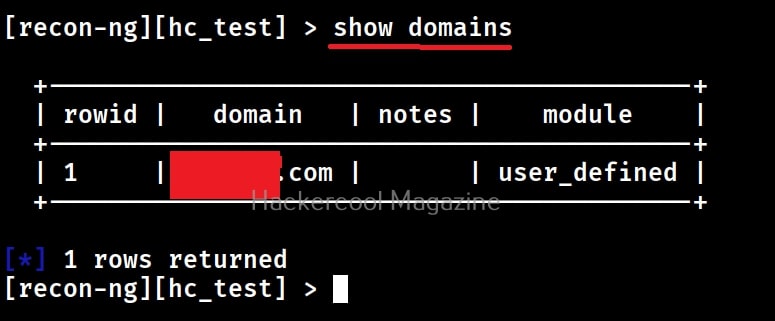
Now, you can see the domains you added using command shown below.

show domains

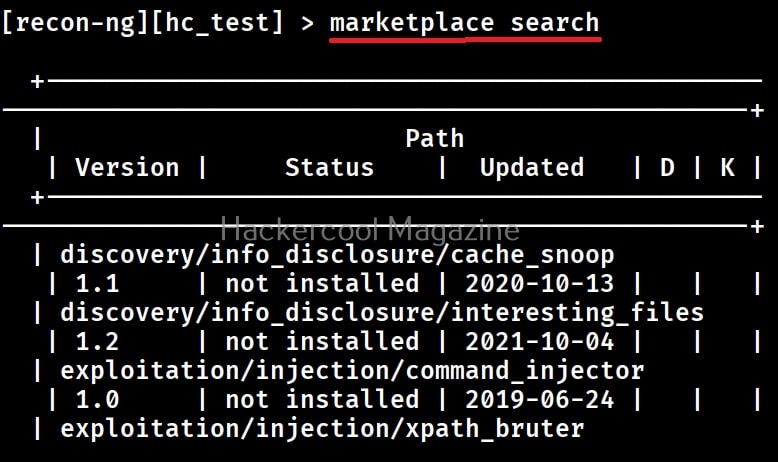
Similarly you can add and view other items too in similar manner. Just like Metasploit, Recon-ng has various modules each performing a specific function. You need to first add these modules to Recon-ng to be able to use them. This modules are found in ‘marketplace’ and can be viewed using command shown below.

marketplace search

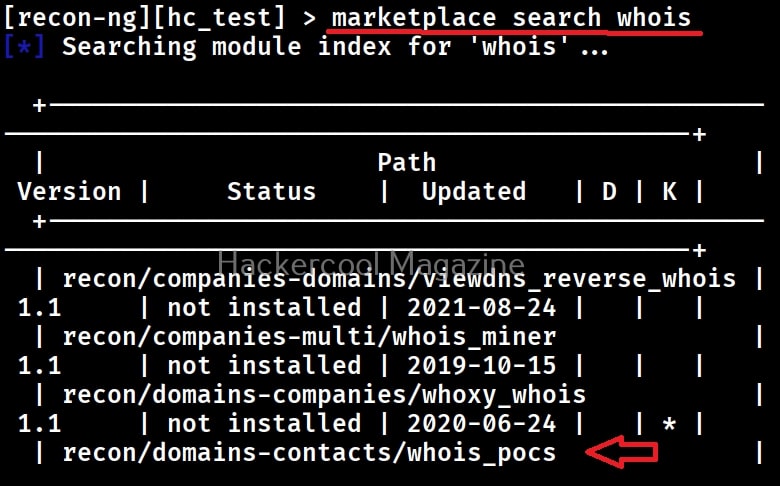
This will list all available modules. Searching for the module we want can be laborious and in some cases nothing less than searching for needle in haystack. But don’t worry. You can even search for modules you want. For example, let’s search for Whois related modules. This can be done as shown below.

marketplace search <search term>

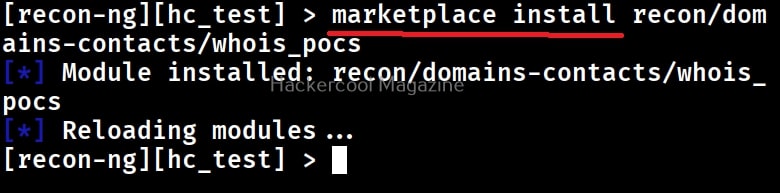
From here, you can install any module we want. This can be done using command shown below. For example, let’s install the recon/domain-contents/ whois-pocs/ module.

marketplace install <module>

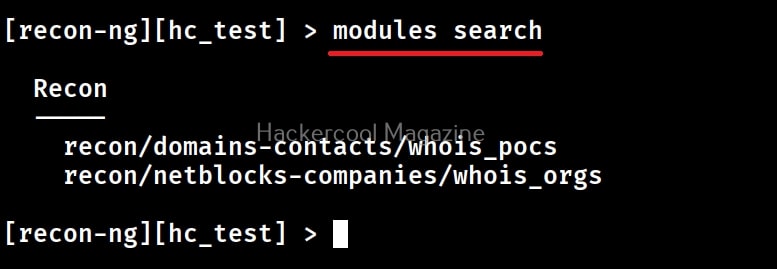
Similarly, you can install other modules we want in the same way from the market place. Once they are installed, you can search for all installed modules using the command shown below.

modules search

To load a module, we use command as shown below.

modules load <module_name>

For example. let’s load the module we just installed.

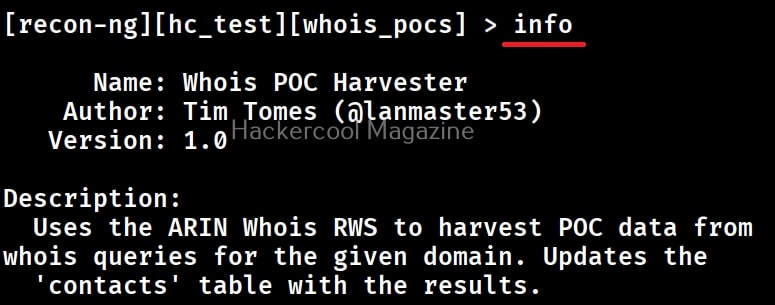
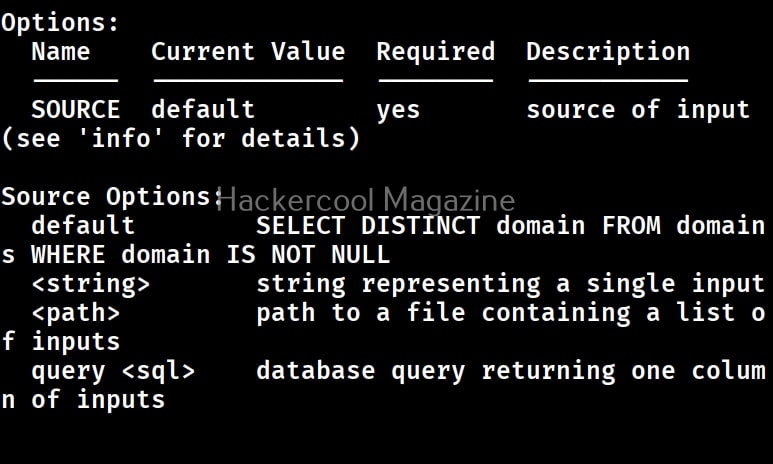
Once the modules is loaded, you can view information about the module using the “info” command as shown below.

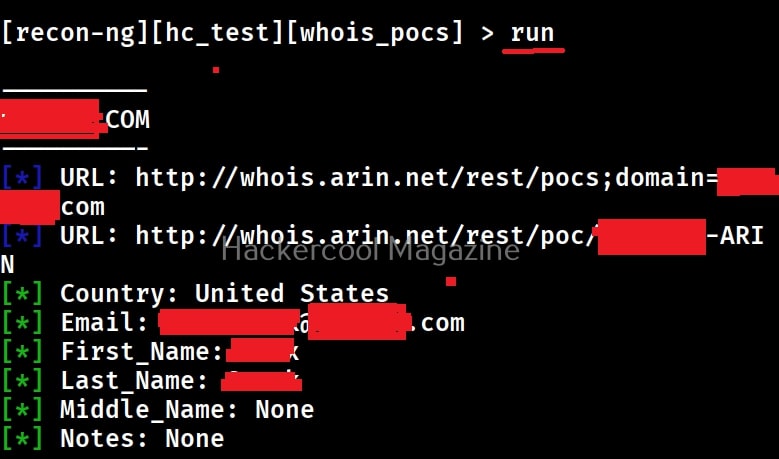
As you can read in the above module, this module retrieve poc data about a domain for Whois queries. Since we have already added a domain, all you have to do is execute the module using command “run”.

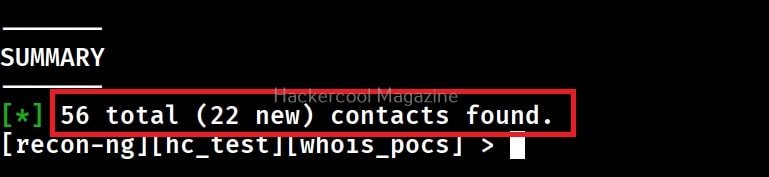
As you can see, the module retrieved contact information belonging to the domain we queried. This information contains first name, second name and email addresses of 46 contacts belonging to the domain (The retrieved data has been hidden for the purpose of privacy). This information can be useful while phishing or spear-phishing our targets.

In the same manner, we can retrieve other OSINT information using recon-ng. Next, learn how to perform OSINT using Maltego.