Hello, aspiring ethical hackers. In our previous blogpost, you learnt in detail about Linux privilege escalation. In this article, you will learn how to exploit cron jobs in Linux to elevate privileges on a Linux system.
NEW TO ETHICAL HACKING?
Start your ethical hacking journey with our FREE Beginner Ethical Hacker Starter Kit (2026 Edition).
Get beginner-friendly guidance to understand the fundamentals of ethical hacking and take your first steps into cybersecurity.
What are cron jobs?
Cron is a job scheduler in Unix like operating systems like Linux and macOS. It allows users to schedule commands or scripts to run automatically at specific intervals or at fixed times and dates. These scheduled tasks are called as “cron jobs”.
They are similar to Task Scheduler in Windows. For example, you have a Linux server and want to clean cache regularly once a day. You can do this manually everyday or schedule a job to do this daily without your intervention. Here’s where cron jobs assist you. You can assign a job in cron. Sometimes these jobs are assigned with root privileges and these can be exploited to gain root privileges. Let’s see it practically.
For this article, we will be using a Linux target system on which we already gained a shell. Then I run the PE.sh or Linux exploit suggester script on this system to find ways to elevate privileges. As I scroll down the output of our PE.sh file, we can see our target has some cron jobs set.


As you can see in the above images, we can set cron jobs monthly, daily or hourly. But our job here is to not schedule cron jobs. It is to exploit them. As we scroll down further, we can see the format of a cron job.

In the above image, you can see the exact format of a cron job. It is minutes first, followed by hours, day of month, month and day of week. We can see a cron job named /opt/new_year.sh that is scheduled to run at the 00:00 time of first day of the first month of every year. That is the occasion of New Year.
But what does * * * * * mean? It means these cron jobs are scheduled to run every minute of every hour of every day of the week (i.e daily) every month. That typically means these jobs run each and every minute. The important thing to notice here is that all these jobs are running as user “root”.
READY TO BUILD YOUR ETHICAL HACKING FOUNDATIONS?
Go beyond the basics. Develop the essential knowledge every aspiring ethical hacker needs.
Your learning package includes:
Networking Fundamentals
Linux Fundamentals
Windows Fundamentals
Web Fundamentals
Command Line Essentials
Virtual Labs
$1 INTRODUCTORY TRIAL
6 Foundation Resources + Full Magazine Access
Trial terms apply. Post-trial subscription billing is manual.
Let’s manipulate one of these scripts. Let’s say /opt/my_script.sh. We have a SETUID bit set on “dash” shell, one of the shells installed on the target system. This can be seen in the image below.

For this article, we will remove the SETUID bit set on the binary using cron jobs. Let’s edit the my_script.sh file with a command given below.
chmod u-s /bin/dash
What this command does is, it will remove the SETUID bit set on the binary. Wait for one minute and check the /bin/dash command.

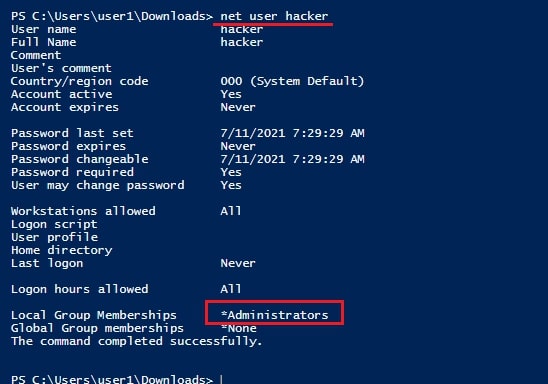
As you can see in the above image, the SETUID bit on the binary is now gone. Not just that, we can add new users on the target system using cron hobs as shown below.

That’s how cron jobs can be exploited for linux privilege escalation. Next, learn how to exploit SETUID bits to elevate privileges on a Linux system.
YOUR ETHICAL HACKING JOURNEY STARTS HERE!
Not sure where to begin? Download our FREE 18-page Beginner Ethical Hacker Starter Kit (2026 Edition).
Take your first step towards building practical cybersecurity knowledge.