Posted on

Beginners guide to Incident response

Hello, aspiring ethical hackers. In this article, you will learn everything you need to know about Incident Response (IR). Unfortunately, unlike pen testing or ethical hacking, the role of incident response becomes important only after a cyber attack or any other cyber incident has occurred.

What is Incident Response (IR)?

In simple terms, incident response is how you or your organization respond to a cyber attack or a data breach that occurred in your organization. Obviously, any organization will want to respond to any cyber incident in such a way that the impact or damage due to that incident is minimized and contained.

So, IR is a planned and organized response of an organization to a cyber attack or incident.

Why is incident response important?

No matter how much security an organization has, there is no guarantee that a cyber incident may not occur. This cyber attack can damage the organization’s brand reputation, affect customers retention, damage intellectual property etc. A data breach can simply make a business run out of business.

IR aims to reduce this damage as quickly as possible. This requires a definite plan instead of ad hoc responses.

Stages of Incident Response

As I told you, Incident response should follow a planned and organized approach that should make the organization quickly recover from the impact of the cyber attack. Any good Incident response should have 5 steps. They are,
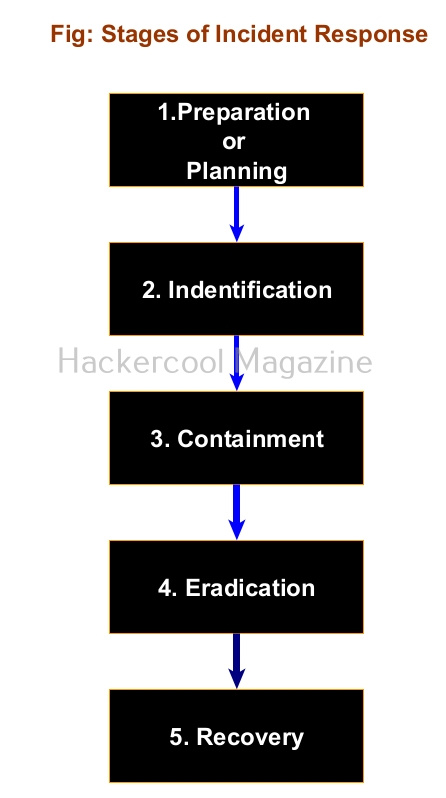
1.Preparation or Planning

Every organization should have a definite Incident response plan that caters to its requirements and depends on resources it wants to protect in its organization. This plan should be in written format. It should also have a dedicated incident response team that is not only aware of the incident response plan but also trained in it. This team should have the necessary tools and documentation ready in the case of a cyber attack.

2.Identification:

The next step is identifying the incident. In this era of false positives and false negatives, the incident response teams should be able to first determine what is a cyber attack to its organization. For example, let’s imagine an organization uses Windows XP machines in its organization. You know Windows XP machines are vulnerable to ms08-067.

Multiple SYN requests to SMB port of Windows XP machines of an organization may raise shackles but it is not yet an incident. But somebody exploiting the vulnerability to gain a shell or creating a new user account on that Windows XP machine can be termed as an incident.

3.Containment:

Once an incident has been identified correctly, the next step should be to limit and prevent further damage. The infected resource should be isolated and steps taken to ensure that customers or employees don’t experience any problems in accessing the resource.

Going with the same example we gave above, the infected Windows XP machine should be isolated so that the infection can be prevented from spreading to other devices on the network. In some cases, the network traffic needs to be rerouted or redirected. Once isolated, the forensics team should be informed so that it can perform digital forensics to further investigate the incident.

4.Eradication:

After the infected system or resource is isolated and the forensics team is done with creating forensic images of the infected system, the next step is the removal and restoration of systems affected by the security incident. For example, this stage involves fixing the ms08-067 vulnerability and removing the malware or payload, backdoors from the infected system. The important role of this stage is to make sure that the system cannot be exploited again.

5. Recovery

This stage involves bringing the infected system back into production environment and to make sure that another incident doesn’t occur. Before the infected system is brought back into production again, they are tested, monitored, validated and cleansed of all malware.

All of the above steps should be written in policy plan and should be documented. That’s all about Incident response. Next, learn how to prevent your organization from being hacked with threat intelligence.

Posted on

Email analysis for beginners

Hello, aspiring Ethical Hackers. In our previous blogpost, you have learnt what is footprinting and various methods to perform footprinting. One such type of Footprinting is Email Footprinting or Email analysis.

Not just that. Emails are one of the most common ways cyber attacks happen. From phishing scams to malware delivery, attackers often use email as their first point of entry. That’s why learning email analysis is an important skill for anyone interested in cybersecurity or ethical hacking. The good news?

You don’t need advanced skills to start learning it. In this beginner-friendly guide, you’ll learn:

  • What email analysis is
  • Why it matters
  • How to analyze emails step by step
  • What suspicious signs to look for

What is Email Analysis?

Email analysis is the process of examining an email to determine whether it is safe, suspicious or malicious. This includes checking:

  • Sender information
  • Links
  • Attachments
  • Email headers
  • Writing style

In simple terms, you investigate an email before trusting it.

Why is Email Analysis Important?

Cybercriminals rely heavily on email attacks because they target people directly. Email analysis helps:

  • Detect phishing attempts
  • Identify fake senders
  • Prevent malware infections
  • Protect sensitive information

Why Attackers Use Email:

Email attacks are effective because:

  • People trust familiar brands
  • Emails can create urgency
  • Users may click without thinking

Even experienced users can be fooled.

Common Types of Malicious Emails

Before analyzing emails, you should understand some of the common malicious emails.

1. Phishing Emails:

These email are designed to steal:

  • Passwords
  • Banking details
  • Personal information

Usually pretend to be:

  • Banks
  • Companies
  • Online services

2. Malware Emails:

Contain:

  • Malicious attachments
  • Dangerous download links

Goal:

  • Infect systems

3. Spoofed Emails:

The sender address is faked to appear legitimate.

4. Scam Emails:

Try to trick victims into:

  • Sending money
  • Sharing sensitive information

Step-by-Step Email Analysis Process

Let’s go through a simple beginner workflow of analysing emails.

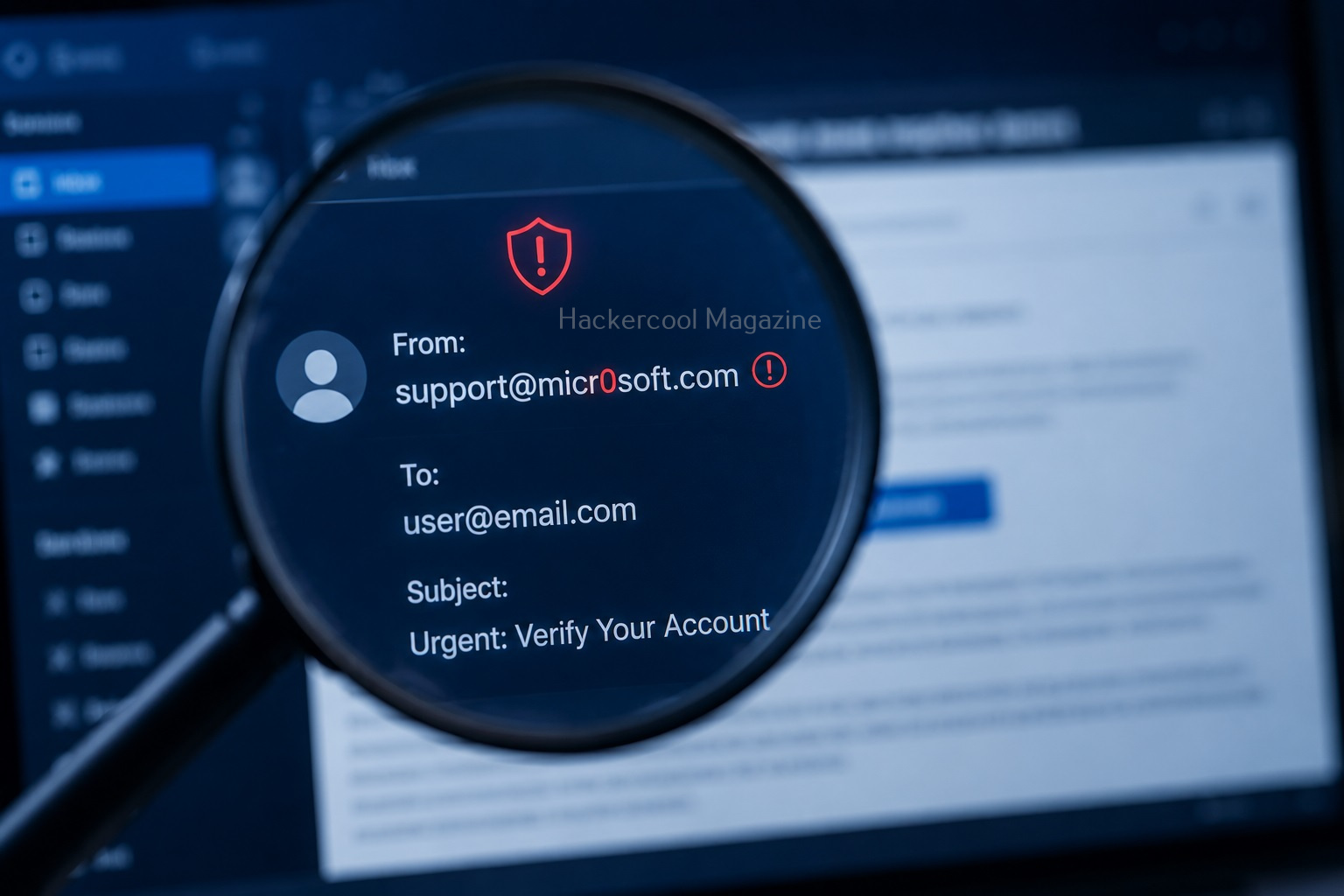
Step 1: Check the Sender Address:

This is the first thing you should inspect. Attackers often use:

  • Misspelled domains
  • Fake addresses

Example:

Real:

Fake:

Notice the subtle difference?

Step 2: Analyze the Subject Line:

Suspicious emails often create:

  • Fear
  • Urgency
  • Curiosity

Examples:

  • “Your account will be suspended!”
  • “Urgent payment required!”

Attackers want you to react quickly.

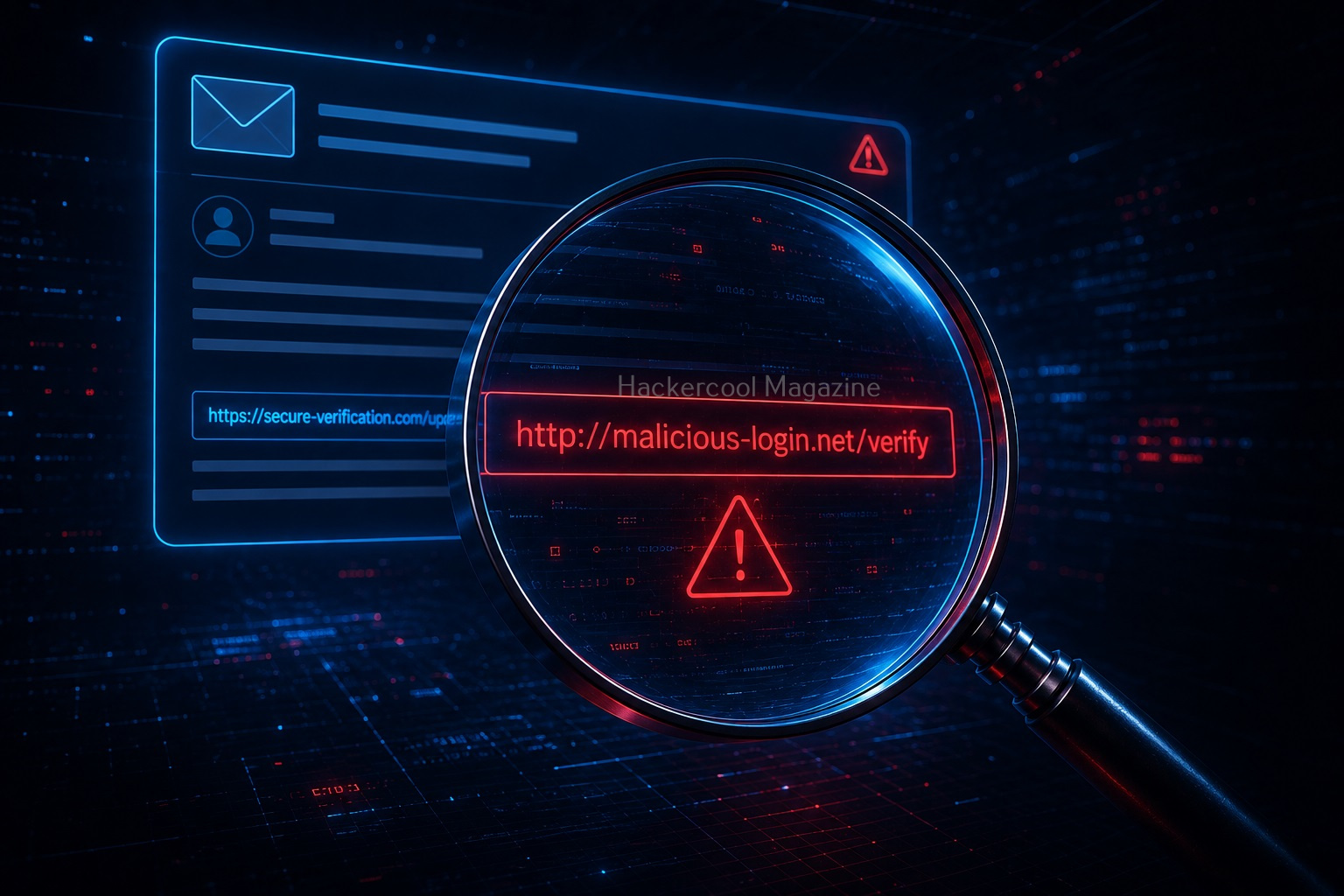
Step 3: Look For Suspicious Links:

Never trust links inside an email immediately. Hover over links and check:

  • Destination domain
  • Strange URLs

Red Flags:

  • Random characters
  • Shortened URLs
  • Misspelled domains

Step 4: Inspect Attachments:

Attachments can contain malware. Be cautious with:

  • ZIP files
  • EXE files
  • Office documents with macros

If unexpected, don’t open them.

Step 5: Check the Writing Style:

Many phishing emails contain:

  • Grammar mistakes
  • Unusual wording
  • Generic greetings

Examples:

  • “Dear user”
  • “Dear customer”

Legitimate companies usually personalize emails.

Step 6: Analyze Email Headers:

Headers contain technical information about the email. They can reveal:

  • Sending servers
  • Email path
  • Authentication results

Why Headers Matter:

Headers help identify:

  • Fake senders
  • Spoofing attempts

Beginners don’t need to master headers immediatel but learning basics helps a lot. Let’s show you a simple example of header analysis of a real-world email received on Gmail. Go to your Inbox and open a mail. Go to the vertical dots (move button) at the top right of the email and click on it as shown below.

Click on “Show original”.

This should show you the entire email headers of the particular mail.

Let’s learn about each header in detail.

Delivered To:

Email address to whom the mail has been delivered.

Received:

This header indicates all the SMTP servers through which this email has passed through before reaching to your Inbox. This contains server IP address, SMTPID etc.

X-Google-SMTP-source:

It shows the transferring email using a Gmail SMTP server. If this header is present, then it usually means this was transferred by GMAIL SMTP server.

X_Received-BY:

This header indicates the last visited SMTP server the mail reached before reaching your Inbox. It contains Server IP address, SMTP ID of the visited server and Date & time when the email was received by the SMTP server.

ARC-Seal, ARC-Message-Signature, ARC-Authentication-Results: ARC stands for Authenticated Receiver Chain (ARC). This is used to preserve email authentication results and to verify the identity of email intermediaries that forward a manage to its final destination (i.e. your Inbox).

SMTP-mailfrom:

You can see the IP address of the sender of the email.

Return-Path:

This is the path specified to go when email is bounced or not sent.

Received SPF:

SPF stands for Sender Policy Framework. This is used to prevent sender address forgery. It SPF is set to PASS, the Email source is valid, if it is softfail, it is likely the email source is fake and if it is having value Fail, source is invalid.

This is how Email headers can be analysed.

Step 7: Verify Before Taking Action:

If an email seems suspicious, don’t click immediately. Instead:

  • Visit the official website manually
  • Contact the company directly

Real-World Example (Simple Scenario)

Imagine receiving an email saying:

“Your account has been locked. Click here immediately.”

You notice:

  • The sender domain looks slightly different
  • The link points to another website
  • The email creates panic

These are classic phishing indicators.

Tools Used in Email Analysis

Beginners can use simple tools to help analyze emails. Common Tool Types:

  • Header analyzers
  • URL scanners
  • Attachment scanners

These tools help identify suspicious indicators.

Common Mistakes Beginner Make

Avoid making these mistakes.

Trusting Display Names:

Attackers can fake names easily. Always inspect actual email address.

Clicking Too Quickly:

Urgency is a common attacker tactic.

Ignoring Small Details:

Tiny spelling changes matter.

Assuming “Professional Looking” Means Safe:

Some phishing emails look very convincing.

Tips to Improve Your Email Analysis Skills

Slow Down:

Most mistakes happen because users rush.

Think Like an Atatcker:

Ask:

  • How is this trying to manipulate me?

Practice Regularly:

Analyze:

  • Spam emails
  • Example phishing emails

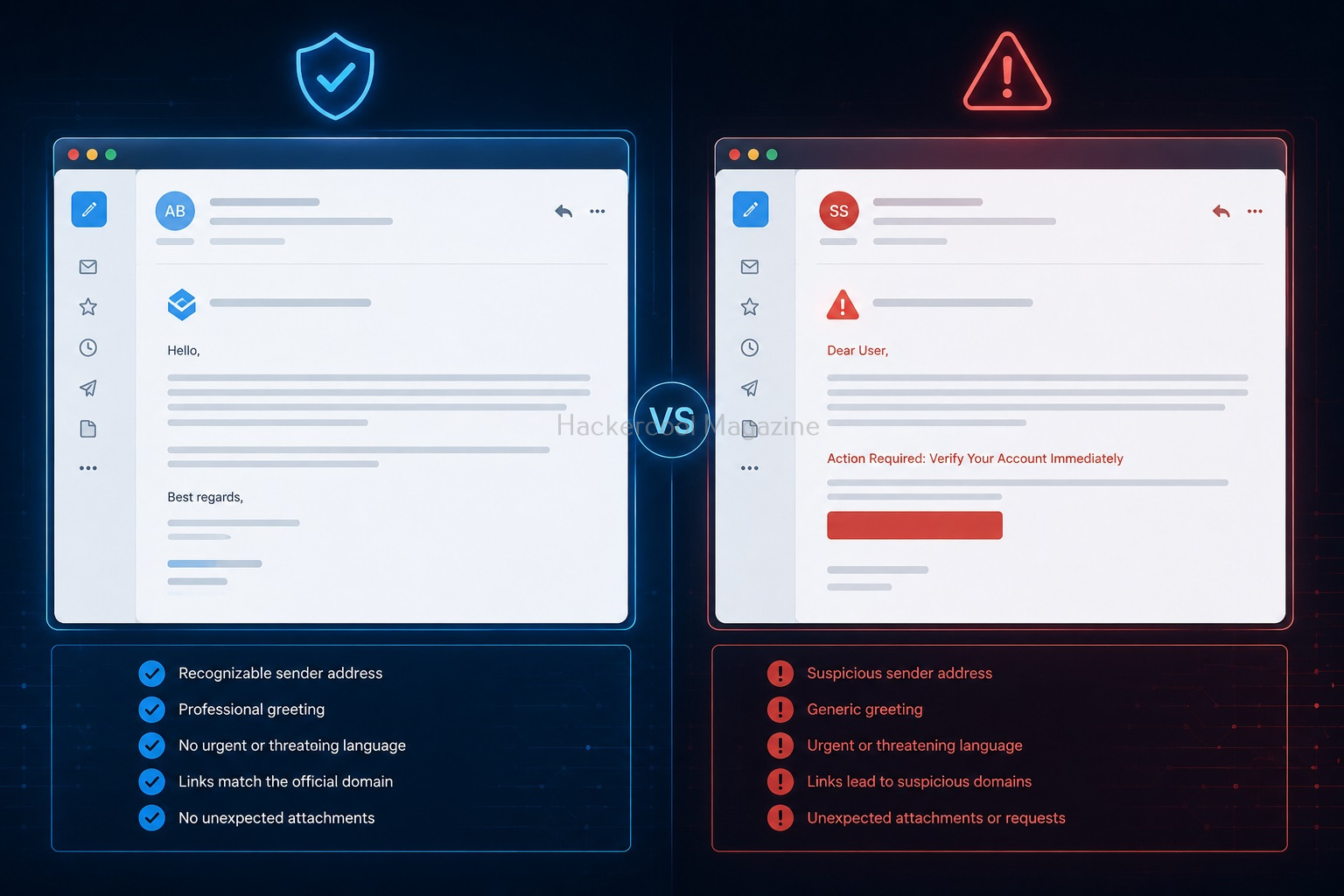
Compare Real vs Fake Emails:

This improves recognition skills quickly.

Legal & Ethical Reminder

When learning email analysis, never:

  • Open suspicious files recklessly
  • Interact with malicious links on real systems

Always:

  • Use safe environments
  • Practice responsibly

Why Email Analysis Matters in Cybersecurity?

Email analysis is important because:

  • Many attacks begin with phishing
  • Human error is a major security risk

Strong email analysis skills help:

  • Protect individuals
  • Protect organizations

Beginner Practice Ideas

Here are some ideas for beginners to practice email analysis.

1. Analyze Spam Emails:

Look for:

  • Suspicious wording
  • Fake domains

2. Study Example Phishing Emails:

Compare them with legitimate emails.

3. Learn Basic Headers:

Understand how email routing works.

How Email Analysis Helps Ethical Hackers?

Ethical hackers use email analysis to:

  • Understand phishing techniques
  • Test organizational awareness
  • Investigate incidents

It builds both defensive and analytical skills.

Conclusion

Email analysis is one of the most practical beginner cybersecurity skills you can learn.

You don’t need:

  • Expensive tools
  • Advanced programming skills

You just need:

  • Attention to detail
  • Curiosity
  • Practice

Key Takeaways

  • Always inspect sender addresses
  • Be cautious with links and attachments
  • Analyze before trusting
  • Think critically]]

Next time you receive an email: Don’t just read it. Analyze it. That’s how cybersecurity professionals think.