Posted on

Complete guide to fcrackzip

Hello, aspiring ethical hackers. In our previous blogpost, you learnt about various methods of password cracking. In this blogpost, you will learn about fcrackzip, a tool that can crack passwords of zip archives. Frackzip is a fast password cracker written in assembler. It can crack password protected zip archives using brute forcing or dictionary based attacks.

This tool is useful for pen testers while doing pen tests, ethical hackers and even cyber forensic experts. Sometimes in the course of a pen test or a cyber forensic investigation, you encounter password protected zip archives. They may be backups or confidential files. Cracking the password of the password protected archives can reveal information that can be helpful further in a pen test. That’s where fcrackzip comes real handy.

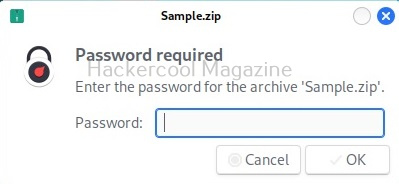
Let’s see how fcrackzip works. For this article, I will be using Kali Linux on which this tool is installed by default. We also need a password protected zip archive as shown below.

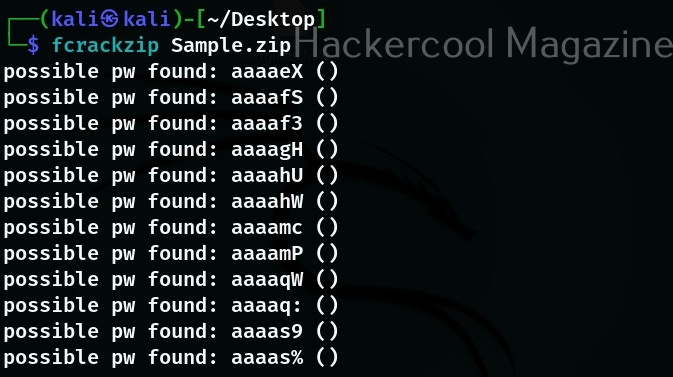
All you have to do to crack the passwords of the zip archive using fcrackzip is to give the below command.

fcrackzip <password protected zip archive>

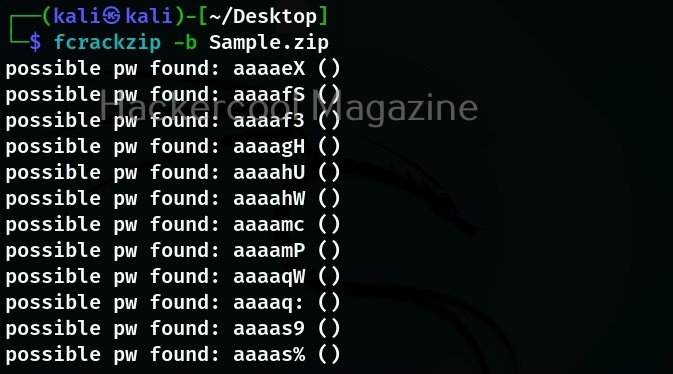
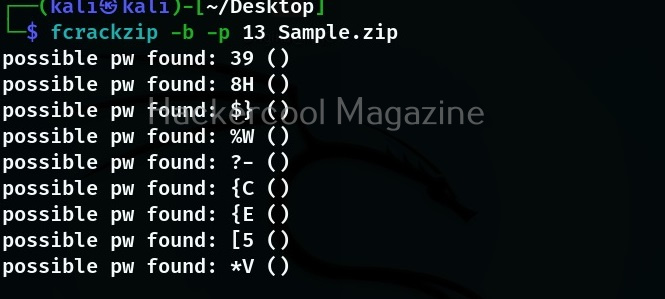
This will bruteforce the password of the zip archive. This is same as using the brute force option which is set with ‘-b’ option.

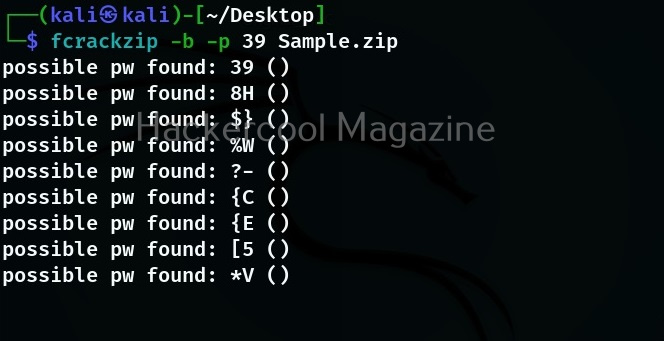
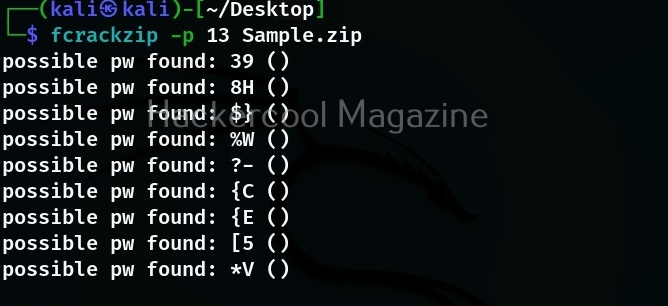
Set the initial password to test or specify a dictionary(-p)

The ‘-p’ option of fcrackzip does two things. It can set initial password for brute forcing or it can be used to specify a wordlist while dictionary cracking.

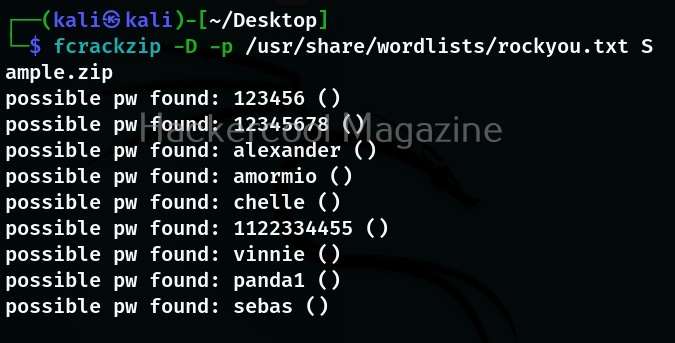
Dictionary Cracking (-D)

You can set dictionary cracking by using option ‘-b’ as shown below.

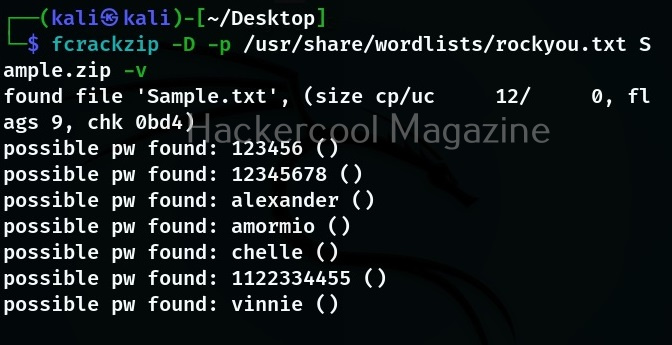
Get a more detailed output (-v)

If you want a detailed and verbose output you can get it using the ‘-v’ option as always.

Characterset specification

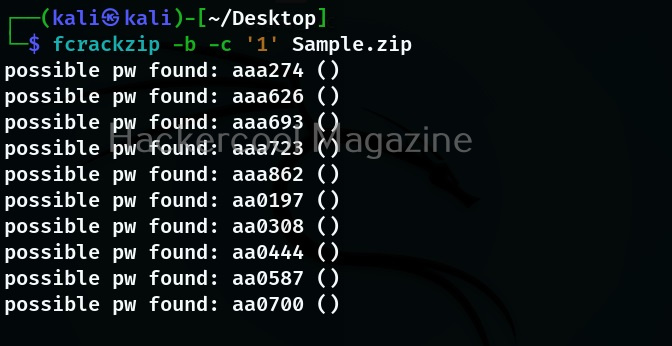
You can also specify a character set you want to use while brute forcing with fcrackzip using the “-c” option as shown below. Here’s how we can set fcrackzip to use only numbers while brute forcing.

Here are the options you can set with ‘-c’.

a: Include all lowercase character.

A: Include all uppercase charcater.

I: Include digits (0-9)

!: Include symbols !:$%&/()=?{[]}+*^#

Verifying the cracked password

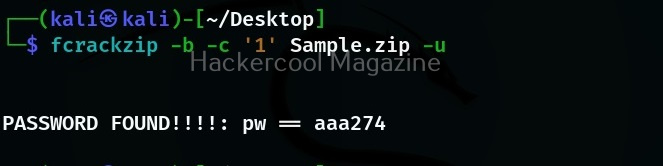
Till now you have seen that fcrackzip found many passwords. Well, all of them are not the correct passwords. Just like any password cracker there will be false positives while using this tool. We can weed out this false positives using unzip to extract the archive using the password fcrackzip claims to be found.

Specify the length of the password to use for cracking (-l).

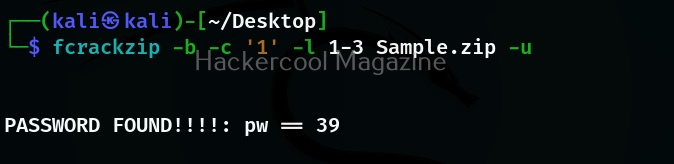
Using this option, you can set the length of the password to use for brute forcing as shown below.

That’s how you use fcrackzip to crack password protected zip archives.

Posted on

Password Sniffing for Beginners: How It Works and How to Prevent It

Imagine logging in to a website using a username and password. You expect those credentials to remain private. But what happens if the application sends them across a network without proper encryption?

In certain circumstances, someone who can observe that network traffic may be able to read the credentials. This is the basic idea behind password sniffing.

For cybersecurity beginners, understanding password sniffing is important because it explains why secure protocols, encrypted connections and properly configured networks are essential for protecting accounts. In this guide, we’ll explore what password sniffing is, how it works, which protocols are vulnerable, how security professionals study network traffic and how organizations can protect their users.

What is Password sniffing?

Password sniffing is the process of capturing and examining network traffic to identify passwords or other authentication information transmitted between systems. A network sniffer is a tool that captures packets traveling through a network interface. Security professionals use packet analyzers to troubleshoot networks, investigate incidents and identify security problems.

However, when authentication data travels over an unencrypted connection, captured packets may reveal sensitive information. For example, if a legacy application transmits a password in plaintext, someone with access to the relevant traffic may be able to read it.

To understand how password sniffing works, beginners must first understand how devices exchange information, how network protocols operate and how data travels between systems. These concepts are covered in our networking fundamentals blogpost.

Important: Capturing network traffic should only be performed on networks and systems you own or have explicit permission to assess.

How Does Password Sniffing Work?

When two devices communicate over a network, they exchange information in the form of packets. Depending on the application and protocol, these packets may contain requests, responses, metadata and sometimes authentication information.

A simplified password-sniffing scenario follows these stages:

  1. Network communication: A user connects to a service and attempts to authenticate.
  2. Packet transmission: The client and server exchange network packets.
  3. Traffic capture: An authorized analyst or an attacker with suitable network access captures relevant traffic.
  4. Protocol analysis: The captured packets are examined to determine which protocol is being used and what information is visible.
  5. Credential exposure: If sensitive authentication data was transmitted without adequate protection, it may be exposed.

Modern networks introduce important limitations. A device connected to a switched Ethernet network generally cannot automatically observe every other device’s unicast traffic. Wireless encryption, network segmentation, endpoint protections and encrypted application protocols can also limit what an observer can see.

Password sniffing is therefore not a magical technique that reveals every password on a network.

Why Are Unencrypted Protocols Dangerous?

The security of a connection depends partly on the protocol used to carry the information. Older protocols were sometimes designed without the encryption protections expected today.

Examples include:

  • HTTP: Ordinary HTTP does not encrypt application data in transit.
  • FTP: Traditional FTP does not protect usernames and passwords with transport encryption.
  • Telnet: Telnet generally transmits session information without encryption.
  • POP3 or IMAP without TLS: Email authentication and content may be exposed when secure transport is not enabled.

If credentials travel across an observable network using these insecure configurations, they may be readable in captured traffic. By contrast, properly configured HTTPS, SSH and TLS-protected email protocols encrypt data in transit.

Encryption protects sensitive information while it travels across networks, making intercepted traffic significantly harder to read. Understanding encryption and hashing helps explain how modern systems protect credentials and other sensitive data.

Password Sniffing vs Password Cracking

These two concepts are often confused but they are different. Password sniffing involves capturing network traffic and examining it for exposed authentication information. Password cracking involves attempting to recover a password from a password hash or another password-related representation, usually by testing candidate passwords.

Consider two scenarios. In the first, an application transmits a password in plaintext. An observer who can capture the relevant traffic may be able to read it directly. In the second, a security tester obtains a password hash from an authorized test environment. The tester may evaluate its resistance to guessing using an approved password-auditing process.

The first scenario concerns network communication. The second concerns password recovery and authentication security. Both demonstrate why organizations must protect credentials throughout their lifecycle.

What Tools Are Used to Analyze Network Traffic?

Cybersecurity professionals use packet-analysis tools to understand how systems communicate.

Wireshark:

Captured network packets can be examined to understand the information exchanged between devices and determine whether sensitive data is exposed. Wireshark packet analysis helps security professionals investigate these communications.

tcpdump:

tcpdump is a command-line packet analyzer available on many Unix-like systems. It is useful for inspecting network traffic and investigating communication problems.

Tshark:

TShark is Wireshark’s command-line analysis utility. It supports packet capture and protocol analysis in scripted or terminal-based workflows. These tools do not automatically reveal passwords. What they can show depends on the captured traffic, available permissions, protocol configuration, encryption and the quality of the capture.

Beginners should start with saved sample captures or traffic generated inside an isolated lab.

Can Password Sniffing Work Against HTTPS?

Properly configured HTTPS encrypts application data in transit using TLS. An observer capturing ordinary HTTPS traffic may see information such as IP addresses, connection timing, packet sizes and some connection metadata, depending on the environment. However, the actual application content—including a password submitted through the encrypted connection—is normally protected from passive packet inspection.

HTTPS is not a guarantee against every type of credential theft. Credentials may still be compromised through phishing, malware, compromised endpoints, insecure application design, malicious browser extensions or other attacks. That is why organizations need multiple layers of security rather than relying on encryption alone.

How Can Beginners Practice Password Sniffing Safely?

You can learn the underlying concepts without capturing anyone else’s credentials. Start with a controlled network laboratory using your own devices, an isolated virtual network and sample packet captures. Beginners can develop a better understanding of packet capture and credential exposure by practising these concepts in hands-on ethical hacking labs using controlled test environments and sample traffic.

Linux provides several built-in networking utilities that help security professionals inspect interfaces, examine active connections and investigate network activity. Understanding the Linux command-line environment makes these tasks easier.

A safe learning path includes:

  1. Learn packet fundamentals: Understand Ethernet frames, IP packets, TCP, UDP, DNS and HTTP.
  2. Explore Wireshark: Open a sample capture and identify the protocols and communication endpoints.
  3. Compare HTTP and HTTPS: Examine the difference between readable application data in a deliberately constructed HTTP lab and encrypted HTTPS traffic.
  4. Study authentication flows: Learn how applications handle login requests and why secure transport matters.
  5. Document your findings: Record what is visible, what remains encrypted and what security controls reduce exposure.

Use synthetic credentials that have no connection to real accounts. Keep testing within your lab and do not collect passwords belonging to other people.

Let’s see password sniffing practically. For this, we will be using three virtual machines which are on the same network.

They are  Metasploitable 2 which acts as server, Ubuntu which acts as client and of course Kali as our Attacker system.  As you can see, the IP addresses of the three machines are

     Metasploitable2 – 192.168.64.128 (Server)
     Ubuntu – 192.168.64.132 (Client)
     Kali – 192.168.64.132 (Attacker system)

Let’s start Wireshark on the attacker machine (on interface eth0). It starts capturing packets on the network.

The reason why we are using Metasploitable 2 as our target is that it already has many services that we need for this tutorial preinstalled.  The first service we will be using is Telnet. It is a protocol that is used for remote access on another system. On most Linux systems, Telnet clients are installed by default.

So we open a terminal and log into the Metasploitable 2 Telnet server with the credentials shown below.

The login is successful. Now on the Attacker system, we can observe the traffic being captured by the Wireshark sniffer. You can see data related to Telnet being transferred.

We can Right Click on that Telnet data stream and click on “Follow” as shown below.

In the sub menu that opens when we click on the only option “TCP stream” a new window opens that will show only the TCP stream.

In this window, you can see the credentials we just used to login into the target system. Telnet is a plain text protocol which transfers credentials and other sensitive data in plain text. This allows sniffing of data. That’s the reason it has been mostly replaced by Secure Shell (SSH) nowadays.   

Let’s see another protocol. File Transfer Protocol (FTP) is a protocol that is used to share files. It is another protocol that transfers data in plain text. From our client, we login into the FTP server with credentials “anonymous:anonymous”.

Anonymous account in FTP is used to share files to anyone without the need for them to know credentials.

On the Wireshark interface, you can see FTP data being transferred.

We can view the TCP stream

This once again shows credentials.

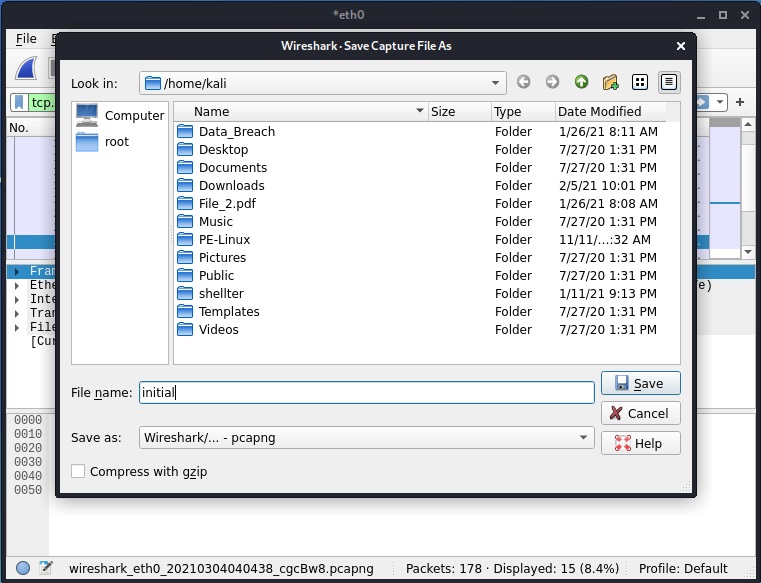
Instead of observing LIVE data transfer and following TCP stream from there, we can also just save the packet capture file and open the file later for analysis.

After opening the file, we can search for specific terms as shown below. 

packet sniffing

Then following the TCP stream gives us the credentials.

Seeing the vulnerability due to sniffing, many protocols have been replaced with secure protocols which transfer data in encrypted form instead of plain text form. These are given below.

How Can Organizations Prevent Password Sniffing?

1. Enforce HTTPS and TLS

Use HTTPS for web applications and properly configured TLS for other services that transmit authentication data. Redirect users to secure connections where appropriate and avoid insecure fallback mechanisms.

2. Disable Insecure Protocols

Replace Telnet with SSH and traditional FTP with secure alternatives such as SFTP or properly configured FTPS. Disable legacy services that are no longer required.

3. Use a VPN on Untrusted Networks

A properly configured VPN can protect traffic between a device and the VPN endpoint on an untrusted network. It does not replace HTTPS or protect against a compromised endpoint, so use it as one layer of defense.

4. Enable Multi-Factor Authentication

Multi-factor authentication (MFA) adds another authentication requirement beyond a password. Phishing-resistant options, such as passkeys or security keys, can offer stronger protection against credential theft.

5. Secure Wi-Fi Networks

Use modern Wi-Fi security, strong administrative credentials, updated access points and appropriate network segmentation. Public Wi-Fi users should avoid ignoring certificate warnings or entering credentials into suspicious websites.

6. Monitor and Update Systems

Monitor network activity for unexpected protocols and suspicious authentication behavior. Keep operating systems, applications and network devices updated and investigate unnecessary plaintext traffic.

Conclusion

Password sniffing shows how the security of a password depends on more than its length or complexity. A strong password can still be exposed if an application transmits it insecurely. For beginners, the most useful lesson is to understand how network protocols work, how encryption protects data in transit and how packet-analysis tools help identify security weaknesses.

Start with networking fundamentals and Wireshark, use authorized lab traffic and learn to distinguish encrypted communication from exposed data.

For ethical hackers, this knowledge supports responsible security assessments. For defenders, it helps identify insecure protocols before attackers can exploit them. The goal is not simply to learn how credentials can be captured. It is to understand how to prevent that exposure and build safer systems.

Posted on

Password cracking for beginners

Hello aspiring Ethical hackers. In this article, you will learn what is password cracking and various types of password cracking techniques. When beginners first hear the term password cracking, it often sounds illegal or malicious. In reality, password cracking is a concept, not a crime by itself. For ethical hackers, understanding password cracking is about learning how attackers exploit weak authentication so those weaknesses can be identified and fixed, ofcourse with permission.

This article explains password cracking for beginners, why it still works and what ethical hackers should focus on when learning this topic.

What Is Password Cracking?

Password cracking is the process of attempting to recover passwords from stored authentication data, most commonly password hashes. As you studied in our blogpost on cryptography, modern systems do not store passwords in plain text. Instead, they store a hash, a one-way mathematical representation of the password.

As hashes cannot usually be reversed, attackers attempt to guess passwords, hash those guesses and compare them to the stored value. If the hashes match, the password has effectively been cracked. Ethical hackers study this process to evaluate whether password policies and storage mechanisms are strong enough.

Why Password Cracking Still Works?

Despite years of security awareness, password cracking remains effective for one simple reason: people choosing weak passwords. Common contributing factors include:

  • Short or predictable passwords
  • Reusing the same password across multiple services
  • Poor password storage practices by applications
  • Legacy systems using outdated hashing methods
  • Lack of multi-factor authentication

Attackers do not need advanced skills when these weaknesses are widespread.

Common Password Cracking Concepts

There are two types of password cracking attacks: Online and Offline.

Online attacks:

In this type of attack, passwords are guessed through login systems and are limited by lockouts.

Offline attacks:

In this type of attack, attackers obtain password databases and test guesses without alerts.

Common Password Cracking Techniques

There are various password cracking techniques. They are,

1. Shoulder Surfing
2. Password Guessing
3. Dictionary Attack
4. Brute Force Attack
5. Rainbow Table Attack  
6. Phishing
7. Sniffing
8. Malware

Let’s learn each of these attacks in detail.

1. Shoulder Surfing:

Shoulder Surfing is one of the easiest password cracking techniques that doesn’t require use of any technology. In shoulder surfing, the hacker stands behind (or sits behind, position is not really important) the victim when he is entering his credentials and captures the credentials by simple observation. As you can see, this is the easiest way to capture credentials of the target.

2. Password Guessing:

Another password cracking technique that doesn’t require any technology. In this technique, hacker tries to guess the password of the victim using his own mind. You may be surprised but this technique yielded me results in at least 20% of the total attempts made.

3. Dictionary attack:

In dictionary attack, a hacker uses a dictionary to crack passwords. A dictionary or wordlist has a huge list of words (possible passwords), each one of which is tried as a password. In Kali Linux, the dictionary or wordlists are present in /usr/share/dirb/wordlists directory.

4. Brute Force attack:

In brute force attack, hackers use every possible criteria or password to crack the credentials. A brute force attack may be slow but it will eventually crack the password. A brute force attack works by calculating the hash function of every password string it has and compares it with one on the target system or victim.

5. Rainbow Table attack:

To understand Rainbow Table Attack, you need to first understand what is a Rainbow Table. A Rainbow Table is a database that contains huge list of plaintext passwords and their precompiled hashes. Unlike a Brute Force attack, Rainbow table attack bypasses calculation of a hash for every password string as it already has a pre compiled list of hashes.

6.Phishing:

Phishing is one of the easiest methods to crack passwords. You have already learnt about phishing in our previous blogposts.

7. Sniffing:

Sniffing or Man In The Middle (MITM) attack can also be used to crack passwords while they are on transit in a network.  Learn more about sniffing here.

8. Malware:

Malware is another way hackers capture credentials of their victims. Once hackers gain initial access to a system, they install malware which allows hackers to not only perform further malicious actions but also capture user credentials from the target system.

How Password Cracking Fits Into Real-world Ethical Hacking?

Password cracking is rarely the first step in an attack. It usually follows another compromise, such as:

  • A data breach
  • Phishing
  • Malware infection
  • Misconfigured storage exposure

Once attackers obtain hashed passwords, cracking becomes a way to expand access, escalate privileges or move laterally. Ethical hackers must see password cracking as part of a larger attack chain, not an isolated skill.

Defensive Lessons from Password Cracking

Studying password cracking teaches ethical hackers how to prevent it. To keep passwords secure, some key defensive practices include:

  • Enforcing long, unique passwords
  • Using modern, slow hashing algorithms with salt
  • Implementing multi-factor authentication
  • Limiting password reuse across systems
  • Monitoring for credential abuse

Ethical hackers are expected to provide defensive recommendations, not just findings.

Conclusion

Password cracking is not about breaking into systems. It’s about revealing broken security assumptions. For ethical hacking beginners, it is one of the best examples of why cybersecurity starts with strong fundamentals. If passwords are weak, everything built on top of them becomes fragile. Ethical hackers shouldn’t crack passwords to prove skill, they should study password cracking to help organizations stop attackers before real damage occurs.

Posted on

Beginners guide to packet sniffing

Hello, aspiring ethical hackers. In our previous blogpost, you learnt about Man in the Middle (MiTM) attack. In this blogpost, you will learn about packet sniffing. Data doesn’t only get hacked when it is saved on a computer or a hard disk. It also gets hacked when it is in transit between one system and another system over internet. For example, in 2008, the Heartland Payment Systems which is one of the world’s largest credit card payment processors was hacked by two Russian hackers. After gaining access, they placed sniffers within the Heartland system.  Using these sniffers, they collected 130 million credit card credentials.

What is Packet Sniffing?

Packet sniffing is an act or method of monitoring, gathering or collecting data or information while it is in transit from one system to another system (usually from client to server). Since data or information is transferred over internet in the form of small network packets, it is known as packet sniffing.

Types of Sniffing

Sniffing can be classified into two types. They are Passive sniffing and Active sniffing.

1. Passive Sniffing:

In this type of sniffing, we just observe or monitor the traffic going around the network. There is no need of injection of any additional traffic into the network. To do this, we should be able to view the traffic belonging to all the devices in the network. This is only possible when all the devices in the network are connected through a Network hub. In a network connected by a hub, all the devices can see the traffic sent to all other devices on the network.

2. Active Sniffing:

In this type of sniffing, additional traffic has to be injected into the network to begin sniffing. This type of sniffing is performed in network connected by a switch.

What is a Sniffer?

Packet sniffing can be performed using either software or hardware. The software or appliance used to perform sniffing is known as a sniffer.

Examples of software sniffers include Wireshark, Tcpdump, Windump, Ettercap, dsniff, Kismet, Driftnet and Network miner etc.

Examples of Sniffing attacks

1. Password Sniffing:

This is the simplest form of sniffing attack as in this type of sniffing, sniffers just collect the data in transit silently. Although, sniffers are looking to sniff on credentials. any data that is not encrypted before being transmitted between two devices can be sniffed on. For example, protocols like FTP, Telnet and HTTP etc. transmit all data including credentials in clear text. Learn more about password sniffing attack here.

2. DNS Cache Poisoning:

Also known as DNS poisoning or DNS spoofing, this attack involves poisoning the cache of a DNS server. A Domain Name Server (DNS) resolves host names to the IP addresses and vice versa. So, if a DNS cache is poisoned with malicious entries, any user trying to visit a genuine website may be redirected to a fake malicious website.

3. MAC Flooding:

In this type of sniffing attack, attacker sends a large amount of traffic to the network switch to fill the MAC address table using fake MAC addresses. When the MAC address table is full, the network switch behaves like a hub.

4. MAC Spoofing:

Also known as ARP spoofing or ARP poisoning, in this attack, the attacker tries to spoof the MAC address of another device like a switch. This results in all the devices on the networks thinking that attacker-controlled computer is the switch and start sending traffic to it.

5. TCP Session Hijacking:

In this sniffing technique, also known as Session Hijacking, attacker steals the user’s session ID and impersonates as that user.

6. JavaScript Card Sniffing:

In this type of sniffing attack, hackers take control of a website and make changes to the javascript by adding malicious lines of code to it. These changes are done to collect any valuable information, like credentials, credit card numbers and other information.

7. DHCP attacks:

In this attack, DHCP server is flooded by the attacker with fake DHCP requests to use all the allocated IP addresses for that network.

Next, learn about Wireshark, a versatile network analyzer and sniffer.

Posted on — 1 Comment

Automatically crack WEP & WPA networks with Besside -ng

Hello aspiring ethical hackers. In our previous article, WiFi hacking, you have learnt all the basics you need to learn about auditing wireless networks. In this article, you will learn about a tool Besside -ng, which can automatically crack WEP passwords and log WPA handshakes. This tool authored by Andrea Bittau is made in the line of another tool, Wesside-ng which can only crack WEP passwords automatically.

Let’s see how this tool works. For this we will be using Kali Linux as Besside-ng is installed by default on it. We will also need a Wifi adapter that allows packet monitoring. For this, we will be using ALFA AWVS036NHA wifi adapter.

Before you run Besside-ng, monitor mode should be enabled on the wireless interface as shown below.

Once monitor mode is enabled on the wireless interface, we can run Besside-ng as shown below to automatically crack all the WEP passwords and log WPA handshakes.

If you want to crack the WEP password of a single Access Point, the command is as shown below

where “-c” is used to specify the channel the Wireless Access Point is running on and “-b” is the –bssid of the Wi -Fi access point.

how to use besside to crack wifi passwords

Besside-ng automatically starts creating traffic and cracking the WEP key as shown below.

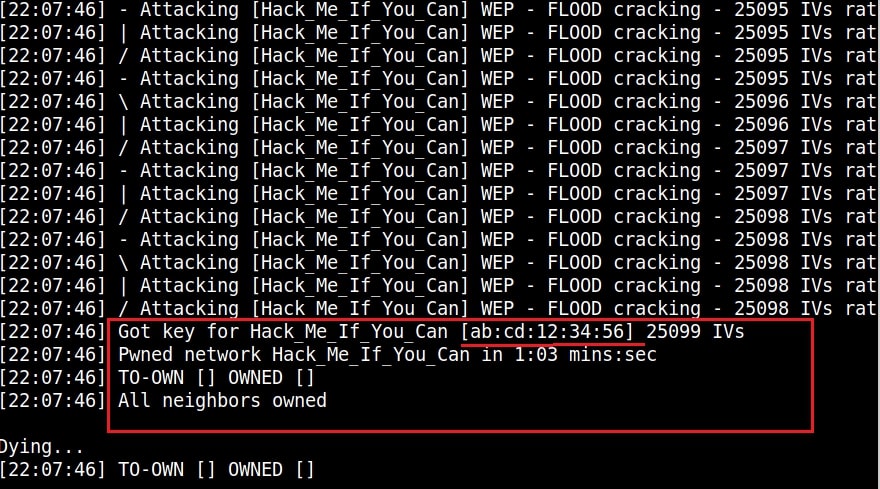
As you can see in the above image, it cracked a 64bit ASCII WEP key in less than 1 minute. How about 64 bit hexadecimal WEP key that’s a bit complex.

This key was cracked in 63 seconds. How long it will take to crack the same key we cracked earlier with aircrack?

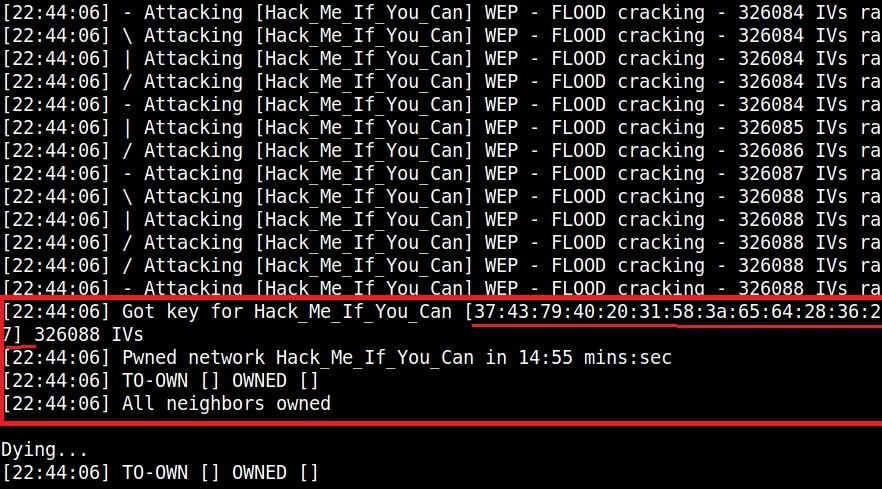
It took just 45 seconds to crack the password. This time, I generated a complex WEP key and tried again. The key was cracked in around 15 minutes as shown below.

Here’s the WEP key I set.

Just like cracking WEP, even Cracking WPA can be automated using tool besside-ng. To do this, we run besside-ng on the target wi-fi network.

Besside-ng automatically captures WPA handshake. Then all we have to do is run aircrack on the wpa.cap file.

The WPA key has been cracked successfully. Next, learn about Wifite, which can automatically crack WEP, WPA and WPS.