Posted on

Beginners guide to Network Forensics

Hello, aspiring computer forensic investigators. In our previous blogpost, you learnt about digital forensics. In this article, you will learn about Network Forensics, one of the branches of digital forensics. In today’s hyperconnected world, cyber threats are not a question of if, but when. Whether it’s a data breach, ransomware, or insider abuse, almost every cybercrime leaves behind a digital trail — and many of those trails run through the network. That’s where the role of network forensics comes.

What is Network Forensics?

Network forensics is a branch of digital forensics that focuses on monitoring, capturing and analyzing network traffic as a part of investigating security incidents. In simpler terms: it’s like watching and recording the flow of digital “conversations” between computers to spot anything suspicious — whether it’s a malware infection, data leak or unauthorized access.

Uses of Network Forensics

Network Forensics helps cyber forensic investigators in:

  • Reconstructing cyberattacks
  • Trace data exfiltration
  • Understand how threats moved through a network
  • Provide legal evidence after a breach

While file forensics focuses on data present on the devices (like hard drives or phones), this branch of forensics focuses on the communication between devices. This is important because:

  • Many attackers leave no trace on the device itself after attack.
  • Real-time monitoring can catch threats as they happen.
  • Network logs often provide a broader view of suspicious activity.

It helps answer critical questions like:

  • How did the attacker get in?
  • What data was accessed or stolen?
  • Where did the malicious traffic come from?
  • Was the incident internal or external?

Some real-life examples are,

Corporate Breach: An e-commerce company notices a spike in outbound traffic. Network forensic analysis reveals that customer data was being exfiltrated to an external server in another country.
Insider Threat: An employee tries to upload sensitive documents to a personal cloud account. Network forensics identifies the behavior and logs the attempted breach before data is lost.
Malware infection: A user clicks on a phishing link and unknowingly installs malware. Network traffic shows communication with a known command-and-control (C2) server — allowing the security team to isolate the device and stop further damage.

Key Elements of Network Forensics
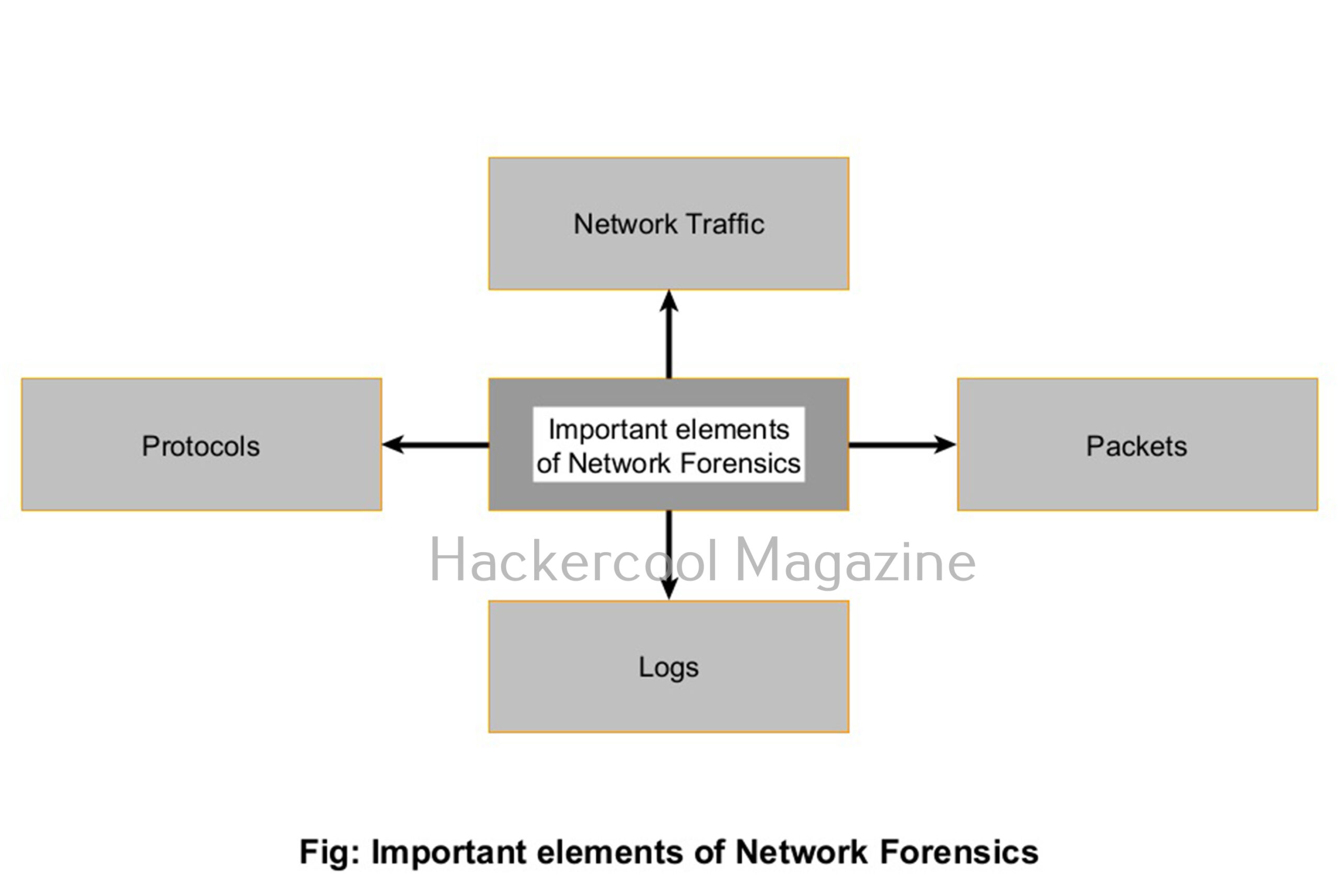
To understand how network forensics works, it helps to know what analysts are looking at. Here are the key components:

1. Network Traffic:

All the data moving across a network like emails, file transfers, web requests and more is collectively called Network Traffic.

2. Packets:

Network traffic is broken into small units called packets while transmitting. Each packet contains data and metadata, like source/destination IP addresses, ports and protocols.

3. Logs:

Many devices like firewalls, IDS, IPS, Honeypots, routers and servers generate logs that record traffic activity. This logs are a goldmine for forensic analysis.

4. Protocols:

Understanding how common protocols like HTTP, TCP/IP, DNS, FTP and SMTP etc work helps identify unusual or malicious behavior.

Network Forensics process
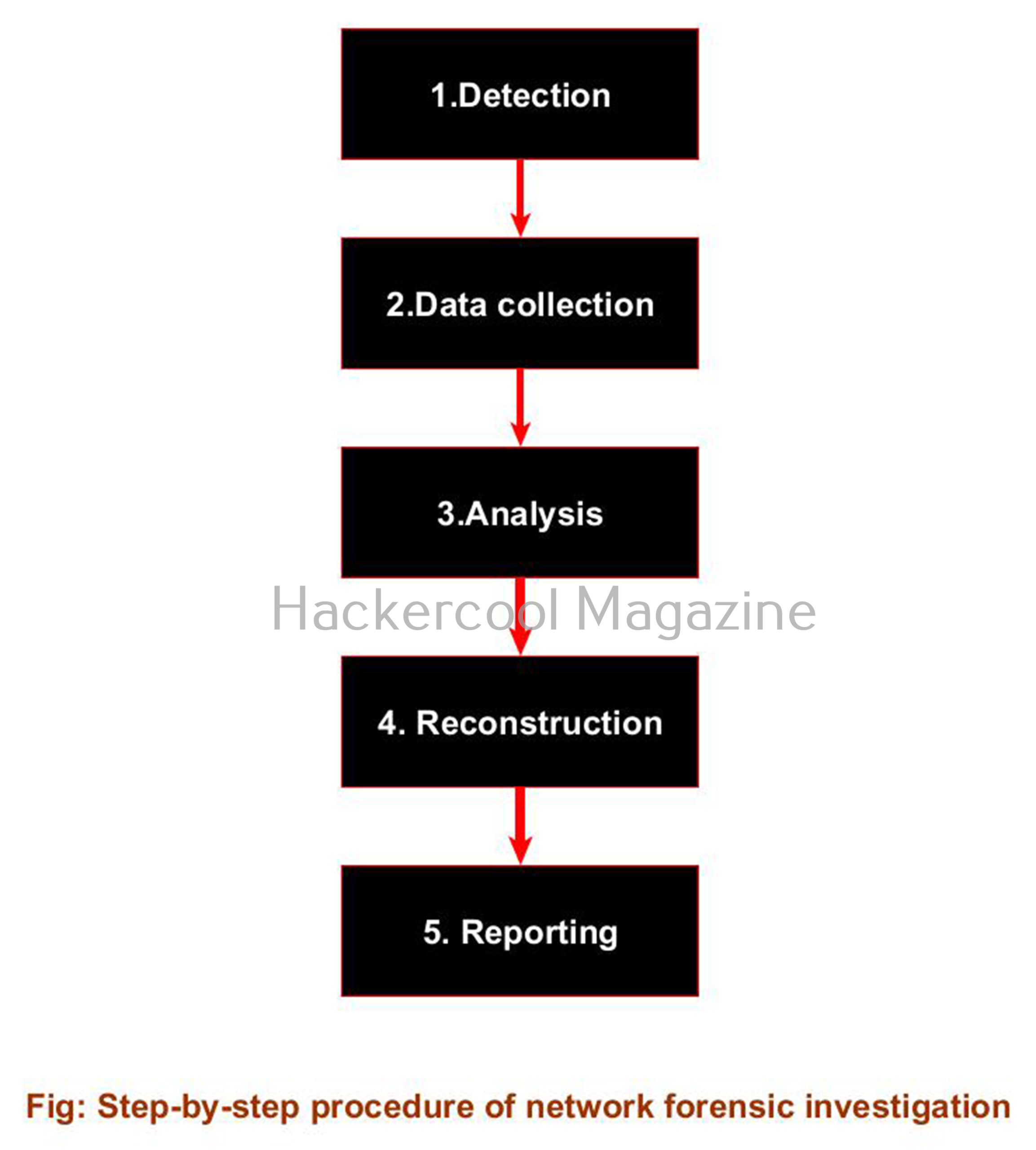
Here’s a simplified version of how a typical network forensics process works:

1. Detection:

The first step of a network forensics process starts when an alert is triggered — perhaps from a firewall, intrusion detection system (IDS) or a suspicious login attempt.

2. Data collection:

As soon as a alert is triggered, traffic logs or full packet captures (PCAP files) are collected for analysis. Tools may capture live traffic or pull from historical data.

3. Analysis:

Security analysts then inspect the collected data to identify patterns or anomalies, such as:

  • Unusual traffic spikes
  • Unexpected data transfers to external IPs
  • Use of non-standard ports or protocols etc.

4. Reconstruction:

Analysts recreate the sequence of events: how the attacker entered, moved laterally and what data was affected etc.

5. Reporting:

After analysis and reconstructing the events is complete, a clear, documented report is created that is used for incident response, compliance or legal action.

Popular Network Forensic tools

Here are some popular tools that beginners frequently used in network forensics:

  • Wireshark: The most widely used open-source tool for analyzing network packets.
  • tcpdump: A command-line tool for capturing packets in real-time.
  • Zeek (formerly Bro): A powerful network monitoring tool that turns raw packet data into structured logs.

In the ever-evolving world of cyber threats, network forensics plays a very important role. It allows teams to not just react to attacks, but understand them and build stronger defenses for the future. Neext, learn about Database Forensics.

Posted on

Beginners guide to Mobile Forensics

Hello, aspiring cyber forensic investigators. In our previous blogpost, you learnt about digital forensics. In this article, you will learn about mobile forensics, an important branch of digital forensics.

Smartphones have become a central part of modern life. We use them for everything — from messaging and social media to banking, GPS and storing data like personal memories. As a result, mobile devices often provide lot of evidence in criminal investigations, cybercrimes and even internal corporate cases. That’s where mobile forensics comes in.

Whether you’re curious about digital investigations, exploring a cybersecurity career, or just want to understand how data from phones can be recovered and used, this beginner’s guide to mobile forensics will walk you through the basics.

What is Mobile Forensics?

Mobile forensics is a branch of digital forensics focused on recovering, analyzing, and preserving data from mobile devices, such as:

  • Smartphones (e.g., iPhones, Android phones)
  • Tablets (e.g., iPads)
  • SIM cards
  • Memory cards (e.g., microSD cards)

The goal of mobile forensics is to extract useful information — such as messages, call logs, photos, app data or location history — in a way that is legally sound and forensically accurate. It’s like being a digital detective, uncovering clues hidden inside a mobile device.

Uses of Mobile Forensics

With mobile phones playing such a big role in everyday life, they are now critical sources of evidence in:

  • Criminal cases (e.g., drug trafficking, harassment, fraud)
  • Cybercrime investigations (e.g., phishing, identity theft)
  • Civil lawsuits (e.g., divorce, workplace misconduct)
  • Corporate investigations (e.g., insider threats, data leaks)

Mobile forensics can answer questions like:

  • Who did the person contact?
  • Where were they at a certain time?
  • What was deleted — and can we recover it?
  • Which apps were used, and how?

Some real-life examples are,

  • Criminal Case: Investigators use GPS data and deleted WhatsApp messages from a suspect’s phone to place them at the scene of a robbery.
  • Corporate Investigation: A company suspects an employee of leaking sensitive documents. A forensic analysis of their work phone reveals messages with a competitor and file transfers.
  • Personal Case: In a divorce proceeding, phone records and photos provide evidence of infidelity or hidden financial activity.

Mobile Forensics process

Here’s a beginner-friendly overview of how a mobile forensics investigation typically works:

1. Seizure and Preservation:

The first step of mobile forensic process is seizing and securing the device. The mobile device needs to be secured so that evidence it contains is not contaminated. The phone is put in airplane mode or a Faraday bag to block network signals, preventing remote wipes.

2. Identification and Documentation:

Next, the details of the mobile phone are recorded. This details are device type, model, serial number, SIM card and even its physical condition.

3. Data extraction:

In this stage, the data from the mobile device is extracted using forensic tools. The extracted data may include logical (e.g., messages and contacts), file system, or physical (bit-by-bit copy) extraction.

4. Data Analysis:

This stage involves analysis of the extracted data. All the evidence relevant to the investigation will be searched for. This includes analyzing messages, metadata, app usage, GPS trails and deleted content.

5. Reporting:

After analysing the evidence, a detailed report outlining what was found, how it was found and its relevance to the case is created. This is useful in court or internal reviews.

What information you can recover through Mobile Forensics?

Mobile forensics can reveal a wide range of data, including:

  • Text messages (SMS and instant messaging apps like WhatsApp)
  • Call logs and contacts
  • Emails and browsing history
  • Photos, videos and voice notes
  • GPS/location history
  • App data (e.g., social media, dating apps, banking apps)
  • Wi-Fi connections and Bluetooth activity
  • Deleted files (depending on the device and data state)

Even deleted data can sometimes be recovered and used in court — if handled properly. Not all data is always accessible, especially on newer encrypted devices — but forensic tools and techniques are constantly evolving to keep up.

Popular mobile forensic tools

Professional mobile forensic investigators use specialized software and hardware to extract and analyze mobile data. Some popular tools include:

  • Cellebrite UFED: Widely used for data extraction from iOS and Android devices
  • Magnet AXIOM: Combines mobile, computer, and cloud data analysis
  • Oxygen Forensic Detective: Powerful tool for in-depth mobile analysis
  • XRY by MSAB: Offers both logical and physical data extraction

These tools can extract both logical data (what’s accessible through the phone’s interface) and physical data (including deleted or hidden files at the storage level).

Mobile forensics is a fascinating, fast-growing field at the intersection of technology, law, and investigation. With smartphones holding more information than ever before, the ability to properly extract and analyze mobile data has become a vital skill — in law enforcement, corporate security, and beyond.

Whether you’re a curious student, an IT professional, or a budding digital detective, learning mobile forensics opens the door to exciting challenges and the chance to uncover digital truths hidden in plain sight. Next, learn about network forensics, another important branch of digital forensics.

Posted on

Beginners guide to Computer forensics

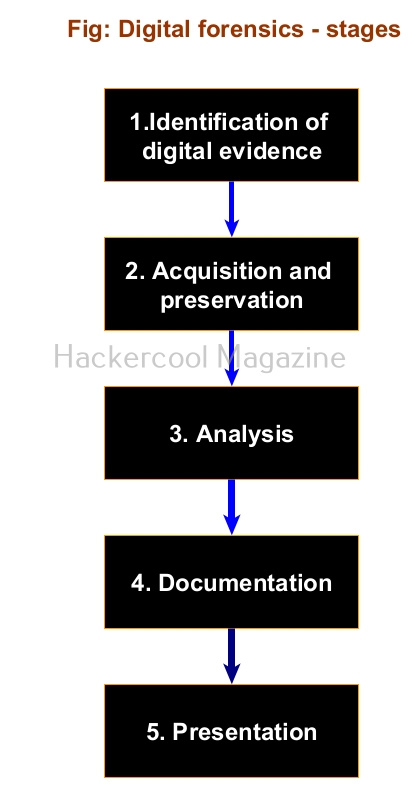
Hello aspiring cyber forensic invetigators. In our previous blogpost, you learnt what is digital forensics, types of digital forensics and stages of a digital forensic investigation. In this article, you will learn about computer forensics, one of the branches of digital forensics.

What is computer forensics?

Computer forensics (often interchangeably and mistakenly used with digital forensics) is a branch of digital forensics in which the digital evidence is collected and analyzed from computer systems like workstations, servers and Laptops. It is a process of identifying, preserving, analyzing and presenting digital evidence in a way that is legally sound but focussed on computers, hard drives and data storage systems.

The goal of computer forensics is to:

  • Investigate digital crimes
  • Recover lost or hidden data
  • Understand how a breach or attack occurred
  • Support legal proceedings with solid digital evidence

Just like physical detectives collect fingerprints or DNA, computer forensic investigators collect digital footprints like logs, browser history, downloads, recent files, emails, file metadata, internet activity, user activity, login activity, running processes. programs and open network connections etc.

Uses of computer forensics

Computer forensics plays an important role in:

  • Law enforcement: To investigate crimes like fraud, hacking, identity theft, or online harassment.
  • Businesses: To examine data breaches, insider threats or employee misconduct.
  • Cybersecurity teams: To analyze how attackers got in and what data was affected.
  • Legal cases: To gather digital evidence for civil lawsuits or intellectual property disputes.

Common Steps in a Computer Forensics Investigation

Although every case is different, most computer forensics investigations follow the same process every digital forensic investigation has to follow. Here’s a simplified breakdown:

1. Identification:

Determine the computer devices on which digital evidence can be present. Then, identify what data needs to be examined and where it’s stored. This might involve computers, hard drives, RAM etc.

2. Acquisition and Preservation:

Next important step is to acquire the evidence and preserve it without the fear of contamination. Forensics experts often create a forensic image — an exact, bit-by-bit copy of a device — to work from, while preserving the original. Hard disks of computers can be imaged using tools like dd, dcfldd, Guymager, FTK Imager etc. Forensic images of RAM can be taken using tools like DumpIt, WinPmem, Magnet RAM capture for Windows, LiME, Compile and Load, AVML for Linux and OSXPmem for macOS.

The preservation of the forensic image can be achieved using hashing tools and write blockers. Some of the hashing tools are sha256sum, CertUtil, Get-FileHash etc.

3. Analysis:

This is the deep dive. Investigators look through files, logs, emails, browser history and other data sources to find relevant evidence to a data breach or cybercrime. Analysis should always be done on the forensic image and not on the original.

Generally forensic analysis involves file carving, timeline analysis, Partition and volume analysis, RAM analysis, examining metadata etc. Some of the tools used here are Foremost, Scalpel, TestDisk for carving, fdisk and Autopsy for partition and volume analysis, Log2timeline, Plaso, Timesketch for timeline analysis and Volatility for RAM analysis.

4 Documentation

The computer forensic investigation procedure from the beginning needs to be carefully recorded and documented to ensure that the evidence can be used in court. Even small mistakes in this step could lead to evidence being thrown out.

5. Reporting:

Investigators should prepare a detailed report explaining what was found, how it was found and what it means. This will be useful in legal proceedings or internal investigations.

As the threat of data breaches, cyber crimes, identity theft cases increase exponentially, the importance of digital evidence — and the people who know how to handle it — will only grow. Whether you want to protect your business, support law enforcement, or start a career in cybersecurity, learning computer forensics is a smart step forward. Next, learn about mobile forensics, another important branch of digital forensics.

Posted on

Beginners guide to Purple Teaming

Hello, aspiring ethical hackers. In our previous blogposts, you learnt about Blue Teaming and Red Teaming. In this article. you will learn what is Purple Teaming, why it matters and how to get started in Purple teaming.

In the ever-evolving world of cybersecurity, staying ahead of attackers is a constant challenge. Traditionally, organizations split their security efforts between two distinct groups: the Red Team, who simulate attacks to find vulnerabilities, and the Blue Team, who defend networks and respond to incidents. But what if these two teams worked together — seamlessly sharing insights and strategies to build a stronger, smarter defense?

What is Purple Teaming?

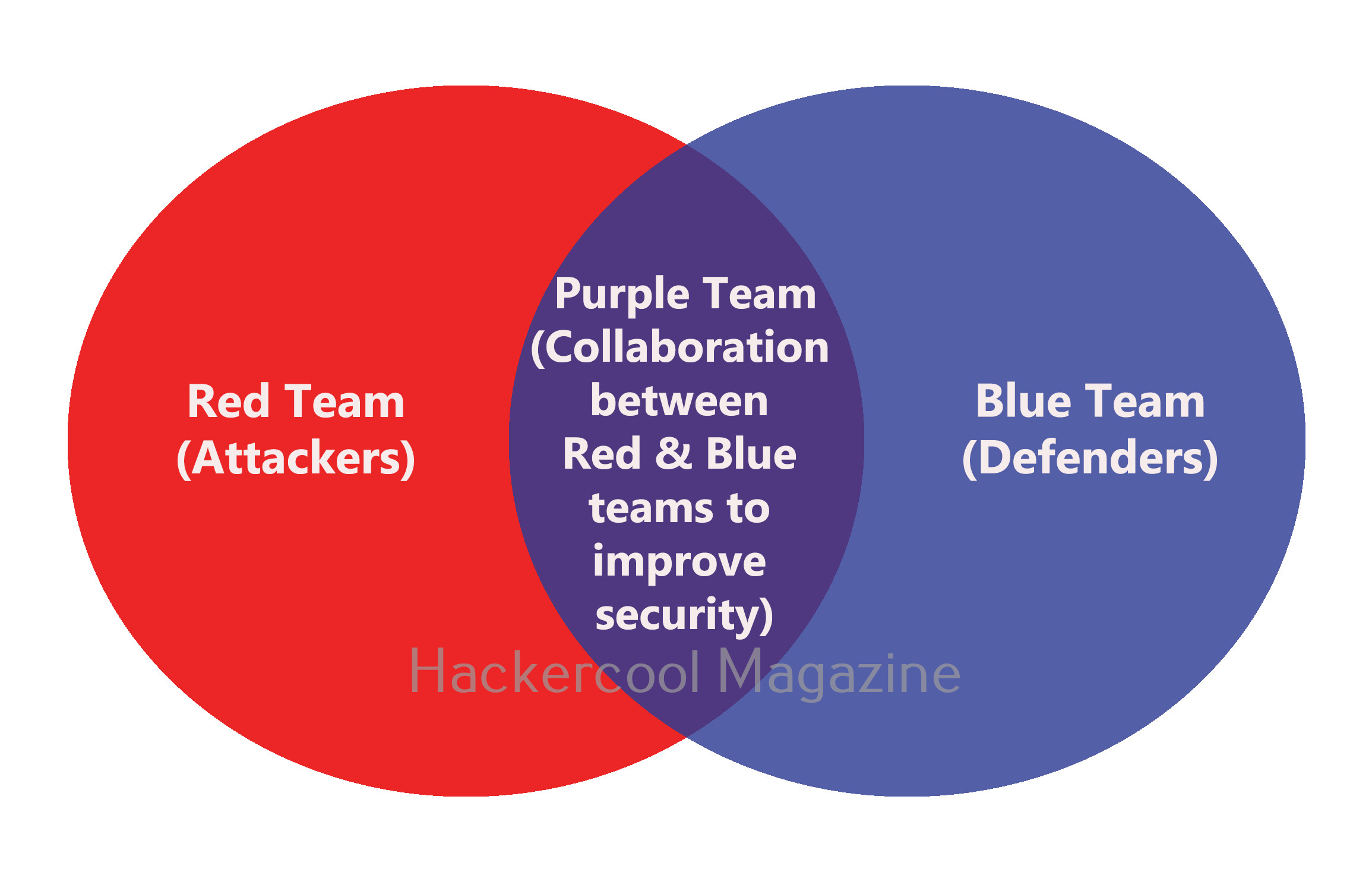
Purple Teaming is the practice of combining the offensive tactics of the Red Team with the defensive strategies of the Blue Team. The name comes from mixing the colors red and blue to create purple, symbolizing the integration of attack and defense.

Unlike a traditional Red Team vs. Blue Team setup, where each group operates somewhat independently, the purple team approach fosters ongoing communication and collaboration. This way, vulnerabilities discovered by the Red Team can be immediately addressed by the Blue Team and defensive measures can be tested and refined in real-time.

Why is Purple Teaming important?

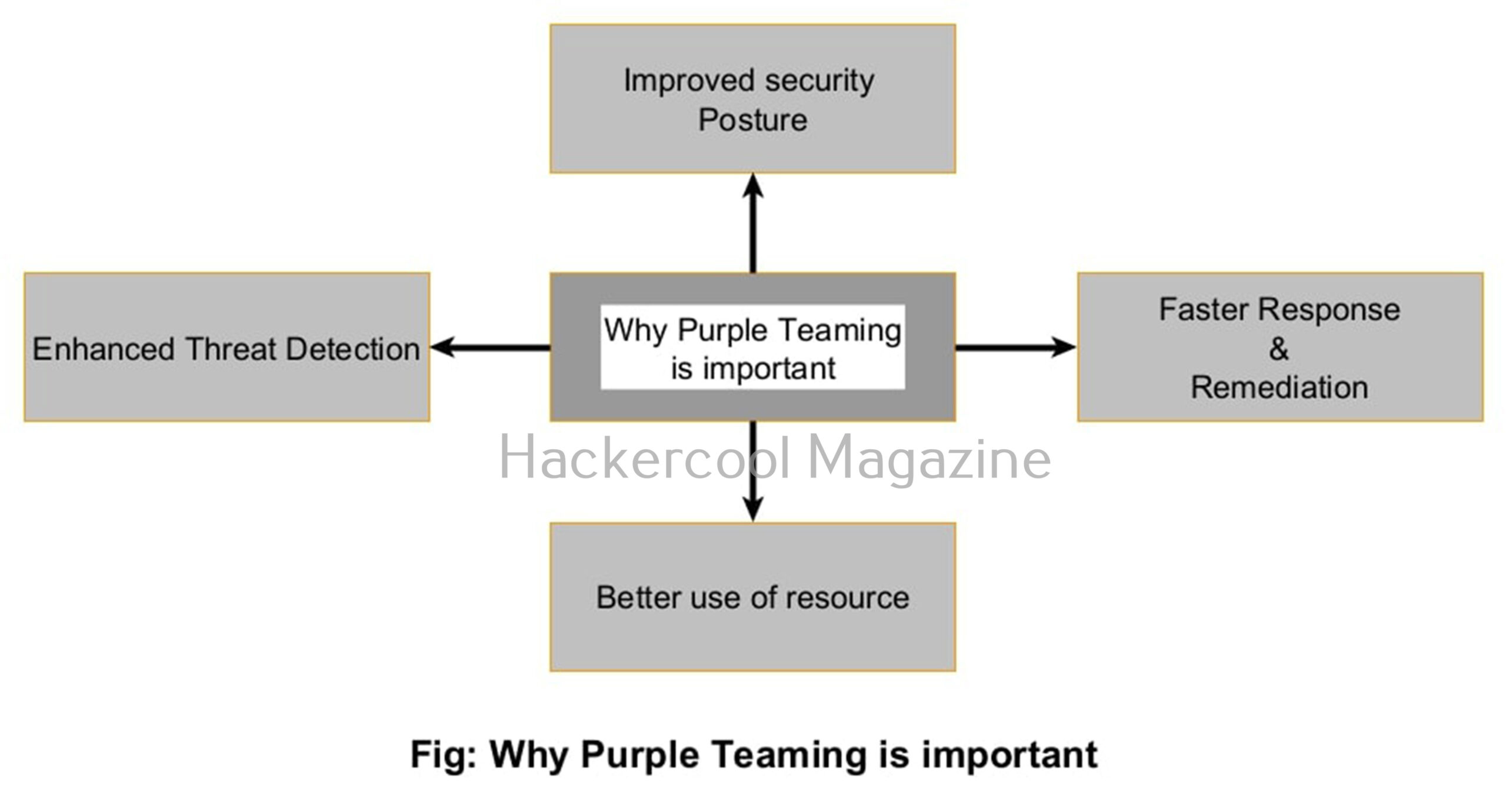
Here are a few reasons purple teaming is becoming essential in cybersecurity.

1. Improved Security Posture:

By combining insights from both attackers and defenders, purple teams help organizations identify and close gaps faster. It’s no longer a matter of “who found what,” but rather how both teams can learn from each other to build a stronger security posture.

2. Faster Response and Remediation:

When the Red Team discovers an exploit or attack path, the Blue Team can instantly develop countermeasures. This reduces the window of vulnerability and minimizes potential damage from real attackers.

3. Enhanced Threat Detection:

Purple teams help fine-tune detection tools like SIEMs (Security Information and Event Management) and EDRs (Endpoint Detection and Response) by testing alerts against real-world attack techniques. This reduces false positives and sharpens the team’s ability to spot genuine threats.

4. Better use of resources:

Instead of working in silos, purple teams leverage each other’s skills and tools. This not only improves efficiency but also fosters a security culture focused on shared goals.

How does Purple Teaming work in practice?

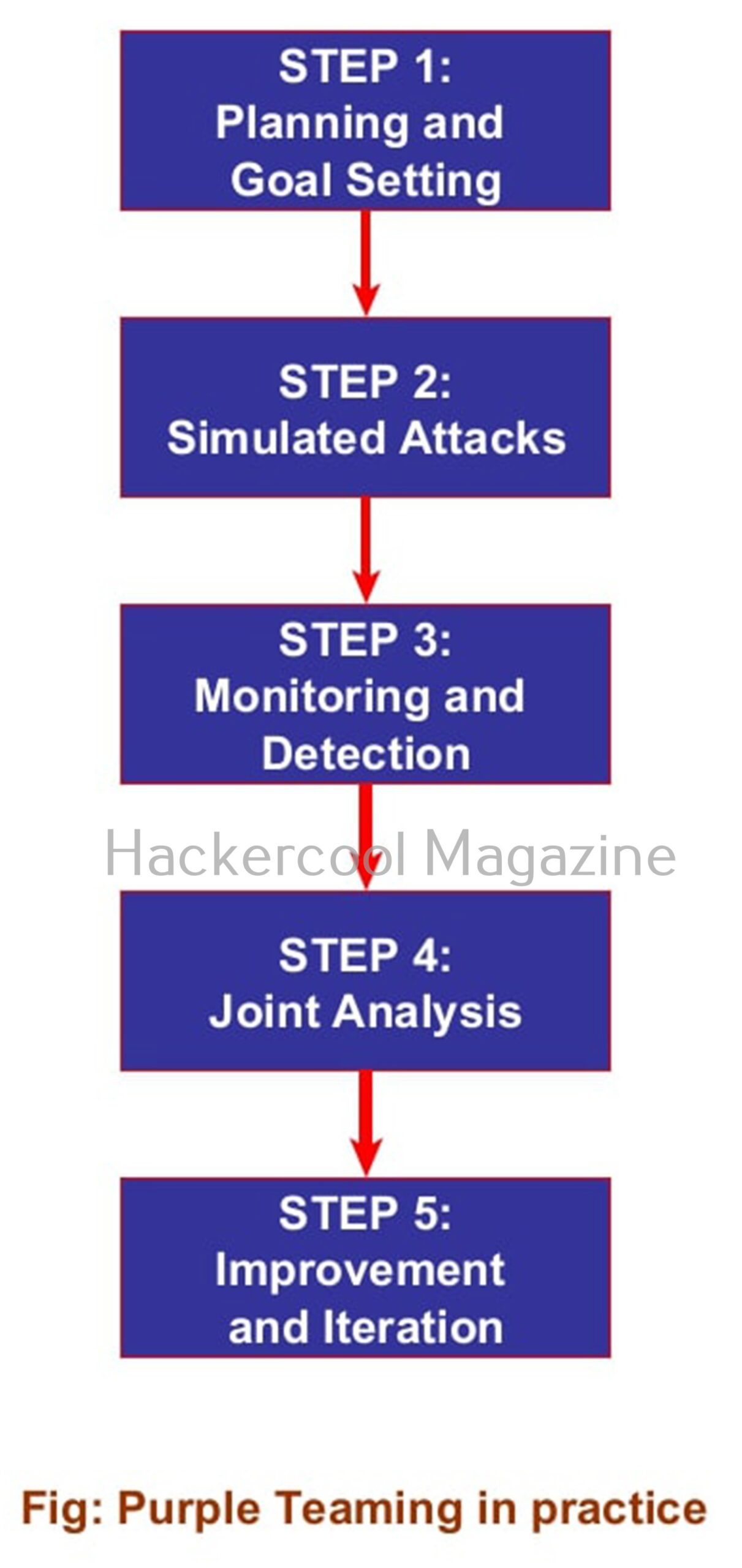
Purple teaming isn’t a just a formal job title or role — it’s a collaborative process that involves people, tools and workflows. Here’s what it typically looks like:

1. Planning and Goal setting:

Red and Blue teams agree on objectives — for example, testing the effectiveness of phishing defenses or evaluating how well the network detects lateral movement.

2. Simulated Attacks:

The Red Team performs controlled attack simulations based on agreed scenarios. They might try phishing campaigns, exploit vulnerabilities, or attempt privilege escalation — all in a monitored environment.

3. Monitoring and Detection:

The Blue Team watches the network, endpoint and security tools to see if the simulated attacks are detected, blocked or logged. They gather data on alerts, response times and gaps in coverage.

4. Joint Analysis:

Both teams review the results together. The Red Team explains attack techniques and where they succeeded or failed. The Blue Team shares how they detected or missed events and discusses improvements.

5. Improvement and Iteration:

The Blue Team adjusts detection rules, hardens defenses or changes response workflows. The Red Team adapts tactics based on updated defenses. This cycle repeats continuously improving the organization’s security.

Tools used in Purple Teaming

Purple teaming doesn’t have separate tools for itself. Tools like Cobalt Strike, Metasploit or open-source frameworks like Atomic Red Team are used by Red Teams to emulate real-world attacks while solutions such as Splunk, ELK Stack or Microsoft Sentinel help Blue Teams analyze logs and tune alerts. Communication and documentation tools like Jira, Confluence or even shared chat platforms like Slack enable smooth teamwork. Emerging tools such as Verodin (acquired by FireEye) and SafeBreach provide automated purple teaming workflows, bridging attack simulations with defense validation.

The future is Purple

Purple teaming represents a shift in cybersecurity mindset — from adversarial to collaborative. By breaking down silos between Red and Blue teams, organizations gain faster insights, stronger defenses and a proactive security culture. Next, learn about Threat Hunting.

Posted on

Beginners guide to Blue Teaming

Hello aspiring Blue teamers. In our previous blogpost, you learnt what is Red teaming. In this article, you will learn what Blue Teaming or Blue Team hacking is, what Blue Teams do and how you can get started in this essential field of cybersecurity.

In today’s connected world, protecting your digital assets is just as important as growing your business. Every day, organizations face threats from hackers, malware, Advanced Persistent Threats (APTs) and even insider threats. While attackers often get the spotlight, the real heroes are the ones quietly defending in the background — the Blue Team.

What is Blue Teaming?

Have you ever wondered who protects networks from being hacked, who investigates cyber incidents or who sets up the defenses that keep organizations safe — that’s the Blue Team.

Blue Teaming refers to the defensive side of cybersecurity. A Blue Team’s mission is to detect, respond to and defend against cyber threats. While the Red Team acts like attackers — trying to break into systems — the Blue Team protects those systems and makes them stronger over time.

The Blue Team sets up firewalls and other defensive technologies, monitors systems for unusual behavior, investigates alerts and responds to incidents — all to keep data and infrastructure safe from real-world threats.

How does a Blue Team protect the network?

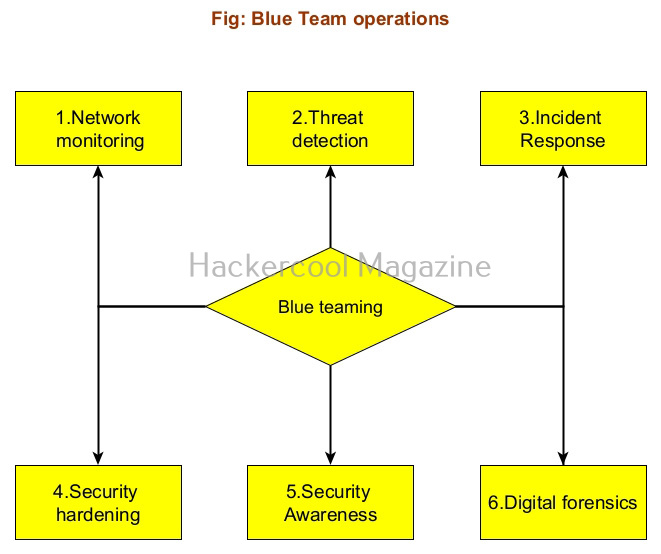
Blue Teams are involved in a wide range of activities to ensure the security and resilience of an organization’s digital systems. Here are some of their core responsibilities.

1. Network monitoring:

Blue Teams always monitor the network traffic using tools in real-time. They look for any signs of unusual activity — like a user logging in from an unfamiliar location or data being transferred at odd hours.

2. Threat detection:

They also analyze logs, alerts and data to detect threats early. This includes identifying malware infections, phishing attempts or suspicious behavior by insiders.

3. Incident Response:

When a malicious activity occurs, like a breach or ransomware attack — the Blue Team investigates what happened, stops or tries to mitigate the damage and helps the organization recover.

4. Security Hardening:

They make systems more secure by configuring firewalls, updating software, disabling unnecessary services and applying the principle of least privilege (giving users only the access they truly need).

5. Security Awareness:

Blue Teams also train employees on how to spot phishing emails, avoid risky behavior and follow security best practices. Human error is one of the biggest cybersecurity risks.

6. Digital forensics:

If a system is compromised, the Blue Team gathers and analyzes digital evidence to understand the attack and prevent it from happening again.

Importance of Blue Teaming

Cyber threats are only going to increase and grow more sophisticated. These can vary from ransomware gangs targeting hospitals to phishing emails trying to steal banking information. Without Blue Teaming, these attacks would succeed more often and cause even more damage.

Here’s why Blue Teaming is important. They protect sensitive data like financial records, personal information, and trade secrets. They respond to emergencies, minimizing the impact of attacks. They continuously improve defenses, making systems stronger over time. They help organizations meet compliance requirements (e.g., GDPR, HIPAA, ISO).

Common Blue Team Tools

Blue Teams use a wide range of tools and platforms to do their job. Some popular ones include:

  • 1. SIEM Tools (Security Information and Event Management):
    e.g., Splunk, IBM QRadar or Elastic Security — used for log analysis and threat detection.
  • 2. Endpoint Detection & Response (EDR):
    e.g., CrowdStrike, SentinelOne — used to monitor and protect devices like laptops and servers.
  • 3. Firewalls and IDS/IPS (Intrusion Detection/Prevention Systems):
    e.g., Palo Alto, Snort — help block unauthorized access and detect intrusions.
  • 4. Packet Analyzers:
    e.g., Wireshark — used to inspect network traffic at a detailed level.
  • 5. Threat Intelligence Platforms:
    Used to stay updated on the latest attacker tactics and threat indicators.

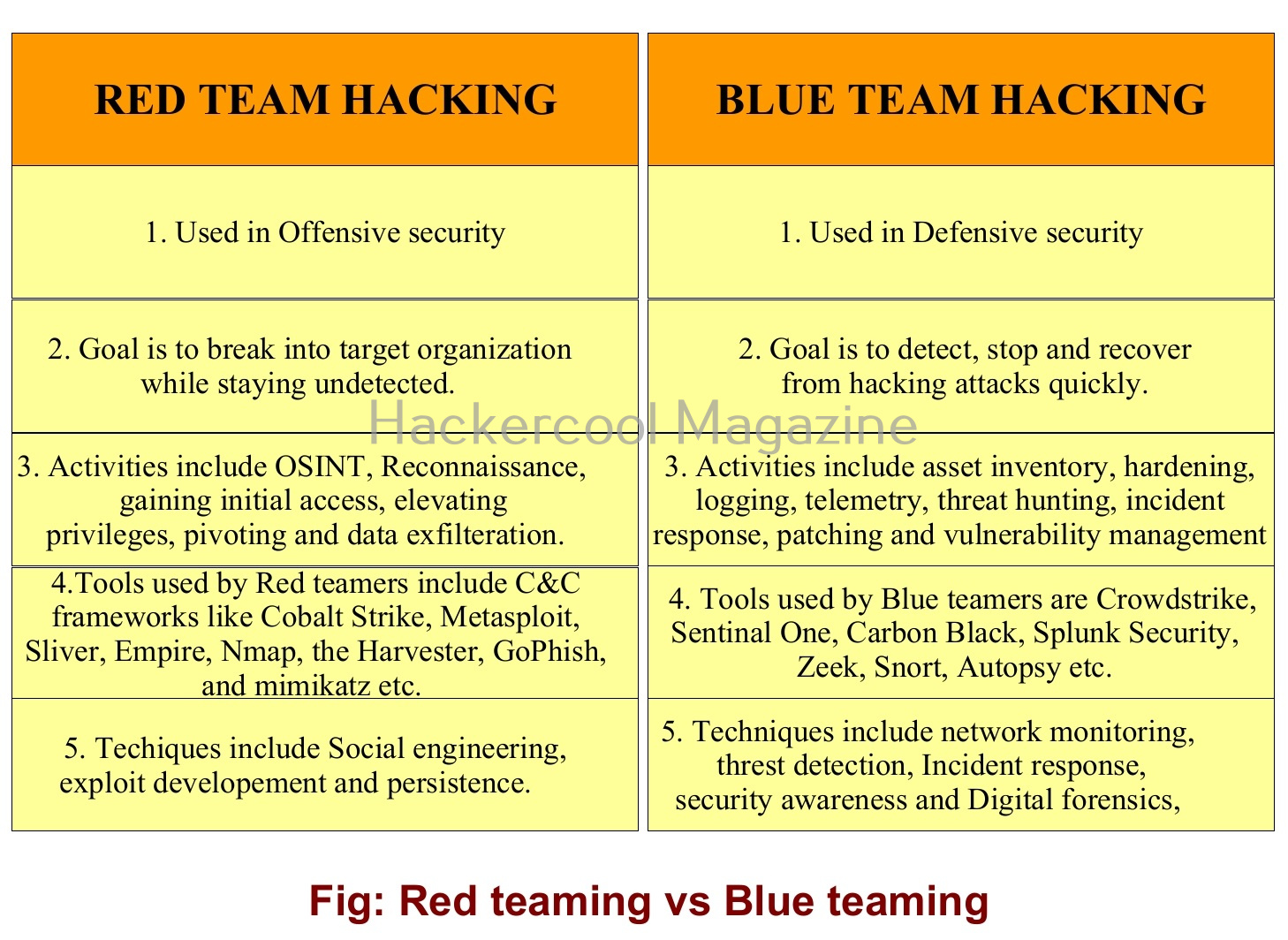
Red Teaming vs Blue Teaming

People often get confused with Red teaming and Blue teaming. While both are used to improve the security posture of an organization, they have some differences. They are,

How to get started in Blue Teaming?

If you’re interested in joining a Blue Team or building one for your organization, here are some beginner-friendly steps:

1. Learn the basics of networking:

Learn and try to understand how data moves through networks. Learn about OSI model, TCP/IP, DNS, Firewalls and VPNs.

2. Get comfortable with operating systems:

Blue Teams often need to work with both Windows and Linux systems. So, learn basic commands, file structures and system logs etc.

3. Learn Cybersecurity fundamentals:

Learn about various cybersecurity fundamentals.

4. Earn Certifications:

Certifications like CompTIA Security+, Cisco’s CCNA, or Certified SOC Analyst (CSA) are great starting points.

5. Practice Detection and Response:

Set up your own lab at home. Use open-source tools like Security Onion to monitor and analyze traffic.

The digital world needs more defenders. Whether you’re a student exploring cybersecurity, an IT professional looking to specialize, or a business leader wanting to strengthen your team — Blue Teaming is a powerful, rewarding path.

As threats evolve, the need for sharp, prepared, and proactive defenders has never been greater. Next, learn about Purple teaming.