Hello aspiring ethical hackers. Welcome to the second part of understanding Wireless security. In Part 1, readers have learnt about the history of WiFi, terminology used in WiFi and WEP security and its weakness. So, let’s continue from there. Responding to the serious weaknesses in WEP encryption security, the Wi-Fi Alliance introduced Wi-Fi Protected Access (WPA) to secure wireless networks. However, the Wi-Fi Alliance intended WPA as an interim measure to take the place of WEP before they bring in Wi-Fi Protected Access 2 (WPA 2).
Wi – Fi Protected Access (WPA)
New to Ethical Hacking?
Start your journey with The Beginner Ethical Hacker Starter Kit (2026 Edition).
Also known as Temporal Key Integrity Protocol (TKIP) standard, WPA implements the TKIP encryption method and was introduced in 2003. TKIP introduced three new methods to overcome weaknesses in Wired Equivalent Privacy (WEP) standard.
1. TKIP implements a key mixing function that combines the secret root key with the initialization vector before passing it to the RC4 cipher initialization. WEP on the other hand merely concatenated the initialization vectors to the root key and passed this value to the RC4 cipher.
2. A sequence counter is implemented to protect against replay attacks. Hence, packets received out of order will be rejected by the Access point.
3.TKIP implements a 64-bit Message Integrity Check (MIC) replacing Cyclic Redundancy Check (CRC) used in WEP. This re-initializes the sequence number each time when a new key (Temporal Key) is used.
Wi – Fi Protected Access (WPA) 2
WPA 2 was introduced in 2004 to replace WPA. It implemented the mandatory elements of IEEE 802.11i. 802.11i makes use of the Advanced Encryption Standard (AES) block cipher instead of RC4 stream cipher used by both WEP and WPA. It also uses Counter Mode Cipher Block Chaining Message Authentication Code Protocol (CCMP) encryption protocol. It provides the following security services.
1. Data Confidentiality: It ensures only authorized parties can access the information
2. Authentication: provides proof of genuineness of the user
3. Access control in conjunction with layer management.
Wi – Fi Protected Access 3 (WPA 3)
The Wi-Fi Alliance announced WPA3 as a replacement to WPA2 in 2018. The new standard uses an equivalent 192-bit cryptographic strength in WPA3-Enterprise mode (AES-256 in GCM mode with SHA-384 as HMAC) and still mandates the use of CCMP-128 (AES-128 in CCM mode) as the minimum encryption algorithm in WPA3-Personal mode. The WPA3 standard also replaces the pre-shared key (PSK) exchange with Simultaneous authentication of Equals (SAE) exchange, a method originally introduced with IEEE 802.11s. This results in a more secure initial key exchange in personal mode and forward secrecy.
WPA – Versions
There are two versions of WPA. They are,
A. WPA- Personal
B. WPA – Enterprise
WPA – Personal
Wi-Fi Protected Access (WPA) – Personal is designed for home and small office networks. This version uses Pre- Shared Key (PSK) and hence it is also referred as WPA-PSK (pre-shared key) mode. The network traffic is encrypted using a 128-bit encryption key derived from a 256-bit shared key. WPA-Personal mode is available on all three WPA versions.
WPA – Enterprise
As its name implies, this is designed for enterprise networks and requires a RADIUS authentication server. This requires a more complicated setup but provides additional security like protection against dictionary attacks on short passwords. Various kinds of the Extensible Authentication Protocol (EAP) are used for authentication. WPA-Enterprise mode is available on all three WPA versions.
Weakness Of WPA/WPA2
1. Pre-shared key WPA and WPA2 remain vulnerable to password cracking attacks if users rely on a weak password or passphrase.
2. WPA passphrase hashes are seeded from the SSID name and its length; rainbow tables exist for the top 1,000 network SSIDs and a multitude of common passwords, requiring only a quick lookup to speed up cracking WPA-PSK
Brute forcing of simple passwords can be attempted using the Aircrack Suite starting from the four-way authentication handshake exchanged during association or periodic re-authentication. In this article, readers have seen how WPA password was cracked. One important feature of cracking WPA /WPA2 is that we don’t need a lot of traffic to crack it. We just need one client connected to the Wi-Fi Access point. Then we de authenticate it from the Wi-Fi Access point. The client automatically tries to connect to the Wi-Fi access point again.
It is at this stage, we try to capture the WPA handshake. If you have noticed, while using aircrack, to crack the password, we supplied a dictionary or wordlist. While cracking WEP we didn’t.
So what is a weak password? Any password that is part of a dictionary or wordlist can be called a weak password in WPA. Otherwise, WPA /WPA2 is considered secure. WPA3 replaces cryptographic protocols susceptible to off-line analysis with protocols that require interaction with the infrastructure for each guessed password, supposedly placing temporal limits on the number of guesses. However, design flaws in WPA3 enable attackers to plausibly launch brute-force attacks.
Wi-Fi Protected Setup (WPS)
In year 2007, the Wi-Fi Alliance introduced Wi-Fi Protected Setup (WPS). The main feature of this protocol is to allow home users who have little knowledge about wireless security to set up Wi-Fi Protected Access (For some users, accessing the router dashboard and setting passwords can be too complex). It also makes it easy to add new devices to an existing Wireless network without entering long passphrases. WPS also allows the owner of Wi-Fi privileges to block other users from using their household Wi-Fi. There are two common methods to use WPS.
PIN Method.
Push Button Method.
PIN Method
Every Wireless Router with WPS enabled has a PIN on the Wi-Fi Router (which is usually printed on a sticker). This PIN must then be entered into any new device that wants to connect to this Wireless network. No need of memorizing any password.
Want to Learn Ethical Hacking Step-by-Step?
If you’re serious about learning cybersecurity, a structured roadmap makes the journey much easier.
Download The Beginner Ethical Hacker Starter Kit (2026 Edition) and discover:
✔ The ethical hacking learning path ✔ Beginner-friendly security concepts ✔ Essential tools ethical hackers use ✔ The most common vulnerabilities explained
In this method, the user has to PUSH a WPS button on both the Access point and the new wireless client device. On most devices, this discovery mode turns itself off as soon as a connection is established or after a delay (typically 2 minutes or less), whichever comes first, thereby minimizing its vulnerability. Although WPS was introduced to simplify Wi-Fi Connection issues, it suffers from a major vulnerability. Any remote attacker can recover the WPS pin in a few hours by using brute force attack. Once he does this, he can easily recover WPA/WPA2 key also. Nowadays, all recent models of Wireless Routers have WPS enabled by default. It is wise to turn off WPS PIN feature although this is not possible on many routers. WPS is widely understood to have added insecurity to otherwise secure WPA/WPA2. WPS pin is a 8 digit PIN that is required by clients to connect to the Wireless Router. The Wireless Router instead of checking the entire 8 digit PIN at once, checks the first four digits initially and then checks the last four digits. This makes brute forcing WPS PINs very easy. This is because there are only 11,000 possible 4 digit pins and once the brute force software gets the first 4 digit pin right, the attacker can move on to cracking the latter 4 digit pin. Tools Bully and Reaver are first to come to mind when we want to crack WPS pin. However, in our latest tests, both the tools are presenting some problems. You can read our previous articles on Bully and Wifite.
That was a complete guide to understanding wireless security. Hope our readers now have a better understanding of Wireless security. You can read Part 1 of Understanding Wireless security here. Happy hacking.
Start Your Ethical Hacking Journey Today
Learning cybersecurity can feel overwhelming at first. The best way to start is with a clear roadmap and the right resources.
Download The Beginner Ethical Hacker Starter Kit (2026 Edition) and get instant access to:
Ethical Hacking Fundamentals A beginner cybersecurity learning roadmap Essential hacking tools every beginner should know Common vulnerabilities explained simply
Hello, aspiring ethical hackers. In this blogpost, we bring you the complete guide to WiFi hacking. Compromising the security of the wireless networks is known as WiFi hacking or wireless hacking. Before going deep into hacking wireless networks, let us give you a brief history of Wi–Fi.
New to Ethical Hacking?
Start your journey with The Beginner Ethical Hacker Starter Kit (2026 Edition).
Wi-Fi is the name given to a family of wireless network protocols, based on the IEEE 802.11 family of standards. These are commonly used for local area networking of devices and also for Internet access. Simply put, this allows nearby digital devices to exchange data using radio waves.
The beginning of Wi – Fi happened in the form of ALOHAnet which successfully connected the Great Hawaiian Islands with a UHF wireless packet network in 1971. ALOHA net and the ALOHA protocol in fact were precursors of Ethernet and 802.11 protocols.
After another 14 years, in 1985 a ruling by the U.S. Federal Communications Commission released the band for unlicensed use. These frequency bands are the 2.4 gigahertz (120 mm) UHF and 5 gigahertz (60 mm) SHF radio bands. These frequency bands are the same ones used by equipment such as microwave ovens, wireless devices etc.
The first version of the 802.11 protocol was released in year 1997 and provided speed up to 2 Mbit/s. The 802.1a came as an improvement over the original standard. It operates in 5 GHz band, uses a 52-subcarrier orthogonal frequency-division multiplexing (OFDM) and has speed of mid 20 Mbit/s. This was replaced with 802.11b protocol in 1999 and this had 11 Mbit/s speed. It is this protocol that would eventually make Wi -Fi popular.
In the same year, a non-profit association named Wi-Fi Alliance was formed which restricted the use of the term Wi-Fi Certified to products that successfully complete interoperability certification testing. By 2017, the Wi-Fi Alliance had more than 800 companies from around the world and shipped over 3.05 billion Wi-Fi enabled devices by year 2019. The first devices to use Wi-Fi connectivity were made by Apple which adopted this option in their laptops. 802.11g was adopted to the 802.11 specification in year 2003. It operated in the 2.4 GHz microwave band and provided speed upto 11 Mbit/s. Another standard was adopted in year 2008, named 802.11n which operated in both 2.4 and 5 GHz and had a linkrate 72 to 600 Mbit/s. This standard was also known as WI-Fi 4.
Similarly, 802.11ac, 802.11ax and standards were also adopted later which further improved speed and performance of Wi -Fi. Now, let us learn about some terms that frequently occur while learning wireless hacking.
Basic terminology Of Wi-Fi hacking
Wireless Access Point (WAP): A Wireless Access Point (WAP), commonly known as Access Point (AP) is a networking hardware device that allows other Wi-Fi devices to connect to it. This Access Point allows wireless devices to connect to wired devices and generally provides internet. Mostly the Access Point is a Wi -Fi Router.
Wireless Client: A wireless device that connects to the Wireless Access Point to access internet is known as a wireless client. Ex : all the devices that connect to a Wi- Fi Router.
Wireless Local Area Network (WLAN) : The Computer Network comprising of the Wireless Access Point and two or more Wireless Clients is known as Wireless Local Area Network. This is a LAN but without wires.
Service Set Identifier (SSID) : A Service Set Identifier (SSID) is the name of the wireless network. Normally, it is broadcast in cleartext by Wireless Access Points in beacon packets to announce the presence of a Wi -Fi network. The SSIDs can be up to 32 octets (32 bytes) long. For example, SSID in our first wireless hacking article is “Hack_Me_If_You_Can”.
Extended Service Set Identifier (ESSID): An Extended Service Set Identifier (ESSID) is a wireless network created by multiple access points. This is useful in providing wireless coverage in a large building or area in which a single Access Point (AP) is not enough. However, this appears as a single seamless network to users. The name is same as SSID.
Basic Service Set Identifier (BSSSID): Previously our readers learnt that every hardware device in computing is hardcoded with a MAC Address. A BSSID is the MAC address of the Access Point.
Channels: Readers have learnt that Wi- Fi operates in the frequency range of 2.5GHz and 5GHz. These frequency bands are divided into smaller frequency bands which are known as channels. Usually, these channels are of width 20MHz. The 2.5 GHz range is divided into 14 channels each spaced 5Mhz apart to avoid interference and disturbance. Similarly, The 5GHz band is divided into 24 channels.
Beacons: Beacons are one of the management frames in IEEE 802.11 based WLANs. A Beacon Frame contains all the information about the network and is transmitted periodically to announce the presence of a wireless LAN and to synchronize the members of the WLAN.
Signal Strength : Wi-Fi signal strength refers to the strength of the Wi-Fi network connection. The correct way to express Wi-Fi signal strength is mW but it is also very complex. So for simplicity, the signal strength is expressed in as dBm, which stands for decibels relative to a milliwatt. dBm works in negatives. For example, -34 is a higher signal than -64 or -94 because -80 is a much lower number.
Data: Data needs no explanation.
Encryption: Encryption refers to the Wi fi Encryption protocol used for security. There are three types of wireless encryption protocols at present. Wired Equivalent Privacy (WEP), Wi-Fi Protected Access (WPA), and Wi-Fi Protected Access Version 2 (WPA2). More about them soon.
Authentication: The authentication method used by wireless clients to authenticate with wireless access point. More about it soon too.
Cipher : Ciphers are standard security. ciphers are part of Wi-FI security to enhance the security of wireless networks. Example WPA can use either CCMP or TKIP ciphers.
Various wireless attacks
1. Wardriving
Searching for publicly accessible Wi-Fi networks while driving is known as wardriving. Publicly accessible networks or open Wi-Fi networks are those wireless networks that are configured without any passwords. Since this attack is usually performed while driving, it is known as war driving. The term War driving originated from the term wardialing, the method which was popularized by a character played by Matthew Broderick in the film WarGames. There are other variants of Wardriving like Warbiking, Warcycling and Warwalking which are similar to wardriving but use other modes of transportation.
You can scan for wireless access points available in your area using tools like LinSSID, Kismet etc. If you prefer a graphical tool for doing this, sparrow-wifi is the tool.
2. Password attacks
Just now, you have read that, Wi-Fi networks can be configured without a password. This is dangerous in real-world. So, in real world, Wi-Fi networks are usually secured using a password. Only those users who are authorized to use the Wi-Fi are provided with a password using which they can connect. Here are the types of Wireless security protocols that can be used to secure the WiFi networks.
Wired Equivalent Privacy (WEP)
Wi-Fi Protected Access (WPA)
Wi-Fi Protected Access 2 (WPA2)
Wi-Fi Protected Access 3 (WPA3)
Let’s learn about each of these security protocols and how they are cracked in detail.
Wired Equivalent Privacy (WEP)
Wired Equivalent Privacy (WEP) is the first security algorithm for IEEE 802.11 wireless networks that was introduced as part of the original 802.11 standard ratified in 1997. As its name implies, the intention was to provide data confidentiality equivalent to that of a traditional wired network. WEP was the only encryption protocol available to 802.11a and 802.11b devices as these were built before the WPA standard was released. WEP was ratified as a Wi-Fi security standard in 1999. The first versions of WEP used only 64-bit encryption as U.S.A restricted export of cryptographic technology.
WEP uses the Rivest Cipher 4 (RC4) for confidentiality and the Cyclic Redundancy Check (CRC) 32 checksum for integrity. RC4 is a stream cipher known for simplicity and speed. Standard 64-bit WEP uses a 40 bit key which is concatenated with a 24-bit initialization vector (IV, remember something) to form the RC4 key. A 64-bit WEP key usually has a string of 10 hexadecimal (base 16) characters (0–9 and A–F). See Image below.
Each character in the key represents 4 bits. 10 digits of these 4 bits each give 40 bits. When we add 24-bit Initialization Vector to this 40 bits, complete 64-bit WEP key is produced. Some devices also allow the user to enter the key as 5 ASCII characters (0–9, a–z, A–Z), each of which is turned into 8 bits using the character’s byte value in ASCII. However, this restricts each byte to be a printable ASCII character, which is only a small fraction of possible byte values, greatly reducing the possible keys. After USA lifted restrictions on export of cryptographic technology, 128bit WEP key came into existence.
Each digit is of 4 bits. 26 digits of these 4 bits each give 104 bits. When we add a 24-bit IV to this 104 bits produced the complete 128-bit WEP key. Most devices allowed the user to enter 13 ASCII characters as WEP key.
Although some vendors made 152-bit and 256-bit WEP systems also available, 128 bit WEP was widely used.
Authentication System of WEP:
WEP uses two methods of authentication. They are,
1. Open System Authentication:
In Open System authentication, the WLAN client that wants to connect to a Access Point doesn’t need any credentials during authentication. Simply put, no authentication occurs. Subsequently, WEP keys are used for encrypting data frames. At this point, the client needs to have correct WEP key.
2. Shared Key Authentication:
In Shared key authentication, authentication takes place in a four-step challenge-response handshake :
Step 1: The client sends an authentication request to the Access Point. Step 2: The Access Point replies with a clear-text challenge. Step 3: The client encrypts the challenge-text using the configured WEP key and sends it back in another authentication request. Step 4: The Access Point decrypts the response. If this matches the challenge text, the Access Point sends back a positive reply.
Want to Learn Ethical Hacking Step-by-Step?
If you’re serious about learning cybersecurity, a structured roadmap makes the journey much easier.
Download The Beginner Ethical Hacker Starter Kit (2026 Edition) and discover:
✔ The ethical hacking learning path ✔ Beginner-friendly security concepts ✔ Essential tools ethical hackers use ✔ The most common vulnerabilities explained
After the authentication and association is successful, the pre-shared WEP key is also used for encrypting the data frames using RC4. Although Shared Key Authentication appears secure than Open System Authentication, it is actually vice versa.
How to crack WEP passwords:
WEP uses RC4 which is a stream cipher. Hence the same traffic key cannot be used twice. It is due to this purpose that WEP uses Initialization Vectors (IVs). But the problem is WEP uses 24 bit IVs for both 64 bit and 128 bit key. This 24bit IV is not long enough to ensure non-repetition on a busy network. For a 24-bit IV, there is a 50% probability the same IV will repeat after 5,000 packets. So WEP key in a busy network can be easily cracked since it has lot of traffic.
Attackers can even create fake connections ( to generate more traffic and then crack the WEP key. As we have seen in this article, the more IVs we captured the faster it is to crack WEP and it usually takes only minutes to crack the WEP key with besside tool. WEP can also be cracked using tools like aircrack, Fern Wifi cracker, Wifite etc.
Wi-Fi Protected Access (WPA)
Also known as Temporal Key Integrity Protocol (TKIP) standard, WPA implements the TKIP encryption method and was introduced in 2003. TKIP introduced three new methods to overcome weaknesses in Wired Equivalent Privacy (WEP) standard.
1. TKIP implements a key mixing function that combines the secret root key with the initialization vector before passing it to the RC4 cipher initialization. WEP on the other hand merely concatenated the initialization vectors to the root key and passed this value to the RC4 cipher. 2. A sequence counter is implemented to protect against replay attacks. Hence, packets received out of order will be rejected by the Access point. 3.TKIP implements a 64-bit Message Integrity Check (MIC) replacing Cyclic Redundancy Check (CRC) used in WEP. This re-initializes the sequence number each time when a new key (Temporal Key) is used.
Wi-Fi Protected Access 2 (WPA2)
WPA 2 was introduced in 2004 to replace WPA. It implemented the mandatory elements of IEEE 802.11i. 802.11i makes use of the Advanced Encryption Standard (AES) block cipher instead of RC4 stream cipher used by both WEP and WPA. It also uses Counter Mode Cipher Block Chaining Message Authentication Code Protocol (CCMP) encryption protocol. It provides the following security services.
1. Data Confidentiality: It ensures only authorized parties can access the information. 2. Authentication: provides proof of genuineness of the user 3. Access control in conjunction with layer management.
WPA – versions:
There are two versions of WPA. They are,
1. WPA – Personal:
Wi-Fi Protected Access (WPA) – Personal is designed for home and small office networks. This version uses Pre- Shared Key (PSK) and hence it is also referred as WPA-PSK (pre-shared key) mode. The network traffic is encrypted using a 128-bit encryption key derived from a 256-bit shared key. WPA-Personal mode is available on all three WPA versions.
2. WPA – Enterprise:
As its name implies, this is designed for enterprise networks and requires a RADIUS authentication server. This requires a more complicated setup but provides additional security like protection against dictionary attacks on short passwords. Various kinds of the Extensible Authentication Protocol (EAP) are used for authentication. WPA-Enterprise mode is available on all three WPA versions.
How to crack WPA/WPA2 passwords:
1. Pre-shared key WPA and WPA2 remain vulnerable to password cracking attacks if users rely on a weak password or passphrase. 2. WPA passphrase hashes are seeded from the SSID name and its length; rainbow tables exist for the top 1,000 network SSIDs and a multitude of common passwords, requiring only a quick lookup to speed up cracking WPA-PSK
Brute forcing of simple passwords can be attempted using the Aircrack Suite starting from the four-way authentication handshake exchanged during association or periodic re-authentication. In this article, you can see how to crack a WPA/WPA2 password. One important feature of cracking WPA /WPA2 is that we don’t need a lot of traffic to crack it. We just need one client connected to the Wi-Fi Access point. Then we de authenticate it from the Wi-Fi Access point. The client automatically tries to connect to the Wi-Fi access point again.
It is at this stage, we try to capture the WPA handshake. If you have noticed, while using aircrack, to crack the password, we supplied a dictionary or wordlist. While cracking WEP we didn’t.
So what is a weak password? Any password that is part of a dictionary or wordlist can be called a weak password in WPA. Otherwise, WPA /WPA2 is considered secure. WPA3 replaces cryptographic protocols susceptible to off-line analysis with protocols that require interaction with the infrastructure for each guessed password, supposedly placing temporal limits on the number of guesses. However, design flaws in WPA3 enable attackers to plausibly launch brute-force attacks.
The Wi-Fi Alliance announced WPA3 as a replacement to WPA2 in 2018. The new standard uses an equivalent 192-bit cryptographic strength in WPA3-Enterprise mode (AES-256 in GCM mode with SHA-384 as HMAC) and still mandates the use of CCMP-128 (AES-128 in CCM mode) as the minimum encryption algorithm in WPA3-Personal mode. The WPA3 standard also replaces the pre-shared key (PSK) exchange with Simultaneous authentication of Equals (SAE) exchange, a method originally introduced with IEEE 802.11s. This results in a more secure initial key exchange in personal mode and forward secrecy.
Wi-Fi Protected Setup (WPS)
In year 2007, the Wi-Fi Alliance introduced Wi-Fi Protected Setup (WPS). The main feature of this protocol is to allow home users who have little knowledge about wireless security to set up Wi-Fi Protected Access (For some users, accessing the router dashboard and setting passwords can be too complex). It also makes it easy to add new devices to an existing Wireless network without entering long passphrases. WPS also allows the owner of Wi-Fi privileges to block other users from using their household Wi-Fi. There are two common methods to use WPS.
1. PIN method:
Every Wireless Router with WPS enabled has a PIN on the Wi-Fi Router (which is usually printed on a sticker). This PIN must then be entered into any new device that wants to connect to this Wireless network. No need of memorizing any password.
2. Push Button method:
In this method, the user has to PUSH a WPS button on both the Access point and the new wireless client device. On most devices, this discovery mode turns itself off as soon as a connection is established or after a delay (typically 2 minutes or less), whichever comes first, thereby minimizing its vulnerability.
How to crack WPS pin:
Although WPS was introduced to simplify Wi-Fi Connection issues, it suffers from a major vulnerability. Any remote attacker can recover the WPS pin in a few hours by using brute force attack. Once he does this, he can easily recover WPA/WPA2 key also. Nowadays, all recent models of Wireless Routers have WPS enabled by default. It is wise to turn off WPS PIN feature although this is not possible on many routers. WPS is widely understood to have added insecurity to otherwise secure WPA/WPA2. WPS pin is a 8 digit PIN that is required by clients to connect to the Wireless Router. The Wireless Router instead of checking the entire 8 digit PIN at once, checks the first four digits initially and then checks the last four digits. This makes brute forcing WPS PINs very easy. This is because there are only 11,000 possible 4 digit pins and once the brute force software gets the first 4 digit pin right, the attacker can move on to cracking the latter 4 digit pin.
A Rogue Access Point is a wireless access point in a secure network but runs without the authorization from the network administrator. If this Rogue Access Point runs with weak security, it can compromise the security of the entire network. Wifipumpkin and Wifi phisher are tools you need to use if you want to create rogue access points.
As the name implies, an evil twin is an access point set with the same name as that of a legitimate Wi-Fi access point.For example, let’s say there is a Wi-Fi access point with name “shunya” that is configured with WPA2 password. Hackers setup another access point with the same name but without a password (open network). Users while trying to connect to the legitimate access point, get connected to this Evil Twin. Evil Twin can be considered as wireless equivalent of the phishing. This is usually done to capture credentials. Wifi phisher is the tool to go for creating evil twin attack.
In a Wi-Fi DoS attack, the wireless access point is flooded with so many packets that it becomes unavailable to genuine users. Tools like mdk3 can be useful in performing a variety of DoS attacks on wifi access points.
6. WiFi Packet capture attack
This attack occurs after the hacker gains access to the Wi-Fi network. After gaining access, hackers try to sniff on the traffic of the entire network. Learn more about Packet sniffing.
Start Your Ethical Hacking Journey Today
Learning cybersecurity can feel overwhelming at first. The best way to start is with a clear roadmap and the right resources.
Download The Beginner Ethical Hacker Starter Kit (2026 Edition) and get instant access to:
Ethical Hacking Fundamentals A beginner cybersecurity learning roadmap Essential hacking tools every beginner should know Common vulnerabilities explained simply
Hello aspiring ethical hackers. In our previous blogpost, you learnt how to crack WEP and WPA network passwords automatically with Besside. this article, you will learn about a tool named Wifite that can crack WEP, WPA and WPS networks automatically. Wifite is an automatic Wireless password cracking tool that tries almost all known methods of wireless cracking like Pixie-Dust attack, Brute-Force PIN attack, NULL PIN attack, WPA Handshake Capture + offline crack, The PMKID Hash Capture + offline crack and various WEP cracking attacks.
New to Ethical Hacking?
Start your journey with The Beginner Ethical Hacker Starter Kit (2026 Edition).
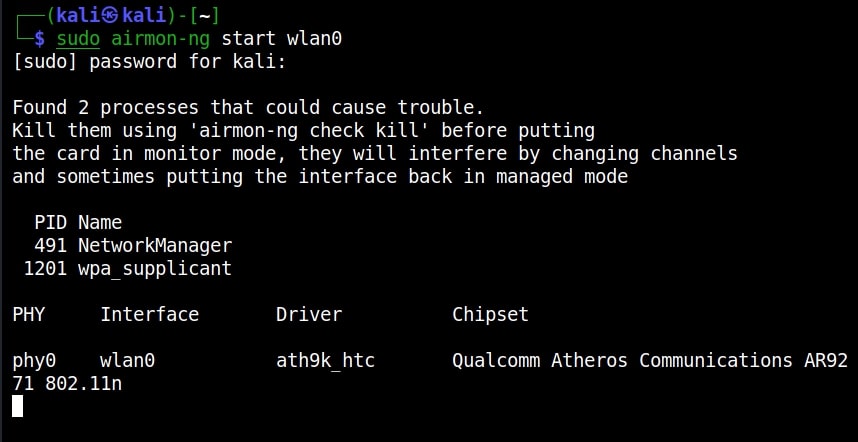
Let’s see how this tool works. For this, we will be using Kali Linux, as this tool is available by default in its repositories. We will also be needing a wireless adapter that can monitor wireless packets. I am using ALFA AWVS036NHA adapter for this article. Just like any wireless password cracking method, Wifite needs monitor mode to be enabled on the wireless interface as shown below. However, it automatically enables this monitor mode but if it fails to enable it, you can enable it manually as shown below.
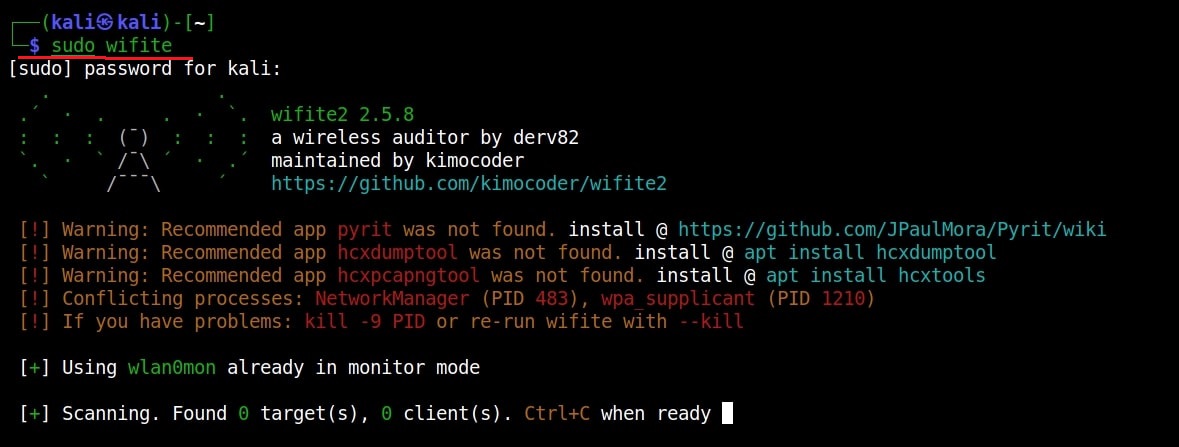
Let’s see how Wifite works in cracking WEP, WPA and WPS enabled networks. Once the interface is in monitor mode, open a terminal and start Wifite using command as shown below.
sudo wifite
Cracking WEP
It starts displaying all the wireless networks in your vicinity as shown below.
Let’s target the Access Point “Hack_Me_If_You_Can” which has WEP security enabled. Once you select the access point you want to target, hit CTRl + C and enter the number of that access point. In our case it is “1”.
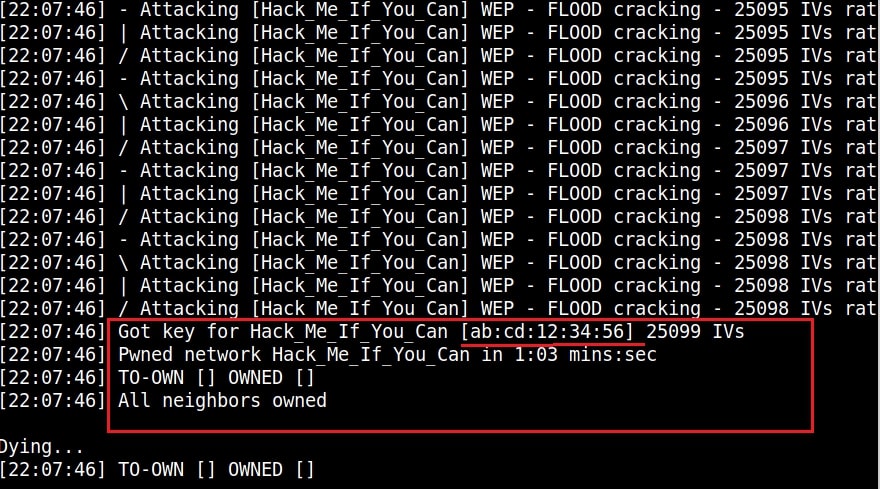
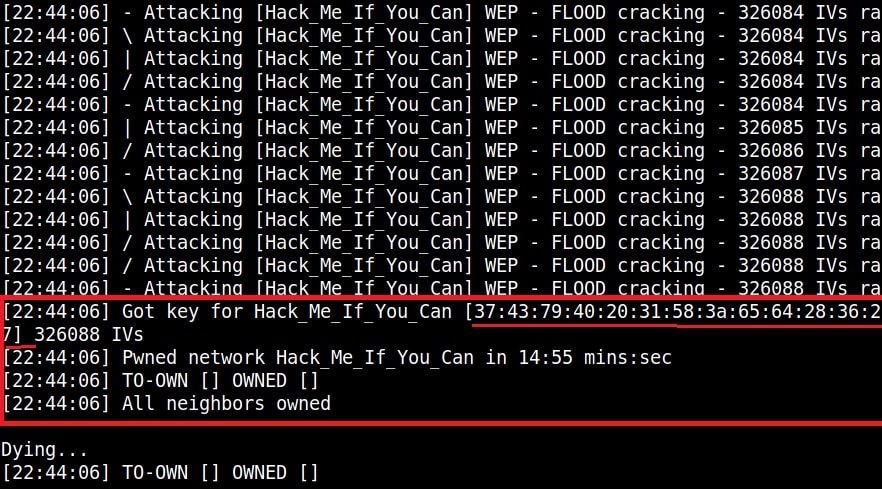
As soon as you enter the number of that access point, Wifite tries out various attacks against the access point and grabs its password as shown below.
Cracking WPA2
WEP is too easy. Let’s see how it fares in cracking WPA password. We start Wifite as shown above. Our target is once again “Hack_Me_If_You_Can”. However, as you can see it is secured with WPA now.
It starts attacking employing various methods as shown below.
Cracking WPS pin
Now, let’s target a Access Point with WPS pin enabled.
Want to Learn Ethical Hacking Step-by-Step?
If you’re serious about learning cybersecurity, a structured roadmap makes the journey much easier.
Download The Beginner Ethical Hacker Starter Kit (2026 Edition) and discover:
✔ The ethical hacking learning path ✔ Beginner-friendly security concepts ✔ Essential tools ethical hackers use ✔ The most common vulnerabilities explained
Well, If you get WPA PASSPHRASE as soon as you crack WPS pin, you are lucky. However, sometimes the WPS pin is cracked but the WPA-PSK key is not shown. For example, see the image below.
In the above image, we can clearly see that the Wifite cracked WPS pin successfully but failed to retrieve the WPA passphrase. To get the WPA passphrase in such cases, open a new terminal and type the command shown below.
sudo systemctl stop NetworkManager
Then using your favorite text editor, open the file “wpa_supplicant.conf” located in /etc directory.
You should see the contents of the file as shown below.
If there is any data more than this, delete it and just leave the above three lines. Then, run the command shown below.
Leave this terminal open and open another new terminal window and run the command as shown below.
sudo wpa_cli
It goes into interactive mode.
While interactive mode is active, type the following command as shown below.
status
Many events will take place but what we are looking for is an event that says “connected”. Once that happens, check the “wpa_supplicant.conf” file and you should be seeing WPA-PSK passphrase of the wireless network as shown below.
As you can see, Wifite is successful in cracking WEP, WPA and WPS keys automatically without running any complex commands . Next, learn about Evil Twin attack on wireless networks.
Start Your Ethical Hacking Journey Today
Learning cybersecurity can feel overwhelming at first. The best way to start is with a clear roadmap and the right resources.
Download The Beginner Ethical Hacker Starter Kit (2026 Edition) and get instant access to:
Ethical Hacking Fundamentals A beginner cybersecurity learning roadmap Essential hacking tools every beginner should know Common vulnerabilities explained simply
Hello aspiring ethical hackers. In our previous article, WiFi hacking, you have learnt all the basics you need to learn about auditing wireless networks. In this article, you will learn about a tool Besside -ng, which can automatically crack WEP passwords and log WPA handshakes. This tool authored by Andrea Bittau is made in the line of another tool, Wesside-ng which can only crack WEP passwords automatically.
New to Ethical Hacking?
Start your journey with The Beginner Ethical Hacker Starter Kit (2026 Edition).
Let’s see how this tool works. For this we will be using Kali Linux as Besside-ng is installed by default on it. We will also need a Wifi adapter that allows packet monitoring. For this, we will be using ALFA AWVS036NHA wifi adapter.
Before you run Besside-ng, monitor mode should be enabled on the wireless interface as shown below.
Once monitor mode is enabled on the wireless interface, we can run Besside-ng as shown below to automatically crack all the WEP passwords and log WPA handshakes.
If you want to crack the WEP password of a single Access Point, the command is as shown below
where “-c” is used to specify the channel the Wireless Access Point is running on and “-b” is the –bssid of the Wi -Fi access point.
Besside-ng automatically starts creating traffic and cracking the WEP key as shown below.
As you can see in the above image, it cracked a 64bit ASCII WEP key in less than 1 minute. How about 64 bit hexadecimal WEP key that’s a bit complex.
If you’re serious about learning cybersecurity, a structured roadmap makes the journey much easier.
Download The Beginner Ethical Hacker Starter Kit (2026 Edition) and discover:
✔ The ethical hacking learning path ✔ Beginner-friendly security concepts ✔ Essential tools ethical hackers use ✔ The most common vulnerabilities explained
It took just 45 seconds to crack the password. This time, I generated a complex WEP key and tried again. The key was cracked in around 15 minutes as shown below.
Just like cracking WEP, even Cracking WPA can be automated using tool besside-ng. To do this, we run besside-ng on the target wi-fi network.
Besside-ng automatically captures WPA handshake. Then all we have to do is run aircrack on the wpa.cap file.
The WPA key has been cracked successfully. Next, learn about Wifite, which can automatically crack WEP, WPA and WPS.
Start Your Ethical Hacking Journey Today
Learning cybersecurity can feel overwhelming at first. The best way to start is with a clear roadmap and the right resources.
Download The Beginner Ethical Hacker Starter Kit (2026 Edition) and get instant access to:
Ethical Hacking Fundamentals A beginner cybersecurity learning roadmap Essential hacking tools every beginner should know Common vulnerabilities explained simply
Good Evening friends. Today we will learn how to perform Wifi DOS attack on Wifi networks. We will use a tool called mdk3 which is inbuilt in Kali Linux and we need a compatible wifi adapter for this attack. A Dos attack stands for Denial Of Service attack. If all is set, open a terminal and type command “mdk3” to see various attacks available in this tool as shown below.
New to Ethical Hacking?
Start your journey with The Beginner Ethical Hacker Starter Kit (2026 Edition).
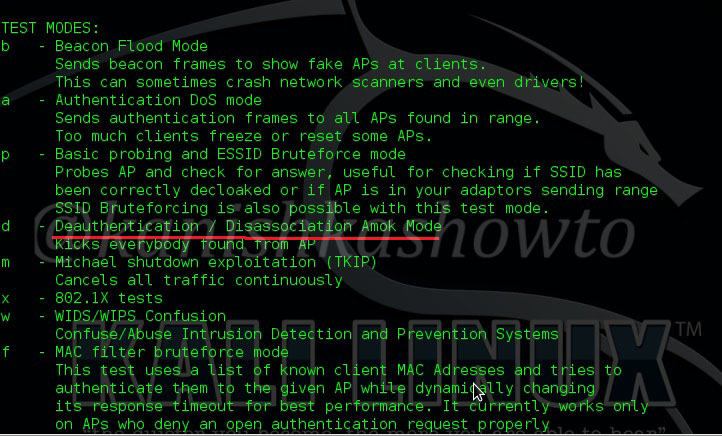
Scroll down to see more options. We can see the various testing modes available in this tool. We will use the deauthentication attack for this Wifi DOS. As the name implies, this attack disconnects all clients connected to the wifi network.
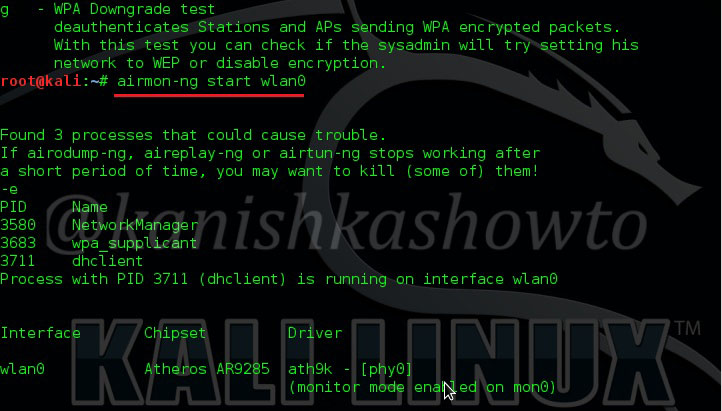
Before we start our attack, we have to start our adapter in monitor mode. Type command “airmon-ng start wlan0“. (where wlan0 is your wifi interface and may differ for you).
Want to Learn Ethical Hacking Step-by-Step?
If you’re serious about learning cybersecurity, a structured roadmap makes the journey much easier.
Download The Beginner Ethical Hacker Starter Kit (2026 Edition) and discover:
✔ The ethical hacking learning path ✔ Beginner-friendly security concepts ✔ Essential tools ethical hackers use ✔ The most common vulnerabilities explained
Then type command “mdk3 mon0 d -i <ESSID name>” and you will see the tool disconnecting all the clients connected to the Wifi network you are targeting. Here,
“mon0” – is the interface where monitor mode has been started. This can be different for you.
Learning cybersecurity can feel overwhelming at first. The best way to start is with a clear roadmap and the right resources.
Download The Beginner Ethical Hacker Starter Kit (2026 Edition) and get instant access to:
Ethical Hacking Fundamentals A beginner cybersecurity learning roadmap Essential hacking tools every beginner should know Common vulnerabilities explained simply