Imagine logging in to a website using a username and password. You expect those credentials to remain private. But what happens if the application sends them across a network without proper encryption?
In certain circumstances, someone who can observe that network traffic may be able to read the credentials. This is the basic idea behind password sniffing.
For cybersecurity beginners, understanding password sniffing is important because it explains why secure protocols, encrypted connections and properly configured networks are essential for protecting accounts. In this guide, we’ll explore what password sniffing is, how it works, which protocols are vulnerable, how security professionals study network traffic and how organizations can protect their users.
NEW TO ETHICAL HACKING?
Start your ethical hacking journey with our FREE Beginner Ethical Hacker Starter Kit (2026 Edition).
Get beginner-friendly guidance to understand the fundamentals of ethical hacking and take your first steps into cybersecurity.

What is Password sniffing?
Password sniffing is the process of capturing and examining network traffic to identify passwords or other authentication information transmitted between systems. A network sniffer is a tool that captures packets traveling through a network interface. Security professionals use packet analyzers to troubleshoot networks, investigate incidents and identify security problems.

However, when authentication data travels over an unencrypted connection, captured packets may reveal sensitive information. For example, if a legacy application transmits a password in plaintext, someone with access to the relevant traffic may be able to read it.
To understand how password sniffing works, beginners must first understand how devices exchange information, how network protocols operate and how data travels between systems. These concepts are covered in our networking fundamentals blogpost.
Important: Capturing network traffic should only be performed on networks and systems you own or have explicit permission to assess.

How Does Password Sniffing Work?
When two devices communicate over a network, they exchange information in the form of packets. Depending on the application and protocol, these packets may contain requests, responses, metadata and sometimes authentication information.
A simplified password-sniffing scenario follows these stages:
- Network communication: A user connects to a service and attempts to authenticate.
- Packet transmission: The client and server exchange network packets.
- Traffic capture: An authorized analyst or an attacker with suitable network access captures relevant traffic.
- Protocol analysis: The captured packets are examined to determine which protocol is being used and what information is visible.
- Credential exposure: If sensitive authentication data was transmitted without adequate protection, it may be exposed.
Modern networks introduce important limitations. A device connected to a switched Ethernet network generally cannot automatically observe every other device’s unicast traffic. Wireless encryption, network segmentation, endpoint protections and encrypted application protocols can also limit what an observer can see.
Password sniffing is therefore not a magical technique that reveals every password on a network.

Why Are Unencrypted Protocols Dangerous?
The security of a connection depends partly on the protocol used to carry the information. Older protocols were sometimes designed without the encryption protections expected today.
Examples include:
- HTTP: Ordinary HTTP does not encrypt application data in transit.
- FTP: Traditional FTP does not protect usernames and passwords with transport encryption.
- Telnet: Telnet generally transmits session information without encryption.
- POP3 or IMAP without TLS: Email authentication and content may be exposed when secure transport is not enabled.
If credentials travel across an observable network using these insecure configurations, they may be readable in captured traffic. By contrast, properly configured HTTPS, SSH and TLS-protected email protocols encrypt data in transit.
Encryption protects sensitive information while it travels across networks, making intercepted traffic significantly harder to read. Understanding encryption and hashing helps explain how modern systems protect credentials and other sensitive data.

Password Sniffing vs Password Cracking
These two concepts are often confused but they are different. Password sniffing involves capturing network traffic and examining it for exposed authentication information. Password cracking involves attempting to recover a password from a password hash or another password-related representation, usually by testing candidate passwords.
Consider two scenarios. In the first, an application transmits a password in plaintext. An observer who can capture the relevant traffic may be able to read it directly. In the second, a security tester obtains a password hash from an authorized test environment. The tester may evaluate its resistance to guessing using an approved password-auditing process.
The first scenario concerns network communication. The second concerns password recovery and authentication security. Both demonstrate why organizations must protect credentials throughout their lifecycle.

What Tools Are Used to Analyze Network Traffic?
Cybersecurity professionals use packet-analysis tools to understand how systems communicate.
Captured network packets can be examined to understand the information exchanged between devices and determine whether sensitive data is exposed. Wireshark packet analysis helps security professionals investigate these communications.
tcpdump is a command-line packet analyzer available on many Unix-like systems. It is useful for inspecting network traffic and investigating communication problems.
Tshark:
TShark is Wireshark’s command-line analysis utility. It supports packet capture and protocol analysis in scripted or terminal-based workflows. These tools do not automatically reveal passwords. What they can show depends on the captured traffic, available permissions, protocol configuration, encryption and the quality of the capture.
Beginners should start with saved sample captures or traffic generated inside an isolated lab.

Can Password Sniffing Work Against HTTPS?
Properly configured HTTPS encrypts application data in transit using TLS. An observer capturing ordinary HTTPS traffic may see information such as IP addresses, connection timing, packet sizes and some connection metadata, depending on the environment. However, the actual application content—including a password submitted through the encrypted connection—is normally protected from passive packet inspection.
HTTPS is not a guarantee against every type of credential theft. Credentials may still be compromised through phishing, malware, compromised endpoints, insecure application design, malicious browser extensions or other attacks. That is why organizations need multiple layers of security rather than relying on encryption alone.

How Can Beginners Practice Password Sniffing Safely?
You can learn the underlying concepts without capturing anyone else’s credentials. Start with a controlled network laboratory using your own devices, an isolated virtual network and sample packet captures. Beginners can develop a better understanding of packet capture and credential exposure by practising these concepts in hands-on ethical hacking labs using controlled test environments and sample traffic.
Linux provides several built-in networking utilities that help security professionals inspect interfaces, examine active connections and investigate network activity. Understanding the Linux command-line environment makes these tasks easier.
A safe learning path includes:
- Learn packet fundamentals: Understand Ethernet frames, IP packets, TCP, UDP, DNS and HTTP.
- Explore Wireshark: Open a sample capture and identify the protocols and communication endpoints.
- Compare HTTP and HTTPS: Examine the difference between readable application data in a deliberately constructed HTTP lab and encrypted HTTPS traffic.
- Study authentication flows: Learn how applications handle login requests and why secure transport matters.
- Document your findings: Record what is visible, what remains encrypted and what security controls reduce exposure.
Use synthetic credentials that have no connection to real accounts. Keep testing within your lab and do not collect passwords belonging to other people.
Let’s see password sniffing practically. For this, we will be using three virtual machines which are on the same network.
They are Metasploitable 2 which acts as server, Ubuntu which acts as client and of course Kali as our Attacker system. As you can see, the IP addresses of the three machines are
Metasploitable2 – 192.168.64.128 (Server)
Ubuntu – 192.168.64.132 (Client)
Kali – 192.168.64.132 (Attacker system)


Let’s start Wireshark on the attacker machine (on interface eth0). It starts capturing packets on the network.


The reason why we are using Metasploitable 2 as our target is that it already has many services that we need for this tutorial preinstalled. The first service we will be using is Telnet. It is a protocol that is used for remote access on another system. On most Linux systems, Telnet clients are installed by default.
READY TO BUILD YOUR ETHICAL HACKING FOUNDATIONS?
Go beyond the basics. Develop the essential knowledge every aspiring ethical hacker needs.
Your learning package includes:
Networking Fundamentals
Linux Fundamentals
Windows Fundamentals
Web Fundamentals
Command Line Essentials
Virtual Labs
$1 INTRODUCTORY TRIAL
6 Foundation Resources + Full Magazine Access
Trial terms apply. Post-trial subscription billing is manual.
So we open a terminal and log into the Metasploitable 2 Telnet server with the credentials shown below.


The login is successful. Now on the Attacker system, we can observe the traffic being captured by the Wireshark sniffer. You can see data related to Telnet being transferred.

We can Right Click on that Telnet data stream and click on “Follow” as shown below.

In the sub menu that opens when we click on the only option “TCP stream” a new window opens that will show only the TCP stream.

In this window, you can see the credentials we just used to login into the target system. Telnet is a plain text protocol which transfers credentials and other sensitive data in plain text. This allows sniffing of data. That’s the reason it has been mostly replaced by Secure Shell (SSH) nowadays.
Let’s see another protocol. File Transfer Protocol (FTP) is a protocol that is used to share files. It is another protocol that transfers data in plain text. From our client, we login into the FTP server with credentials “anonymous:anonymous”.
Anonymous account in FTP is used to share files to anyone without the need for them to know credentials.

On the Wireshark interface, you can see FTP data being transferred.

We can view the TCP stream

This once again shows credentials.

Instead of observing LIVE data transfer and following TCP stream from there, we can also just save the packet capture file and open the file later for analysis.
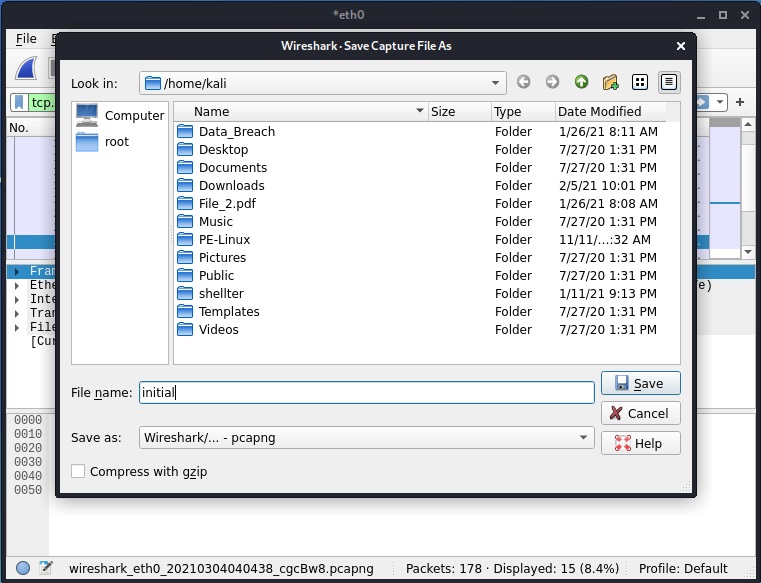

After opening the file, we can search for specific terms as shown below.

Then following the TCP stream gives us the credentials.

Seeing the vulnerability due to sniffing, many protocols have been replaced with secure protocols which transfer data in encrypted form instead of plain text form. These are given below.


How Can Organizations Prevent Password Sniffing?
1. Enforce HTTPS and TLS
Use HTTPS for web applications and properly configured TLS for other services that transmit authentication data. Redirect users to secure connections where appropriate and avoid insecure fallback mechanisms.
2. Disable Insecure Protocols
Replace Telnet with SSH and traditional FTP with secure alternatives such as SFTP or properly configured FTPS. Disable legacy services that are no longer required.
3. Use a VPN on Untrusted Networks
A properly configured VPN can protect traffic between a device and the VPN endpoint on an untrusted network. It does not replace HTTPS or protect against a compromised endpoint, so use it as one layer of defense.
4. Enable Multi-Factor Authentication
Multi-factor authentication (MFA) adds another authentication requirement beyond a password. Phishing-resistant options, such as passkeys or security keys, can offer stronger protection against credential theft.

5. Secure Wi-Fi Networks
Use modern Wi-Fi security, strong administrative credentials, updated access points and appropriate network segmentation. Public Wi-Fi users should avoid ignoring certificate warnings or entering credentials into suspicious websites.
6. Monitor and Update Systems
Monitor network activity for unexpected protocols and suspicious authentication behavior. Keep operating systems, applications and network devices updated and investigate unnecessary plaintext traffic.

Conclusion
Password sniffing shows how the security of a password depends on more than its length or complexity. A strong password can still be exposed if an application transmits it insecurely. For beginners, the most useful lesson is to understand how network protocols work, how encryption protects data in transit and how packet-analysis tools help identify security weaknesses.
Start with networking fundamentals and Wireshark, use authorized lab traffic and learn to distinguish encrypted communication from exposed data.
For ethical hackers, this knowledge supports responsible security assessments. For defenders, it helps identify insecure protocols before attackers can exploit them. The goal is not simply to learn how credentials can be captured. It is to understand how to prevent that exposure and build safer systems.
YOUR ETHICAL HACKING JOURNEY STARTS HERE!
Not sure where to begin? Download our FREE 18-page Beginner Ethical Hacker Starter Kit (2026 Edition).
Take your first step towards building practical cybersecurity knowledge.