Hello, aspiring ethical hackers. In our previous blogpost, you learnt what is cybersecurity. In this blogpost, you will learn about network security which is one of the branches of cybersecurity.
New to Ethical Hacking?
Start your journey with The Beginner Ethical Hacker Starter Kit (2026 Edition).
Network security is the practice of protecting a computer network from cyber attacks like unauthorized access, insider threats, malware and other advanced threats. Network security includes various technologies, processes, tools and policies etc.
Different security technologies that are used in an organization to protect the network against cyber-attacks. Various devices and software come into play while protecting the organization from a variety of threats. Let’s learn about each of them.
1. Firewall:
A firewall is the most common defensive measure that is used in organizations against cyber attacks. It can be considered the first layer of defense against hackers. Just as its name implies, it works as a wall between two networks thus preventing malicious traffic from entering the network of the organization. Learn more about firewalls here.
2. Anti-Malware:
In one of our previous articles, you learnt about virus and malware. Anti virus protects the computers and other devices in the network from this malicious software. Learn more about Antivirus.
An Intrusion Detection System (IDS) monitors the entire traffic of the network and as soon as it sees any traffic that it considers malicious, it raises an alert. Learn more about IDS.
Want to Learn Ethical Hacking Step-by-Step?
If you’re serious about learning cybersecurity, a structured roadmap makes the journey much easier.
Download The Beginner Ethical Hacker Starter Kit (2026 Edition) and discover:
✔ The ethical hacking learning path ✔ Beginner-friendly security concepts ✔ Essential tools ethical hackers use ✔ The most common vulnerabilities explained
An Intrusion Prevention System (IPS) is one step above IDS. It performs the functions just like an IDS, but whenever it detects malicious traffic, it tries to prevent the connection by dropping the packets. Learn more about Intrusion Prevention System (IPS).
Sometimes, organizations need to understand what hackers would be interested in once they are in their network. A honeypot serves this purpose. A honeypot acts as a juicy target and attracts towards thus preventing them from hacking anything in the original network. A honeypot designed with a lot of vulnerabilities that can keep the hackers constantly interested. Learn more about honeypots.
7. Demilitarized Zone (DMZ):
A demilitarized zone is a network used to add an external layer of security to the organization’s network. Usually placed at the perimeter, it has access to the external network. It usually contains an external facing service.
8. Data-Loss Prevention (DLP):
Data Loss Prevention (DLP) ensures that no confidential data is being sent out of the organization’s network. Confidential data refers to data that once exposed to the internet can harm the security of the network.
A security Incident & Event Manager raises an alert if it detects any malicious activity. That’s all about the various security technologies.
Start Your Ethical Hacking Journey Today
Learning cybersecurity can feel overwhelming at first. The best way to start is with a clear roadmap and the right resources.
Download The Beginner Ethical Hacker Starter Kit (2026 Edition) and get instant access to:
Ethical Hacking Fundamentals A beginner cybersecurity learning roadmap Essential hacking tools every beginner should know Common vulnerabilities explained simply
Hello aspiring Ethical Hackers. In this blogpost, you will learn about steganography. Before you learn what is it, you need to learn why are we learning about it. In Feb 2023, Red Eyes Hacking Group (APT37) used a jpg image as attachment in one of their spear phishing email. When victims clicked on this image, it triggered an exploit that ran shellcode on the victim’s computer to download and execute a malicious payload that is stored within the jpg file mentioned above. But how was the malicious payload was hidden inside the jpg image?
New to Ethical Hacking?
Start your journey with The Beginner Ethical Hacker Starter Kit (2026 Edition).
It is an art or technique of hiding secret or any precious information inside something that looks common & ordinary. This information is hidden in such a manner that its presence is not evident to the human inspection. The word stegano graphy came from Greek word steganographic, that is combination of words steganos (meaning hidden or concealed) and graphia (writing).
In ancient and medieval times, kings used steganography to forward messages secretly. Greeks were the fist to use it. Coming to modern times, hackers are using it to hide malicious code in images, text, files, audio, video film and any other medium that looks benign.
Types of Steganography
There are five types of stegano graphy. They are,
Text stegano graphy
Image stegano graphy
Video stegano graphy
Audio stegano graphy
Network Stegano graphy
1. Text Steganography::
In text steganography, the secret information is hidden in a piece of text. For example, let’s say a text contains “Indians love Unity”. This may look like an ordinary or normal text. But just take the first letter of these three words. That becomes “ILU” a shortcut for I Love You message used by youngsters.
2. Image Stegano graphy:
As you might have already expected, when the secret information is hidden in an image (digital image) it is known as Image steganography.
Want to Learn Ethical Hacking Step-by-Step?
If you’re serious about learning cybersecurity, a structured roadmap makes the journey much easier.
Download The Beginner Ethical Hacker Starter Kit (2026 Edition) and discover:
✔ The ethical hacking learning path ✔ Beginner-friendly security concepts ✔ Essential tools ethical hackers use ✔ The most common vulnerabilities explained
If the information we want to hide is hidden in an audio, it is known as audio steganography. Humans can hear sound that only contains certain frequencies. So, by altering the properties of audio like frequency, amplitude etc. secret messages can be hidden. However, to be able to receive and understand this secret information, the receiver needs to have smart listening devices to decipher the hidden information.
4. Video Steganography:
If the secret information is hidden in a video, it is called video steganography. A video is simply a representation of a sequence of consecutive images. So, we can say that this is an advanced version of Image steganography.
5. Network Steganography:
Considered to be more advanced and practically useful to Black Hat Hackers, in Network steganography information is hidden in network traffic. For example, it can be hidden in the TCP/IP headers etc.
Examples of Steganography attacks in hacking
In September 2022, researchers at ESET discovered a previously unknown Threat actor they named Worok hiding malicious payload in PNG files.
In 2019, researchers at Symantec observed a Russian cybersecurity group waterbug (also known as just the malicious) delivering a publicly known backdoor by hiding it in a WAV file.
In the same year, security researchers at Cylance observed a hacking campaign that was delivering XMRIG Monero CPU miner by hiding them in WAV files.
PLATINUM hacker group, that usually targets Governments of South Asia and South East Asia, embedded their malware commands in the HTML code of a website. They achieved this by encoding malware commands in a specific sequence of “TAB” and “SPACE” bar.
In future steganography is going to increase in cyber security.
Start Your Ethical Hacking Journey Today
Learning cybersecurity can feel overwhelming at first. The best way to start is with a clear roadmap and the right resources.
Download The Beginner Ethical Hacker Starter Kit (2026 Edition) and get instant access to:
Ethical Hacking Fundamentals A beginner cybersecurity learning roadmap Essential hacking tools every beginner should know Common vulnerabilities explained simply
Computer viruses are among the most widely recognized cybersecurity threats in the world. Even people with little technical knowledge have heard the phrase, “My computer has a virus.” However, the term is often used to describe many different types of malicious software. In cybersecurity, a computer virus has a more specific meaning.
A virus is a type of malicious software, commonly called malware that attaches itself to a legitimate file or program and can spread when that infected file is executed or shared. Understanding computer viruses is important for anyone learning cybersecurity. Viruses help beginners understand how malicious software can affect files, applications, operating systems and users.
This guide explains what computer viruses are, how they spread, the different types of viruses, common warning signs, and how users and organizations can protect themselves.
What Is a Computer Virus?
A computer virus is a type of malware designed to replicate by attaching itself to another file, program or document. The virus generally requires some form of execution to become active. For example, an infected file may need to be opened or a compromised program may need to be run. Once active, the virus may attempt to copy itself to other files or systems.
Depending on its design, a computer virus may:
Modify or corrupt files
Disrupt normal system operations
Delete or alter data
Spread to additional files
Cause applications to behave unexpectedly
Create security risks for the affected system
Not every malicious program is technically a virus. For example, worms, Trojans, ransomware, spyware and rootkits are different categories of malware. However, in everyday conversation, people often use the word virus to describe almost any malware infection.
For cybersecurity beginners, understanding this difference is useful because malware categories often spread and behave in different ways.
How Does a Computer Virus Spread?
A virus needs a way to reach a new system and a way to become active. Historically, viruses commonly spread through infected floppy disks and removable media. Today, infections can occur through a variety of digital channels.
Infected Files and Software:
A virus may be attached to an executable program or another file. If a user downloads the file from an untrusted source and runs it, the malicious code may become active. This is why downloading software from official and trusted sources is important.
Email Attachments:
Email attachments can be used to distribute malicious files. An attacker may attempt to disguise a malicious attachment as:
An invoice
A document
A software installer
A report
An image or archive
Unexpected attachments should always be treated carefully, especially if the sender or context seems unusual.
Removable Storage Devices:
USB drives and other removable storage devices can potentially transfer infected files between systems. If an infected file is copied and executed on another computer, the infection may spread. Organizations may use endpoint security controls and device policies to reduce this risk.
Compromised Downloads:
Attackers may distribute malicious software through websites or download sources that appear legitimate. Modified versions of popular software can sometimes contain hidden malicious components. Using official download sources reduces this risk.
Common Types of Computer Viruses
Computer viruses can be categorized according to how they behave and where they attempt to attach themselves.
File-Infector Viruses:
A file-infector virus attaches itself to executable files. When the infected program runs, the malicious code may also execute. The virus may then attempt to infect other compatible files on the system.
Macro Viruses:
Macro viruses are associated with documents that contain macros. Macros can automate tasks inside certain document applications. A malicious macro may attempt to perform unauthorized actions when the document is opened or when macros are enabled. This is why modern office security tools often warn users about macros from untrusted sources.
Boot Sector Viruses:
Boot sector viruses target areas involved in the computer startup process. Historically, these viruses were associated with infected removable storage devices. Although modern systems use different technologies and security protections, boot-related malware remains an important concept when studying the history of cybersecurity threats.
Polymorphic Viruses:
Some viruses are designed to modify aspects of their code as they replicate. The goal is often to make simple detection methods more difficult. For beginners, the important lesson is that malware authors may attempt to change how malicious code appears while preserving its harmful behavior.
Resident Viruses:
A resident virus can remain active in system memory after execution. This may allow it to monitor certain system activities and potentially infect files when they are accessed. Understanding this concept helps beginners recognize that malware does not always operate only when a single infected file is open.
Hello aspiring Ethical Hackers. In this blogpost, you will learn in detail about computer virus. In our previous article on malware, you have read that virus is one type of malicious software.
New to Ethical Hacking?
Start your journey with The Beginner Ethical Hacker Starter Kit (2026 Edition).
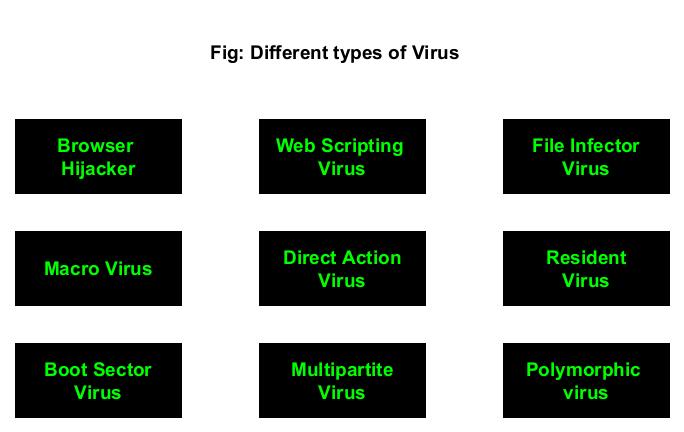
Virus stands for Vital Information Resources Under Seize (VIRUS). Once a computer virus infects any system it tries to seize is resources. Like it’s pathological name sake, a virus attaches itself to an executable or program to propagate or infect computers. VIRUS always requires human action or interaction to infect systems. Let’s now study about different types of Virus and what resources they affect.
Types of Computer VIRUS
1. Browser Hijacker:
Have you ever opened your browser and noticed that all of its settings have changed? These settings include but not restricted to the URL of the home page, favorites and even the default search engine. Well, this is the case of a Browser Hijacker. It is called so because it simply hijacks your browser to alter its settings and also redirect to a phishing site or to display advance.
Browser hijackers are used by hackers to earn some good amount of money. For example, a browser hijacker named CoolWebSearch infected victim’s browsers and redirected the homepage and search results to the links the hackers wanted. Every time a victim clicked on these links, the hacker was paid money.
Want to Learn Ethical Hacking Step-by-Step?
If you’re serious about learning cybersecurity, a structured roadmap makes the journey much easier.
Download The Beginner Ethical Hacker Starter Kit (2026 Edition) and discover:
✔ The ethical hacking learning path ✔ Beginner-friendly security concepts ✔ Essential tools ethical hackers use ✔ The most common vulnerabilities explained
A web scripting is a virus that exploits vulnerabilities in browser to infect web pages or websites and inject malicious code. This virus is useful to send spam or for stealing cookies.
3. File Infector virus:
One of the most common viruses, file infector virus infects files and copies itself into other executable programs such as .COM and EXE files. Some file infecting viruses infect critical system files too thus affecting the operating system.
4. Macro virus:
Macro virus is a virus that is written in the language of Microsoft Office macros or Excel Macros. They are embedded into a Word document on Excel file
5. Direct Action virus:
Also known as Non-resident virus, this type of virus directly connects itself to executables like EXE and COM file. This virus is also known as Non-resident Virus as it doesn’t install itself on the target system. Direct Action Virus becomes active only when the victim executes the file.
6. Resident virus:
Resident virus install itself in the memory to the system and then from there, infects other files while they are opened by the users.
7. Boot Sector virus:
This type of virus infects the Master Boot Sector of the hard disk or a USB drive. Master Boots Record (MBR) is the boot sector that is located at the very beginning of partition table. It contains information about operating system’s location and how it can be booted. Once this section is infected, the infected system will face bootup problems etc.
8. Multipartite virus:
A virus that uses multiple methods to infect the target system is known as multipartite virus.
9. Polymorphic virus:
A polymorphic virus or metamorphic virus is a virus that constantly changes its appearance or signature files to avoid detection.
Start Your Ethical Hacking Journey Today
Learning cybersecurity can feel overwhelming at first. The best way to start is with a clear roadmap and the right resources.
Download The Beginner Ethical Hacker Starter Kit (2026 Edition) and get instant access to:
Ethical Hacking Fundamentals A beginner cybersecurity learning roadmap Essential hacking tools every beginner should know Common vulnerabilities explained simply
Malware is one of the most important concepts to understand when learning cybersecurity. Whether you are interested in ethical hacking, penetration testing, network security or defensive cybersecurity, you will eventually encounter the term malware.
Malware can affect personal computers, mobile devices, servers and even large enterprise networks. Understanding what malware is and how it works at a high level can help beginners recognize cyber threats and understand why security controls are important.
This beginner’s guide explains what malware is, the major types of malware, how malware can spread, warning signs of infection and basic ways individuals and organizations can reduce their risk.
New to Ethical Hacking?
Start your journey with The Beginner Ethical Hacker Starter Kit (2026 Edition).
Malware is short for malicious software. It is software designed to perform harmful, unwanted or unauthorized actions on a computer system, network or device. The exact behavior of malware can vary significantly. Some malicious programs are designed to steal information, while others may disrupt systems, spy on activity, damage data or give an attacker unauthorized access.
Malware is not one single type of threat. It is a broad category that includes several different forms of malicious software. Understanding these categories is an important first step for anyone learning cybersecurity.
Common Types of Malware
1. Viruses
A computer virus is malicious code that can attach itself to legitimate files or programs. Traditionally, viruses spread when an infected file is executed or shared with another system.
A virus may be capable of:
Modifying files
Disrupting applications
Damaging data
Spreading to other systems
Modern cybersecurity discussions often use the word “virus” casually to describe any type of malware, but technically, a virus is only one category of malicious software.
According to Discovery, the first virus is the Creeper program. It was created by Bob Thomas in 1971. It was actually designed as a security test to see if a self-replicating program will be successful. The function of Creeper was to just display a simple message on computer if infected.
The most popular (or should I say unpopular) virus should be ILOVEYOU virus. Released in 2000, ILOVEYOU infected over ten million Windows computers. It started spreading as an email message with subject line “I LOVE YOU” and contained an attachment with name “LOVE-LETTER-FOR-YOU.TXT.VBS. When the recipient clicked on this attachment, a Visual Basic script activated and over wrote files on the infected system. Then, it sent itself to all the email addresses in the Windows Address Book. It is estimated that the losses infected by this simple virus were at least $15 billion.
2. Worms
A worm is malware capable of spreading across systems or networks without necessarily requiring a user to manually performing an action (like sharing an infected file). Worms can become particularly dangerous because automated spreading can allow an infection to affect many systems quickly.
A worm may exploit weaknesses in:
Network services
Unpatched software
Insecure configurations
This is one reason why regular patching and network security are important.
Morris worm is considered to be the first worm to spread over the internet. It was created by Robert Tappan Morris and it caused a loss of over $100,000 and $10,000,000. It infected over 2000 computers within 15 hours. Morris worm spread by exploiting vulnerabilities like holes in the debug mode of the Unix send mail program, a buffer overflow vulnerability in finger network service. Rexec and Rsh accounts with weak or no password at all.
The most unpopular worm should definitely be Stuxnet. Released in 2010 and accused of sabotaging nuclear program of Iran, Stuxnet was designed to target programmable logic controllers (PLCs). These PLC’s allow automation of electromechanical process used by control machines and industrial processes (for example, gas centrifuge that are used to separate nuclear material). Stuxnet spread by exploiting 4 zero-day vulnerabilities in Siemens setup7 software installed on Windows systems. Stuxnet infected almost over 2,00,000 computers and destroyed at least 100 machines.
3. Trojans
A Trojan or Trojan horse, is malicious software that attempts to appear legitimate or harmless.
A user might believe they are downloading:
A useful application
A document
A game
A software update
But the file may contain malicious functionality. The important lesson is that software should be downloaded from trusted and verified sources whenever possible. The name Trojan is a reference to the Trojan horse (the large wooden horse) of Trojan war assumed by Trojans as gift given by Greeks to Troy. However, when the horse was let into the kingdom, Greek soldiers hiding inside the horse came out and ransacked Troy (you should watch Troy movie).
Just like viruses, Trojans also need victims to click on Trojan to be activated and most users fall victim to trojans thinking that they are genuine files. ANIMAL, a program released in 1975 is generally considered the world’s first Trojan. It fooled victims by presenting itself as a simple game of 20 questions. When user clicked on it, it copied itself to shared directories to be found by other victims.
According to me, the most dangerous Trojan was Zeus. Zeus is a banking Trojan used to steal banking information. It is spread by drive by downloads and phishing in 2003. It is estimated that Zeus infected over 74,000 FTP accounts.
4. Ransomware
Ransomware is malware designed to prevent normal access to data or systems, often by encrypting files. The attacker may then demand payment in exchange for restoring access. Ransomware incidents can affect individuals, businesses, hospitals, schools and other organizations.
The first known ransomware was AIDS Trojan. It’s payload hid the files on the victim’s hard drive and encrypted their names. The most dangerous & popular ransomware attack was WannaCry in 2017. WannaCry ransomware spread by exploiting EternalBlue vulnerability and it infected over 2,30,000 computers within one day.
Strong backups, security updates, access controls and user awareness can help reduce the impact of ransomware incidents.
5. Spyware
Spyware is designed to secretly collect information from a device or user. Depending on its capabilities, spyware may attempt to monitor:
Browsing activity
User behavior
Device information
Other sensitive information
The best protection includes using trusted software, keeping devices updated and paying attention to unusual behavior.
The most popular spyware seen recently should be Pegasus spyware. This spyware developed by Israeli cyber arms firm NSO Group installs not just covertly but remotely on mobile phones running IOS and Android and that too using a zero-click exploit (an exploit that doesn’t need any user action at all). Once installed on a device, Pegasus can read text messages, snoop on calls, collect credentials, track location of the device, access device’s cameras and microphone and harvest information from apps installed on the target device.
Want to Learn Ethical Hacking Step-by-Step?
If you’re serious about learning cybersecurity, a structured roadmap makes the journey much easier.
Download The Beginner Ethical Hacker Starter Kit (2026 Edition) and discover:
✔ The ethical hacking learning path ✔ Beginner-friendly security concepts ✔ Essential tools ethical hackers use ✔ The most common vulnerabilities explained
Adware displays unwanted advertising or modifies the user’s browsing experience. Not all ad-supported software is necessarily malware. The difference often depends on whether the software was installed with informed user consent and how it behaves.
Malicious adware may:
Display intrusive advertisements
Redirect browsers
Track user activity
Change browser settings
7. Keyloggers
Keylogger is a malicious software that records keystrokes a user types into computer or mobiles. The first keylogger used in real world was allegedly distributed with Grand Theft Auto V mod in 2015. Recently, a keylogger named Snake keylogger was detected being distributed with Microsoft Excel sample. Snake keylogger first appeared in late 2020.
8. Backdoors
A backdoor is a type of malware that provides access to a system bypassing normal security measures that usually prevent access. For example, if you can access a system without providing any login or need of credentials, you have a Backdoor access. Usually, hackers install backdoor after gaining complete access to the system to have unhindered and continuous access in future.
In 1998, a U.S hacker group “Cult of the Dead cow” designed a backdoor named “Back Orifice” that enables a user to control a computer remotely. In 2014, multiple backdoors were detected in WordPress. These backdoors were WordPress plugins with an obfuscated JavaScript code.
9. Rootkits
A rootkit is designed to hide malicious activity or provide persistent unauthorized access. Rootkits can be particularly difficult to detect because their purpose may include concealing files, processes or other evidence of malicious activity.
It is designed to enable access to a computer in a way that is not usually possible to an authorized user. Simply put, Rootkit gives SYSTEM level access. As if this is not enough, Rootkit is undetectable once installed, unlike other types of malware. The term “Rootkit” is a combination of root (the most privileged account on Unix system and “kit”. This is because rootkits usually give ‘root’ level access to the target system.
The first malicious rootkit appeared in 1999 and it affected Windows NT OS. In 2012, a rootkit named Flame was detected. Flame affected over 80 servers around the world and is considered one of the dangerous rootkits.
For beginners, the key concept is that some malware is designed not only to perform harmful actions but also to avoid detection.
10. Bots
A BOT is a shortcut for Robot and it is an automated piece of code that performs predefined tasks. Malicious Bots as normally used to infect a system and make them a part of a Botnet which can then be used to perform DDOS attacks.
In 2007, a botnet attack called Cutwail attacked Windows systems using a trojan named Pushdo which infected Windows systems to make them part of the Cutwail botnet. This botnet had over 1.5 to 2 million computers. The most famous BOT malware should be MIRAI. MIRAI is designed to infect smart devices that run on ARC processes.
11. Crypto Miner
Crypto mining malware or cryptojacker is a malicious software that targets computer sources and mines crypto currencies like Bitcoin. Cryptominers are rather new in the evolution of malware. Their growth directly grew with the growth in popularity of crypto currencies.
How Does Malware Spread?
Malware can reach systems through many different methods.
Phishing Emails
Attackers may send emails containing malicious attachments or links. These messages often attempt to create urgency or trick the recipient into taking action without thinking carefully.
Malicious Downloads
Downloading software, files or applications from untrusted sources can introduce malware. Fake software downloads and modified applications can appear legitimate.
Vulnerable Software
Outdated or unpatched software may contain known security weaknesses. Attackers may attempt to take advantage of these weaknesses to gain access to a system. This is why security updates are important.
Infected External Devices
Removable storage devices can potentially transfer malicious files between computers. Organizations often use security policies and endpoint controls to reduce this risk.
Compromised Websites
A legitimate website may sometimes become compromised and serve malicious content to visitors. Security software and updated browsers can help reduce exposure to known threats.
Common Signs of Malware Infection
Not every unusual computer problem is caused by malware but certain signs may indicate that a system should be investigated.
Possible warning signs include:
Unusual system slowdowns
Unexpected pop-ups
Unknown applications appearing
Browser settings changing unexpectedly
Unusual network activity
Security software being disabled
Files becoming inaccessible
Unexpected system crashes
These symptoms do not automatically prove that malware is present. However, they may indicate that further investigation is necessary.
How Malware Affects Organizations
For businesses, malware can create much more than a technical problem.
A serious malware incident can affect:
Business operations
Customer information
Financial systems
Employee productivity
Company reputation
For this reason, organizations use multiple security controls rather than relying on a single antivirus product. A modern security strategy may include:
This approach is often described as defense in depth.
How Beginners Can Protect Against Malware
You do not need to be a cybersecurity expert to follow good security practices.
Keep Software Updated
Install security updates for operating systems, browsers and applications. Updates often fix known security weaknesses.
Download Software Carefully
Use official or trusted sources whenever possible. Avoid downloading suspicious files from unknown websites.
Be Careful With Email Attachments
Unexpected attachments and links should be treated carefully. Verify unusual messages before interacting with them.
Use Security Software
Endpoint protection and other security tools can help identify known malicious activity. However, no security product is perfect. Safe user behavior remains important.
Create Backups
Regular backups can reduce the impact of data loss and ransomware incidents. Backups should be protected and periodically tested.
Use Strong Authentication
Strong passwords and multi-factor authentication can help reduce the risk of unauthorized account access.
Beginners interested in cybersecurity may eventually hear about malware analysis. Malware analysis is the process of examining malicious software to understand its behavior and help improve defenses.
Security researchers and analysts may study malware to answer questions such as:
What does it attempt to do?
Which systems does it target?
What indicators might help detect it?
How can defenders reduce the risk?
This is very different from creating or distributing malware. For beginners, it is best to focus on safe analysis concepts, threat detection, prevention and defensive security.
A Beginner Learning Path for Malware
A structured learning path can make malware easier to understand.
Some malware may attempt to hide its presence. Security professionals often rely on multiple sources of evidence.
Believing Antivirus Solves Everything
Security software is important but it is only one layer of protection.
Downloading Security Tools From Untrusted Sources
Cybersecurity-related software should also be downloaded carefully from legitimate sources.
Ignoring Software Updates
Unpatched systems may remain exposed to known security problems.
Trying to Experiment With Real Malware
Beginners should avoid downloading or executing live malware.
Learning resources, simulations, defensive labs and controlled training environments are much safer ways to study malware concepts.
Conclusion
Malware is a broad category of malicious software that can affect individuals, businesses and critical systems. For beginners, the most important goal is not memorizing every malware family or technical term.
Instead, understand the fundamentals. Learn what malware is. Understand the major categories. Know how malware can spread. Recognize common warning signs. Learn basic prevention methods and understand how security professionals detect and respond to malicious activity.
As your cybersecurity knowledge grows, you can explore areas such as malware analysis, threat intelligence, endpoint security, digital forensics and incident response. A strong understanding of malware provides an excellent foundation for the defensive side of cybersecurity and helps you better understand the threats that ethical hackers and security professionals work to identify and prevent.
Start Your Ethical Hacking Journey Today
Learning cybersecurity can feel overwhelming at first. The best way to start is with a clear roadmap and the right resources.
Download The Beginner Ethical Hacker Starter Kit (2026 Edition) and get instant access to:
Ethical Hacking Fundamentals A beginner cybersecurity learning roadmap Essential hacking tools every beginner should know Common vulnerabilities explained simply
When learning cybersecurity, you will quickly encounter vulnerability reports containing numbers such as 5.3, 7.5 or 9.8. These numbers are designed to help security professionals understand how serious a vulnerability might be.
This process is known as vulnerability scoring. For beginners, vulnerability scoring can initially seem complicated. Terms such as CVE, CVSS, severity, exploitability and impact may appear together in security reports.
The good news is that the basic idea is simple. Vulnerability scoring helps security teams estimate the severity of a security weakness so they can prioritize which issues need attention first.
In this guide, we’ll explain vulnerability scoring in simple terms, introduce CVE and CVSS, explain severity levels and show how beginners can learn to interpret vulnerability scores.
New to Ethical Hacking?
Start your journey with The Beginner Ethical Hacker Starter Kit (2026 Edition).
Before understanding vulnerability scoring, you need to understand what a vulnerability is. A vulnerability is a weakness in software, hardware, configuratio on a system that could potentially be used to compromise security.
For example, outdated software might contain a publicly known security weakness. A vulnerability does not automatically mean that a system has been compromised. It simply means that a weakness exists that could potentially create security risk.
What Is Vulnerability Scoring?
Vulnerability scoring is a method of assigning a numerical or categorical rating to a security vulnerability based on characteristics such as its potential impact and exploitability. The purpose is prioritization.
Imagine a security team discovers 500 vulnerabilities across an organization’s infrastructure. It would be difficult to fix all 500 immediately. Instead, the team can use vulnerability scores and other contextual information to determine which issues deserve immediate attention.
What Is CVE?
One of the first terms beginners should understand is CVE. CVE stands for Common Vulnerabilities and Exposures. A CVE identifier provides a standardized reference for a publicly known cybersecurity vulnerability.
A CVE usually looks something like:
CVE-2026-XXXX
The identifier itself does not tell you how dangerous the vulnerability is. It provides a way for security professionals, vendors, researchers and security tools to refer to the same vulnerability consistently. Think of CVE as the identity of a vulnerability, rather than its severity score.
What Is CVSS?
The most widely recognized vulnerability scoring system is CVSS or the Common Vulnerability Scoring System. CVSS provides a standardized method for describing the severity of vulnerabilities.
Scores range from:
0.0 to 10.0
A higher score generally indicates greater severity. However, beginners should remember that a CVSS score is not the same thing as the actual risk to every organization. The importance of a vulnerability depends on the environment in which it exists.
Understanding CVSS Severity Levels
CVSS scores are commonly grouped into four major severity categories. They are,
None:
0.0
No severity is assigned.
Low:
0.1-3.9
The vulnerability generally has relatively limited security impact.
Medium:
4.0-6.9
The vulnerability presents a more significant security concern and may deserve attention depending on the affected system.
High:
7.0-8.9
The vulnerability can represent a serious security risk and generally deserves timely remediation.
Critical:
9.0–10.0
These vulnerabilities represent the highest severity category and often require urgent attention.
However, severity categories should be treated as a starting point rather than the final decision about what an organization should fix first.
What Factors Influence Vulnerability Scores?
CVSS considers several characteristics of a vulnerability. Beginners don’t need to memorize every metric immediately but understanding the major concepts is useful.
Attack Vector:
This describes how an attacker would reach the vulnerable component. For example, a vulnerability that can be exploited remotely across a network may present different characteristics from one requiring local access.
Attack Complexity:
This considers how difficult exploitation may be. A vulnerability requiring complicated conditions may receive a different assessment from one that can be exploited under relatively straightforward conditions.
Privileges Required:
Some vulnerabilities require an attacker to already have an account or certain permissions. Others may not require authentication or existing privileges.
User Interaction:
Some vulnerabilities require a victim to perform an action. Others can potentially be exploited without user interaction.
Confidentiality Impact:
This considers the potential effect on the confidentiality of information. For example, could exploitation allow unauthorized access to sensitive data?
Integrity Impact:
This considers whether exploitation could allow unauthorized modification of information or systems.
Availability Impact:
This considers whether exploitation could affect the availability of a system or service. For example, could it cause a service to become unavailable?
Why a High Score Doesn’t Always Mean “Fix This First”
This is one of the most important lessons for beginners.
Suppose a vulnerability has a CVSS score of 9.8. That sounds extremely serious. But imagine the vulnerable system is an isolated laboratory server with no sensitive data and no connection to important business systems. Now consider another vulnerability with a score of 7.5 affecting an Internet-facing server responsible for an organization’s most important application.
The second vulnerability could deserve immediate attention despite having a lower CVSS score. This is why security teams consider business context, exposure, asset importance and existing controls alongside vulnerability scores.
Want to Learn Ethical Hacking Step-by-Step?
If you’re serious about learning cybersecurity, a structured roadmap makes the journey much easier.
Download The Beginner Ethical Hacker Starter Kit (2026 Edition) and discover:
✔ The ethical hacking learning path ✔ Beginner-friendly security concepts ✔ Essential tools ethical hackers use ✔ The most common vulnerabilities explained
The scanner may identify a vulnerability and associate it with a CVE and CVSS score. The security professional then investigates the finding and determines its relevance to the environment. This human analysis is extremely important.
False Positives
Automated vulnerability scanners aren’t perfect. A scanner might report a vulnerability that doesn’t actually exist because of:
Incorrect version detection
Configuration differences
Missing information
Environmental factors
This is called a false positive. Security professionals should validate important findings before making major decisions.
Vulnerability Prioritization
Once vulnerabilities have been identified and scored, security teams need to decide what to fix first. A simple prioritization model might consider the following things:
1. Severity:
How serious is the vulnerability according to the scoring system?
2. Exposure:
Can the affected system be reached from the Internet or an untrusted network?
3. Asset Importance:
How important is the affected system to the organization?
4. Exploitation Activity:
Is the vulnerability actively being exploited?
5. Remediation Availability:
Is a patch or mitigation available?
Combining these factors produces a much more useful risk picture than looking at the CVSS score alone.
Study publicly documented vulnerabilities and compare:
CVE identifiers
CVSS scores
Severity ratings
Attack characteristics
Potential impact
Recommended remediation
The goal is to learn why a vulnerability receives a particular rating rather than simply memorizing scores.
A Simple Learning Path
If you’re new to vulnerability scoring, follow this progression:
Step 1: Learn what vulnerabilities are.
Step 2: Understand CVE identifiers.
Step 3: Learn the purpose of CVSS.
Step 4: Understand severity categories.
Step 5: Study CVSS metrics.
Step 6: Learn about false positives.
Step 7: Practice interpreting vulnerability reports.
Step 8: Learn how organizations prioritize vulnerabilities using business context.
This foundation will make vulnerability scanners and security reports much easier to understand.
Conclusion
Vulnerability scoring is an essential skill for anyone learning cybersecurity. It helps security teams organize large numbers of vulnerabilities and determine which weaknesses deserve closer attention.
For beginners, remember the difference between the major concepts:
CVE identifies a vulnerability.
CVSS helps describe its severity.
Risk considers the vulnerability within a real-world environment.
The most important lesson is not to become obsessed with the number attached to a vulnerability.
Instead, learn to ask better questions:
What is vulnerable? How can the vulnerability be reached? What could happen if it were exploited? How important is the affected system? Is the vulnerability being actively exploited? How can it be fixed?
Once you can answer those questions, vulnerability scoring becomes much more than a number. It becomes a practical tool for understanding, prioritizing and reducing cybersecurity risk.
Start Your Ethical Hacking Journey Today
Learning cybersecurity can feel overwhelming at first. The best way to start is with a clear roadmap and the right resources.
Download The Beginner Ethical Hacker Starter Kit (2026 Edition) and get instant access to:
Ethical Hacking Fundamentals A beginner cybersecurity learning roadmap Essential hacking tools every beginner should know Common vulnerabilities explained simply