Privilege escalation is one of the most important concepts beginners encounter when learning ethical hacking and penetration testing.
Getting initial access to a system is often only one part of a security assessment. An account or process may have limited permissions while sensitive files, administrative settings, security controls and critical systems require higher privileges. Understanding how permissions are assigned and how misconfigurations can allow those permissions to be abused—is therefore an essential cybersecurity skill.
This guide explains privilege escalation from a beginner’s perspective, including the difference between horizontal and vertical privilege escalation, common Linux and Windows weaknesses, a typical assessment methodology and safe ways to practice.
Important: Privilege-escalation techniques should only be tested on systems you own or have explicit authorization to assess. Use intentionally vulnerable labs, virtual machines and training platforms.
New to Ethical Hacking?
Start your journey with The Beginner Ethical Hacker Starter Kit (2026 Edition).
Inside the free guide, you’ll learn:.
What Is Privilege Escalation?
Privilege escalation occurs when a user, process or application gains access to resources or capabilities beyond what it was originally authorized to use.
Imagine a system with three users:
- A standard user
- A department administrator
- A system administrator
If the standard user discovers a legitimate path to administrator-level permissions because of a security weakness, that situation represents privilege escalation. The same concept applies to servers, workstations, cloud environments, applications and enterprise identity systems.
Privilege escalation is generally divided into two categories. They are,
Vertical Privilege Escalation:
Vertical escalation occurs when a lower-privileged user gains higher privileges.
For example:
Standard User → Administrator → System-Level Access
This is the type most beginners associate with privilege escalation.
Horizontal Privilege Escalation:
Horizontal escalation occurs when one user accesses resources belonging to another user with a similar privilege level.
For example, imagine two ordinary accounts:
User A → User B’s Account or Data
The attacker may not become an administrator but accessing another user’s resources can still represent a serious security problem. Understanding this distinction is important because not every privilege problem involves becoming a system administrator.
Why Does Privilege Escalation Matter?
Organizations use permissions to limit what users and applications can do. A normal employee may need access to business applications but should not necessarily be able to modify security settings, install arbitrary software or access another employee’s confidential files.
Privilege separation reduces the impact of compromised accounts. If an attacker compromises a standard account and discovers that the account can immediately obtain administrative privileges because of a configuration mistake, the security boundary becomes much weaker.
This is why penetration testers don’t stop after obtaining an initial foothold. They examine what that access actually allows.
How Privilege Escalation Fits Into a Security Assessment
A simplified penetration-testing workflow might look like this:
Reconnaissance → Initial Access → Enumeration → Privilege Assessment → Privilege Escalation → Impact Analysis → Reporting
Privilege escalation generally happens after some level of access has already been obtained.
The tester asks questions such as:
- What account am I using?
- What permissions does this account have?
- What groups is it part of?
- Which applications are running?
- Which files are accessible?
- Which services operate with elevated privileges?
- Are there incorrectly configured permissions?
- Are outdated components present?
- Are credentials or secrets unnecessarily exposed?
- Are administrative functions restricted correctly?
The important lesson is that enumeration comes before exploitation. Beginners sometimes immediately search for an exploit. A better approach is to first understand the system.
Linux Privilege Escalation
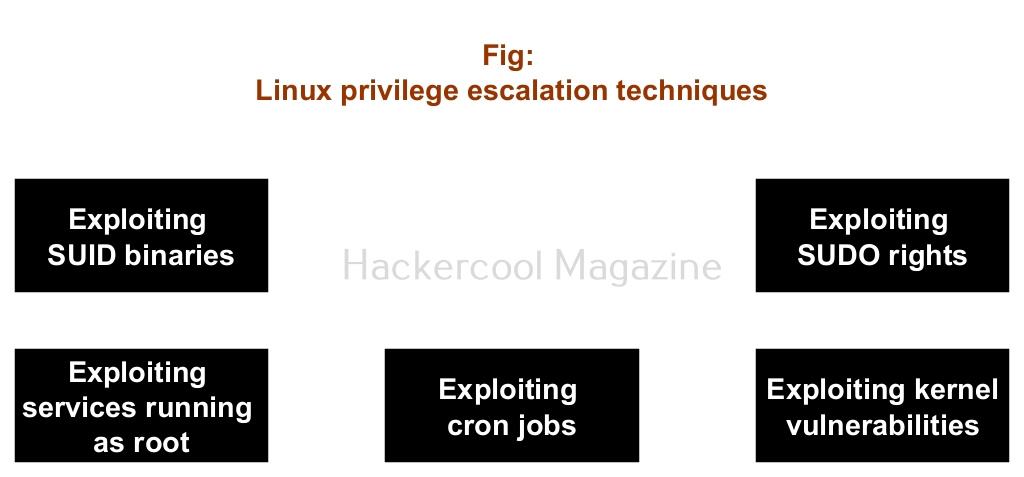
Linux systems use a permission model involving users, groups, files, processes, services and administrative privileges.
A beginner learning Linux privilege escalation should first understand:
Users and Groups
Linux permissions are strongly connected to users and groups. A file might belong to one user and group while allowing different levels of access to the owner, group members and other users. Understanding this model is more important than memorizing individual privilege-escalation tricks.
Sudo and Administrative Permissions
Linux systems can allow selected users to perform certain administrative operations. Misconfigured administrative permissions can create security risks. For example, giving a user permission to perform a powerful administrative operation without sufficient restrictions can potentially allow that user to cross a security boundary.
This is why security assessments examine administrative permissions carefully.
File and Directory Permissions
Incorrect ownership or overly permissive access controls can expose sensitive information or allow unauthorized modification.
A beginner should learn how to reason about:
Owner → Group → Permissions → Sensitive Resource
rather than simply looking for a particular command or exploit.
Services and Scheduled Tasks
Background services and scheduled processes may run with higher privileges. If such a process interacts with files, scripts or other resources that lower-privileged users can modify, the configuration may create a privilege-escalation risk.
This is an important security concept because the weakness can come from the relationship between two individually legitimate components.
Want to Learn Ethical Hacking Step-by-Step?
If you’re serious about learning cybersecurity, a structured roadmap makes the journey much easier.
Download The Beginner Ethical Hacker Starter Kit (2026 Edition) and discover:
✔ The ethical hacking learning path
✔ Beginner-friendly security concepts
✔ Essential tools ethical hackers use
✔ The most common vulnerabilities explained
Windows Privilege Escalation
Windows privilege escalation has a different ecosystem but follows many of the same underlying principles.
Beginners should understand:
User and Group Membership
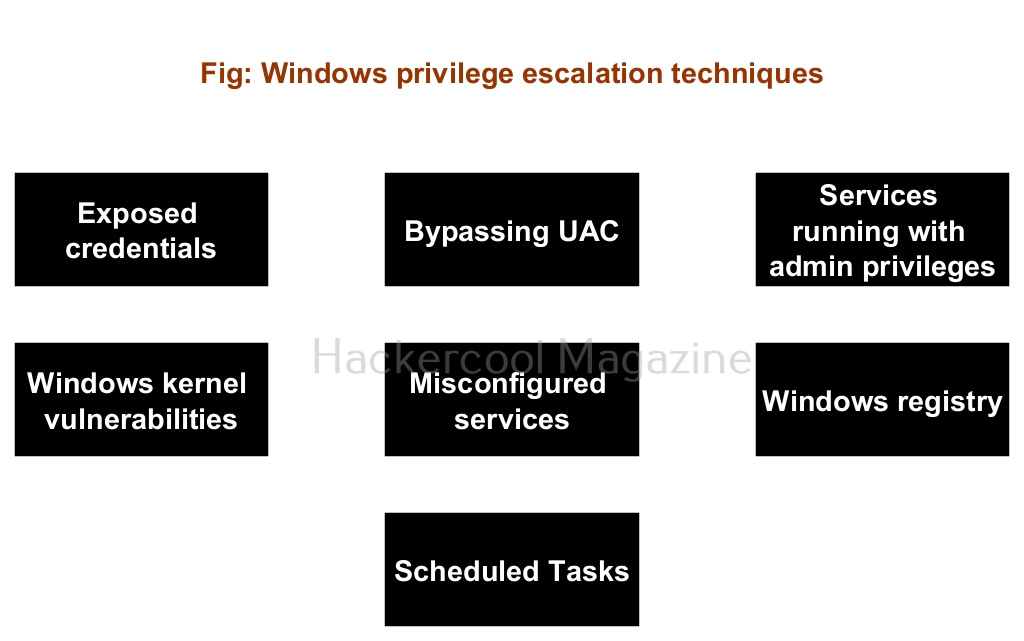
Windows uses users and groups to control access to resources. Membership in certain administrative or powerful groups can significantly change what an account can do.
Services
Windows services frequently run in privileged security contexts. A poorly configured service can become a security weakness if a lower-privileged user can improperly influence how that service operates.
File and Registry Permissions
Windows uses access control mechanisms to determine who can read, modify or execute resources. Weak permissions on sensitive files, directories or configuration information can create opportunities for unauthorized access.
Scheduled Tasks
Scheduled tasks can execute automatically under particular accounts or security contexts. Incorrect permissions surrounding a scheduled task can therefore create a privilege boundary problem.
Credentials and Secrets
Passwords, tokens, configuration files and other secrets should never be unnecessarily exposed to low-privileged users.
During an authorized assessment, testers look for situations where sensitive authentication material is stored or exposed incorrectly.
Common Privilege-Escalation Weaknesses
Although every operating system is different, several recurring categories appear in security assessments:
- Weak permissions
- Misconfigured services
- Excessive administrative privileges
- Unpatched software
- Exposed credentials or secrets
- Insecure scheduled tasks
- Poorly configured applications
- Weak separation between users and resources
- Unsafe scripts or automation
- Improper access-control design
Notice that many of these are configuration problems rather than sophisticated software vulnerabilities. That is an important lesson for beginners. Security is often broken by ordinary components that have been configured incorrectly.
A Beginner’s Privilege-Escalation Methodology
Instead of memorizing hundreds of techniques, develop a repeatable process.
Step 1: Identify Your Current Context
Determine which account, groups, permissions and security context you currently have.
Step 2: Understand the System
Identify the operating system, installed applications, running services, network configuration and important directories.
Step 3: Review Permissions
Look for resources that your current account can access or modify.
Step 4: Look for Misconfigurations
Focus on excessive privileges, writable sensitive resources, insecure services, exposed credentials and weak access controls.
Step 5: Research the Finding
If you discover an unusual configuration or vulnerable component, research its security implications using trusted documentation and vulnerability databases.
Step 6: Validate Safely
In an authorized laboratory, determine whether the suspected weakness actually crosses a privilege boundary.
Step 7: Document Everything
Record the original privilege level, the weakness discovered, the security impact and the recommended remediation.
This methodology is more valuable than memorizing a collection of commands.
How Beginners Can Practice Safely
The best way to learn privilege escalation is through deliberately vulnerable environments. Create an isolated virtual lab containing systems you control. Beginner-friendly cybersecurity training platforms and vulnerable virtual machines can also provide structured exercises.
Your goal should not simply be:
“How do I become administrator?”
Instead, ask:
“Why was the privilege boundary weak?”
That question develops a much stronger security mindset.
For example, if a lab demonstrates an insecure service configuration, investigate why the service had excessive privileges, what permission allowed the lower-privileged account to influence it and how an administrator could correct the problem.
How to Prevent Privilege Escalation
Learning offensive security should also teach you how to defend systems.
Organizations can reduce privilege-escalation risk by:
- Applying security updates regularly
- Following the principle of least privilege
- Reviewing administrator and group memberships
- Restricting service permissions
- Protecting credentials and secrets
- Monitoring privileged activity
- Removing unnecessary software and services
- Reviewing file and registry permissions
- Separating administrative accounts from normal accounts
- Auditing configuration changes
Least privilege is particularly important. Users and applications should receive only the permissions they actually need.
What Beginners Should Learn Next
Privilege escalation sits at the intersection of several important cybersecurity fundamentals.
A useful learning sequence is:
Networking → Linux → Windows → Permissions → Authentication → Enumeration → Vulnerability Management → Privilege Escalation → Active Directory → Security Reporting
You don’t need to master everything at once. Start with operating-system fundamentals. Learn how users, groups, processes, services, files, permissions and authentication work.
Then practice identifying security weaknesses in controlled environments. Eventually, privilege escalation becomes less about memorizing tricks and more about recognizing relationships between users, permissions, processes, services, applications and resources.
Conclusion
Privilege escalation is an essential skill for anyone learning ethical hacking. The most important lesson for beginners is that privilege escalation isn’t simply about finding a clever exploit. It is about understanding why a system allows one security boundary to be crossed.
A strong ethical hacker can look at a system and reason about permissions, trust relationships, configuration, and security controls.
Build that foundation first.
Practice only in authorized environments.
Document what you discover.
And most importantly, learn both sides of the problem: how privilege boundaries can fail and how administrators can build stronger ones.
That is what turns privilege escalation from a collection of hacking tricks into a genuine cybersecurity skill.
Start Your Ethical Hacking Journey Today
Learning cybersecurity can feel overwhelming at first. The best way to start is with a clear roadmap and the right resources.
Download The Beginner Ethical Hacker Starter Kit (2026 Edition) and get instant access to:
Ethical Hacking Fundamentals
A beginner cybersecurity learning roadmap
Essential hacking tools every beginner should know
Common vulnerabilities explained simply