Posted on

Brutus Password Cracker: Complete Guide for Beginners

Password security is one of the fundamental topics in cybersecurity. When learning ethical hacking, beginners often encounter tools designed to assess how resistant authentication systems are too weak or having predictable passwords. One of the tools associated with this area is Brutus, a password-cracking and authentication-testing utility that has historically been used for security training and auditing.

Although Brutus is an older tool, studying it can help beginners understand important concepts such as password strength, authentication security, brute-force attacks and the importance of account protection. However, tools that attempt repeated authentication are sensitive. They should only be used against systems that you own or have explicit authorization to test.

This guide explains what Brutus is, how password attacks work conceptually, its limitations and how beginners can study password security safely.

What Is Brutus?

Brutus is a password-cracking tool designed to test authentication services. It became known for its ability to perform automated password-guessing attempts against certain network authentication services. The tool is primarily associated with older Windows-based security-testing environments and is now considered dated compared with many modern password-auditing solutions.

It was actually designed to test for default credentials for routers. It was made public way back in October 1998 but it is still popular in present time. For beginners, Brutus is more useful as a learning example than as a modern password-security solution. It demonstrates an important cybersecurity concept:

Weak authentication can become a security problem when an attacker can repeatedly guess credentials.

What Is Password Cracking?

Password cracking generally refers to techniques used to recover or guess passwords. There are several different approaches.

Brute Force

A brute-force approach attempts many possible password combinations. The theoretical search space can become extremely large as passwords become longer and more complex.

Dictionary Attacks

A dictionary-based approach uses lists of commonly used words, passwords or combinations. This can be effective against users who choose predictable passwords.

Credential Attacks

Other attacks may involve previously exposed username and password combinations being tested against another service. These attacks highlight why people should avoid reusing passwords across different accounts.

The important lesson is that password security isn’t simply about hiding a password. It also depends on how an authentication system responds to repeated attempts.

Why Was Brutus Important?

Brutus is historically interesting because it helped demonstrate how automated authentication attempts could be used to assess password strength. Security professionals can use controlled password-auditing exercises to demonstrate problems such as:

  • Weak passwords
  • Predictable credentials
  • Lack of account protections
  • Poor authentication policies
  • Missing rate limiting

These concepts remain relevant even though modern security systems have evolved considerably.

How Authentication Attacks Work

An automated password-guessing process follows a simple concept. A testing tool has a target authentication service and attempts different credential combinations. The service responds to each authentication attempt. The tester then analyzes whether an attempt succeeded or failed. In a properly protected system, repeated failed attempts should trigger appropriate defenses.

These may include:

  • Rate limiting
  • Account lockout policies
  • Multi-factor authentication
  • CAPTCHA or similar controls
  • IP-based protections
  • Monitoring and alerting

Modern authentication systems therefore aim to make automated guessing difficult and detectable.

Why Weak Passwords Are Dangerous

Consider two hypothetical passwords. One is short, common and predictable. The other is long, unique and difficult to guess.

The second password generally provides a much larger search space. Password length is especially important because increasing the number of possible combinations can make guessing substantially harder.

This is why modern security guidance generally emphasizes:

  • Long passwords
  • Unique passwords
  • Password managers
  • Multi-factor authentication
  • Avoiding commonly used passwords

A password should also not be reused across important accounts.

Brutus and Modern Security

Brutus was created during an earlier era of cybersecurity. Modern applications often use stronger authentication protections than the systems Brutus was originally associated with.

For example, modern applications may implement:

  • Multi-factor authentication
  • Strong password policies
  • Account lockouts
  • Rate limiting
  • Bot detection
  • Risk-based authentication
  • Security monitoring

As a result, an older password-testing tool may not accurately represent the security of modern authentication systems.

This is an important lesson for beginners:

Security tools have lifecycles. A tool can still be useful for understanding a historical security concept without being appropriate for modern security testing.

Brutus vs Password Hash Cracking

Beginners sometimes confuse authentication testing with password-hash cracking. They are different concepts.

Authentication Testing:

A tool attempts to authenticate to a service and observes the response.

Password-Hash Cracking

A security professional obtains password hashes through an authorized assessment and attempts to determine the original passwords offline. Hash cracking is commonly associated with tools such as John the Ripper and Hashcat.

These approaches have different technical characteristics and defensive considerations. Understanding the distinction is important when studying password security.

How Beginners Can Study Brutus Safely

The safest approach is to use a controlled cybersecurity laboratory.

A beginner lab could contain:

  • A virtual machine running a deliberately vulnerable training service
  • A separate security-testing machine
  • An isolated virtual network
  • Test accounts created specifically for the exercise

The environment should not contain real passwords or accounts. The objective is to understand authentication security rather than obtain access to real systems.

You can use the lab to explore questions such as:

  • Why are weak passwords dangerous?
  • How do authentication services respond to repeated failures?
  • What happens when rate limiting is enabled?
  • How does multi-factor authentication change the attack surface?
  • How can defenders detect repeated authentication attempts?

These questions provide much more useful cybersecurity knowledge than simply trying to recover a password.

Brutus In Action

Now, let’s see some Brutus action practically. Brutus doesn’t need installing since it’s portable but remember that it only runs on Windows. After downloading, we just need to extract the contents of the archive.

To run Brutus, click on the BrutusA2 application file.

It has three modes of operation. They are: wordlist, brute force and combo list where credentials are given as username/password pairs.

Brutus password cracker

For the purpose of demonstration, let’s try to crack FTP password of Metasploitable 2. I will be using the wordlist mode of attack for this. This wordlist was created while performing SMB enumeration of the target. Wordlists can also be generated using tools like Crunch, Cewl etc. After specifying the wordlist, I just need to click on “Start” to begin cracking passwords.

As the tool continues to crack credentials, any positive authentication results will be displayed as soon as they are found. In our current example, Brutus successfully extracted three credentials. They are,

  • user:user
  • postgres:postgres
  • msfadmin:masfadmin

Let’s use them to login into our target.

Successful. Similarly Brutus password cracker can be used to brute force credentials too.

What Should Beginners Learn First?

Before studying password-auditing tools, learn the fundamentals.

Networking

Understand IP addresses, ports, protocols and network services.

Authentication

Learn how systems verify user identity.

Password Security

Understand password length, uniqueness, password managers and multi-factor authentication.

Rate Limiting

Learn how systems restrict repeated requests.

Logging

Understand how authentication attempts are recorded.

Security Monitoring

Learn how defenders detect unusual authentication behavior.

These concepts help explain why password attacks succeed or fail.

Common Beginner Mistakes

Testing Real Accounts

Never use password-testing tools against accounts that you don’t own or have explicit permission to assess.

Using Real Passwords in a Lab

Create dedicated test accounts with artificial credentials.

Assuming Every Finding Is a Vulnerability

A successful authentication test may require additional context before determining the actual security impact.

Ignoring Defensive Controls

Rate limiting, MFA, account lockout and monitoring are important parts of the lesson.

Focusing Only on the Tool

Understanding authentication is more valuable than memorizing a particular application’s interface.

How Organizations Defend Against Password Attacks

Organizations can use multiple layers of protection.

Strong Password Policies

Encourage long and unique passwords rather than predictable credentials.

Multi-Factor Authentication

MFA adds another authentication factor beyond the password.

Rate Limiting

Systems can limit repeated authentication attempts.

Account Protection

Organizations can monitor and respond to suspicious login activity.

Password Managers

Password managers help users create and store unique credentials.

Security Monitoring

Repeated failed authentication attempts can be useful indicators of suspicious activity.

A layered approach makes automated password guessing significantly more difficult.

Is Brutus Still Relevant?

Brutus is largely a historical and educational example today. Cybersecurity has changed significantly since the tool was introduced. Modern security professionals generally use more current tools and techniques when assessing authentication security.

Nevertheless, Brutus can still help beginners understand an important security principle:

Authentication mechanisms should be designed to resist automated guessing and detect suspicious login behavior.

Studying older tools can also provide useful historical context about how defensive technologies have evolved.

Conclusion

Brutus is an older password-cracking and authentication-testing tool that can be useful for understanding the fundamentals of password attacks. For beginners, the most important lesson isn’t learning how to attack an authentication service.

It’s understanding why weak passwords are vulnerable, how authentication defenses work and how security teams can detect and prevent repeated credential-guessing attempts. If you’re studying Brutus, use a dedicated cybersecurity lab with artificial accounts and intentionally vulnerable services. Learn networking, authentication, password security, rate limiting, logging and multi-factor authentication alongside the tool.

and always remember the fundamental rule of ethical hacking:

Only test systems and accounts you own or have explicit permission to assess.

The tool may be old but the security lessons surrounding password strength and authentication remain highly relevant.

Posted on

Password cracking for beginners

Hello aspiring Ethical hackers. In this article, you will learn what is password cracking and various types of password cracking techniques. When beginners first hear the term password cracking, it often sounds illegal or malicious. In reality, password cracking is a concept, not a crime by itself. For ethical hackers, understanding password cracking is about learning how attackers exploit weak authentication so those weaknesses can be identified and fixed, ofcourse with permission.

This article explains password cracking for beginners, why it still works and what ethical hackers should focus on when learning this topic.

What Is Password Cracking?

Password cracking is the process of attempting to recover passwords from stored authentication data, most commonly password hashes. As you studied in our blogpost on cryptography, modern systems do not store passwords in plain text. Instead, they store a hash, a one-way mathematical representation of the password.

As hashes cannot usually be reversed, attackers attempt to guess passwords, hash those guesses and compare them to the stored value. If the hashes match, the password has effectively been cracked. Ethical hackers study this process to evaluate whether password policies and storage mechanisms are strong enough.

Why Password Cracking Still Works?

Despite years of security awareness, password cracking remains effective for one simple reason: people choosing weak passwords. Common contributing factors include:

  • Short or predictable passwords
  • Reusing the same password across multiple services
  • Poor password storage practices by applications
  • Legacy systems using outdated hashing methods
  • Lack of multi-factor authentication

Attackers do not need advanced skills when these weaknesses are widespread.

Common Password Cracking Concepts

There are two types of password cracking attacks: Online and Offline.

Online attacks:

In this type of attack, passwords are guessed through login systems and are limited by lockouts.

Offline attacks:

In this type of attack, attackers obtain password databases and test guesses without alerts.

Common Password Cracking Techniques

There are various password cracking techniques. They are,

1. Shoulder Surfing
2. Password Guessing
3. Dictionary Attack
4. Brute Force Attack
5. Rainbow Table Attack  
6. Phishing
7. Sniffing
8. Malware

Let’s learn each of these attacks in detail.

1. Shoulder Surfing:

Shoulder Surfing is one of the easiest password cracking techniques that doesn’t require use of any technology. In shoulder surfing, the hacker stands behind (or sits behind, position is not really important) the victim when he is entering his credentials and captures the credentials by simple observation. As you can see, this is the easiest way to capture credentials of the target.

2. Password Guessing:

Another password cracking technique that doesn’t require any technology. In this technique, hacker tries to guess the password of the victim using his own mind. You may be surprised but this technique yielded me results in at least 20% of the total attempts made.

3. Dictionary attack:

In dictionary attack, a hacker uses a dictionary to crack passwords. A dictionary or wordlist has a huge list of words (possible passwords), each one of which is tried as a password. In Kali Linux, the dictionary or wordlists are present in /usr/share/dirb/wordlists directory.

4. Brute Force attack:

In brute force attack, hackers use every possible criteria or password to crack the credentials. A brute force attack may be slow but it will eventually crack the password. A brute force attack works by calculating the hash function of every password string it has and compares it with one on the target system or victim.

5. Rainbow Table attack:

To understand Rainbow Table Attack, you need to first understand what is a Rainbow Table. A Rainbow Table is a database that contains huge list of plaintext passwords and their precompiled hashes. Unlike a Brute Force attack, Rainbow table attack bypasses calculation of a hash for every password string as it already has a pre compiled list of hashes.

6.Phishing:

Phishing is one of the easiest methods to crack passwords. You have already learnt about phishing in our previous blogposts.

7. Sniffing:

Sniffing or Man In The Middle (MITM) attack can also be used to crack passwords while they are on transit in a network.  Learn more about sniffing here.

8. Malware:

Malware is another way hackers capture credentials of their victims. Once hackers gain initial access to a system, they install malware which allows hackers to not only perform further malicious actions but also capture user credentials from the target system.

How Password Cracking Fits Into Real-world Ethical Hacking?

Password cracking is rarely the first step in an attack. It usually follows another compromise, such as:

  • A data breach
  • Phishing
  • Malware infection
  • Misconfigured storage exposure

Once attackers obtain hashed passwords, cracking becomes a way to expand access, escalate privileges or move laterally. Ethical hackers must see password cracking as part of a larger attack chain, not an isolated skill.

Defensive Lessons from Password Cracking

Studying password cracking teaches ethical hackers how to prevent it. To keep passwords secure, some key defensive practices include:

  • Enforcing long, unique passwords
  • Using modern, slow hashing algorithms with salt
  • Implementing multi-factor authentication
  • Limiting password reuse across systems
  • Monitoring for credential abuse

Ethical hackers are expected to provide defensive recommendations, not just findings.

Conclusion

Password cracking is not about breaking into systems. It’s about revealing broken security assumptions. For ethical hacking beginners, it is one of the best examples of why cybersecurity starts with strong fundamentals. If passwords are weak, everything built on top of them becomes fragile. Ethical hackers shouldn’t crack passwords to prove skill, they should study password cracking to help organizations stop attackers before real damage occurs.

Posted on

Name That Hash: Identifying Password Hashes the Smart Way

Hello, aspiring Ethical Hackers. In our previous blogpost, you learnt about hash cracking. In this article, you will learn about a tool named “Name That Hash”. In cybersecurity, not all password hashes are created equal. Some are fast, outdated and easy to crack. Others are slow, salted and intentionally resistant to attacks. Before any legitimate password audit, forensic investigation or lab exercise can begin, one crucial question must be answered:

What You Should Know First?

Before using “Name That Hash”, it helps to understand these basic concepts:

What type of hash is this?

This is where Name That Hash becomes extremely useful. It is a lightweight hash identification tool designed to analyze a hash string and predict which hashing algorithm was used to create it.

What is “Name That Hash”?

Name That Hash is a hash identification tool that examines the structure, length and character patterns of a given hash and compares them against known hashing formats. Instead of blindly guessing or manually searching online, the tool provides a shortlist of likely algorithms. It can identify over 300 types of hashes including MD5 and SHA256. The other features of this tool include displaying summaries for the hashes identified, colored output and displaying in the order of their popularity etc.

For example, we have a hash shown below:

5f4dcc3b5aa765d61d8327deb882cf99

The above hash could be:

  • MD5
  • NTLM
  • LM (in some cases)
  • Or another legacy format

Name That Hash helps narrow this down before any further analysis is attempted.

How Name That Hash works?

At a higher level, Name That Hash relies on pattern recognition rather than brute force. It evaluates:

  • Hash length (32, 40, 64 characters, etc.)
  • Character set (hexadecimal, base64, mixed symbols)
  • Prefixes or markers (such as $2b$ for bcrypt)
  • Known format signatures

Based on this information, the tool produces:

  • A ranked list of possible hash types
  • Confidence indicators (depending on ambiguity)
  • Contextual notes in some cases

Importantly, it does not crack hashes. It only identifies them.

Practical Walkthrough

Now, let’s see this tool’s working practically. For this, we will be using Kali Linux. It can be installed from the repository of Kali using command shown below.

sudo apt install name-that-hash

Once this tool is installed, it can be started using command “nth”. To test a single hash, we can use “nth” with option “-t” as shown below. Let’s first give it a MD5 hash and see if it can identify it.

nth -t <hash>
name that hash

As you can see in the above image, this tool got it right and it is also giving us some additional information like where the hash is actually used. For example, Md5 is used in Linux shadow files. What about SHA-1 hash?

It got this right too. Next, let’s give it a LM hash.

It put this in the Least likely section. Next, let’s give it a NTLM hash.

It failed to get spot on NTLM too. However, it correctly detected the SHA-512 and SHA-256 hashes.

The good thing about name-that-hash is that instead of being bland, it gives us more information about actually where the hash is used. This can be useful when you grab a collection of hashes from a target network. You can easily decide which hashes to crack and which not to crack.   

Where This Fits in Your Learning Journey?

Name That Hash is a hash identification tool that examines the structure, length and character patterns of a given hash and compares them against known hashing formats.

Your Learning Journey

Networking → Linux → Windows → Web →Command Line Essentials→ Virtual Labs → Security Tools & Practice

Where This Article Fits

“Name That Hash” fits primarily in Security Tools & Practice.

 If you have multiple hashes, giving it one by one can be cumbersome. Luckily, you can give them all at once by saving these hashes in a text file as shown below.

and using “-f” option to specify the text file containing hashes.

nth -f <path to the file that contains hashes>

The output which is not shown here is same as above. Name-That-Hash is only designed to identify hashes but if you have a base64 encoded string, it can be decoded by nth using the “-b64” option as shown below.

nth -b64 -t <base64 encoded string>

It correctly decoded the string. All the above hashes are also encrypted hashes of the text “hackercool”.  Suppose you want the result to only display the most likely result, you can get this by using the “-a” option as shown below.

nth -a -t <hash>

If you observe the above images, you can see the banner of name-that-hash occupying lot of space. Just like me, if this is putting you off, you canalso view results without banner using the “–no-banner” option as shown below. 

nth --no-banner <hash>

Once go to the image above the above image, the one where we used the “-a” option. Once, carefully observe the result. It correctly detected the hash as SHA-512. Next to it, you can see the text “HC 1700 JtR: raw-sha512”. This is HashCat (HC stands for HashCat) and John (JtR stands for John The Ripper) information being displayed by the tool because the next thing you will do after identifying the hash is to crack it using Hashcat or John. This requires what you need to put into these tools to crack it. For example, let’s take a simpler hash.

John The Ripper says its raw-md5. We need to just supply this format as shown below in JTR to crack this.

Similarly, the HC number given is “0”. Let’s supply it as shown below in HashCat.

However, if you are an experienced ethical hacker with too much details hurting your ego, you can just view the result without the information about John The Ripper using “–no-john” option as shown below.

nth --no-john -t <hash>

This is the difference.

You can do the same with HashCat information using “–no-hashcat” command as shown below.

nth --no-hashcat -t <hash>

The difference can be seen below.

Where Name That Hash is Useful?

Name That Hash plays an important role in various situations. They are,

1. Ethical Hacking and Red Team Exercises:

Helps Red teams quickly categorize password storage weaknesses without unnecessary noise.

2. Digital Forensics:

Used to identify unknown hash artifacts found during investigations.

3. CTFs and Practice Environments:

A staple tool for early-stage challenge analysis.

Conclusion

Name That Hash may seem simple, but it plays a critical role in building correct cybersecurity fundamentals. It encourages analysts to understand before acting, reduces mistakes and reinforces why secure password storage matters. In security, knowing what you’re looking at is often more important than knowing how fast you can attack it.

Posted on — 6 Comments

Beginners guide to hash cracking

Hello aspiring ethical hackers. In our previous blogpost on cryptography, apart from learning the uses of encryption in cybersecurity, you learnt about various encryption techniques. One such method is hashing. In this article, you will learn about hash cracking.

The process of cracking a password hash is known as hash cracking. In ethical hacking, you will definitely encounter password hashes. You will have to learn how to crack these hashes to be able to move forward in pen testing or Red teaming. For example, let’s say you encounter NewsP Free News Script 1.4.7 software in the target network. This particular version of software had a credential disclosure vulnerability as shown below. The only thing that stops me from accessing the website is the password in encrypted format.

Image explaining how to crack hash es with kali linux

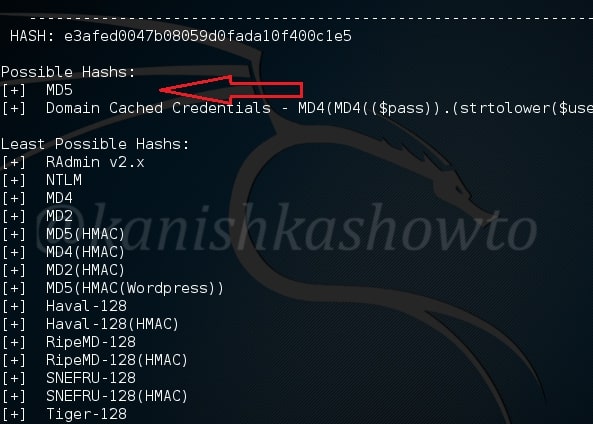
The first step in cracking hashes is to identify the type of hash we are trying to crack. We can identify a hash type using a tool named hash-identifier. This tool is installed by default on Kali. Open a terminal and type command given below.

hash-identifier

Enter the hash we need to identify as shown above and hit ENTER. It will show the possible hash type as shown below. In our case, it is MD5 hash or a variant of it.

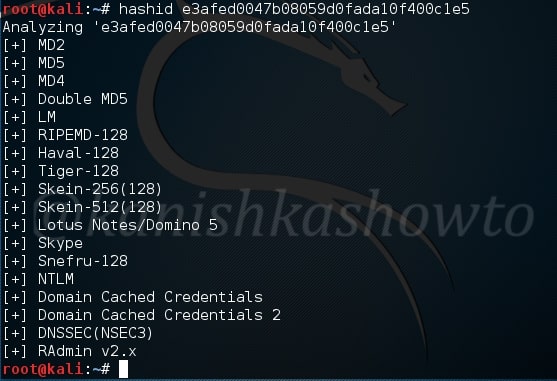
We can also use another tool “hashid” for hash identification. It’s syntax is as shown below.

hashid &lt;hash>

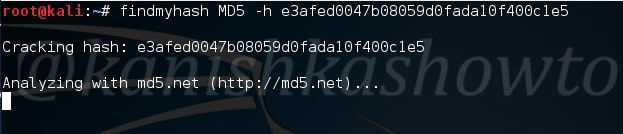
Since now we know that the hash type is Md5, it’s time to crack the hash. We will use a tool called ‘findmyhash’. This tool tries to crack the hash by using various online hash crackers available. To use this tool, we need to specify the hash type ( which we already know ) and hash after it as shown below.

findmyhash &lt;hash type> -h &lt;hash>

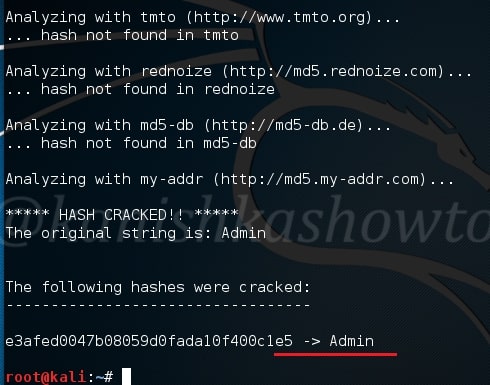
After successfully cracking the hash, it will display us the password as shown below. In our case, the password is admin.