
Computer networks are the backbone of modern organizations. Businesses use networks to connect employees, servers, applications, cloud services, printers, databases and other devices. These connections allow information to move quickly and enable organizations to operate efficiently.
However, every connected device and communication channel introduces potential security risks. An attacker who gains unauthorized access to a network may steal sensitive information, disrupt services, install malware or compromise systems that were previously secure. This is why network security is an essential part of cybersecurity.
Network security involves protecting network infrastructure, connected devices, communication channels and the information transmitted across them from unauthorized access, misuse, modification and disruption.
Before learning how networks are protected, it is important to understand the basic concepts of cybersecurity, including threats, vulnerabilities, risk and security controls.
For beginners learning cybersecurity or ethical hacking, understanding network security is important because many security assessments begin with examining how devices communicate, how networks are organized and what security controls protect them.
NEW TO ETHICAL HACKING?
Start your ethical hacking journey with our FREE Beginner Ethical Hacker Starter Kit (2026 Edition).
Get beginner-friendly guidance to understand the fundamentals of ethical hacking and take your first steps into cybersecurity.
In this guide, you will learn the fundamental concepts of network security, the technologies organizations use to protect their networks, common network threats and how different security controls work together.

What Is Network Security?
Network security refers to the technologies, policies, procedures and practices used to protect computer networks from unauthorized access, cyberattacks, data theft and operational disruption.
A network security system attempts to ensure that:
- Only authorized users and devices can access network resources.
- Network communications are protected from interception and manipulation.
- Malicious traffic is identified and blocked.
- Security incidents are detected quickly.
- Network services remain available to legitimate users.
- Sensitive information is protected while stored and transmitted.
Network security protects different types of infrastructure, including:
- Local Area Networks (LANs)
- Wireless networks
- Enterprise networks
- Data center networks
- Cloud networks
- Virtual private networks
- Internet-facing infrastructure
- Industrial and IoT networks
Network security is not a single technology. It is a combination of multiple security controls working together.
For example, an organization might use a firewall to control incoming and outgoing traffic, an intrusion detection system to identify suspicious activity, endpoint security to protect computers and a VPN to secure remote connections. These technologies provide different layers of protection.

Why Network Security Is Important
Organizations depend on networks to store, process and exchange information. If a network is compromised, the consequences can affect an entire business.
Protecting sensitive information
Networks frequently carry confidential information such as customer records, employee information, financial data, authentication credentials and business documents. Network security controls help prevent unauthorized individuals from accessing this information.
Preventing unauthorized access
A poorly protected network may allow attackers to access systems they should not be able to reach. Security controls such as firewalls, network access control, authentication systems and network segmentation help restrict access.
Maintaining availability
Network attacks can disrupt business operations.
Denial-of-Service attacks, malware infections, network equipment failures and misconfigurations can prevent employees and customers from accessing services. Network security helps organizations detect and respond to these problems.
Protecting business operations
A compromised network may allow attackers to move from one system to another. For example, an attacker might compromise an employee workstation and attempt to access internal servers, databases or administrative systems.
Network segmentation and access controls can limit the impact of such incidents.
Supporting compliance
Organizations may need to protect information according to legal, regulatory or contractual requirements. Network security helps support compliance with standards and regulations involving sensitive information.

Networking vs Network Security
Networking and network security are closely related but they serve different purposes.
Networking focuses on connecting devices and enabling communication whereas Network security focuses on protecting those connections, devices and communications.
Before learning network security, beginners should understand networking fundamentals, including IP addresses, subnetting, ports, protocols, DNS, DHCP, TCP, UDP, routers, switches and basic network architecture.
| Networking | Network Security |
|---|---|
| Connects devices | Protects connected devices |
| Enables communication | Controls and monitors communication |
| Uses routers and switches | Uses firewalls, IDS, IPS and security gateways |
| Focuses on connectivity | Focuses on confidentiality, integrity and availability |
| Configures IP addressing and routing | Restricts access and detects suspicious activity |
| Troubleshoots connectivity | Investigates security incidents |
For example, a network administrator might configure a router to allow devices in one network to communicate with another network.
A network security professional might configure a firewall to allow only specific types of communication between those networks. Both disciplines require an understanding of networking fundamentals.

Common Network Security Threats
Before understanding how networks are protected, beginners should know what they are being protected against. Networks face various risks, including unauthorized access, malware, denial-of-service attacks, spoofing and traffic interception. Explore common network security threats to understand the attacks and risks that network security controls are designed to address.
Understanding these threats helps beginners understand why security controls are necessary.

Unauthorized access
Unauthorized access occurs when an individual or device accesses a network or resource without permission.
This may happen because of:
- Weak passwords
- Stolen credentials
- Misconfigured access controls
- Unsecured wireless networks
- Vulnerable services
- Compromised devices
Once an attacker gains access to a network, they may attempt to discover other systems or access sensitive resources. Organizations use authentication, access controls, network segmentation and monitoring to reduce this risk.

Malware
Malware is malicious software designed to perform harmful activities.
Examples include:
- Viruses
- Worms
- Trojans
- Ransomware
- Spyware
- Remote access malware
Malware may enter a network through malicious email attachments, compromised websites, infected software, removable media or vulnerable systems. Endpoint security solutions, firewalls, email security, software updates and user awareness help reduce malware risks.

Man-in-the-Middle Attacks
A Man-in-the-Middle attack occurs when an attacker positions themselves between two communicating parties and attempts to intercept or manipulate their communication. For example, attackers may attempt to observe network communication to identify sensitive information transmitted through insecure protocols between a user and a website.
Learn more about how network traffic can expose credentials in our guide to password sniffing.
Encryption technologies such as HTTPS and properly configured VPNs help protect network communication from interception and manipulation. However, encryption alone does not protect against every threat. A compromised endpoint or malicious application may still access information before it is encrypted or after it is decrypted.

DoS and DDoS Attacks
Denial-of-Service attacks attempt to make a system, network or service unavailable to legitimate users. A Distributed Denial-of-Service attack uses multiple systems or sources to generate traffic or requests toward a target.
Learn more about the different types of DoS attacks and how they work.
These attacks may overwhelm:
- Network bandwidth
- Server resources
- Application resources
- Connection tables
- Infrastructure services
Organizations use traffic filtering, rate limiting, DDoS protection services, network monitoring and resilient infrastructure to reduce the impact of these attacks.

Packet Sniffing
Packet sniffing involves capturing and analyzing network traffic. Network administrators and security professionals use network packet analysis tools to troubleshoot communication problems and investigate suspicious activity.
However, attackers may also attempt to capture network traffic to identify sensitive information transmitted through insecure protocols.
Encryption helps protect data transmitted over networks. For example, HTTPS encrypts application data between a browser and a website, making it significantly more difficult for passive network observers to read the communication.
Network Scanning and Reconnaissance
Network scanning and reconnaissance involve identifying systems, services and characteristics of a network.
Security professionals use network discovery tools such as Nmap during authorized assessments to understand network infrastructure and identify potential security weaknesses. Attackers may also perform reconnaissance to identify exposed systems and services.
Network administrators can reduce unnecessary exposure by disabling unused services, restricting access to management interfaces, monitoring network activity and maintaining an accurate inventory of network assets.

Network Security Architecture
Network security architecture describes how security controls are organized and deployed throughout a network. A secure network architecture does not rely on a single device. It uses multiple controls to protect different parts of the infrastructure.
Perimeter Security
Perimeter security protects the boundary between an organization’s internal network and external networks such as the internet.
Typical perimeter security technologies include:
- Firewalls
- Secure gateways
- Intrusion prevention systems
- VPN gateways
- DDoS protection services
Perimeter security helps control what traffic can enter or leave an organization.
However, modern networks cannot rely entirely on perimeter security because employees may work remotely, cloud services may operate outside traditional network boundaries and attackers may already have access to an internal device.
Internal Network Security
Internal network security protects communication and access between devices inside an organization.
Security controls may include:
- Internal firewalls
- Network access control
- Authentication
- Network monitoring
- Endpoint security
- Access restrictions
Internal security is important because a compromised device should not automatically have unrestricted access to every other system.

Network Segmentation
Organizations rarely place all their devices and systems on a single unrestricted network. Instead, they divide networks into smaller segments to control communication and limit unauthorized access between different environments. This approach is known as network segmentation and helps reduce the potential impact of a security breach.
For example, an organization might separate its network into:
- Employee network
- Guest network
- Server network
- Management network
- Finance network
- Security monitoring network
Segmentation reduces unnecessary communication between systems.
If a device in the guest network becomes compromised, network segmentation can help prevent the attacker from accessing internal servers. Segmentation is often implemented using VLANs, firewalls, routing policies and access control rules.

DMZ
Organizations sometimes need to make public-facing services, such as web servers and email gateways, accessible from external networks without exposing their internal systems directly.
A Demilitarized Zone (DMZ) provides a separate network segment for these services. Understanding a DMZ helps beginners learn how network architecture can reduce exposure and separate public-facing systems from internal resources.
Common DMZ systems include:
- Public web servers
- Mail gateways
- Public DNS servers
- Reverse proxies
A typical architecture might look like this:
Internet → Firewall → DMZ → Internal Firewall → Internal Network
The DMZ allows organizations to provide public services while reducing direct exposure of internal systems. A public web server in the DMZ should not automatically have unrestricted access to internal databases or employee computers.

Firewalls
One of the first lines of defense in network security is a firewall. Firewalls monitor incoming and outgoing network traffic and apply predefined security rules to control which connections are allowed or blocked. Understanding how firewalls work is essential for learning how organizations protect their networks from unauthorized access.
What Is a Firewall?
A firewall is a security device or software system that controls network traffic according to predefined rules. Firewalls help prevent unauthorized communication between networks or devices.
For example, an organization may configure a firewall to allow:
- HTTPS traffic to a public web server
- VPN connections from authorized remote users
- DNS traffic to approved DNS servers
The firewall may block:
- Unnecessary inbound connections
- Unauthorized administrative access
- Traffic from prohibited destinations
- Communication between restricted network segments
How Firewalls Work
A firewall examines network traffic and compares it with configured security rules.
Depending on the firewall type, it may examine:
- Source IP address
- Destination IP address
- Source port
- Destination port
- Protocol
- Connection state
- Application information
- User identity
The firewall then determines whether the traffic should be allowed, blocked or otherwise handled.
A firewall rule might conceptually state:
Allow TCP traffic from the internet to the public web server on port 443.
Another rule might state:
Block direct access from the guest network to the internal server network. Firewall rules should be carefully designed because overly permissive rules may create security weaknesses.
Types of Firewalls
Packet Filtering Firewall
Packet filtering firewalls examine individual packets using information such as IP addresses, ports and protocols. They are relatively simple and can provide basic traffic control.
Stateful Firewall
Stateful firewalls track active network connections. They can determine whether a packet belongs to an established connection and use connection state when making decisions.
Proxy Firewall
Proxy firewalls act as intermediaries between clients and servers. They can inspect application-level communication and provide additional security controls.
Next-Generation Firewall
Next-Generation Firewalls or NGFWs, may include features such as:
- Application awareness
- Deep packet inspection
- Intrusion prevention
- User-based policies
- Threat intelligence integration
- Malware detection
The exact capabilities depend on the product.

IDS and IPS
Organizations also use technologies to identify and prevent suspicious network activity. Intrusion Detection Systems (IDS) monitor traffic for potential threats and generate alerts, while Intrusion Prevention Systems (IPS) can take action to block detected malicious activity. Learn the differences between IDS vs IPS and understand how these technologies protect networks.
Intrusion Detection System
An Intrusion Detection System or IDS, monitors network or system activity and identifies suspicious behavior.
An IDS may generate alerts when it detects:
- Known attack patterns
- Suspicious traffic
- Unusual communication
- Policy violations
- Potential malware activity
An IDS typically detects and alerts rather than directly blocking the traffic.
Intrusion Prevention System
An Intrusion Prevention System or IPS, monitors traffic and can take action to prevent detected threats.
Depending on its configuration, an IPS may:
- Block suspicious traffic
- Drop malicious packets
- Terminate connections
- Prevent communication with known malicious destinations
IDS vs IPS
| Feature | IDS | IPS |
|---|---|---|
| Primary function | Detect suspicious activity | Detect and prevent suspicious activity |
| Typical action | Generate alerts | Block or modify traffic |
| Deployment | Often passive | Often inline |
| Impact on traffic | Usually does not block | May block traffic |
| Purpose | Visibility and detection | Prevention and enforcement |
IDS and IPS technologies may use signature-based detection, behavioral analysis, anomaly detection or combinations of these methods. They are not perfect. False positives and false negatives are possible, so security teams must review alerts and maintain detection rules.

VPNs and Secure Network Communication
When employees access organizational resources remotely, their communication must be protected against interception and unauthorized access. Virtual Private Networks (VPNs) create encrypted connections that help protect data transmitted over untrusted networks. Learn how VPNs work and why secure tunnels are important for network security.
VPNs are commonly used to:
- Allow employees to access corporate networks remotely
- Protect communication over untrusted networks
- Connect different office networks
- Secure traffic between cloud and on-premises infrastructure
When a remote employee connects to an organization’s VPN, their device establishes an encrypted tunnel to the VPN gateway. The VPN gateway can then provide access to authorized internal resources.
VPNs help protect network communication but they do not automatically make a device secure. If the endpoint is compromised, malware may still access information on the device or use the VPN connection to communicate with authorized systems.
Organizations should combine VPNs with authentication, device security, access controls and monitoring.
READY TO GO BEYOND NETWORK SECURITY FUNDAMENTALS?
Understanding how networks are protected is just the beginning. Discover how ethical hackers explore networks, identify exposed services, investigate vulnerabilities and understand real-world attack techniques.
Get access to Hackercool Magazine, practical cybersecurity tutorials and beginner-friendly learning resources.
YOUR INTRODUCTORY TRIAL INCLUDES:
Networking Fundamentals
Linux Fundamentals
Windows Fundamentals
Web Fundamentals
Command Line Essentials
Virtual Labs
$1 INTRODUCTORY TRIAL
Trial terms apply. Post-trial subscription billing is manual.
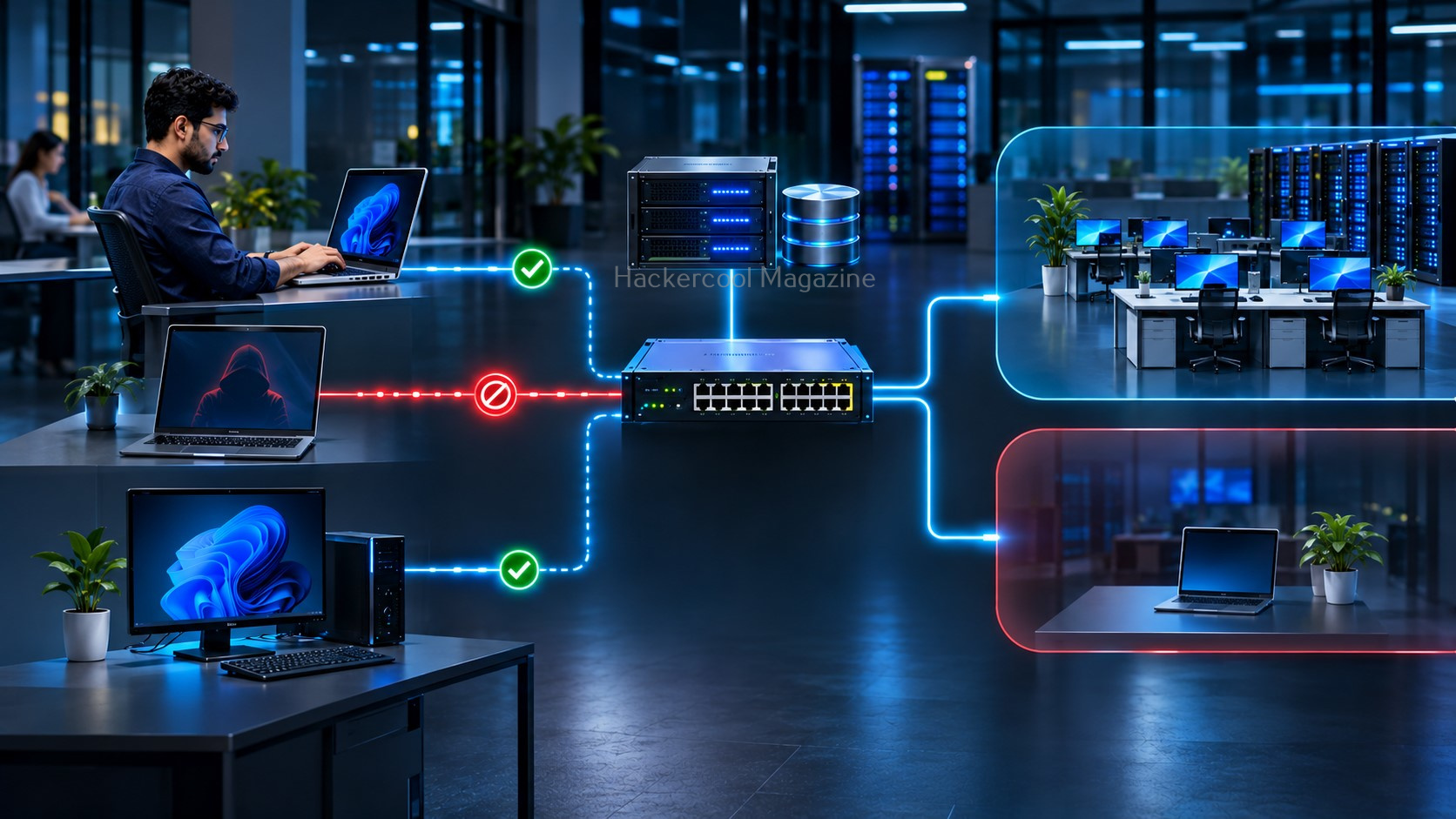
Network Access Control (NAC)
Not every device should automatically receive access to an organizational network. Organizations need mechanisms to verify devices and enforce access policies before allowing them to connect. Network access control helps ensure that only authorized and appropriately configured devices can access network resources.
Network Access Control systems help organizations determine which users and devices are permitted to connect to a network.
NAC may evaluate:
- User identity
- Device identity
- Authentication status
- Security configuration
- Operating system updates
- Endpoint security status
- Device compliance
For example, an organization may allow an employee’s managed laptop to connect to the internal network while placing an unknown device into a restricted network. NAC can help prevent unauthorized devices from accessing sensitive resources.
Some NAC systems can automatically assign devices to different network segments based on their identity or security status.

Wireless Network Security
Wireless networks introduce additional security considerations because devices communicate through radio signals rather than physical network cables. Organizations must protect Wi-Fi networks using appropriate encryption, authentication and access controls. Our guide to wireless network security explains how Wi-Fi networks are protected against unauthorized access and common attacks.
Wireless networks introduce additional security considerations because communication takes place over radio signals. Unlike a wired connection, wireless signals may extend beyond the physical boundaries of an office.
Important wireless security practices include:
Use Strong Encryption
Modern wireless networks should use WPA2 or WPA3 encryption, depending on device compatibility and organizational requirements. Older wireless security protocols should be avoided.
Use Strong Authentication
Weak Wi-Fi passwords can allow unauthorized individuals to access wireless networks. Organizations may use strong passwords, enterprise authentication or certificate-based authentication.
Separate Guest Networks
Guest wireless networks should be separated from internal corporate networks. Visitors should not automatically have access to employee devices, internal servers or administrative systems.
Disable Unnecessary Features
Wireless routers and access points should have unnecessary features disabled. Management interfaces should not be exposed unnecessarily.
Monitor Wireless Infrastructure
Organizations should monitor wireless access points, connected devices, authentication events and suspicious activity. Wireless security is not limited to encryption. Access control, network segmentation, monitoring and secure configuration are also important.

Endpoint Security
Network security is not limited to routers, switches and firewalls. Every computer, server and other device connected to a network can become a potential entry point for attackers. Organizations therefore use endpoint security solutions, including antivirus, Endpoint Detection and Response (EDR) and Extended Detection and Response (XDR), to protect individual devices.
Network security depends heavily on the security of devices connected to the network.
Endpoints include:
- Desktop computers
- Laptops
- Servers
- Smartphones
- Tablets
- IoT devices
Two important endpoint security technologies are antivirus and Endpoint Detection and Response.
Antivirus
Antivirus software detects and helps prevent malware infections. Traditional antivirus solutions often rely heavily on signatures, which identify known malicious files or patterns.
Modern antivirus solutions may also use behavioral analysis, cloud-based intelligence and other detection techniques. Antivirus helps protect endpoints from malware but cannot detect every threat.
EDR
Endpoint Detection and Response or EDR, provides more advanced endpoint monitoring and investigation capabilities.
EDR solutions may collect information about:
- Processes
- File activity
- Network connections
- User activity
- System changes
- Suspicious behavior
Security teams use EDR to investigate suspicious events and respond to incidents. For example, an EDR solution might identify an unusual process launching from a user directory, detect suspicious activity and provide information that helps an analyst investigate the event.
EDR may also support response actions such as isolating a compromised endpoint from the network.

SIEM and Network Monitoring
Network security requires visibility into what is happening across the infrastructure. Security Information and Event Management systems or SIEMs, collect and analyze security-related information from multiple sources.
Protecting a network requires more than deploying preventive security controls. Organizations must continuously observe network activity to identify unusual communication patterns, suspicious connections and potential security incidents. This process is known as network monitoring, and it helps security teams maintain visibility into their network environments.
Sources may include:
- Firewalls
- Servers
- Endpoints
- IDS and IPS systems
- Authentication systems
- VPN gateways
- Cloud services
- Network devices
Network security devices, servers and endpoints generate logs containing valuable information about system activity. Security teams collect and analyze these logs to identify suspicious events and investigate potential incidents. Security Information and Event Management (SIEM) platforms help centralize this process. Learn how SIEM works and how security logs are analyzed.
A SIEM can correlate events from different systems and help security analysts identify suspicious activity.
For example, a security team might investigate an alert involving:
- Multiple failed login attempts.
- A successful login from an unusual location.
- A connection to an unfamiliar internal server.
- Unusual file access.
Individually, these events may not indicate an attack. When correlated, they may provide evidence of a security incident. Network monitoring tools also help administrators understand traffic patterns, identify performance problems and detect unusual communication.
Defense in Depth
No single security technology can protect an organization against every possible threat. Effective network security combines multiple protective layers, including firewalls, intrusion detection, network segmentation, endpoint protection and access controls. This approach is known as defense in depth, where multiple security mechanisms work together to reduce the likelihood and impact of attacks.
Defense in Depth is a security strategy that uses multiple layers of protection. Instead of depending on one security control, organizations deploy several controls so that the failure of one does not automatically compromise the entire network.
For example, a network may use:
Layer 1: Physical Security
Protect servers, network devices and facilities from unauthorized physical access.
Layer 2: Perimeter Security
Firewalls and secure gateways control traffic entering and leaving the network.
Layer 3: Network Security
Segmentation, internal firewalls, IDS, IPS and NAC protect network communication.
Layer 4: Endpoint Security
Antivirus, EDR, patch management and secure configurations protect devices.
Layer 5: Identity and Access Security
Strong authentication, MFA, access controls and least privilege restrict access.
Layer 6: Monitoring and Detection
SIEM, logs, network monitoring and incident response help identify and investigate suspicious activity.
Layer 7: Data Security
Encryption, backups, access restrictions and data protection policies protect information.
Defense in Depth reduces the likelihood that a single security failure will result in a major compromise.
Network Security Best Practices
Understanding network security technologies is only the beginning. Organizations must also follow consistent security practices, such as updating devices, restricting access, monitoring traffic, securing wireless connections and reviewing firewall configurations. Explore our guide to network security best practices to learn how these principles can be applied to protect networks.
Organizations can improve network security by following several fundamental practices.
Maintain an Accurate Asset Inventory
Organizations should know which devices, servers, applications and network services exist. Unknown devices can introduce security risks.
Use Strong Authentication
Use strong passwords, MFA and appropriate authentication controls for network access.
Apply Security Updates
Keep operating systems, network devices, applications and security software updated. Security updates frequently address vulnerabilities that could be exploited.
Disable Unnecessary Services
Unused services and ports increase the attack surface. Organizations should disable services that are not required.
Implement Network Segmentation
Separate systems according to their purpose and security requirements.
Protect Wireless Networks
Use modern encryption, strong authentication and separate guest networks.
Monitor Network Activity
Collect logs and monitor traffic for suspicious patterns.
Protect Endpoints
Use endpoint security, patch management, secure configurations and device management.
Restrict Administrative Access
Management interfaces should only be accessible to authorized users and devices.
Back Up Important Data
Maintain regular backups and test recovery procedures.
Backups can help organizations recover from ransomware, accidental deletion, hardware failures and other incidents.
Develop an Incident Response Plan
Organizations should have procedures for identifying, containing, investigating and recovering from security incidents.
How Network Security Technologies Work Together
Network security technologies are most effective when they work together. Consider an employee working remotely.
- The employee connects to the organization using a VPN.
- Authentication controls verify the employee’s identity.
- Network Access Control checks whether the device meets security requirements.
- The firewall restricts access to authorized resources.
- Network segmentation limits communication between different systems.
- Endpoint security monitors the employee’s device.
- IDS or IPS monitors network activity for suspicious behavior.
- Logs are sent to a SIEM for analysis.
- Security analysts investigate suspicious events.
- Incident response procedures are used if a threat is confirmed.
This illustrates why network security is not about installing a single firewall. It is about creating a coordinated security environment in which different technologies provide protection, visibility, detection and response.
Practical Beginner Lab: Build and Observe a Secure Network
Beginners can learn network security concepts using a small virtual lab. Learn how to build your first ethical hacking lab at home.
Lab Requirements
You can use:
- VirtualBox or another virtualization platform
- One Linux virtual machine
- One Windows virtual machine, if available
- A virtual network configured for lab use
- Wireshark
- A host firewall
The lab should use systems you own or have explicit permission to test.
Step 1: Understand Your Lab Network
Identify the IP addresses of your virtual machines.
Record:
- IP address
- Subnet mask
- Default gateway
- DNS server
- Operating system
This helps you understand how devices communicate.
Step 2: Observe Network Communication
Use Wireshark to observe traffic generated by your own lab devices.
Explore:
- DNS requests
- TCP connections
- HTTP or HTTPS traffic
- ICMP traffic
- DHCP communication
Do not attempt to capture credentials or sensitive traffic belonging to other users.
Step 3: Examine Firewall Rules
Review the firewall configuration on your Linux or Windows virtual machine.
Identify:
- Allowed connections
- Blocked connections
- Services permitted to communicate
- Whether the firewall is enabled
Step 4: Test Network Connectivity
Use basic connectivity tools to understand how devices communicate.
For example, you can test connectivity between lab devices using approved diagnostic tools.
Observe how firewall rules may affect connectivity.
Step 5: Compare Network Behavior
Create a simple observation table:
| Activity | Observation |
|---|---|
| Device connected to lab network | Record IP address |
| DNS request generated | Observe DNS traffic |
| Connection to local service | Observe TCP communication |
| Firewall enabled | Compare behavior |
| Firewall rule changed | Observe permitted or blocked communication |
Step 6: Document Your Findings
Create a short lab report containing:
- Lab architecture
- Devices used
- IP addresses
- Security controls
- Network observations
- Firewall configuration
- Lessons learned
This type of documentation is useful for building a cybersecurity portfolio.
Common Network Security Mistakes
Even organizations with security technologies may make mistakes that weaken their networks.
Relying Only on a Firewall
A firewall is important but it cannot protect against every threat. Organizations also need endpoint security, access controls, monitoring, patch management and incident response.
Using Flat Networks
A network in which every device can communicate with every other device may allow attackers to move easily after compromising one system. Segmentation helps limit this movement.
Ignoring Internal Threats
Security controls should protect internal communication as well as external communication. Employees, compromised devices and unauthorized internal systems may introduce threats.
Leaving Unused Services Enabled
Unnecessary services create additional attack surfaces. Systems should be configured according to their intended purpose.
Weak Wireless Security
Weak passwords, outdated encryption and poorly configured guest networks can expose organizations to unauthorized access.
Poor Monitoring
Security incidents may go unnoticed if organizations do not collect logs or monitor network activity.
Delaying Updates
Unpatched systems may contain known vulnerabilities that attackers can exploit.
Excessive Permissions
Users and devices should not receive more access than necessary. The principle of least privilege helps reduce the impact of compromised accounts.
What Should Beginners Learn Next?
Network security is a broad field. Beginners should build their knowledge gradually.
Step 1: Networking Fundamentals
Learn:
- IP addresses
- Subnetting
- TCP and UDP
- Ports
- DNS
- DHCP
- Routers
- Switches
- Network topologies
Start with our networking fundamentals guide for beginner ethical hackers.
Step 2: Operating Systems
Develop basic knowledge of:
- Linux
- Windows
- Command-line tools
- File systems
- Processes
- User accounts
- System services
Our Windows Fundamentals and Linux Fundamentals blogposts are a good place to start.
Step 3: Cybersecurity Fundamentals
Understand:
- CIA Triad
- Threats
- Vulnerabilities
- Risk
- Security controls
- Authentication
- Authorization
Step 4: Network Security Technologies
Learn how:
- Firewalls
- IDS and IPS
- VPNs
- NAC
- Endpoint security
- SIEM
- Network segmentation
work.
Step 5: Network Monitoring
Learn to observe and analyze network communication using tools such as Wireshark.
Step 6: Network Discovery
Learn how authorized network discovery tools identify devices and services.
Nmap is an important tool for understanding network discovery and security assessment.
Step 7: Build a Virtual Lab
Create an isolated environment where you can practice networking, firewall configuration, traffic analysis, and security monitoring.
Step 8: Document Your Learning
Document lab exercises, network diagrams, security observations, and lessons learned. This documentation can help you build a cybersecurity portfolio.
Conclusion
Network security is one of the most important foundations of cybersecurity.
Organizations use multiple technologies and practices to protect their networks, including firewalls, IDS and IPS, VPNs, network access control, wireless security, endpoint protection, SIEM, network segmentation and monitoring.
These technologies address different security challenges. Firewalls control communication, IDS and IPS identify or prevent suspicious traffic, VPNs protect communication, NAC restricts network access, endpoint security protects devices and SIEM systems help security teams investigate suspicious activity.
The most effective network security strategy combines these technologies with strong authentication, regular updates, secure configurations, monitoring and defense in depth.
For beginners, the best way to understand network security is to fir st learn networking fundamentals and then explore how security controls protect network communication.
Building a small virtual lab and documenting your experiments will help you develop practical knowledge that can be applied to ethical hacking, penetration testing, network administration, SOC analysis and other cybersecurity career paths.
Network security is not about a single tool or technology. It is about understanding how networks operate, identifying potential risks and applying appropriate controls to protect them.
READY TO BUILD YOUR ETHICAL HACKING FOUNDATIONS?
You’ve learned how networks are protected. Now take the next step towards understanding ethical hacking, cybersecurity tools, and the technologies that keep digital systems secure.
Get the Beginner Ethical Hacker Starter Kit (2026 Edition) and start building the essential knowledge every aspiring ethical hacker needs.