Posted on

NTP Enumeration for Beginners: A Complete Guide

When learning ethical hacking and cybersecurity, beginners often focus on popular topics like network scanning, web vulnerabilities and password security. However, many important discoveries come from understanding smaller network services that quietly run in the background.

One such service is NTP (Network Time Protocol).

Time synchronization may seem like a simple function, but accurate time is extremely important in modern computer networks. Servers, applications, security systems and authentication mechanisms all depend on synchronized time.

Understanding NTP enumeration helps beginners learn how cybersecurity professionals analyze network services and identify information exposed by systems.

In this guide, you’ll learn:

  • What NTP is
  • What NTP enumeration means
  • Why time synchronization matters
  • Information that may be discovered
  • How NTP fits into cybersecurity assessments
  • Common beginner mistakes

What is NTP?

NTP stands for Network Time Protocol. It is a networking protocol used to synchronize clocks between computers and servers. Every device has an internal clock. Over time, these clocks can become inaccurate.

NTP helps ensure that systems across a network share the correct time. Think of NTP like a central clock in a large organization. Instead of every computer keeping its own slightly different time, devices synchronize with trusted time sources.

Why Accurate Time Matters?

Time synchronization is more important than many beginners realize. Accurate time helps with:

Security Logs:

Security systems record events with timestamps. Examples include,

  • Login attempts
  • System changes
  • Network activity

If clocks are incorrect, investigating incidents becomes much harder.

Authentication Systems:

Many authentication mechanisms depend on accurate timing. Incorrect time differences can cause authentication problems.

System Coordination:

Servers often work together. Accurate time helps ensure:

  • Proper communication
  • Scheduled tasks
  • Data consistency

Incident Response:

During investigations, security teams build timelines. Reliable timestamps help determine what happened and when.

Build Strong Foundations:

What is NTP Enumeration?

NTP enumeration is the process of collecting information from systems running the Network Time Protocol service.

The goal is to understand:

  • NTP configuration
  • Time synchronization details
  • Server information
  • Network relationships

Simply put. NTP enumeration helps security professionals understand how a system manages time synchronization and what information the service exposes.

Why Learn NTP Enumeration?

Beginners may wonder:

“Why spend time learning about a time service?”

The answer is simple:

Small services can reveal useful information.

Cybersecurity professionals study every part of a system because security depends on the entire environment.

NTP enumeration teaches:

  • Network service analysis
  • Attention to detail
  • Information gathering
  • Infrastructure understanding

NTP in Ethical Hacking

NTP enumeration usually appears during the information-gathering and enumeration phases. A typical security assessment workflow:

  1. Reconnaissance
  2. Network Discovery
  3. Port Scanning
  4. Service Enumeration
  5. Analysis
  6. Reporting

After discovering available services, security professionals investigate what those services reveal.

Information Found During NTP Enumeration

Depending on configuration, NTP analysis may reveal different types of information.

1. Time Server Information:

Systems may show which time servers they communicate with. This helps understand network relationships.

2. System Configuration Details:

Some configurations may expose information about how the service operates. This provides insight into system management.

3. Connected Systems:

Time synchronization relationships may reveal connected devices. This can help build a network picture.

4. Service Information:

Enumeration may identify:

  • Service availability
  • Configuration details
  • Network behavior

This contributes to understanding the system.

Understanding Network Services

NTP enumeration teaches an important cybersecurity lesson. Every network service has a purpose. Common services include:

  • Web services
  • Email services
  • File sharing
  • DNS
  • Time synchronization

Each service provides functionality. Each service also needs proper security management.
Why Exposed Services Matter?

Any publicly accessible service increases a system’s exposure. Security teams regularly review services to determine:

  • Is this service needed?
  • Is it configured properly?
  • Who can access it?
  • Is it maintained?

Good security requires understanding what is running.

NTP Security Considerations

Like any network service, NTP should be configured carefully.

Organizations usually focus on:

Proper Configuration:

Services should expose only necessary information.

Access Control:

Only appropriate systems should interact with internal services.

Monitoring:

Unexpected activity should be investigated.

Updates:

Software should remain maintained and secure.

Common Beginner Mistakes

Please avoid doing these mistakes when learning NTP enumeration.

Thinking Small Services Don’t Matter:

Beginners often focus only on popular services. However, security professionals examine everything. Small details can provide important context.

Memorizing Tools Only:

Tools can collect information. Understanding results is more important.

Ask yourself:

“What does this information tell me?”

Ignoring Networking Basics:

Enumeration becomes easier when you understand:

  • IP addresses
  • Ports
  • Protocols
  • Network communication

Learn the foundations first.

Poor Documentation:

Always document findings.

Record:

  • Services discovered
  • Observations
  • Questions
  • Configuration notes

Good documentation builds professional habits.

Practicing Without Permission:

Always follow ethical rules.

Only analyze:

  • Your own systems
  • Home labs
  • Training environments
  • Authorized networks

Safe Ways Beginners Can Practice

You can learn NTP enumeration safely. Here’s how.

Build a Home Lab:

Create a controlled environment using your own devices.

Use Virtual Machines:

Virtual machines allow safe experimentation.

Study Network Services:

Learn how different protocols work.

Practice Documentation:

Write notes like a professional security report.

Skills Developed by Learning NTP Enumeration

Apart from providing crucial information, learning NTP enumeration improves important cybersecurity abilities.

Attention to Detail:

Security requires noticing small clues.

Network Understanding:

You learn how systems communicate.

Analytical Thinking:

You connect pieces of information together.

Investigation Skills:

You learn structured information gathering.

Professional Methodology:

You develop a systematic approach.

Why Beginners Should Learn Enumeration Concepts

NTP enumeration is only one example. The bigger lesson is learning how to analyze services. The same thinking applies to:

  • DNS
  • Web servers
  • Email services
  • Databases
  • File sharing systems

Enumeration builds the mindset needed for cybersecurity.

Conclusion

NTP may appear to be a simple time synchronization protocol, but understanding it teaches valuable cybersecurity lessons. Security professionals know that every service contributes to the overall picture of a network.

NTP enumeration helps beginners develop:

  • Curiosity
  • Investigation skills
  • Technical understanding
  • Attention to detail

Remember:

✔ NTP keeps systems synchronized
✔ Time accuracy is critical for security
✔ Enumeration helps understand exposed services
✔ Small details can provide valuable context
✔ Concepts matter more than tools
✔ Always practice in authorized environments

Learning NTP enumeration is another step toward developing the mindset of a cybersecurity professional.

Hello, aspiring Ethical Hackers. In our previous blogpost, you learnt what is enumeration, why it is important in pen testing and what are the various types of enumeration. In this blogpost, you will learn about NTP enumeration.

What is NTP?

NTP stands for Network Time Protocol. Network Time protocol is used to synchronize clocks of networked computers. In simple words, NTP is used to maintain same time on all the computers of the same network. NTP runs on UDP port 123.

What information does NTP enumeration reveal?

NTP enumeration can reveal valuable information such as list of hosts connected to the NTP server, their IP addresses, system names, target server’s operating system etc.

How to perform NTP enumeration?

There are many tools to perform enumerate NTP but for this article, let’s see how to perform it using Nmap scripting engine. Yes, Nmap has specific scripts to enumerate NTP. One such script is “ntp-info.nse”. The “ntp-info.nse” script reveals time and configuration variables from the NTP server. Let’s see how to use it.

As you can see, the above script gives us information not only about the target server’s operating system but also the version of the kernel running etc. Another script “ntp-monlist.nse” can be used to retrieve NTP server’s monitor data.

Posted on

DNS Enumeration for Beginners: Complete Guide

Hello, aspiring ethical hackers. In our previous blogpost, you learnt about DNS footprinting. In this article, you will learn about DNS enumeration. When you start learning ethical hacking and cybersecurity, one of the first skills you encounter is information gathering. Before security professionals can analyze a system, they need to understand what exists. They need to discover domains, servers and services that make up an organization’s online presence.

One important technique used during this process is DNS enumeration. DNS is often described as the phonebook of the internet. It connects human-friendly domain names to the technical information computers need to communicate. By understanding DNS enumeration, beginners can learn how cybersecurity professionals gather information and map internet-facing infrastructure.

In this guide, we’ll explain:

  • What DNS enumeration is
  • Why DNS matters in cybersecurity
  • Common DNS records
  • Information discovered during enumeration
  • How it fits into ethical hacking
  • Common beginner mistakes

What is DNS?

Before learning DNS enumeration, you first need to understand DNS. DNS stands for Domain Name System. It converts easy-to-remember domain names into IP addresses that computers understand.

For example, Humans prefer:

example.com

Computers communicate using numerical addresses. DNS performs the translation between them. Without DNS, using the internet would be much more difficult because people would need to remember IP addresses instead of names.

What is DNS Enumeration?

DNS enumeration is the process of collecting information about a domain and its DNS records.

The goal is to discover details about:

  • Domain configuration
  • Servers
  • Subdomains
  • Mail systems
  • Infrastructure information

In simple terms,

DNS enumeration helps create a map of the systems connected to a domain. It is commonly performed during the reconnaissance phase of cybersecurity assessments.

Why is DNS Enumeration important?

DNS contains valuable information about how an organization’s online systems are structured. Security professionals use DNS enumeration to improve visibility.

1. Discover Internet Assets:

Organizations may have many systems connected to their domains. Examples are,

  • Main websites
  • Customer portals
  • Development environments
  • Support systems

DNS enumeration helps identify these assets.

2. Understand Infrastructure:

DNS records can provide clues about:

  • Hosting environments
  • Email systems
  • External services
  • Cloud resources

This helps build a technical overview.

3. Improve Security:

Organizations use DNS reviews to identify:

  • Forgotten systems
  • Incorrect configurations
  • Unnecessary exposure

You cannot protect what you don’t know exists.

DNS Enumeration in Ethical Hacking

DNS enumeration is usually performed early in a security assessment.

A typical workflow looks like:

  1. Reconnaissance
  2. DNS Enumeration
  3. Host Discovery
  4. Port Scanning
  5. Service Enumeration
  6. Security Analysis
  7. Reporting

DNS information helps guide later testing phases.

Understanding DNS Records

DNS stores different types of records. Each record provides specific information. Let’s look at some common ones.

1. A Record:

An A record connects a domain name to an IPv4 address.

Example purpose:

Finding where a website points. It helps identify servers hosting services.

2. AAAA Record:

An AAAA record works like an A record but points to an IPv6 address. IPv6 is the newer internet addressing system.

3. MX Record:

MX stands for Mail Exchange. MX records identify mail servers responsible for handling email. They help determine how a domain manages email communication.

4. NS Record:

NS stands for Name Server. These records identify which servers manage DNS information for a domain. They show where DNS records are controlled.

5. TXT Record:

TXT records store text-based information.

They are commonly used for:

  • Domain verification
  • Email security settings
  • Ownership validation

TXT records often reveal useful configuration details.

6. CNAME Record:

A CNAME record creates an alias from one domain name to another. It helps organizations manage multiple services more easily.

Subdomain Enumeration

One important part of DNS enumeration is discovering subdomains. A subdomain is an extension of a main domain.

For example, if example.com is the main domain, it’s subdoamins are,

  • blog.example.com
  • shop.example.com
  • support.example.com

Organizations often use subdomains for different services.

Why Subdomains Matter:

A single organization may operate many web applications.

Examples:

  • Main website
  • Employee portal
  • API services
  • Testing environments

Finding subdomains helps create a more complete picture of online assets.

Information Found During DNS Enumeration

DNS enumeration can reveal information such as:

  • Domain names
  • IP addresses
  • Name servers
  • Mail servers
  • Subdomains
  • Cloud services
  • Technical infrastructure

Each piece helps understand how systems are organized.

Active vs Passive DNS Enumeration

DNS enumeration can generally be divided into two approaches.

Passive DNS Enumeration:

Passive techniques collect existing public information.

Examples include:

  • Public databases
  • Search information
  • Historical records

The goal is to learn about the target without directly interacting heavily with systems.

Active DNS Enumeration:

Active techniques involve making DNS requests and analyzing responses. This provides current information but involves direct interaction. Both approaches have legitimate uses in cybersecurity.

DNS Enumeration and Asset Discovery

Large organizations may have hundreds or thousands of online assets. Over time:

  • Old servers remain online
  • Projects are forgotten
  • Temporary systems become permanent

DNS enumeration helps identify these unknown assets. This is important because forgotten systems can become security risks.

Common Beginner Mistakes

Many beginners make these mistakes while learning DNS enumeration. Please try to avoid these mistakes.

Memorizing Tools Instead of Concepts:

Tools can collect DNS data quickly. But understanding the information matters more. Focus on learning what records mean.

Ignoring Small Details:

Small discoveries can provide valuable context. A single subdomain or record may reveal useful information.

Not Taking Notes:

Documentation is essential. Record:

  • Domains
  • Subdomains
  • Observations
  • Questions

Good documentation builds professional habits.

Forgetting Authorization:

Only perform security testing where you have permission.

Practice using:

  • Your own domains
  • Labs
  • Educational environments

Safe Ways Beginners Can Practice

You can learn DNS concepts safely.

Study Your Own Website:

If you own a domain, explore its DNS records.

Create a Practice Domain:

Experiment with different DNS configurations.

Build a Home Lab:

Practice networking concepts safely.

Use Educational Platforms:

Many cybersecurity labs include DNS exercises.

An Example

There are a number of tools that can be used to perform this enumeration. Let’s see some of them.

1. Linux Host command:

The host command in Linux can be used to perform DNS lookup of a domain. It can be used to retrieve IP address information from domain name and vice versa. See the image below.

We can also query for specific types of records from the DNS server using ‘host’ command. Here are the various records of a DNS server. Let’s query for mail servers and name servers as shown below.

2. dig:

The dig (Domain Information Groups) command is tool for interrogating DNS servers. Just like host command, Dig can be used to perform DNS lookups and query DNS servers. For example, if we want to query for the name servers of a particular domain, we can do this as shown below.

Similarly, we can also query for mail servers and name servers as shown below.

You can also perform DNS enumeration with tools DNSenum, DNSrecon and DNSwalk.

Skills DNS Enumeration Builds

Learning DNS enumeration improves:

Investigation Skills:

You learn how to collect clues.

Network Understanding:

You understand how internet systems connect.

Analytical Thinking:

You learn to connect information together.

Documentation:

You develop organized reporting habits.

Why Beginners Should Learn DNS Enumeration

DNS enumeration teaches an important cybersecurity lesson:

Systems reveal information. Security professionals must understand what information is visible and why it matters.

This skill supports many areas:

  • Ethical hacking
  • Penetration testing
  • Security analysis
  • Incident response
  • Asset management

Conclusion

DNS enumeration is one of the most important beginner skills in cybersecurity. It helps you understand how websites and online services are connected behind the scenes. Before analyzing security weaknesses, professionals first need visibility. DNS enumeration provides that visibility.

Remember:

✔ DNS translates names into technical information
✔ DNS records reveal infrastructure details
✔ Subdomains help map online assets
✔ Understanding results matters more than tools
✔ Documentation is a critical skill
✔ Always practice ethically and legally

Mastering DNS enumeration builds a strong foundation for your ethical hacking and cybersecurity journey.

Posted on

Enumeration in Ethical Hacking: Beginner’s Guide

If you’ve started learning ethical hacking or penetration testing, you’ve probably heard the phrase:

“Enumeration is the key to successful hacking.”

But what exactly does that mean?

Many beginners believe that ethical hacking is all about exploiting vulnerabilities. In reality, experienced security professionals spend much more time gathering information than launching attacks. One of the most important phases of this information gathering process is enumeration.

Enumeration helps security professionals discover valuable details about systems, users, services and network resources. The more you understand about a target environment, the better prepared you are to assess its security.

In this beginner-friendly guide, you’ll learn:

  • What enumeration is
  • Why it’s important
  • Common types of enumeration
  • What information can be discovered
  • Beginner-friendly enumeration techniques
  • Safe ways to practice

What is Enumeration?

Enumeration is the process of actively gathering detailed information from a target system, network or application. Unlike basic reconnaissance, which collects publicly available information, enumeration involves interacting with a system to obtain additional technical details.

The goal is to identify information such as:

  • User accounts
  • Network shares
  • Running services
  • Hostnames
  • Operating systems
  • Domain information
  • Available resources

In simple terms:

Enumeration is the process of asking systems questions and analyzing the information they reveal.

Why is Enumeration Important?

Enumeration is one of the most valuable stages of a security assessment. It helps security professionals understand:

  • What systems exist
  • What services are running
  • Who the users are
  • What resources are available
  • How the environment is structured

Without enumeration, security testing becomes guesswork.

Reconnaissance vs Enumeration

Many beginners confuse these two concepts. Although they are closely related, they are entirely different.

Reconnaissance:

Reconnaissance focuses on collecting publicly available information.

Examples include:

  • Domain names
  • Public websites
  • DNS records
  • Search engine results

Little or no direct interaction occurs.

Enumeration:

Enumeration goes further. It actively interacts with systems to gather more detailed technical information.

Examples include:

  • Service information
  • Usernames
  • Shares
  • Host information
  • Running applications

Think of reconnaissance as looking at a house from the street. Enumeration is like examining each door and window to understand what’s inside, only in authorized environments.

Why Ethical Hackers Perform Enumeration

Ethical hackers use enumeration because it helps answer important questions.

For example:

  • What services are available?
  • Which systems are active?
  • What operating systems are being used?
  • What users exist?
  • What resources are accessible?

The answers help build a complete picture of the environment.

Common Types of Enumeration

Enumeration can focus on different areas depending on the assessment.

1. Network Enumeration:

Network enumeration gathers information about connected systems.

Examples include:

  • Active hosts
  • IP addresses
  • Hostnames
  • Network devices

This helps create a network inventory.

2. Service Enumeration:

Many devices run multiple network services. Enumeration helps identify:

  • Web services
  • Email services
  • File-sharing services
  • Remote management services

Understanding services helps security professionals understand system roles.

3. User Enumeration:

Some services may reveal user account information.

Examples include:

  • Usernames
  • Account names
  • Authentication information

Understanding user accounts can help administrators identify unnecessary exposure.

4. Operating System Enumeration:

Security professionals often try to determine:

  • Windows systems
  • Linux systems
  • Network appliances
  • Other operating systems

This provides valuable context for analysis.

5. Share Enumeration:

Organizations often use shared folders and resources.

Enumeration may identify:

  • Shared directories
  • Shared printers
  • Accessible network resources

This helps understand how information is organized.

6. DNS Enumeration:

DNS provides useful infrastructure information.

Examples include:

  • Host records
  • Mail servers
  • Name servers
  • Subdomains

DNS enumeration helps map an organization’s online presence.

Information That Enumeration Can Reveal

Enumeration can uncover valuable technical information.

Examples include:

  • Hostnames
  • IP addresses
  • Open ports
  • Running services
  • User accounts
  • Operating systems
  • Domain names
  • Network shares
  • Service versions
  • Device roles

Each piece of information contributes to a better understanding of the target environment.

A Typical Enumeration Workflow

Although every assessment is different, beginners can think of enumeration as a step-by-step process.

Step 1:

Identify active systems.

Step 2:

Discover available services.

Step 3:

Identify operating systems.

Step 4:

Gather user and host information.

Step 5:

Document everything. Each step builds upon the previous one.

Why Documentation Matters

Professional security assessments rely heavily on documentation.

Record information such as:

  • Hosts discovered
  • Services identified
  • Observations
  • Questions
  • Interesting findings

Documentation helps you:

  • Stay organized
  • Track progress
  • Review findings later

Good documentation is a professional habit every beginner should develop.

Common Beginner Mistakes

Many beginners make the mistakes given below while learning enumeration.

Skipping Reconnaissance:

Enumeration works best after basic information gathering. Build your foundation first.

Relying Only on Tools:

Tools collect information. Your job is to understand what that information means. Focus on concepts rather than memorizing commands.

Ignoring Small Details:

Small pieces of information often become valuable later. A hostname, service banner or DNS record may reveal useful clues. Pay attention to everything.

Forgetting Documentation:

Without notes, it’s easy to lose track of discoveries. Document your findings as you go.

Practicing on Unauthorized Systems:

This is one of the most important rules.

Only perform enumeration on:

  • Home labs
  • Virtual machines
  • Educational platforms
  • Systems you own
  • Authorized environments

Ethical hacking always requires permission.

Safe Ways to Practice Enumeration

You don’t need access to large enterprise networks to practice enumeration. Safe practice options are available. They are,

Home Lab:

Build a small network using your own devices.

Virtual Machines:

Install different operating systems for testing.

Cybersecurity Training Labs:

Many educational platforms provide legal environments for learning.

Local Networks:

Observe your own authorized systems. These environments allow beginners to practice safely while developing real-world skills.

Skills Developed Through Enumeration

Enumeration teaches much more than technical commands. You’ll improve:

Observation:

Learning to notice details.

Analysis:

Understanding what discovered information means.

Critical Thinking:

Connecting multiple pieces of information.

Documentation:

Recording findings clearly.

Investigation:

Developing the mindset of a cybersecurity professional. These skills remain valuable throughout your cybersecurity career.

Enumeration in Ethical Hacking

Enumeration is one of the most important phases of a penetration test. A simplified workflow looks like this:

  1. Reconnaissance
  2. Host Discovery
  3. Port Scanning
  4. Enumeration
  5. Vulnerability Analysis
  6. Reporting

Notice that enumeration happens before looking for vulnerabilities. That’s because understanding the environment is essential before assessing its security.

Conclusion

Enumeration is often called the heart of reconnaissance because it transforms basic information into meaningful technical knowledge. For beginners, learning enumeration develops important habits:

  • Be curious
  • Observe carefully
  • Analyze systematically
  • Document everything

Remember:

✔ Enumeration actively gathers technical information
✔ It helps identify systems, users, services, and resources
✔ Small details often become valuable clues
✔ Documentation is just as important as discovery
✔ Practice only in authorized environments

As you continue learning ethical hacking, you’ll discover that successful security assessments are built on strong information gathering and enumeration is one of the most valuable skills you can develop.

Posted on

SMTP enumeration for beginners


Enumeration is the process of collecting information about user names, network resources, other machine names, shares and services running on the network. Although a little bit boring, it can play a major role in the success of the pentest. In the previous howto, we saw how to perform SMB enumeration and got some usernames on our target. So we don’t need to perform SMTP enumeration. But we may not be so lucky that SMB enumeration will be successful on every network. For networks like these, we may need to enumerate other services like SMTP.

First let me give you a basic introduction of SMTP. SMTP stands for Simple Mail Transfer Protocol. As the name implies, it is used to send email. It uses port 25 by default. If you ever sent an email, you have definitely used SMTP. SMTP servers talk with other SMTP servers to deliver the email to the intended recipient. Luckily this all happens behind the scenes and we don’t have to break our heads to understand this. But there are some things we have to understand about SMTP that will help us in enumeration.

As the term “simple” implies, SMTP server can only understand simple text commands. Sender of the mail communicates with a mail receiver by issuing these command strings and supplying necessary data. Some of the important commands are

1. HELO – sent by a client to introduce itself.

2. EHLO – another way of client introducing itself to server

3. HELP – used to see all commands.

4. RCPT – to identify message recipients.

5. DATA – sent by a client to initiate data transfer.

6. VRFY – verify if the mailbox exists.

7. QUIT – to end the session.

SMTP enumeration can be performed in many ways. The easiest way to do this is by connecting to the SMTP service port of the target with telnet (we have seen this in scanning and banner grabbing).

As you can see, we got successfully connected. From here, we can verify manually if each user exists or not. If you remember the article on SMB enumeration, we already have some usernames available. Lets use the VRFY command to check if users “user”, “msfadmin” and “root” exist in this system.

Image explaining about SMTP enumeration

Yes, they exist. Similarly, let us test if user kalyan exists. As you can see in the above image, the user kalyan doesn’t exist. Nmap also has a script to perform SMTP enumeration. We can use the script as shown below.

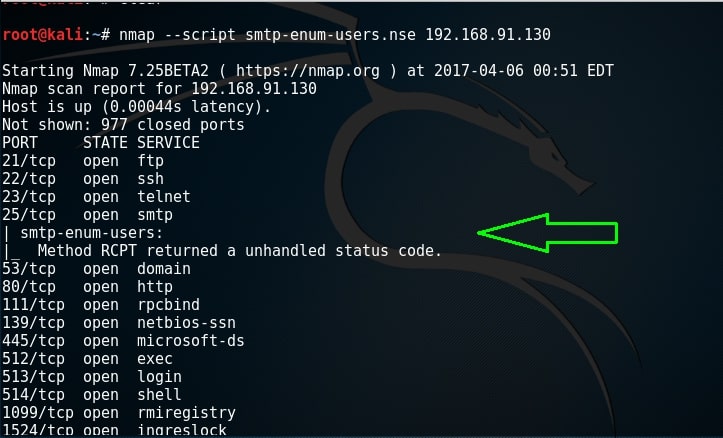
By default, Nmap uses RCPT method to check if a particular user exists. Unfortunately for me, it gave unhandled status code here. This Nmap script can be modified to use different methods. Here I changed it to use VRFY method to enumerate users. I have only scanned port 25 to remove the clutter. But still it gave me the same error.

There is another tool in the arsenal of Kali Linux which is built specifically for SMTP enumeration. Its called smtp-user-enum. Here let us test if a user called “root” exists on the target system as shown below.

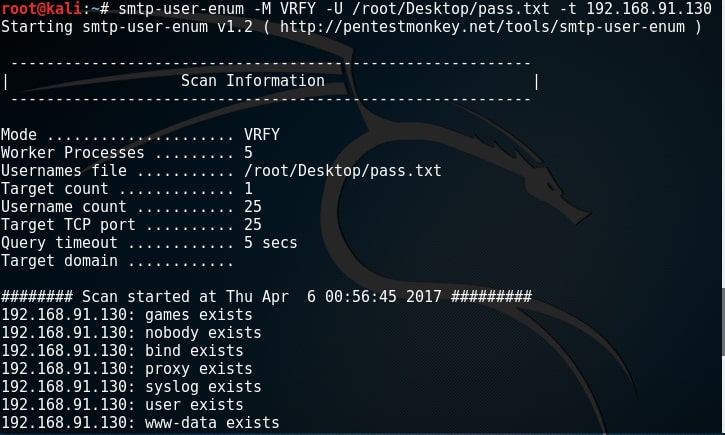
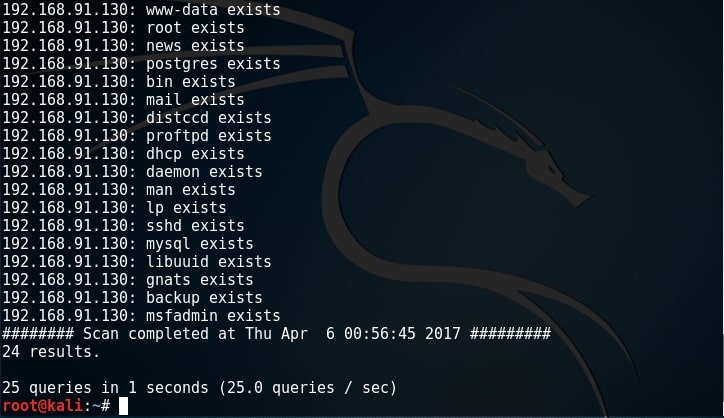
Since user “root” exists, I’m assuming other users like “msfadmin” and “user” also exist. While performing SMB enumeration, we created a wordlist which can be users on the target system. Now let’s enumerate if all the users in that wordlist exist. It can be done as shown below.

All the users we got during SMB enumeration exist. That’s good. In this case, we already have the wordlist of usernames (we got during SMB enumeratin). What if we don’t have the exact wordlist. We can use different wordlists present in Kali Linux. These wordlists are present in /usr/share/dirb directory.

What We Achieved?

We got some usernames which may be useful to us while exploiting the system in future. All these usernames have a recipient email address to them.

Posted on 2 Comments

SMB enumeration for beginners

In the previous part of the tutorial, we performed a vulnerability scan on our target Metasploitable and got some high ranking vulnerabilities. Before we take the plunge and exploit those vulnerabilities, let’s do some enumeration first.

Enumeration is the process of collecting information about user names, network resources, other machine names,  shares and services running on the network. Although little bit boring, it can be very helpful for the success of the hack in real time. In our previous parts, we have performed scanning and banner grabbing. So we already know what services are running on the target machine. They include FTP, telnet, SMTP and SMB etc. We can perform enumeration on all these services.

SMB stands for Server Message Block. Its mainly used for providing shared access to files, printers and miscellaneous communications between nodes on a network. It also provides an authenticated inter-process communication mechanism. It is a predecessor of  Common Internet File system (CIFS). To know more about SMB please go here.

SMB enumeration can provide a treasure trove of information about our target. So for today’s tutorial let’s see how to perform SMB enumeration with Kali Linux. I will use three tools inbuilt in Kali Linux : enum4linux, acccheck and SMBMap.

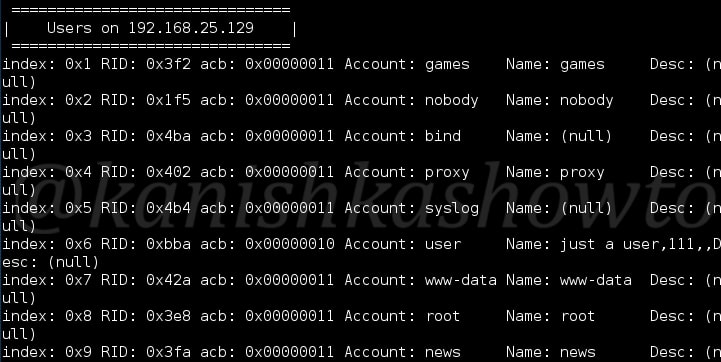
The first tool we will use is enum4linux. As the name suggests, it is a tool used for enumeration of Linux. To see all the options of this tool, just type “enum4linux -h“. Using this tool, first let us see the users of the SMB service. Open terminal and type command “enum4linux -U 192.168.25.129” as shown below.

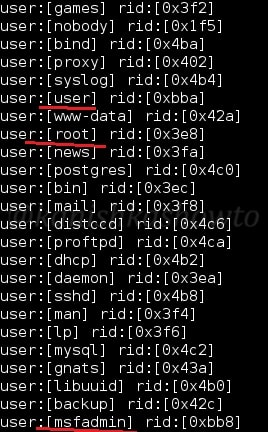
As we can see above, this system is part of a workgroup. Know the difference between domain and workgroup. We can see below that it has listed all the SMB users present on the target.

Of all the usernames the tool got us, I am assuming only three usernames are useful to us: user,root and msfadmin since others seem more like processes but we will keep our fingers crossed.

Before we check for validity of these credentials, let us perform a full enumeration with enum4linux. In the terminal type command “enum4linux 192.178.25.129” i.e without any options.  As you can see below, it lists us Nbtstat information of what services are active on the target.

SMB enumeration

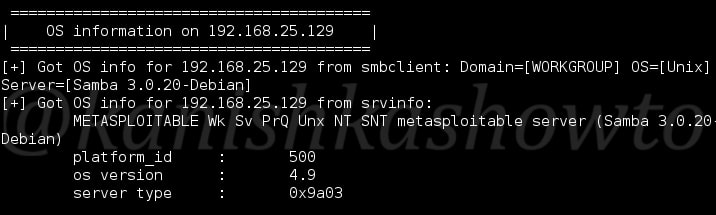
It also provides us with the OS information.

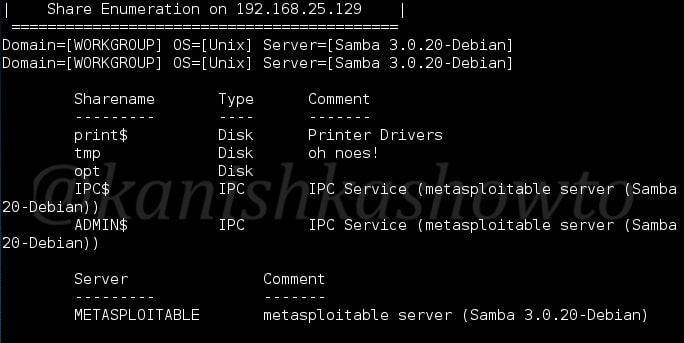
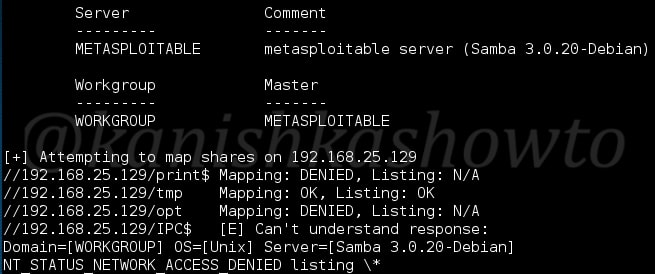
And crucial info about Shares, i.e which user has what rights on the target.

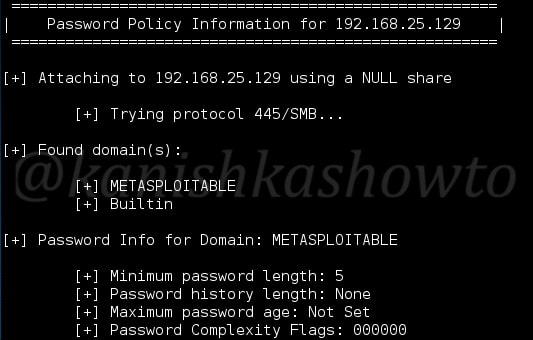
It provides us password policy info, in case we don’t get the credentials and want to crack them.

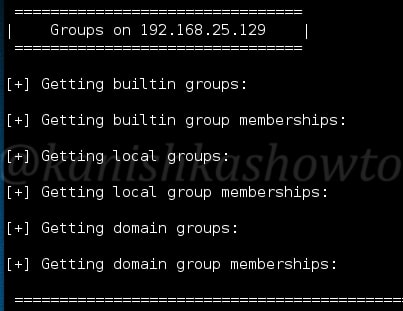
Groups present on the system.

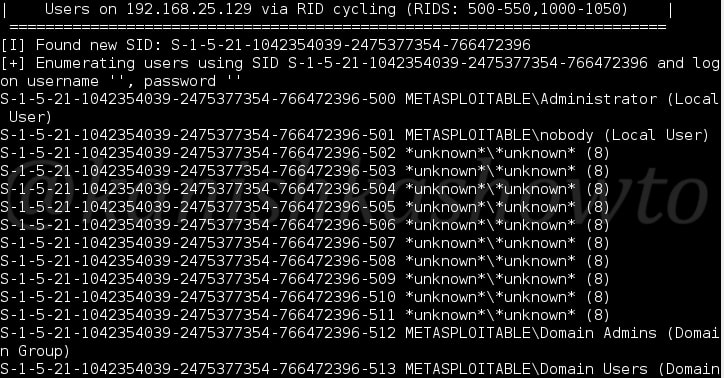
It will also display users based on RID cycling.

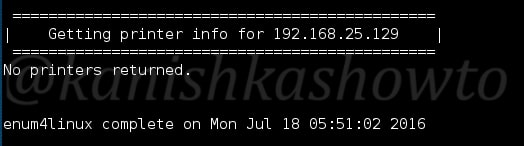
It seems there are no printers connected to the target.

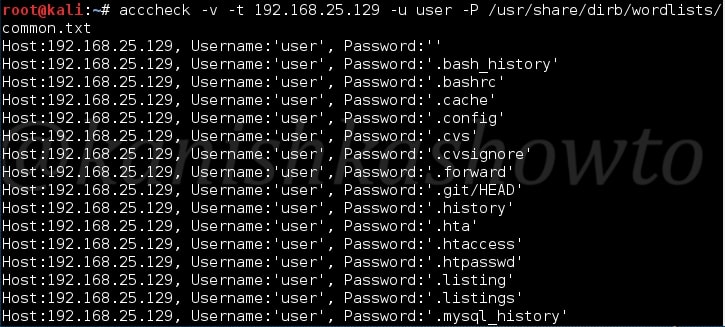
Ok, now we know the users. Let’s try to find out the passwords for the usernames we seem to have got. We will use a tool called acccheck for this purpose. It is a password dictionary attack tool that targets windows authentication via the SMB protocol.  We will see more about password cracking later. First I will try it with the user “user”. In Kali Linux, most of the password dictionaries are present in “usr/share/dirb” directory. So I specify a dictionary which consists of most common passwords used.

Here, I am just guessing that the user may be using a common password. After specifying all the options, Hit Enter. The cracking process starts as shown below.

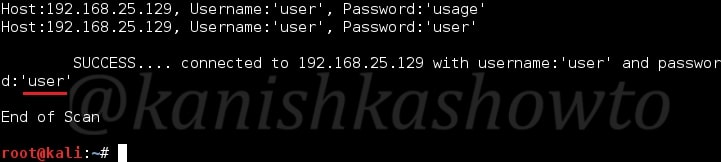
Once the tool gets the correct password, it stops the scan and displays a success message as shown below. Voila … the password of the user “user” is “user” only.

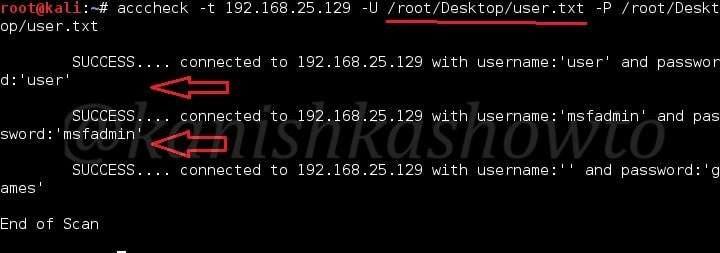
Seeing this result, I get a new idea. There might be a possibility that all the users may be using their username as password. To find out this, I create a new file called user.txt with all the usernames we got with enum4linux and specify the file for both username and password as shown below.

We got succces with three users; user, msfadmin and a blank user with password “games”. Since we successfully got some credentials, it’s time to see the share drives on our target system. For this, we will use another tool called SMBMap.

SMBMap allows users to enumerate samba share drives across an entire domain. List share drives, drive permissions, share contents, upload/download functionality, file name auto-download pattern matching, and even execute remote commands.

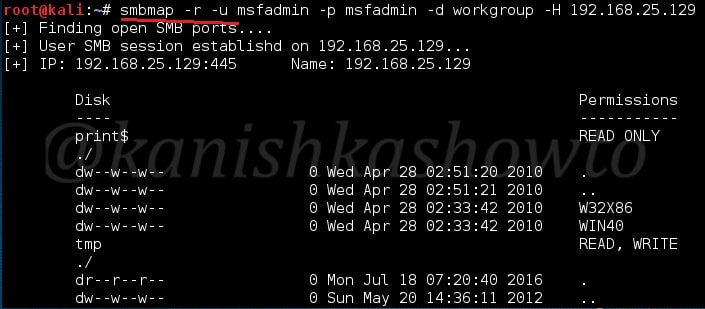
First let us check the rights of each user we got as shown below.

We can see that users user and msfadmin have READ,WRITE permissions on tmp directory only and the Blank user doesn’t have much. Next let us try to list all the drives on the target system with user “msfadmin”. We can see we don’t have enough privileges to execute a command.

Since we have READ privileges, let us read the drive on the target system as shown below. Well that’s all for SMB enumeration guys. If you want to read  about SMTP enumeration, you can go here.

RESULT: We got some usernames which may be useful to us while exploiting the system in future.