Hello, aspiring ethical hackers. Payloads play a very important role in ethical hacking. In this blogpost, you will learn everything about Metasploit payloads beginning from what is a payload, how many types of payloads are there and various functions of payloads etc.
New to Ethical Hacking?
Start your journey with The Beginner Ethical Hacker Starter Kit (2026 Edition).
A payload in cyber security is a piece of code that is executed after successfully running an exploit to take advantage of a vulnerability. When a Proof Of Concept (POC) for a vulnerability is disclosed, this allows most hackers around the world to execute their chosen payloads. This payload can be anything from malware, reverse shell, RAT, ransomware etc or their own custom payload.
For example, ms08_067 vulnerability was exploited in real-world to deploy Conficker worm, but while pen testing, a meterpreter payload is used most probably.
Types of Metasploit payloads
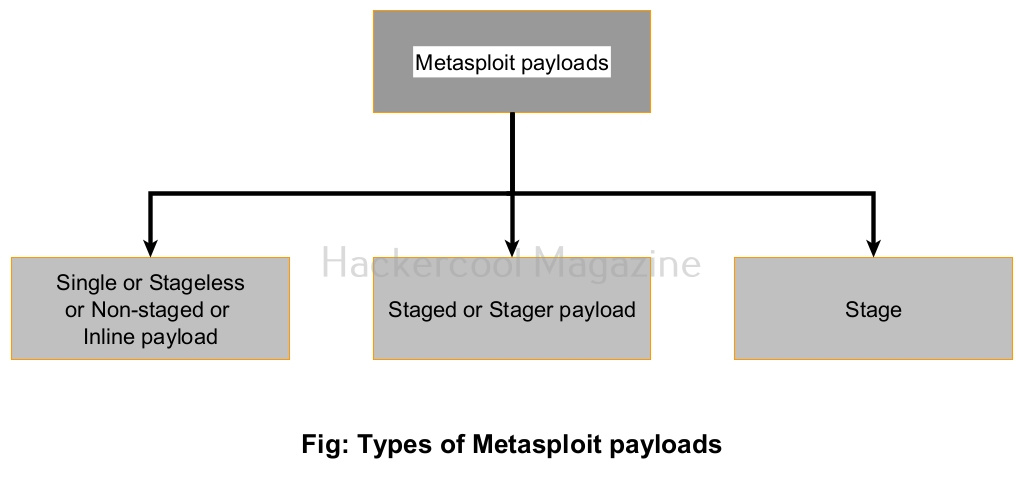
Payloads in Metasploit can be classified into three types based on their function. They are.
Staged payloads or stagers.
Stageless or Non-staged (Inline) payloads or Single payloads.
Stages
1. Single or Stageless / Non-staged or Inline payload:
Want to Learn Ethical Hacking Step-by-Step?
If you’re serious about learning cybersecurity, a structured roadmap makes the journey much easier.
Download The Beginner Ethical Hacker Starter Kit (2026 Edition) and discover:
✔ The ethical hacking learning path ✔ Beginner-friendly security concepts ✔ Essential tools ethical hackers use ✔ The most common vulnerabilities explained
A single payload s self-contained as it contains in itself all the code required to do what it does. This is one of the easiest payloads to create but its size is a bit large. This may increase suspicions.
2. Stager payload:
Stager payloads also known as stagers set the stage for another payload. Their purpose is to establish a network connection between the target system and attacker system.
3. Stages:
This is the payload that is downloaded by stager payload.
Start Your Ethical Hacking Journey Today
Learning cybersecurity can feel overwhelming at first. The best way to start is with a clear roadmap and the right resources.
Download The Beginner Ethical Hacker Starter Kit (2026 Edition) and get instant access to:
Ethical Hacking Fundamentals A beginner cybersecurity learning roadmap Essential hacking tools every beginner should know Common vulnerabilities explained simply
Hello, aspiring ethical hackers. In this blogpost, you will learn about various Data-Link Layer attacks (various hacking attacks that take place on the Data-Link layer).
New to Ethical Hacking?
Start your journey with The Beginner Ethical Hacker Starter Kit (2026 Edition).
The Data-link layer is the second layer of the seven-layer OSI model. This layer is the protocol layer that transports data between network nodes in a wide Area Network or nodes in the same Local Area Network (LAN). It is responsible for ensuring and confirming that the bits and bytes received are similar to the bits and bytes being transmitted. In this layer, data is transferred in frames and communication takes place using MAC addresses instead of IP addresses. The attacks in the Data-link Layer take place in a LAN.
What is a Network Hub?
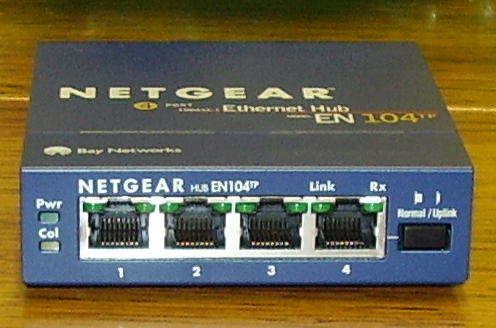
A network hub is a hardware device that connects multiple devices to a network and allows them to communicate with each other and share resources.
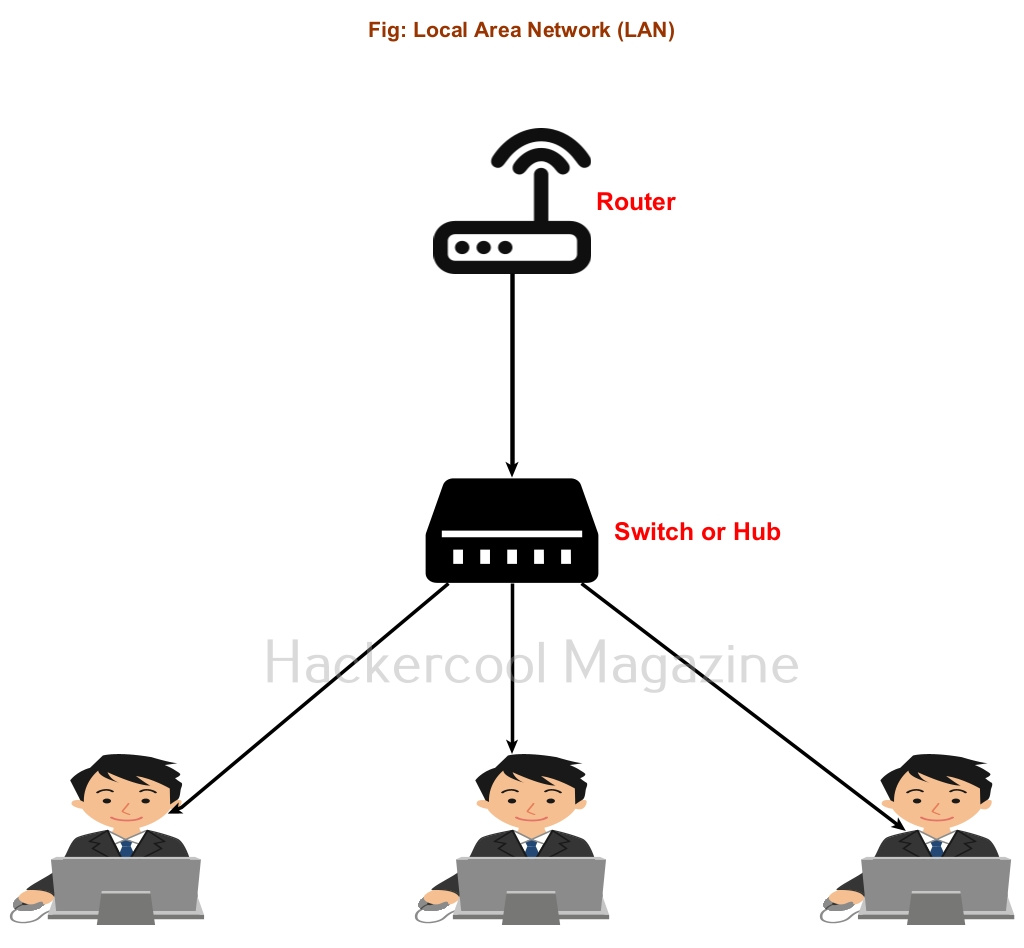
Just imagine, you have a router with 5 LAN ports. Using LAN cables, you can connect 5 devices to this router. Now, what if you want to connect 10 devices to the same network. This is where the use of network hub comes. You can connect a network Hub to one of the ports of a router. Let’s say this network hub has 10 LAN ports. So you can connect 10 computer devices to the same network. Similarly you can connect Network Hub to all ports of the routers to extend the network.
Want to Learn Ethical Hacking Step-by-Step?
If you’re serious about learning cybersecurity, a structured roadmap makes the journey much easier.
Download The Beginner Ethical Hacker Starter Kit (2026 Edition) and discover:
✔ The ethical hacking learning path ✔ Beginner-friendly security concepts ✔ Essential tools ethical hackers use ✔ The most common vulnerabilities explained
The only disadvantage with Hub is that it sends traffic intended to be between two machines to all the devices of the network. Other than consuming bandwidth, it also poses security threats like sniffing.
For example, let’s say someone from machine “B” in a network is logged into telnet server on machine “A”. You have seen in our packet sniffing blogpost that in telnet protocol, data is transferred in plain text format. So in a Hub based network, the network traffic intended to be between “A” and “B” will even go to another machine in the network “C”. If a hacker is on machine “C” he can view the telnet credentials by sniffing.
What is a Network Switch?
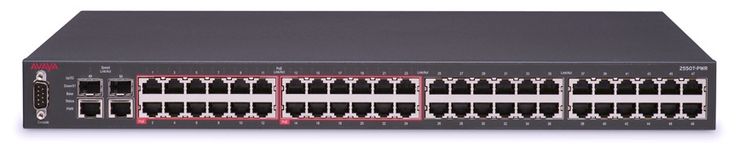
Fig: Network Switch Image source: Wikipedia
The above reasons are why, network Hubs have been replaced by Network Switches. A Switch, similar to a Network Hub in a hardware device that connects all the device of a network. The only difference in switch sends the traffic to the intended device instead of all the devices in the network
What is a MAC address?
Just now, you have read that communication between devices in a LAN takes place using MAC addresses. But what is a MAC address? Every computing device on Internet (Desktop, Laptop and Mobiles etc) has a Network Interface Card (NIC). This Network Interface Card (NIC) is a hardware circuit in the computing devices that enables the devices to be able to connect to a network.
Each NIC is given a unique hardware address that is also popularly known as a Media Access Control (MAC) address. A MAC addresses is a 48-bit number consisting of six groups of two hexadecimal digits. To learn how MAC addresses are assigned to devices and how to find MAC address of your device, you can read this blogpost.
Types of Data-Link layer attacks
Since now you have understood how Data-Link layer works and what is a MAC address, let’s learn about various Data-link layer attacks.
Although every computing device has its unique MAC address, it can be spoofed. Normally, when a MAC address of a device (say A) is spoofed to that of another device (say B) all the traffic that is intended to move toward device B goes to device A and the attacker can view all the traffic belonging to device B.
2. MAC flooding:
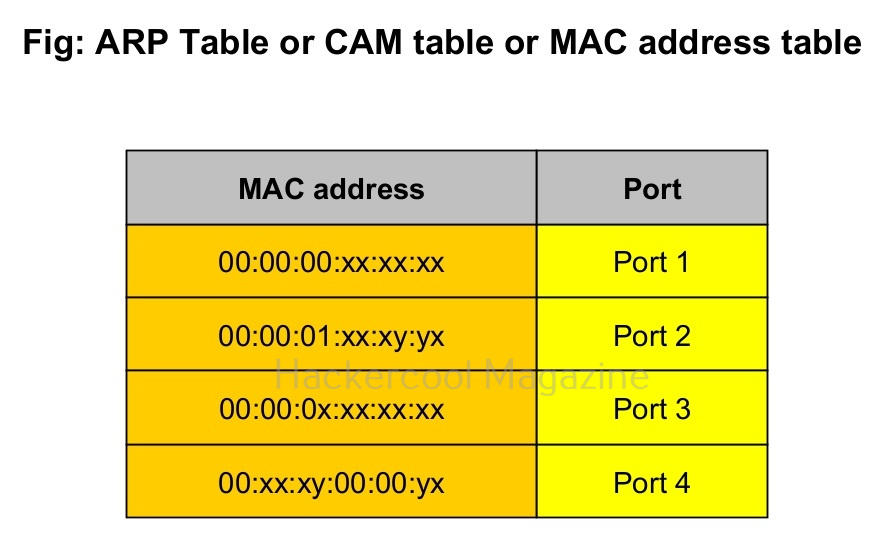
You have just now learnt about what is a Hub and what is a Switch and the differences between a Hub and Switch. You also learnt about CAM table or ARP table. In a MAC flooding attack, the CAM table is bombarded with a number of fake MAC addresses disabling the Switch’s ability to detect which MAC address belongs to which port.
To overcome this problem, a network Switch uses its broadcast address to transmit frames to the intended destination. In typical sense, the network switch here behaves like a Hub and you know about the dangers of using a Hub. A hacker already in the network can monitor the network traffic he wants via packet sniffing.
3. ARP spoofing and poisoning:
In this type of attack, the attacker sends fake ARP packets to the network from the attacker-controlled system (System A). Here, the attacker-controlled system acts as the gateway. This leads to all other devices querying the attacker-controlled system resulting in the attackers using packet sniffing again to sniff on traffic.
4. DNS spoofing:
This attack requires ARP spoofing to work. In this type of attack, attacker responds to DNS queries of the target system instead of the legitimate DNS server.
Start Your Ethical Hacking Journey Today
Learning cybersecurity can feel overwhelming at first. The best way to start is with a clear roadmap and the right resources.
Download The Beginner Ethical Hacker Starter Kit (2026 Edition) and get instant access to:
Ethical Hacking Fundamentals A beginner cybersecurity learning roadmap Essential hacking tools every beginner should know Common vulnerabilities explained simply
Hello, aspiring ethical hackers. This blogpost is a beginner guide to IDS (Intrusion Detection System) and IPS (Intrusion Preventions System). IDS and IPS are two of the security technologies used for securing the network of any organization from hackers.
New to Ethical Hacking?
Start your journey with The Beginner Ethical Hacker Starter Kit (2026 Edition).
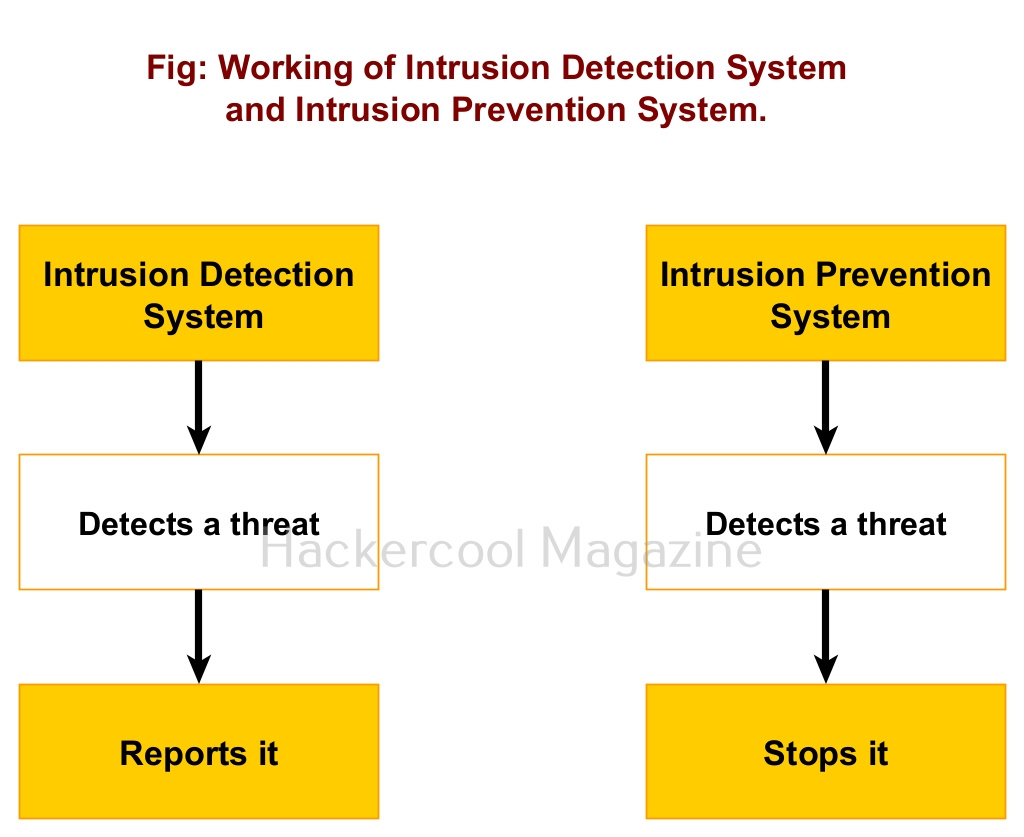
Intrusion Detection system (IDS) is an appliance or software that detects any malicious activity on the network and reports it. Intrusion Prevention System (IPS) on the other hand acts just like Intrusion Detection System but, unlike it doesn’t just make a report but tries to prevent its occurrence. This malicious activity can be anything like modification of system or important files, suspicious network traffic and execution of some files etc. Both Intrusion Detection System (IDS) and Intrusion Prevention System (IPS) are useful in enhancing the security of the network.
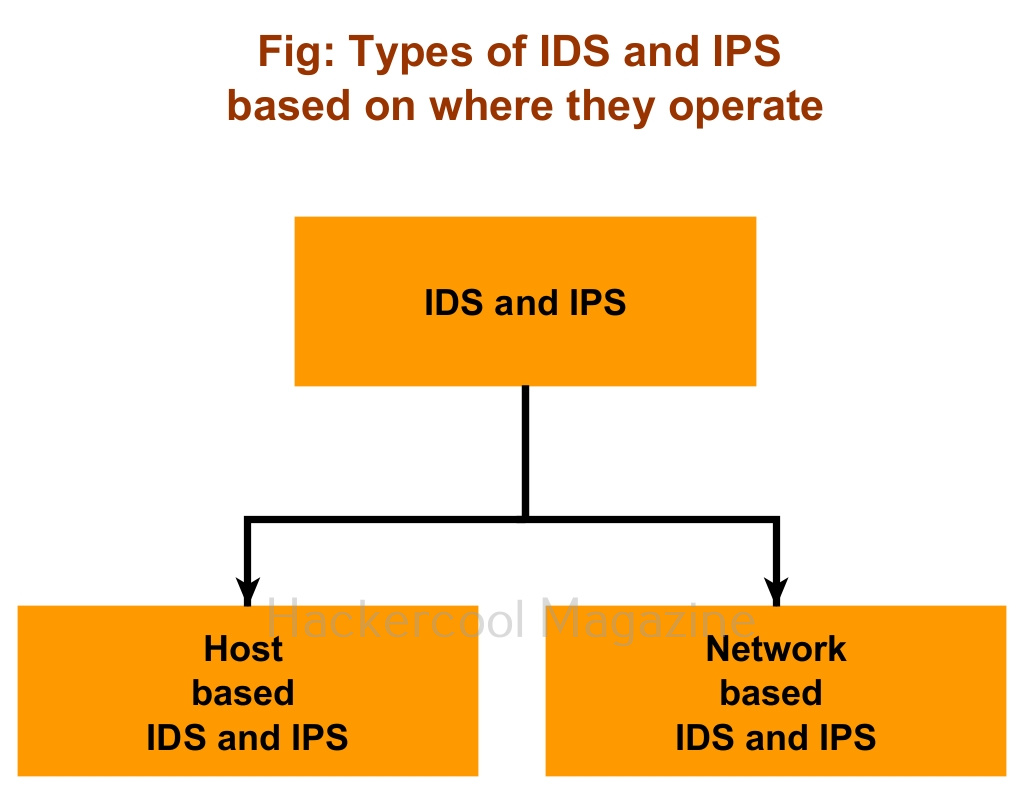
Based on the mode of operation, Intrusion Detection System and Intrusion Prevention System can be classified into two types. They are, 1) Host based (Software) 2) Network based (Hardware).
Host based Intrusion Detection and Prevention Systems: They work by detecting or preventing threats on a single system.
Network based Intrusion Detection and Prevention Systems: These are most probably a hardware appliance that detects or prevents threats on the entire network.
Want to Learn Ethical Hacking Step-by-Step?
If you’re serious about learning cybersecurity, a structured roadmap makes the journey much easier.
Download The Beginner Ethical Hacker Starter Kit (2026 Edition) and discover:
✔ The ethical hacking learning path ✔ Beginner-friendly security concepts ✔ Essential tools ethical hackers use ✔ The most common vulnerabilities explained
Based on the techniques they use to identify and prevent threats, Intrusion Detection Systems and Intrusion Prevention Systems can be classified into two types. They are,
1. Signature-based :
This type of Intrusion Prevention Systems and Intrusion Detection Systems detect threats by comparing actions with predefined signatures. For example, If action of an executable matches with a pre-defined signature of an IDS or IPS, it is classified as a threat.
2. Anomaly based:
Anomaly based Intrusion Detection Systems and Intrusion Prevention Systems detect threats by observing the behavior of the assumed threat. If the IDS and IPS see any different behavior than that is considered to be normal, it classifies it as a threat. For example, if a program being installed is trying to alter system files, this can be considered as an anomaly.
Start Your Ethical Hacking Journey Today
Learning cybersecurity can feel overwhelming at first. The best way to start is with a clear roadmap and the right resources.
Download The Beginner Ethical Hacker Starter Kit (2026 Edition) and get instant access to:
Ethical Hacking Fundamentals A beginner cybersecurity learning roadmap Essential hacking tools every beginner should know Common vulnerabilities explained simply
Covering tracks or clearing tracks is the phase of ethical hacking in which a hacker tries to erase all the evidence on the target system that can lead back to the hacker. For covering tracks, hackers perform various actions. They are,
1. Uninstalling executables and scripts:
Hackers install many scripts and executables on the target system as part of their hacking attack. These scripts may help hackers cracking passwords, privilege escalation, maintaining access etc. Detection of these scripts and executables on the target system can lead the investigators to the hacker. So, hackers uninstall or delete any scripts or executables they have used in carrying the hacking attack.
2. Clearing logs:
Every operating system has its own logs that record different operational activities being performed on the operating system. They also record any actions performed by hackers. When an incident investigator observes these logs, he can easily deduce what the hacker did on the target system. To prevent this, hackers clear these logs to hide whatever they did on the target system.
Want to Learn Ethical Hacking Step-by-Step?
If you’re serious about learning cybersecurity, a structured roadmap makes the journey much easier.
Download The Beginner Ethical Hacker Starter Kit (2026 Edition) and discover:
✔ The ethical hacking learning path ✔ Beginner-friendly security concepts ✔ Essential tools ethical hackers use ✔ The most common vulnerabilities explained
Fig: Event Viewer in Windows where all logs can be viewed
Fig: In Linux all logs are stored in the “/var/log/” directory
3. Timestamping files:
Every file on the operating system has a time stamp which reveals information about the file like the date of its creation, last modified time etc. Hackers change this timestamp of the files appropriately to prevent detection of the modifications they made to files inadvertently while hacking.
Fig: Timestamp of a file in Windows
Fig: Timestamp of a file in Linux
4. Modifying registry values:
The Windows Registry in the Windows operating system is a hierarchical database that contains information, settings, options, and other values for programs and hardware installed on the Windows operating system. Changes made to some program can also be detected by viewing this registry. So, hackers also modify these registry values to hide their malicious activity.
Fig: Windows Registry
Start Your Ethical Hacking Journey Today
Learning cybersecurity can feel overwhelming at first. The best way to start is with a clear roadmap and the right resources.
Download The Beginner Ethical Hacker Starter Kit (2026 Edition) and get instant access to:
Ethical Hacking Fundamentals A beginner cybersecurity learning roadmap Essential hacking tools every beginner should know Common vulnerabilities explained simply
Hello, aspiring ethical hackers. In this blogpost you will learn about web shell. In our previous blogpost you learnt what is a shell, what it does and the types of shell. A web shell is a type of shell but it is used in relation to websites and web server.
New to Ethical Hacking?
Start your journey with The Beginner Ethical Hacker Starter Kit (2026 Edition).
A web shell is a type of shell that gives attacker access to a website or web server. It is usually uploaded after already the website is compromised as a means to have persistent access to the website in future.
Web shells have various features. Most important of them are,
We can say that once a web shell is uploaded to the website, it gives complete control over the website to the attackers.
How are web shells uploaded?
Some vulnerabilities and attack allow hackers to upload web shells to the website to keep having persistent access. Some of these vulnerabilities are.
1. File upload vulnerabilities:
File upload or Remote file inclusion (RFI) vulnerabilities allow attackers to upload arbitrary files to the web servers. These arbitrary files are most probably web shells.
2. Path traversal vulnerabilities:
In some cases, path traversal or Local File Inclusion (LFI) vulnerabilities also allow attackers to upload web shells.
3. XSS vulnerability:
Not just file inclusion vulnerabilities, even cross site scripting (XSS) vulnerabilities in some cases allow uploading of web shells.
After the password of the website is successfully cracked, attackers can upload web shells to a website for future access.
Want to Learn Ethical Hacking Step-by-Step?
If you’re serious about learning cybersecurity, a structured roadmap makes the journey much easier.
Download The Beginner Ethical Hacker Starter Kit (2026 Edition) and discover:
✔ The ethical hacking learning path ✔ Beginner-friendly security concepts ✔ Essential tools ethical hackers use ✔ The most common vulnerabilities explained
Web shells are easily available on internet. There are various types of web shells with variety of features in various languages. Needless to say, the web shell being uploaded to the website should be of same languages as the server-side scripting language used on the web server or website. Now, let’s study about some web shells.
Weevely is a web shell designed for POST-exploitation with almost 30 modules to assist in administrative tasks, maintaining access, elevate privileges and spreading over the network. Learn more about it here.
2. Web shells in Kali Linux
Kali Linux itself has some web shells ready to be deployed. Although their functionality is simple, they are quite good for beginners. Learn about them here.
3. Metasploit/MSFvenom
Is there anything Metasploit can’t create? Yes, you can create your own web shell with msfvenom. Learn how.
Peering to the Black Hat side, C99 shell or its variants are still being used by Black Hat Hackers in real world. Learn more about C99 shell here.
Start Your Ethical Hacking Journey Today
Learning cybersecurity can feel overwhelming at first. The best way to start is with a clear roadmap and the right resources.
Download The Beginner Ethical Hacker Starter Kit (2026 Edition) and get instant access to:
Ethical Hacking Fundamentals A beginner cybersecurity learning roadmap Essential hacking tools every beginner should know Common vulnerabilities explained simply