
Category: Footprinting
Beginners Guide to Website Footprinting

Hello, aspiring Ethical Hackers. In our previous article on Footprinting, you have learnt what is Footprinting, why it is important and how many types of footprinting techniques are there. In this article, you will learn about Website Footprinting, one of the important types of footprinting techniques.
If you’re starting your journey in ethical hacking or cybersecurity, one of the first skills you’ll encounter is website footprinting. Before security professionals test a website for vulnerabilities, they first gather information about it. Think of it like investigating a building before entering it. You want to know:
- How many entrances exist?
- Who owns the building?
- What technologies are being used?
- What areas are publicly accessible?
Website footprinting follows the same principle in the digital world. In this beginner-friendly guide, you’ll learn:
- What website footprinting is
- Why it’s important
- Common information gathered during footprinting
- Basic footprinting techniques
- Ethical considerations
- How beginners can practice safely
New to Ethical Hacking?
Start your journey with The Beginner Ethical Hacker Starter Kit (2026 Edition).
Inside the free guide, you’ll learn:.
- Ethical hacking fundamentals
- Beginner cybersecurity roadmap
- Essential hacking tools
- Common vulnerabilities explained

What is Website Footprinting?
Website footprinting is the process of collecting publicly available information about a website and its infrastructure. The goal is to build a better understanding of:
- The website itself
- Associated technologies
- Hosting environment
- Domain information
- Publicly accessible resources
Website footprinting is usually part of the reconnaissance phase of a security assessment. In simple terms, Website footprinting is digital information gathering.

Why is Website Footprinting Important?
Before testing a website, you need information about that website. Website footprinting gives security professionals exactly that.
1. Understand the Target website:
Learn how a website is structured.
2. Identify Technologies:
Determine what technologies may be running behind the scenes.
3. Discover Additional Assets:
Find subdomains, services and public resources related to that website or organization.
4. Improve Security Awareness:
Organizations can better understand their own exposure.
5. Build Investigation Skills:
Footprinting teaches observation and analytical thinking.
Information Commonly Gathered During Website Footprinting
Let’s look at the most useful information categories that can be obtained during website footprinting.

1. Domain Information:
Every website has a domain name.
Examples:
- example.com
- mywebsite.net
Useful information about this includes:
- Registration details
- Domain age
- Registrar information
- Name servers
Understanding domain information provides valuable context.
2. DNS Information:
DNS (Domain Name System) translates domain names into IP addresses. DNS records may reveal information about:
- Web servers
- Mail servers
- Subdomains
- Hosting information
DNS footprinting is one of the most common reconnaissance activities.
3. IP Address Information:
Websites ultimately run on servers identified by IP addresses. Learning the IP address may reveal:
- Hosting provider
- Geographic region
- Network ownership
This helps build a technical profile.
4. Website Technologies:
Many websites use identifiable technologies.
These technologies include:
- Content Management Systems (CMS)
- Web servers
- Frameworks
- Analytics platforms
Understanding technologies behind the website helps security professionals understand how a site operates.’
5. Subdomains:
Organizations often use multiple subdomains.
Examples:
- blog.example.com
- mail.example.com
- support.example.com
Subdomains may expose additional systems and services.
6. Public Documents:
Organizations sometimes publish documents containing useful information.
Examples:
- PDF files
- Reports
- Presentations
These documents may contain metadata or infrastructure clues.
7. Website Structure:
Understanding site structure helps identify:
- Main pages
- Categories
- Login portals
- Support sections
- User-facing services
This creates a map of the website.
Common Website Footprinting Techniques
A number of techniques are used to gather information from a website. Let’s learn about them. Beginners should first understand the concepts rather than focus solely on tools.

1. Search Engine Analysis:
Search engines often reveal:
- Indexed pages
- Public documents
- Archived content
- Public resources
Search engines can provide surprising amounts of information. Learn more about Google Hacking.

2. DNS Analysis:
DNS records provide valuable infrastructure information. Common record types include:
- A records
- MX records
- NS records
- TXT records
These records help identify services associated with a website. Learn about DNS footprinting.

3. Technology Identification:
Website technologies can sometimes be identified by:
- Source code of the webpages
- Response headers
- Public information
Understanding technologies provides useful context.
Want to Learn Ethical Hacking Step-by-Step?
If you’re serious about learning cybersecurity, a structured roadmap makes the journey much easier.
Download The Beginner Ethical Hacker Starter Kit (2026 Edition) and discover:
✔ The ethical hacking learning path
✔ Beginner-friendly security concepts
✔ Essential tools ethical hackers use
✔ The most common vulnerabilities explained

4. Metadata Analysis:
Files published online may contain metadata.
Examples:
- Author information
- Software used
- Creation dates
Metadata can provide additional clues during investigations. Learn about metadata analysis.

5. Subdomain Discovery:
Organizations often operate multiple web services. Subdomain discovery helps identify:
- Additional applications
- Support systems
- Public-facing services
This expands understanding of the website ecosystem.

6. Understanding Website Architecture:
Many beginners focus only on the homepage. However, websites are often much larger.
A website may include:
- Main application
- Customer portal
- API services
- Support platform
- Blog section
Website footprinting helps uncover these components.

How Website Footprinting helps Ethical Hackers?
Footprinting provides context. Without information gathering, security testing becomes guesswork. Website footprinting helps ethical hackers:
- Understand attack surfaces
- Identify technologies
- Discover exposed resources
- Prioritize testing efforts
It serves as the foundation of a structured security assessment.

Common Beginner Mistakes
Avoid making these mistakes during website footprinting.
1. Focusing Only on Tools:
Tools are useful but understanding the information matters more.
2. Ignoring Small Details:
Tiny clues often reveal valuable information.
3. Skipping Documentation:
Always record observations and findings.
4. Assuming the Homepage Is Everything:
Many websites contain multiple services and hidden sections.
5. Forgetting Ethics:
Information gathering should always remain legal and authorized.

Safe Ways for Beginners to Practice
Practicing website footrpinting is a bit tricky. You need a LIVE website to practice on. However, safe practice ideas are there. Here are some,
1. Analyze Your Own Website:
Practicing on your own website is the best option. Study its:
- Structure
- Technologies
- Public information
2. Explore Practice Domains:
Everyone doesn’t have his own website. In that case, use educational environments designed for learning.
3. Review Public Metadata:
Inspect your own documents and images.
4. Study Website Architecture:
Map sections and functionality.
5. Observe DNS Information:
Learn how domains connect to services.
Skills Developed Through Website Footprinting
Website footprinting helps beginners develop some skills. They are,
1. Observation Skills:
Learning to notice even small details.
2. Analytical Thinking:
Connecting pieces of information.
3. Documentation Habits:
Recording useful findings.
4. Security Awareness:
Understanding exposure and risk.
5. Investigative Skills:
Building a structured approach to information gathering.

Website Footprinting and Cybersecurity Careers
Many cybersecurity roles rely on information gathering. Examples include:
- Penetration Testers
- Security Analysts
- Threat Hunters
- Incident Responders
- Red Team Operators
As you can see, strong reconnaissance skills are valuable across the industry.

Conclusion
Website footprinting is one of the most important foundational skills in ethical hacking and cybersecurity. It teaches you to think like an investigator. Instead of rushing into tools or advanced techniques, footprinting encourages you to:
- Observe
- Analyze
- Document
- Understand
Remember:
The more you understand about a website, the better prepared you are to assess its security.
For beginners, website footprinting is one of the best ways to start developing the mindset of a cybersecurity professional. It requires curiosity, patience and attention to detail, skills that will benefit you throughout your cybersecurity journey.
Start Your Ethical Hacking Journey Today
Learning cybersecurity can feel overwhelming at first. The best way to start is with a clear roadmap and the right resources.
Download The Beginner Ethical Hacker Starter Kit (2026 Edition) and get instant access to:
Ethical Hacking Fundamentals
A beginner cybersecurity learning roadmap
Essential hacking tools every beginner should know
Common vulnerabilities explained simply
Metadata for Beginners: What It Is and Why It Matters

If you’re starting your journey in cybersecurity, digital investigations or ethical hacking, you’ll often hear the term metadata. At first, it sounds technical. But the concept is actually simple and incredibly important. It can reveal hidden details about files, emails, images and documents that many people never notice.
In this beginner-friendly guide, you’ll learn:
- What metadata is
- Why it matters
- Common types of metadata
- Where it is found
- How cybersecurity professionals use it
New to Ethical Hacking?
Start your journey with The Beginner Ethical Hacker Starter Kit (2026 Edition).
Inside the free guide, you’ll learn:.
- Ethical hacking fundamentals
- Beginner cybersecurity roadmap
- Essential hacking tools
- Common vulnerabilities explained

What is Metadata?
Metadata is simply data about data. That sounds abstract, so let’s make it easier. Imagine a photograph. The photo itself is the main data. It is the hidden information attached to that photo, such as:
- Date it was taken
- Device used to take that photo
- File size
- Image dimensions
- GPS location (sometimes)
So:
The content is the data. The descriptive information is the metadata.
Simple Real-World Example
If you stil faied to understand it, let me give you a non-technical example. Think about a book. The content of the book is the actual data. It’s metadata includes:
- Title
- Author
- Publication date
- ISBN
- Number of pages
That information describes the book. The same idea applies to digital files.
Why Metadata Matters
It can reveal a surprising amount of information. It helps people,
- Organize files
- Search efficiently
- Track changes
- Investigate activity
- Understand context
In cybersecurity, it can provide valuable clues.
Common Types of Metadata
Meta data exists in many forms. Let’s break down common categories.
1. File Metadata:
Most digital files contain descriptive information. For example,
- File name
- File size
- Creation date
- Modification date
- File type
- Author information
This helps systems manage files efficiently.

2. Image Metadata:
Photos often contain hidden technical details. Examples:
- Camera model
- Device type
- Resolution
- Timestamp
- GPS coordinates
- Editing software
This is often called EXIF meta data.

3. Document Metadata:
Documents can contain useful embedded details. Examples:
- Author name
- Editing timestamps
- Software version
- Revision history
- Company information
Common in:
- PDFs
- Word documents
- Presentations

4. Email Metadata:
Emails contain hidden technical information beyond what you see. For example,
- Sending server details
- Message path
- Timestamps
- Sender routing information
- Authentication data
Useful for email investigations.

5. Website Metadata:
Websites also contain meta data. Examples:
- Page descriptions
- Keywords
- Open Graph tags
- Structured data
Used for:
- Search engines
- Social sharing
- Content indexing
6. System Metadata:
Operating systems track this data too. Examples:
- Access times
- File ownership
- Permissions
- System timestamps
Useful for troubleshooting and analysis.
Where Can Metadata Be Found?
Metadata appears in many places. The most common sources are,
Images:
Photos often carry hidden embedded data.
Documents:
Office files frequently store author and revision information.
Emails:
Email Headers contain metadata.
PDFs:
Creation and editing information may be stored.
Audio / Video Files:
Media files may include:
- Duration
- Encoding details
- Device information
Websites:
HTML metadata helps search engines understand content.
Metadata in Cybersecurity
Metadata can be extremely useful in cybersecurity work. It helps professionals:
- Gather information
- Investigate incidents
- Understand digital activity
- Identify anomalies
Example: Document Investigation
A document may reveal:
- Original author
- Organization name
- Software used
- Editing history
This can provide useful context.
Example: Email Analysis
Email metadata can help identify:
- Delivery path
- Spoofing attempts
- Suspicious infrastructure
- Authentication failures
Example: Image Analysis
An uploaded image may reveal:
- Device used
- Location data
- Timestamp
This can help in investigations.
Metadata Extraction: Practical Walkthrough
Let’s see a prcatical walkthrough of metadata extraction. There are various tools and online resources that extract metadata from different files. For this article, let’s use one tool that is inbuilt in Kali Linux, exiftool. Exiftool extracts metadata from a number of file types.

Let’s extract metadata of a MS word document (docx) file.


As you can see, it revealed lot of information about the Word file. Now, let’s extract metadata from a PDF file.
Want to Learn Ethical Hacking Step-by-Step?
If you’re serious about learning cybersecurity, a structured roadmap makes the journey much easier.
Download The Beginner Ethical Hacker Starter Kit (2026 Edition) and discover:
✔ The ethical hacking learning path
✔ Beginner-friendly security concepts
✔ Essential tools ethical hackers use
✔ The most common vulnerabilities explained

Let’s see another PDF file.

In both the above files, metadata reveals lot of information about the file like who created it, what software was used and time of creation and modification etc. Last and final, let’s use exiftool on an image file.


Metadata in Digital Forensics
Digital forensics relies heavily on metadata.
Investigators use metadata to:
- Reconstruct timelines
- Track file activity
- Understand user behavior
- Analyze evidence
Examples:
- When was a file created?
- When was it modified?
- Who accessed it?
Metadata in Ethical Hacking
Ethical hackers may use metadata during information gathering. Examples:
- Public document analysis
- Website information gathering
- Email inspection
- Technology identification
Metadata can reveal useful context about exposed assets.
If you have noticed, we have performed metadata extraction from 3 types of files: Docx, PDF and an Image. That’s because these are the most common types of files that are available online. Any organization uses these types of files on their websites or anywhere else to convey information.
While extracting information of the docx file revealed the names of creators of the file (Admin, Kalyan). This revelation can help in gaining access later (i.e username is admin etc) or to perform a spear phishing attack targeted at the specific user. We can also see that the document was created using Microsoft Word software. So, we can target these users with a malicious macro attack.
While observing the information extracted from a PDF file, we can see that this PDF was created using Microsoft Word. In this case, the version of the MS Word software is also very clear (2019) along with the creator’s name.
The second PDF file was created using Microsoft PowerPoint. So, we can figure out that these users need to be targeted with PowerPoint attack.
Images are another most common types of files found on a website or any other company’s property. We can see that the image I downloaded from a website is either edited or created with Photoshop along with its specific version. So, we can search for any vulnerabilities in this particular software or use this software themed lure to target this organization.
That’s how Metadata can help Pen testers in gaining information about the target organization.

Common Privacy Risks associated with Metadata
Metadata can accidentally expose sensitive information. Examples are,
Location Exposure:
Images may contain GPS coordinates, thus exposing location.
Internal User Information:
Documents may reveal usernames or organization details.
Software Fingerprinting:
Metadata can show which tools were used to create a file.

Timeline Exposure:
Creation and modification timestamps reveal activity patterns.

Common Beginner Mistakes
Here are some common mistakes beginners make while dealing with metadata. Please avoid these mistakes.
Assuming Deleted Metadata Is Gone:
Many people think that by deleting the metadata of a particular file, it’s entirely gone. It’s wrong. Some metadata may still persist.
Ignoring Hidden File Information:
Visible content isn’t the whole story.
Sharing Files Without Reviewing Metadata:
Sensitive details may be exposed accidentally.
Overlooking Timestamps:
Time data can be very revealing.

Safe Beginner Practice Ideas
Here are some good ideas for beginners to practice viewing metadata. Practice with your own files.
Inspect Photo Metadata:
Check this on a photo you took. Observe its:
- Device information
- Timestamp
- Resolution
Review Document Properties:
Look at document’s author information.
Analyze Email Headers:
Study email routing details.
Compare File Versions:
Observe metadata differences.
Why Metadata Matters Beyond Cybersecurity?
Metadata is important in many industries. Examples include,
Search Engines:
Metadata helps content indexing.
Digital Asset Management:
Improves organization and retrieval.
Compliance & Auditing:
Tracks file activity.
Content Publishing:
Helps discovery and categorization.

Conclusion
Metadata may be invisible but it can reveal a lot. For beginners, understanding metadata helps build stronger cybersecurity awareness. It teaches you to look beyond what’s obvious.
Remember:
✔ Metadata is data about data
✔ It exists in many file types
✔ It helps investigations and analysis
✔ It can create privacy risks
✔ Cybersecurity professionals use it regularly
The next time you open a file, remember:
There may be more information hidden behind the scenes than you realize.
Start Your Ethical Hacking Journey Today
Learning cybersecurity can feel overwhelming at first. The best way to start is with a clear roadmap and the right resources.
Download The Beginner Ethical Hacker Starter Kit (2026 Edition) and get instant access to:
Ethical Hacking Fundamentals
A beginner cybersecurity learning roadmap
Essential hacking tools every beginner should know
Common vulnerabilities explained simply
Network footprinting for beginners

Hello, aspiring Ethical Hackers. In our previous blogpost Footprinting Guide, you learnt about different types of footprinting techniques ethical hackers perform to gather information about their target. One of the important types of footprinting is Network Footprinting.
If you’re starting your ethical hacking or cybersecurity journey, one of the first skills you should learn is network footprinting. It may sound technical, but the core idea is simple. Network footprinting is about collecting information about a network before testing or securing it.
Think of it like exploring a building before entering it. You want to know:
- How many doors are there?
- Which rooms are occupied?
- Where are the entry points?
That’s exactly what network footprinting helps you understand in the digital world. In this beginner-friendly guide, you’ll learn:
- What network footprinting is
- Why it matters
- Common techniques
- Beginner-friendly tools
- Safe ways to practice
New to Ethical Hacking?
Start your journey with The Beginner Ethical Hacker Starter Kit (2026 Edition).
Inside the free guide, you’ll learn:.
- Ethical hacking fundamentals
- Beginner cybersecurity roadmap
- Essential hacking tools
- Common vulnerabilities explained

What is Network Footprinting?
Network footprinting is the process of gathering information about a target network and its connected systems. The goal is to understand:
- What devices exist
- What services are running
- How the network is structured
This information helps security professionals identify potential weak points. In simple terms, You map the network before analyzing it further.

Why is Network Footprinting Important??
Without information, cybersecurity becomes guesswork. Network footprinting helps you:
1. Understand the Network:
You learn what systems are connected.
2. Identify Potential Entry Points:
You may discover:
- Web servers
- Remote access services
- Exposed devices
3. Improve Troubleshooting:
Knowing the network structure makes issues easier to diagnose.
4. Think Like a Security Professional:
Real attackers gather information first. Ethical hackers do the same but legally.
What Information Can You Gather?
Network footprinting can reveal information about the target like,
- IP addresses
- Hostnames
- Open ports
- Running services
- Operating system clues
- Network topology
- Device types
This creates a clearer picture of the target environment.
Common Network Footprinting Techniques
Let’s look at some of the most common methods used to perform network footprinting.

1. IP Address Discovery:
Every device on a network has an unique IP address. Finding these IP addresses helps you understand:
- How many devices exist
- Which systems are active and inactive
The devices having IP addresses include:
- Computers
- Servers
- Routers
- Printers
This is usually the first step.

2. Host Discovery:
Not every IP address belongs to an active system. Host discovery helps clearly identify:
- Live devices
- Reachable systems
This tells you what systems are actually online.

3. Port Discovery:
Devices offer services through ports.
Examples of services:
- Web services
- Remote access
- File sharing
Finding open ports helps identify what services a device is offering. Open ports often reveal useful information.

4. Service Identification:
Once you find open ports, the next step is understanding:
- What services are running
Examples:
- Web servers
- Secure remote access
- Database services
This helps build a technical profile.

5. Operating System Detection:
Different operating systems behave differently. Network footprinting can help identify:
- Linux systems
- Windows systems
- Networking devices
This helps you understand the target environment better.

6. Topology Mapping:
Network Topology refers to the way devices in a network connect to each other. This helps visualize:
- Gateways
- Routers
- Internal structure
Think of it as drawing a map of the network.

Beginner-Friendly Tools
You don’t need dozens of tools for network footprinting. Start with a few basic tools.
1. Network Scanner Tools:
Used for:
- Host discovery
- Port identification
Ex: Nmap, Amass, masscan, Netcat, netdiscover and Angry IP Scanner etc
Want to Learn Ethical Hacking Step-by-Step?
If you’re serious about learning cybersecurity, a structured roadmap makes the journey much easier.
Download The Beginner Ethical Hacker Starter Kit (2026 Edition) and discover:
✔ The ethical hacking learning path
✔ Beginner-friendly security concepts
✔ Essential tools ethical hackers use
✔ The most common vulnerabilities explained
2. Packet Analysis Tools:
Help inspect:
- Traffic
- Requests
- Responses
3. DNS Lookup Tools:
Useful for:
- Name resolution
- Service discovery
Start simple and learn concepts first.

Step-by-Step Beginner Workflow
Here’s a simple beginner approach to footprint a network.
Step 1: Identify Target Scope
Define what you’re analyzing. For example,
- Home lab
- Test environment
- Target organization’s network
Always stay within legal boundaries.
Step 2: Discover Active Hosts
Once your scope is defined, find:
- Live systems
- Reachable devices
Step 3: Check Open Ports
After finding some LIVE or active hosts, look for:
- Exposed services
Step 4: Identify Running Services
Understand:
- What the systems are doing and what services are running.
Step 5: Map the Network
Visualize:
- Connections
- Structure
Step 6: Document Findings
Write down:
- Devices
- Ports
- Observations
Documentation is a real cybersecurity habit.

Common Mistakes Beginners Make
Almost all beginners make the mistakes given below while performing network footprinting. Avoid these.
1. Jumping Straight Into Tools:
Understand concepts first.
2. Scanning Random Systems:
Never analyze systems without permission.
3. Ignoring Small Clues:
Small details can reveal a lot.
4. Not Taking Notes:
Without documentation, learning becomes messy.
5. Tool Dependence:
Tools hel but analysis matters more.
Tips to Learn Faster
Here are some tips for you to master network footprinting faster.
Be Curious:
Ask:
- What device is this?
- Why is this service exposed?
Document Everything:
Track:
- Findings
- Questions
- Patterns
Practice Repeatedly:
Repeat the process in safe labs.
Connect the Dots:
Combine:
- Network info
- DNS info
- System clues
Legal & Ethical Reminder
This is very important. Never:
- Scan networks you do not own
- Test unauthorized systems
Always:
- Use home labs
- Practice in safe training environments
Ethical hacking is about permission.
Real-World Beginner Example
Imagine you’re analyzing your home lab. You discover:
- A laptop
- A router
- A printer
- A media server
You then identify:
- Which systems are active
- Which services are exposed
This gives you a basic network map. That’s practical network footprinting.
Why Network Footprinting Matters in Ethical Hacking
Network footprinting helps ethical hackers:
- Understand environments
- Identify exposure
- Prepare for security analysis
It’s one of the first steps in:
- Penetration testing
- Security assessments
- Incident investigations

Beginner Practice Ideas
Here are some safe ways for beginners to practice network footprinting.
Home Lab Mapping:
Map your own home network.
Virtual Machine Labs:
Practice in isolated environments in your virtual labs.
Packet Observation:
Study traffic patterns.
Service Identification Practice:
Learn about common network services.

Conclusion
Network footprinting is one of the most valuable beginner cybersecurity skills. It teaches you how to:
- Observe systems
- Think logically
- Build technical awareness
You don’t need advanced hacking knowledge to start. You just need:
- Curiosity
- Patience
- Practice
Key takeaways for you from this blogpost are,
- Network footprinting gathers network information
- It helps identify systems and services
- Documentation is critical
- Practice only in legal environments
Start Your Ethical Hacking Journey Today
Learning cybersecurity can feel overwhelming at first. The best way to start is with a clear roadmap and the right resources.
Download The Beginner Ethical Hacker Starter Kit (2026 Edition) and get instant access to:
Ethical Hacking Fundamentals
A beginner cybersecurity learning roadmap
Essential hacking tools every beginner should know
Common vulnerabilities explained simply
Email analysis for beginners

Hello, aspiring Ethical Hackers. In our previous blogpost, you have learnt what is footprinting and various methods to perform footprinting. One such type of Footprinting is Email Footprinting or Email analysis.
Not just that. Emails are one of the most common ways cyber attacks happen. From phishing scams to malware delivery, attackers often use email as their first point of entry. That’s why learning email analysis is an important skill for anyone interested in cybersecurity or ethical hacking. The good news?
You don’t need advanced skills to start learning it. In this beginner-friendly guide, you’ll learn:
- What email analysis is
- Why it matters
- How to analyze emails step by step
- What suspicious signs to look for
New to Ethical Hacking?
Start your journey with The Beginner Ethical Hacker Starter Kit (2026 Edition).
Inside the free guide, you’ll learn:.
- Ethical hacking fundamentals
- Beginner cybersecurity roadmap
- Essential hacking tools
- Common vulnerabilities explained

What is Email Analysis?
Email analysis is the process of examining an email to determine whether it is safe, suspicious or malicious. This includes checking:
- Sender information
- Links
- Attachments
- Email headers
- Writing style
In simple terms, you investigate an email before trusting it.

Why is Email Analysis Important?
Cybercriminals rely heavily on email attacks because they target people directly. Email analysis helps:
- Detect phishing attempts
- Identify fake senders
- Prevent malware infections
- Protect sensitive information
Why Attackers Use Email:
Email attacks are effective because:
- People trust familiar brands
- Emails can create urgency
- Users may click without thinking
Even experienced users can be fooled.
Common Types of Malicious Emails
Before analyzing emails, you should understand some of the common malicious emails.
1. Phishing Emails:
These email are designed to steal:
- Passwords
- Banking details
- Personal information
Usually pretend to be:
- Banks
- Companies
- Online services
2. Malware Emails:
Contain:
- Malicious attachments
- Dangerous download links
Goal:
- Infect systems
3. Spoofed Emails:
The sender address is faked to appear legitimate.
4. Scam Emails:
Try to trick victims into:
- Sending money
- Sharing sensitive information
Step-by-Step Email Analysis Process
Let’s go through a simple beginner workflow of analysing emails.

Step 1: Check the Sender Address:
This is the first thing you should inspect. Attackers often use:
- Misspelled domains
- Fake addresses
Example:
Real:
Fake:
Notice the subtle difference?
Step 2: Analyze the Subject Line:
Suspicious emails often create:
- Fear
- Urgency
- Curiosity
Examples:
- “Your account will be suspended!”
- “Urgent payment required!”
Attackers want you to react quickly.

Step 3: Look For Suspicious Links:
Never trust links inside an email immediately. Hover over links and check:
- Destination domain
- Strange URLs
Red Flags:
- Random characters
- Shortened URLs
- Misspelled domains

Step 4: Inspect Attachments:
Attachments can contain malware. Be cautious with:
- ZIP files
- EXE files
- Office documents with macros
If unexpected, don’t open them.
Step 5: Check the Writing Style:
Many phishing emails contain:
- Grammar mistakes
- Unusual wording
- Generic greetings
Examples:
- “Dear user”
- “Dear customer”
Legitimate companies usually personalize emails.

Step 6: Analyze Email Headers:
Headers contain technical information about the email. They can reveal:
- Sending servers
- Email path
- Authentication results
Why Headers Matter:
Headers help identify:
- Fake senders
- Spoofing attempts
Beginners don’t need to master headers immediatel but learning basics helps a lot. Let’s show you a simple example of header analysis of a real-world email received on Gmail. Go to your Inbox and open a mail. Go to the vertical dots (move button) at the top right of the email and click on it as shown below.

Click on “Show original”.

This should show you the entire email headers of the particular mail.

Let’s learn about each header in detail.

Delivered To:
Email address to whom the mail has been delivered.
Received:
This header indicates all the SMTP servers through which this email has passed through before reaching to your Inbox. This contains server IP address, SMTPID etc.
X-Google-SMTP-source:
It shows the transferring email using a Gmail SMTP server. If this header is present, then it usually means this was transferred by GMAIL SMTP server.
X_Received-BY:
This header indicates the last visited SMTP server the mail reached before reaching your Inbox. It contains Server IP address, SMTP ID of the visited server and Date & time when the email was received by the SMTP server.

ARC-Seal, ARC-Message-Signature, ARC-Authentication-Results: ARC stands for Authenticated Receiver Chain (ARC). This is used to preserve email authentication results and to verify the identity of email intermediaries that forward a manage to its final destination (i.e. your Inbox).

SMTP-mailfrom:
You can see the IP address of the sender of the email.
Return-Path:
This is the path specified to go when email is bounced or not sent.
Received SPF:
SPF stands for Sender Policy Framework. This is used to prevent sender address forgery. It SPF is set to PASS, the Email source is valid, if it is softfail, it is likely the email source is fake and if it is having value Fail, source is invalid.
This is how Email headers can be analysed.
Want to Learn Ethical Hacking Step-by-Step?
If you’re serious about learning cybersecurity, a structured roadmap makes the journey much easier.
Download The Beginner Ethical Hacker Starter Kit (2026 Edition) and discover:
✔ The ethical hacking learning path
✔ Beginner-friendly security concepts
✔ Essential tools ethical hackers use
✔ The most common vulnerabilities explained

Step 7: Verify Before Taking Action:
If an email seems suspicious, don’t click immediately. Instead:
- Visit the official website manually
- Contact the company directly
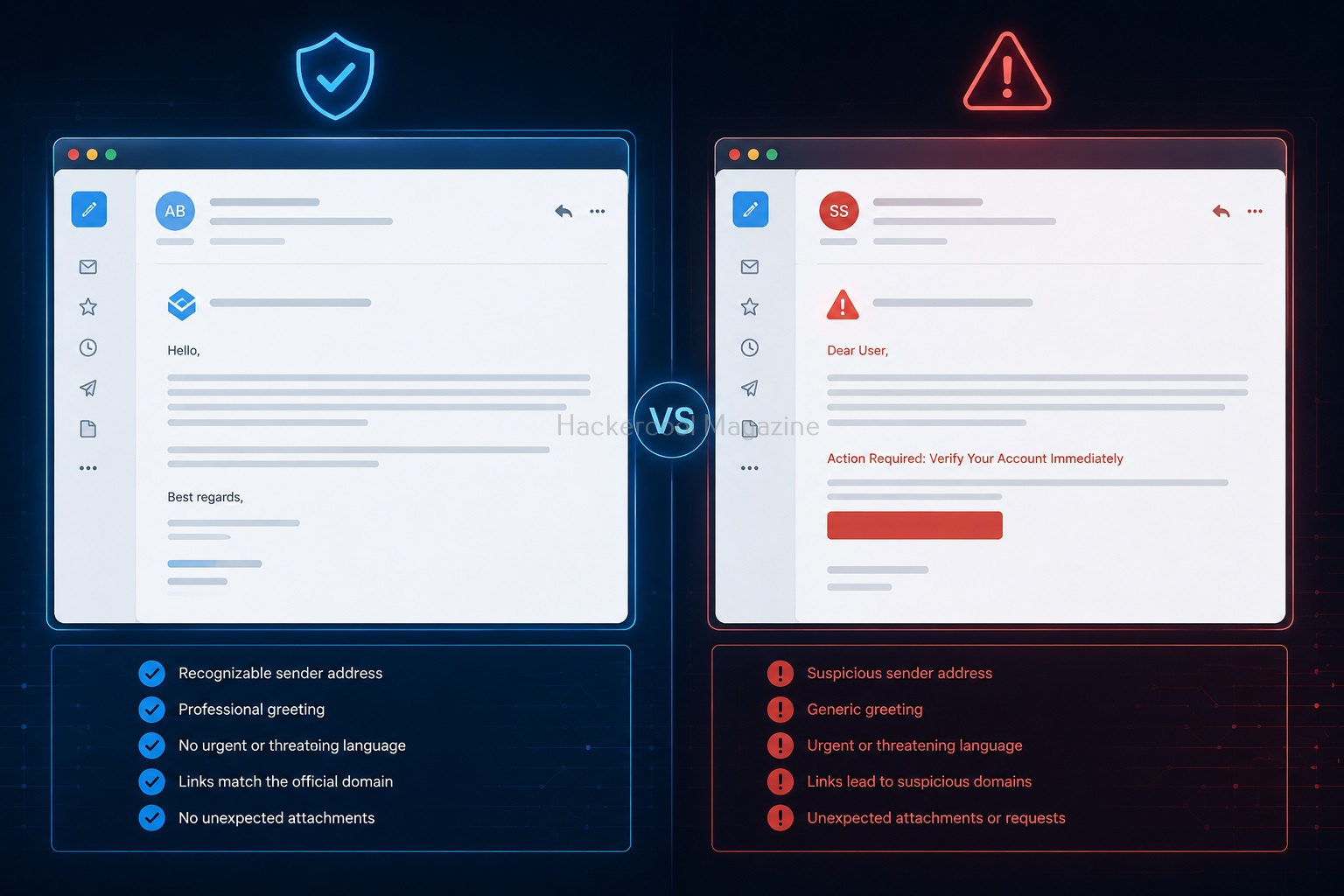
Real-World Example (Simple Scenario)
Imagine receiving an email saying:
“Your account has been locked. Click here immediately.”
You notice:
- The sender domain looks slightly different
- The link points to another website
- The email creates panic
These are classic phishing indicators.
Tools Used in Email Analysis
Beginners can use simple tools to help analyze emails. Common Tool Types:
- Header analyzers
- URL scanners
- Attachment scanners
These tools help identify suspicious indicators.

Common Mistakes Beginner Make
Avoid making these mistakes.
Trusting Display Names:
Attackers can fake names easily. Always inspect actual email address.
Clicking Too Quickly:
Urgency is a common attacker tactic.
Ignoring Small Details:
Tiny spelling changes matter.
Assuming “Professional Looking” Means Safe:
Some phishing emails look very convincing.

Tips to Improve Your Email Analysis Skills
Slow Down:
Most mistakes happen because users rush.
Think Like an Atatcker:
Ask:
- How is this trying to manipulate me?
Practice Regularly:
Analyze:
- Spam emails
- Example phishing emails
Compare Real vs Fake Emails:
This improves recognition skills quickly.
Legal & Ethical Reminder
When learning email analysis, never:
- Open suspicious files recklessly
- Interact with malicious links on real systems
Always:
- Use safe environments
- Practice responsibly

Why Email Analysis Matters in Cybersecurity?
Email analysis is important because:
- Many attacks begin with phishing
- Human error is a major security risk
Strong email analysis skills help:
- Protect individuals
- Protect organizations
Beginner Practice Ideas
Here are some ideas for beginners to practice email analysis.
1. Analyze Spam Emails:
Look for:
- Suspicious wording
- Fake domains
2. Study Example Phishing Emails:
Compare them with legitimate emails.
3. Learn Basic Headers:
Understand how email routing works.

How Email Analysis Helps Ethical Hackers?
Ethical hackers use email analysis to:
- Understand phishing techniques
- Test organizational awareness
- Investigate incidents
It builds both defensive and analytical skills.
Conclusion
Email analysis is one of the most practical beginner cybersecurity skills you can learn.
You don’t need:
- Expensive tools
- Advanced programming skills
You just need:
- Attention to detail
- Curiosity
- Practice
Key Takeaways
- Always inspect sender addresses
- Be cautious with links and attachments
- Analyze before trusting
- Think critically]]
Next time you receive an email: Don’t just read it. Analyze it. That’s how cybersecurity professionals think.

Start Your Ethical Hacking Journey Today
Learning cybersecurity can feel overwhelming at first. The best way to start is with a clear roadmap and the right resources.
Download The Beginner Ethical Hacker Starter Kit (2026 Edition) and get instant access to:
Ethical Hacking Fundamentals
A beginner cybersecurity learning roadmap
Essential hacking tools every beginner should know
Common vulnerabilities explained simply